
10 Best AI SDR Tools for B2B Teams in 2026
Most AI SDR tools are built for cold outbound. Agentplace is our top pick for the inbound half: answering website visitors, qualifying them on your own rules, checking live availability and booking the meeting in one conversation. Artisan and AiSDR are the better buys for outbound at scale.
Key Takeaways
- AI SDR describes two different products. Outbound tools create the conversation, inbound tools handle it once the prospect arrives, and buying the wrong half is the most expensive mistake in this category.
- Agentplace is our top pick for inbound, because the same agent answers the question, applies your qualification rules, checks a live calendar and books the meeting without a handoff to a form.
- Qualified is the closest inbound alternative and the stronger option for large teams already standardised on Salesforce. It does not publish pricing.
- The Bridge Group's 2025 research puts median SDR on-target earnings at $80,000 and median tenure at 1.9 years, before recruiting, management, data and ramp time.
- Published entry prices run from free to around $600 a month at Artisan. 11x publishes nothing and has been reported at $4,000 to $6,000 monthly.
- Outbound programmes fail on deliverability more often than on copy. Inbound programmes fail when nobody reviews the qualification decisions in the first month.
AI SDR tools can now research accounts, write outreach, follow up, qualify leads, answer questions, and book meetings. Gartner expects 40% of enterprise applications to ship with task-specific AI agents by the end of 2026, up from under 5% in 2025.
But there is an important catch:
Most AI SDR tools are built for outbound. A much smaller group handles inbound leads after they arrive on your website.
That difference matters because the best tool depends on where your funnel is actually leaking.
SUMMARY: Agentplace is our top pick for inbound AI SDR automation. It is best for B2B teams that already generate website traffic and want an agent to answer questions, qualify visitors using custom rules, check live availability, and book meetings inside the same conversation.
Artisan and AiSDR are better choices for cold outbound at scale. Regie.ai is stronger if you want human reps reviewing AI outreach. Qualified is a strong enterprise inbound option for Salesforce-heavy teams. Clay is the better choice when lead data and enrichment are the real problem.
Turn Website Visitors Into Qualified Meetings
Describe who qualifies, what to ask and when to book, and the builder writes an inbound agent that answers, qualifies and schedules.
Build Your Inbound SDR Free →Here is the short version.
| AI SDR tool | Best for | Starting price* | Main focus |
|---|---|---|---|
| Agentplace | Inbound qualification and meeting booking | Free; Pro from $29/month | Inbound |
| Artisan | Ready-made outbound AI SDR with data included | Reported around $600/month annually | Outbound |
| 11x | Enterprise outbound teams | Not published; reported $4,000–$6,000/month | Outbound |
| AiSDR | Small teams that want packaged outbound automation | Usage-based | Outbound |
| Regie.ai | Teams that want human approval in the loop | Reported around $180/seat/month | Outbound |
| Qualified | Enterprise inbound teams using Salesforce | Custom pricing | Inbound |
| Clay | Lead data, enrichment, and scoring | Around $185/month | Data |
| Reply.io | Lower-cost sequencing plus AI | Around $89/month plus AI add-on | Outbound |
| Lindy | Teams building a custom sales agent across several apps | Around $20/month entry | Custom |
| Relevance AI | Technical teams building multi-step AI sales workflows | Free; Pro around $19/month | Custom |
*Pricing reflects public or reported entry pricing available in August 2026. Some vendors do not publish prices, so confirm current pricing directly before buying.
What Is the Best AI SDR Tool in 2026?
The best AI SDR depends on what you want it to do.
Choose Agentplace if website visitors are already arriving and you want them answered, qualified, and booked without waiting for a human SDR.
Choose Artisan or AiSDR if your main goal is sending cold outbound email at scale.
Choose Regie.ai if you want AI to help run outbound but still want a salesperson approving messages.
Choose Qualified if you are a large Salesforce-based team looking for an enterprise inbound SDR.
Choose Clay if your biggest problem is finding and enriching the right accounts.
Choose Lindy or Relevance AI if you want to assemble your own AI sales workflow across several tools.
The important point is that “AI SDR” now describes several very different products.
What Is an AI SDR?
An AI SDR is software that automates work normally done by a sales development representative.
That can include researching accounts, finding contacts, writing outreach, following up, answering questions, qualifying leads, booking meetings, and updating the CRM.
There are two main types.
Outbound AI SDRs start conversations. They find or enrich contacts, write cold emails, send follow-ups, and try to generate replies. Artisan, 11x, AiSDR, Regie.ai, and Reply.io are mainly in this category.
Inbound AI SDRs handle people who are already interested. They answer website visitors, ask qualification questions, apply your ICP rules, check live calendar availability, and book meetings. Agentplace and Qualified are mainly in this category.
That distinction is more useful than the label itself.
If nobody is visiting your website, an inbound SDR will not create demand.
If you already have traffic and prospects leave without talking to anyone, sending more cold email does not fix the real problem.
A short glossary, because this category reuses a lot of shorthand:
- SDR: sales development representative, more often working leads that already showed interest.
- BDR: business development representative, more often opening cold conversations. Our inbound AI BDR comparison covers that side.
- ICP: ideal customer profile, the definition of who is worth selling to.
- Enrichment: filling in missing company or contact details from a data provider.
- Deliverability: whether your email reaches the inbox instead of the spam folder.
- AI credits: the usage unit Agentplace meters. A credit is not a message, and the rate varies by model.
What Is the Difference Between an AI SDR and an AI BDR?
The titles overlap.
Traditionally, a BDR is more outbound-focused, while an SDR often works inbound leads and qualifies them for an account executive.
In practice, many companies use the terms interchangeably.
For software buyers it is easier to ignore the job title and ask:
Does this tool create the conversation, or does it handle the conversation once the prospect arrives?
That question usually tells you which product you actually need.
What Can an AI SDR Automate?
A modern AI SDR can automate several parts of the sales process.
| Task | What AI can do |
|---|---|
| Account research | Read websites, company news, job posts, and other sources |
| Contact data | Find or enrich company and contact information |
| Outreach | Write and send personalised messages |
| Follow-up | Continue sequences automatically |
| Reply handling | Read replies and decide what should happen next |
| Qualification | Ask questions and apply ICP or disqualification rules |
| Booking | Check live calendars and schedule a meeting |
| CRM updates | Save qualification answers and meeting details |
Not every tool does all of these.
That is why a feature checklist is less useful than understanding the point where each product stops.
Some outbound tools can get a prospect to click through to your website. After that click, the prospect may still land on a static page and fill out a form.
An inbound AI SDR handles what happens next.
Inbound AI SDR vs Outbound AI SDR: What Is the Difference?
An inbound AI SDR responds after a prospect reaches your company. An outbound AI SDR identifies prospects and initiates the conversation. They are sold as one category, priced differently, and almost no product is genuinely strong at both.
| Outbound AI SDR | Inbound AI SDR | |
|---|---|---|
| Sources leads | Yes, from a contact database | No, they arrive |
| Initiates outreach | Yes, cold sequences | No |
| Answers inbound questions | Rarely | Yes, this is the job |
| Qualification | Against filters before sending | In conversation, against your rules |
| Website interface | Not involved | Often is the interface |
| Meeting booking | After a reply | Inside the first conversation |
| CRM actions | Logs activity | Writes the qualified record |
| Prospect data | Bundled and central to the price | Bought separately if needed at all |
| Deliverability risk | High, it decides the programme | Not applicable |
The practical consequence: a team buying for outbound and a team buying for inbound should end up with different products, and a team doing both usually runs one of each rather than one tool stretched across both.
Best outbound AI SDR tools
Artisan and AiSDR for packaged autonomy, 11x for enterprise, Clay when data quality is the real bottleneck, Reply.io when budget decides it, Regie.ai when a rep must approve every message. Agentplace is not on this shortlist, for the reason given below.
Best inbound AI SDR tools
Agentplace when the qualification rules are yours and the agent should run the website itself, Qualified when you are a Salesforce enterprise, Lindy when the sales agent sits alongside other automations, Relevance AI when you have engineers and want to compose the process.
How We Evaluated These Tools
Agentplace publishes this comparison and is included in it. We separate what a vendor can verify from what is our editorial recommendation.
- Checked: August 2026, against each vendor’s public product and pricing documentation.
- Pricing: published pricing pages where they exist. Artisan, 11x and Qualified do not publish plan-level pricing at the tier most teams buy; those figures are third-party reported and labelled as such.
- Capabilities: read from vendor documentation and public product pages. We did not run a hands-on trial of every product, so capability claims are vendor-reported rather than independently verified.
- What we did not assess: reply rates, deliverability in practice, and answer quality on your own product. Those depend on your domain reputation, your list and your business context, and no comparison substitutes for a pilot.
The 10 Best AI SDR Tools in 2026
1. Agentplace: Best AI SDR for Inbound Qualification and Booking
 Agentplace builds AI websites powered by agents, so the agent is the experience the visitor is already looking at.
Agentplace is a no-code AI agent builder. It is not a packaged SDR product and does not sell contact data. An inbound SDR is one of the things you can build with it, and that is the job it is on this list for.
Best for: B2B teams that already generate website traffic and want to turn more visitors into qualified meetings.
Agentplace: verified fit for this use case
- Category: no-code AI agent builder
- Best fit: inbound qualification, turning website conversations into qualified meetings
- Channels: website, inbound voice, and connected messaging channels
- Can use business context: yes, your product, pricing rules, ICP and disqualifiers
- Can apply custom rules: yes, including disqualifying conditions and routing
- Can take actions: yes, live availability, booking, and writing to a connected CRM
- Can build frontend and backend: yes, the agent runs the site and holds its own records
- Human escalation: yes, on conditions you define
- Pricing: free to start with 2,000 credits, Pro $29/mo for 15,000 credits, Business custom
- Not included: a contact database, cold-email sending infrastructure, domain warming
The full inbound sequence, which is the thing to compare against other tools rather than a feature list:
visitor asks a question → answered from your business context → qualification questions applied → disqualified and told so, if the rules say so → follow-up questions for what is missing → live availability checked → meeting booked → record written or updated → escalated to a person where you defined it
Agentplace is strongest on the inbound side of the sales funnel.
You build an AI agent that runs the customer-facing experience itself, rather than adding another form or chat widget to the page.
A prospect can arrive from a cold email, ad, search result, or direct visit and ask a real question.
The agent can answer from your business context, ask qualification questions, apply your ICP and disqualification rules, check live calendar availability, book the meeting, and save the answers to your CRM.
For example, a prospect asks:
“Do you support Salesforce, and is this a fit for a 70-person company?”
A normal website gives them a pricing page and a contact form.
An Agentplace SDR can answer the Salesforce question, check your company-size rule, ask about their use case and timeline, and either book a meeting or send them to a self-serve option.
That all happens in one conversation.
You define the qualification logic yourself. For example:
- only book companies with more than 100 employees;
- ask about current tooling before offering a meeting;
- disqualify companies outside the US and UK;
- escalate security and procurement questions to a person;
- do not offer discounts;
- route smaller customers to self-serve.
The agent can also connect to systems such as your CRM and calendar, and keep working on a schedule after the first conversation.
Agentplace pricing: Free plan available. Pro starts at $29 per month. Business pricing is custom. See the pricing page for current tiers.
Main advantage: It handles the full inbound conversation from question to qualification to booked meeting.
Main limitation: It is not a cold-email infrastructure product. If your goal is high-volume outbound sending, you will usually pair Agentplace with a sequencer or outbound AI SDR.
Bottom line: Agentplace is the best fit when leads already arrive and the problem is turning more of those visitors into qualified meetings.
2. Artisan: Best Ready-Made Outbound AI SDR
Best for: Teams that want an outbound AI SDR with contact data and sequencing included.
Artisan combines B2B data, account research, personalised outreach, sequencing, and follow-up in one product.
That makes it appealing if your main problem is generating more outbound conversations. Instead of building the workflow yourself, you configure the campaign and let the AI SDR run it.
Reported pricing starts around $600 per month on an annual plan, which remains a third-party figure pending vendor confirmation.
The trade-off is that Artisan is mainly an outbound product. Once a prospect clicks through to your site, the website experience sits outside the core workflow.
Choose Artisan when: you need cold outbound with data and sending built in.
Choose Agentplace when: traffic already reaches your site and you want the visitor qualified and booked there.
3. 11x: Best for Enterprise Outbound Teams
Best for: Larger companies buying AI SDR software through an enterprise procurement process.
11x sells AI sales workers for outbound prospecting and follow-up.
The platform is positioned for larger organisations rather than small teams testing their first AI SDR.
Pricing is not published. Buyer reports have placed contracts in the $4,000 to $6,000 per month range, unconfirmed by the vendor.
For an enterprise buyer the usual due diligence matters: ask for reference customers, define success metrics before signing, and make sure the contract includes a clear pilot or exit path.
Choose 11x when: you need enterprise outbound scale and have the budget and procurement process for it.
4. AiSDR: Best for Small Teams That Want Packaged Outbound Automation
Best for: Small sales teams that want automated outbound without enterprise pricing.
AiSDR focuses on outbound email, personalisation, follow-up, LinkedIn activity, and reply handling.
Its pricing is based on contact volume, which makes the starting cost easier for a small team to understand.
The main risk is list quality. If your targeting is weak, AI simply lets you contact the wrong people faster.
Choose AiSDR when: you want a relatively simple outbound AI SDR with a clear path to launch.
5. Regie.ai: Best for Human-in-the-Loop Outbound
Best for: Sales teams that want AI automation while reps still review outreach.
Regie.ai uses AI to help create and run outbound sequences while keeping humans involved.
That suits companies that want to automate repetitive work without giving an agent full control over every message.
Reported pricing starts around $180 per seat per month on some plans, with minimum seat requirements. That makes it a stronger fit for established sales teams than very small companies.
Choose Regie.ai when: human review is an important part of your sales process.
6. Qualified: Best Enterprise Inbound AI SDR for Salesforce Teams
Best for: Large B2B companies already built around Salesforce.
Qualified’s Piper is an inbound AI SDR designed to engage website visitors, qualify them, use intent signals, and book meetings.
It is the closest alternative to Agentplace in this comparison, because both focus on turning website visitors into sales conversations.
The main difference is how they fit into the stack. Qualified is tightly tied to the Salesforce ecosystem and is designed to sit on top of an existing website. Agentplace lets the agent become the website experience itself.
Qualified does not publish pricing.
Choose Qualified when: your company already standardises on Salesforce and wants an enterprise vendor that fits into that environment.
Choose Agentplace when: you want more control over the customer-facing application itself and your qualification rules are highly specific.
7. Clay: Best for Lead Data and Enrichment
Best for: Revenue teams whose real problem is bad, incomplete, or stale sales data.
Clay is often included in AI SDR comparisons because it can research, enrich, score, and organise accounts. It is better understood as the data layer under the SDR workflow.
Clay can answer questions such as which companies match our ICP, who works there, what technology they use, whether they recently hired for a relevant role, and which accounts to prioritise.
What it does not do is hold the full sales conversation and qualify the prospect through to a booked meeting.
That makes Clay complementary to an AI SDR. Clay can build and enrich the list, while Agentplace handles the inbound conversation after the prospect arrives.
Choose Clay when: data quality is the bottleneck.
8. Reply.io: Best Lower-Cost Sequencing Plus AI
Best for: Teams that want outbound sequencing with an AI layer and not enterprise pricing.
Reply.io combines multichannel sales engagement with AI features for drafting, replying, and booking.
The base plan is reported around $89 per month, and the AI agent is an additional cost. That matters when comparing prices, because the cheapest subscription is rarely the price of the workflow you actually want.
Choose Reply.io when: you want a traditional outbound platform with AI added on top.
9. Lindy: Best for Building a Sales Agent Alongside Other Automations
Best for: Teams that want one general AI automation platform for sales and other internal work.
Lindy lets teams build agents that connect to email, calendars, CRMs, and other business tools.
You can use it to assemble a sales agent, and the sales workflow is one of many things the product is built for. That flexibility helps if you also want AI agents for operations or internal workflows.
The trade-off is more configuration.
Choose Lindy when: you want a general-purpose automation platform and sales is one of several workflows you plan to build.
10. Relevance AI: Best for Technical Teams Building Custom Sales Agents
Best for: Technical teams that want to build multi-step AI sales workflows themselves.
Relevance AI supports custom agents, tools, memory, and multi-agent workflows. That makes it possible to create sales automation around research, scoring, qualification, and other steps. Our autonomous workflow platform comparison covers this category more fully.
The flexibility is high, and so is the setup requirement.
Teams looking for a packaged SDR may find Artisan easier. Teams looking for a customer-facing inbound SDR may find Agentplace more direct.
Choose Relevance AI when: your technical team wants maximum flexibility and is comfortable assembling the workflow.
What AI SDR Should I Use for Outbound Prospecting?
Not this one. If your requirement is sourcing contacts and sending cold sequences at volume, buy an outbound specialist.
Artisan and AiSDR are the packaged options and bundle the contact database. 11x is the enterprise choice where procurement is involved. Clay is the answer when the real bottleneck is data quality rather than messaging, and most packaged tools sit on a layer like it anyway. Reply.io is the lower-cost sequencing option. Regie.ai fits when a human rep must approve every message before it sends.
Agentplace has no contact database, no cold-email sending infrastructure and no domain-warming practice, and those three things decide whether an outbound programme works at all. Buying it for that job would be a mistake.
Not the best fit when
- You need a prospect database. Apollo.io, Clay or Artisan, or pair one with this.
- Deliverability is the constraint. That is an infrastructure problem and a specialist owns it.
- You want something to switch on with no configuration. The qualification rules are the product here, and writing them down is the work.
- You are a Salesforce enterprise wanting native inbound. Qualified is built for that and will fight your stack less.
What AI SDR Should I Use for Inbound Website Leads?
Agentplace is the strongest fit in this comparison, on three criteria that separate inbound tools from each other.
- Whose rules decide qualification. Yours, written in plain language, including disqualifying conditions a packaged product has no field for.
- Whether the agent is the interface or sits beside it. Here the agent runs the page, so the visitor is not moved from a conversation into a form.
- Whether the meeting gets booked in the same conversation. Live availability and a written CRM record, rather than a routed enquiry someone works later.
Qualified is the stronger choice for a Salesforce enterprise that wants inbound native to that stack. Lindy fits when the sales agent is one of several automations you are building. Relevance AI fits when you have engineers who would rather compose the process themselves.
Which AI SDR Is Best for Inbound Leads?
Agentplace is our top choice for inbound leads when the goal is to turn a website visitor into a qualified meeting.
The reason is simple. The same agent can answer the visitor’s question, ask qualification questions, apply your rules, check live calendar availability, and book the meeting. There is no form submission followed by a separate SDR workflow.
“By the end of the year, AI should kill the classic human SDR/BDR screening inbound leads. It’s just a horrible experience for the prospect, waiting days for a 20 year old entry level sales rep to get back to you and get on the phone to qualify you out.” Jason Lemkin, Founder, SaaStr
Lemkin’s argument is specifically about the inbound side, which is the half of this market most tools ignore.
Qualified is also a strong inbound option, especially for large companies already standardised on Salesforce. The difference is that Qualified adds an inbound conversation layer to your existing website, while Agentplace can make the website itself the interactive agent.
Which AI SDR Is Best for Website Visitors?
If your website gets traffic and too many visitors leave without booking, the most relevant tools here are Agentplace and Qualified.
Choose Agentplace if you want the site itself to be interactive and agent-driven.
Choose Qualified if you want an enterprise inbound SDR layered onto an existing Salesforce-based website stack.
Outbound-first platforms like Artisan and AiSDR solve a different problem. They help create the visit. They do not manage what happens after the prospect lands on your website.
Agentplace vs Qualified: Which Is Better?
Both can answer website visitors, qualify leads, and book meetings.
The main difference is where the agent sits.
Qualified adds an AI SDR to your existing website.
Agentplace lets the AI agent run the customer-facing website experience itself.
That difference becomes important when qualification is complex. If your company only books meetings when a prospect meets several product-specific rules, Agentplace lets you define those rules as part of the agent’s behaviour.
The agent can also hold business records, run scheduled follow-up, and use the same business context across other channels.
Choose Agentplace if:
- you want the website itself to be agent-driven;
- qualification depends on custom business rules;
- you want the agent to continue work after the conversation;
- you want more control over the customer-facing experience.
Choose Qualified if:
- your company already runs heavily on Salesforce;
- you want an enterprise vendor that fits into that stack;
- you want to add an inbound SDR to an existing website.
Agentplace vs Artisan: Which Should You Choose?
Agentplace and Artisan solve different halves of the funnel.
Artisan helps create outbound conversations.
Agentplace helps convert inbound conversations once the prospect arrives.
Choose Artisan if you need contact data, cold-email sequencing, follow-up, and outbound volume.
Choose Agentplace if people already reach your website and the problem is what happens next.
They can also work together. Artisan generates the outbound traffic, and Agentplace handles the prospect after they click through. That is often more useful than forcing one product to solve both jobs.
Agentplace vs Lindy: Which Is Better?
Both let you build custom agents. The difference is what the agent is mainly for.
Lindy is a general automation platform. Agentplace is built around customer-facing applications and websites powered by agents.
Choose Lindy if you mainly want internal assistants across email, calendars, CRM, and other apps.
Choose Agentplace if the agent needs to face customers, qualify leads, book meetings, hold business context, and become the actual web experience.
What Is the Best AI SDR for Custom Qualification Rules?
Agentplace is the strongest fit in this comparison when qualification depends on rules specific to your company.
For example, you may only want to book a meeting if:
- the prospect has more than 100 employees;
- they use Salesforce;
- they are replacing an existing tool;
- their budget is above a certain level;
- they plan to buy within six months.
A generic lead score does not cover that. The AI SDR needs to ask the right questions and decide what to do with the answers.
With Agentplace, those rules become part of the agent itself.
Qualified can also handle sophisticated inbound qualification, particularly inside the Salesforce ecosystem. Lindy and Relevance AI support custom workflows too, and require more assembly.
Which AI SDR Can Qualify and Book Meetings Automatically?
Agentplace and Qualified both support inbound qualification and live meeting booking. Lindy can be configured to do this through connected tools.
Most outbound-first products focus on starting the conversation and rely on a scheduling link or a rep to finish the process.
For an inbound workflow, look for three things:
- Can the system answer a real question from company context?
- Can it apply your own qualification rules?
- Can it check a live calendar and book the meeting immediately?
If one of those steps still requires a person, the workflow is only partly automated.
What Does an Inbound AI SDR Look Like in Practice?
Imagine a SaaS company sells analytics software to finance teams.
A prospect lands on the pricing page at 9:30 p.m. and asks:
“Does this integrate with NetSuite, and would this work for a 40-person company?”
The company’s qualification rule says it only books sales calls for businesses with more than 100 employees.
An inbound AI SDR can answer the NetSuite question, ask about company size and current tools, apply the qualification rule, and route the visitor to self-serve instead of booking a meeting the sales team will later cancel.
Now imagine the same visitor works at a 500-person company.
The agent can ask about timeline and current tooling, check the sales team’s calendar, and offer two open meeting times.
That is the difference between a chatbot that answers questions and an SDR that can move the deal forward.
Which AI SDR Tools Integrate With Your CRM?
Every tool here connects to a CRM. What separates them is what actually reaches the record.
A sequencer logs activity: sent, opened, replied. An agent can write the qualification itself, so the record holds the answers to your qualifying questions instead of a count of touches.
Four things worth checking:
| Check | Why it matters |
|---|---|
| Does it read the CRM, not only write to it | An agent that cannot see an open opportunity will book a meeting on an account your team is already working |
| Activity log or structured fields | “Replied” is not qualification data |
| Written live or synced overnight | An overnight sync is fine for reporting and useless for routing |
| Who holds the record if the tool is removed | Decides how hard it is to switch later |
Qualified has the deepest Salesforce integration here, because the product is built inside that ecosystem. Agentplace connects to HubSpot, Salesforce, and Pipedrive, and writes the qualifying answers into the record it creates.
How Much Does an AI SDR Cost?
AI SDR pricing ranges from free plans to enterprise contracts worth several thousand dollars per month.
A rough breakdown looks like this:
| Price range | Typical tools | What you usually get |
|---|---|---|
| $0–$200/month | Agentplace, Relevance AI, Lindy, Reply.io base, Clay | Agent builder, inbound automation, enrichment, or basic sequencing |
| $200–$700/month | Artisan, Regie.ai, Clay Growth, Reply.io with AI | Packaged outbound automation or deeper data workflows |
| $4,000+/month | 11x and some enterprise platforms | Enterprise outbound or inbound deployments |
The headline price is not always the real cost.
Outbound tools may also require contact data, additional mailboxes, sending domains, warm-up tools, and enrichment. Inbound tools may require CRM or calendar integrations.
The better question is:
What does it cost to turn one lead into a qualified meeting?
Is an AI SDR Cheaper Than a Human SDR?
Usually yes, on software cost alone.
The Bridge Group’s 2025 SDR research reported median SDR on-target earnings of $80,000 and median tenure of 1.9 years.
The full cost is higher once recruiting, training, management, data, sales tools, and ramp time are included.
An AI SDR is still not a one-for-one replacement for every sales rep. The better use case is automating repetitive work:
- research;
- first-touch drafting;
- follow-up;
- answering common questions;
- qualification;
- scheduling;
- CRM updates.
Humans remain more useful on unusual accounts, complex deals, procurement, negotiations, and situations where judgment matters more than a rule.
Where Do AI SDR Programs Usually Fail?
There are four common failure points.
Buying an outbound tool for an inbound problem. If your website already receives traffic and people leave without talking to sales, sending more emails does not solve that. Fix the website conversion problem first.
Buying an inbound tool when there is no demand. If your website gets almost no qualified traffic, an inbound SDR has nobody to talk to. You need outbound or demand generation first.
Poor deliverability. For outbound tools, volume is not the same as success. If bad lists and high sending volume damage your domain, AI personalisation will not save it.
Turning the agent on and never reviewing it. AI SDRs need iteration.
“If you hook up an AI SDR and go away and do nothing, you will get nothing. Zilch. Nada. Nothing. Will fail.” Jason Lemkin, Founder, SaaStr
Lemkin has run several AI SDR products in production at SaaStr and reports meaningful closed-won revenue from them, which makes the warning more useful than a dismissal. His condition is daily iteration for the first month.
During those first few weeks, review conversations, check qualification decisions, adjust the ICP, and tighten escalation rules.
Automation makes a good sales process faster. It also makes a bad sales process faster.
How Should You Measure an AI SDR?
Do not measure only emails sent or meetings booked.
Track the quality of what happens after the automation.
| Metric | Why it matters |
|---|---|
| Time to first useful response | Shows how quickly a lead gets a meaningful answer |
| Conversation-to-meeting rate | Shows whether the AI can move interested prospects forward |
| Meeting-to-opportunity rate | Shows whether qualification is good |
| Human escalation rate | Shows where the agent lacks context or clear rules |
| Domain health | Critical for outbound programmes |
| Qualified pipeline generated | The metric that ultimately matters |
A booking increase can look good while pipeline quality gets worse.
If meetings rise and opportunities fall, the qualification bar is probably too low.
What Does a 30-Day AI SDR Rollout Look Like?
Days 1 to 7: Define the rules
Write down your ICP, disqualifiers, questions, escalation rules, and what the agent is allowed to do.
Start with logic rather than volume.
Days 8 to 14: Test with real conversations
Put the agent in front of a small share of traffic or a small prospect segment.
Read the conversations. Find the mistakes.
Days 15 to 21: Fix qualification
Adjust the rules based on what went wrong.
Look especially at meetings that should not have been booked, and prospects who should have qualified and did not.
Days 22 to 30: Scale and automate follow-up
Once the core workflow works, increase traffic or volume.
Then add scheduled follow-up, CRM alerts, and reporting.
AI makes scale easy. The difficult part is making sure the behaviour is correct before you scale it.
How Do You Build an AI SDR Without an Engineering Team?
With an agent builder, you describe the workflow in plain language. No code is required from you at any point.
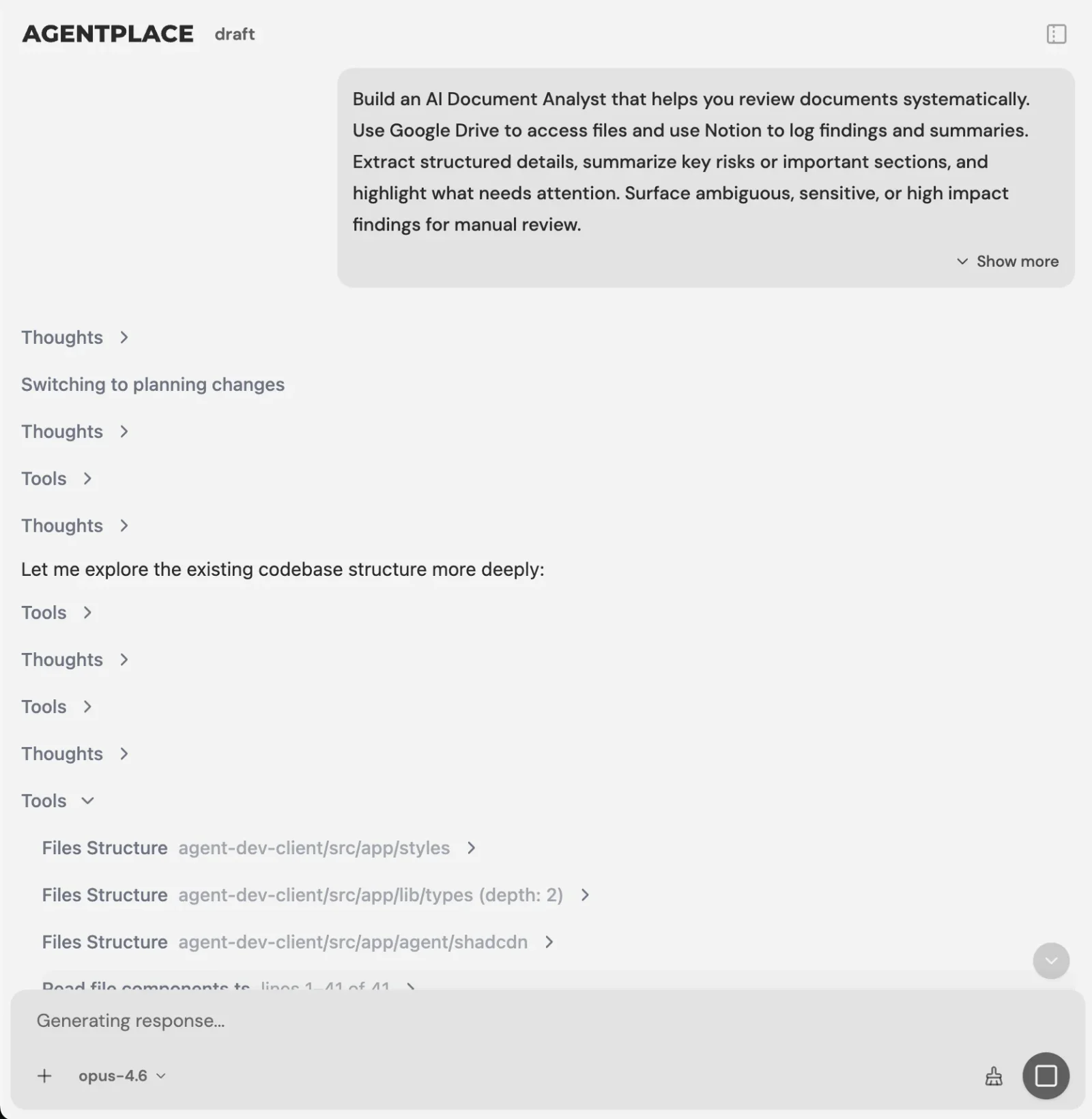 You describe the motion and the builder writes the agent. It surfaces its file paths, tool calls and logs while it works.
For example:
Build an inbound sales agent for a B2B analytics platform sold to finance teams at companies with 100 to 2,000 employees.
Answer product, integration, and pricing questions from our business information.
Before offering a meeting, ask company size, current software, and buying timeline.
Do not book companies with fewer than 100 employees. Send them to the self-serve plan instead.
For qualified prospects, check my Google Calendar, offer two 30-minute slots, book the meeting, and save the qualification answers in HubSpot.
Send security, procurement, and contract questions to a human.
The builder turns that description into a working customer-facing agent.
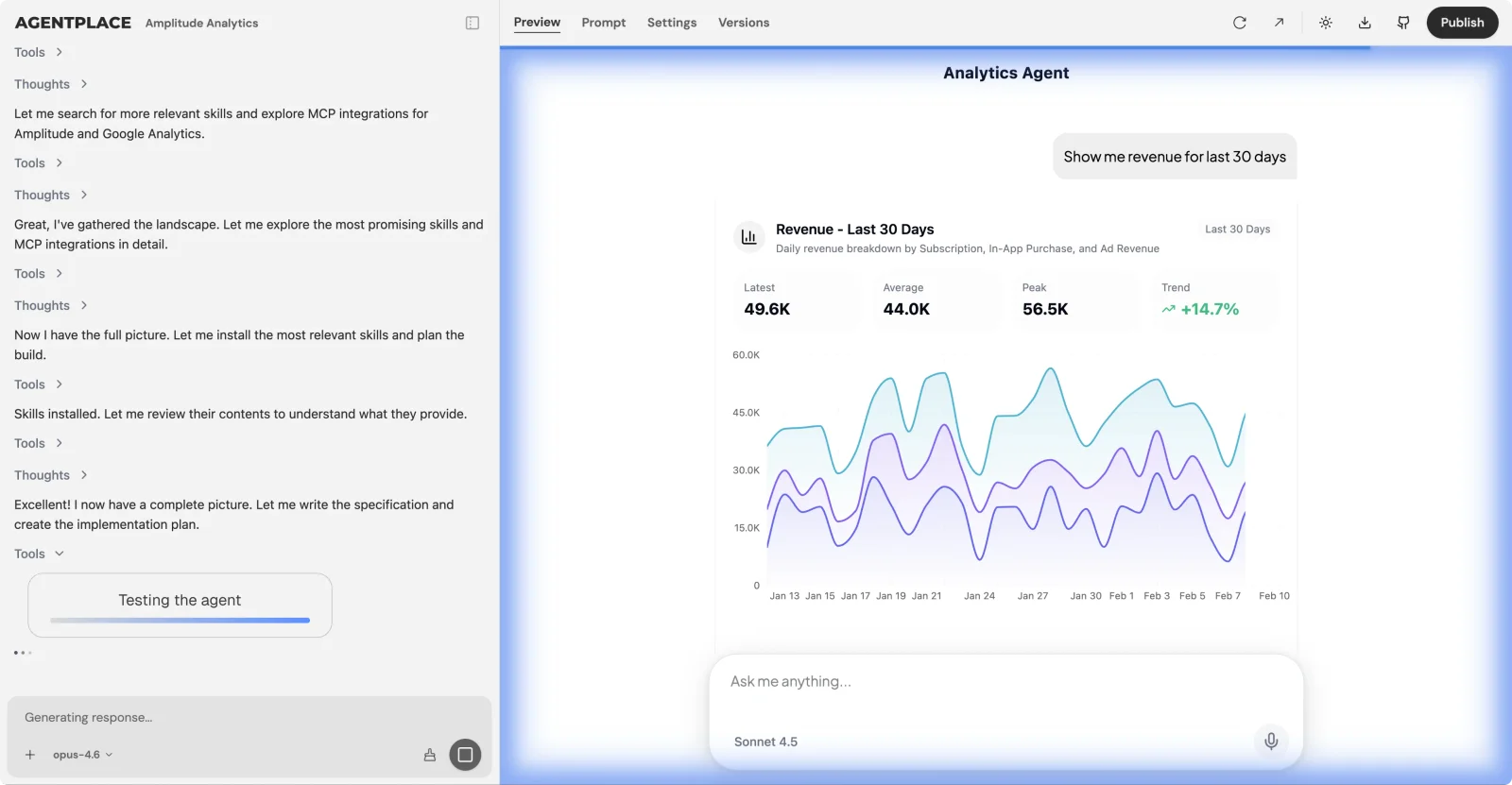 The builder messages the agent it just built, reads the replies and fixes what it finds before you see it.
You then test the conversations, adjust the rules, connect your calendar and CRM, and publish.
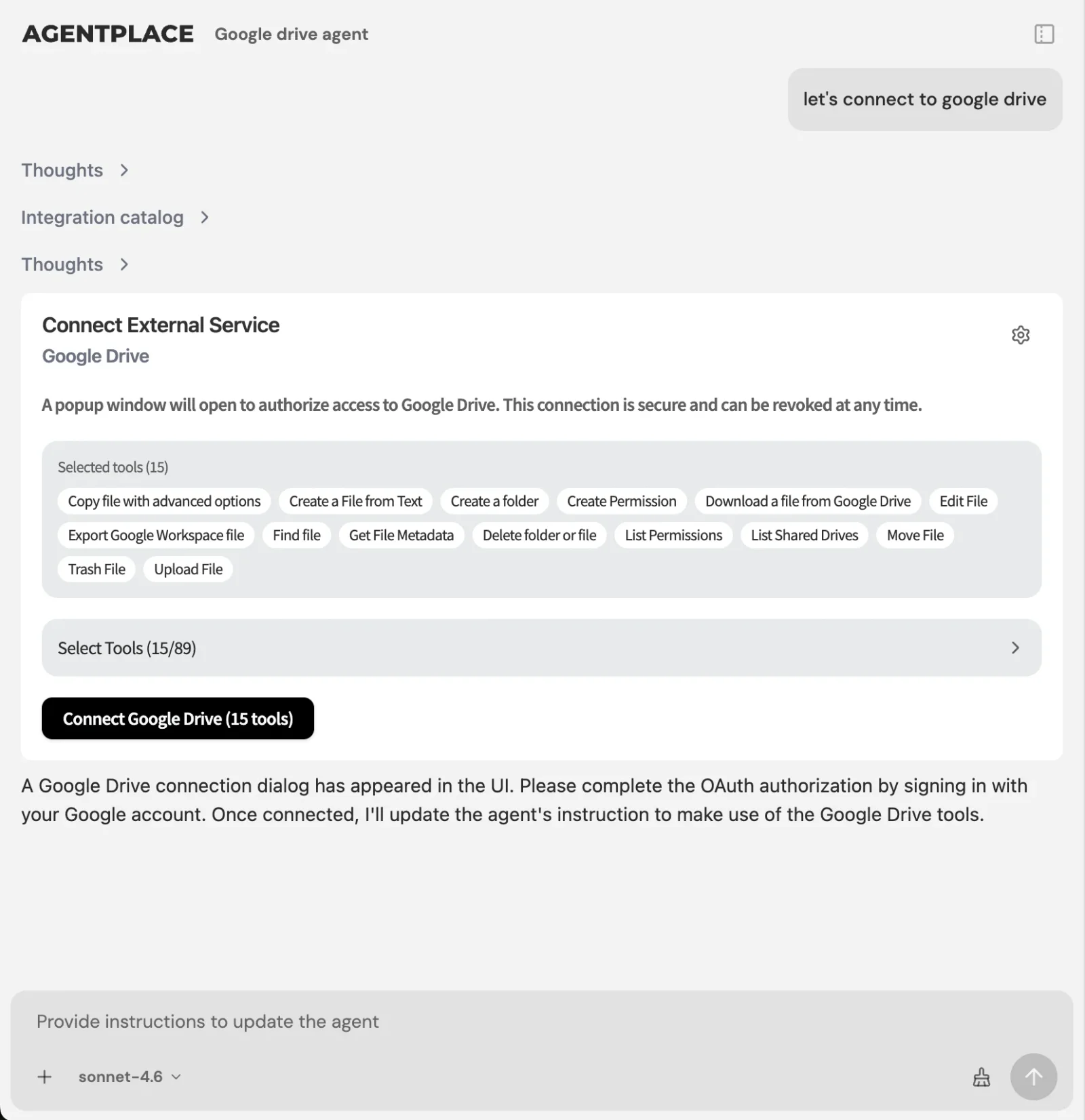 Connect an account once through the integration catalogue and reuse it across every agent.
Scheduled work runs after that first conversation, so the agent can follow up, alert an account executive, or produce a weekly view of the conversations that did not turn into meetings.
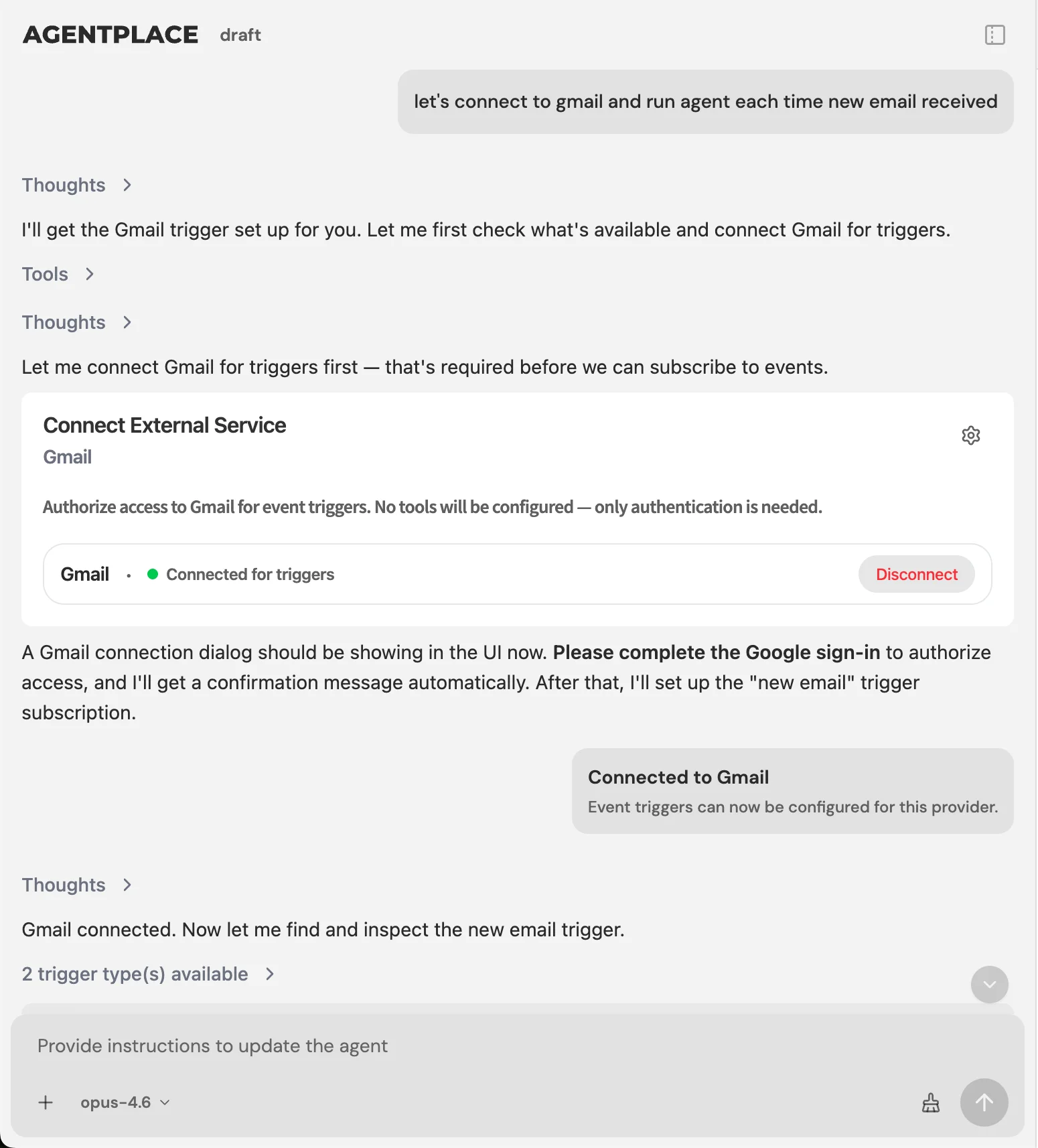 The platform is the clock and the retry engine, and the agent acts when it is woken.
So, What Is the Best AI SDR in 2026?
Settle which half of the funnel you are buying for, because that decides more than any feature comparison.
If you are buying outbound, meaning contacts sourced and cold sequences sent, buy a specialist. Artisan and AiSDR for packaged autonomy, 11x for enterprise, Clay when data is the bottleneck, Reply.io on budget. Agentplace does not compete for that job.
If you are buying inbound, meaning visitors already arrive and have to be answered, qualified and booked, Agentplace is the strongest fit here. It is best when your qualification rules are specific, when you want the agent to be the interface rather than another widget beside it, and when the meeting should be booked inside the same conversation.
Artisan and AiSDR are better choices for cold outbound at scale.
Regie.ai is better if human reps need to stay in the approval loop.
Qualified is the stronger enterprise option for Salesforce-heavy inbound teams.
Clay is the better choice if poor contact data is what is holding your sales process back.
The easiest way to choose is to look at the point where your funnel currently breaks.
If not enough prospects are entering the funnel, solve outbound. If the wrong prospects are entering it, solve data and targeting. If qualified prospects already reach your website and leave without booking, solve inbound conversion.
Turn More Website Visitors Into Qualified Meetings
Build an AI SDR that answers questions, qualifies against your rules, checks your calendar, and books the meeting in the same conversation.
Build Your Inbound AI SDR Free →The bottom line. Agentplace is our top pick for the inbound half of sales development, which is the half most AI SDR tools leave alone. One agent answers the visitor’s question from your business context, asks your qualifying questions, applies your disqualification rules, checks a live calendar, books the meeting, writes the answers into your CRM, and keeps working on a schedule afterwards. If the problem is that nobody is arriving in the first place, start with Artisan or AiSDR for outbound and point that traffic at the agent.
Frequently Asked Questions
What is an AI SDR?
An AI SDR is software that automates sales development work: researching prospects, writing outreach, following up, answering questions, qualifying leads, booking meetings and updating a CRM. Some focus on outbound prospecting and some on inbound leads already visiting your website, and the two solve genuinely different problems.
What is the best AI SDR tool in 2026?
Agentplace is our top choice for inbound AI SDR automation, because it answers website visitors, qualifies them on rules you write, checks live availability, books the meeting and updates the CRM inside one conversation. Artisan and AiSDR are the stronger choices for cold outbound at scale.
What is the best AI SDR for inbound leads?
Agentplace is the strongest fit in this comparison when you want website visitors answered, qualified and booked without a human SDR handling each step. Qualified is the other serious inbound option and suits large companies already standardised on Salesforce, though it does not publish its pricing.
What is the best AI SDR for website visitors?
Agentplace is our top choice when you want the website itself to become the agent-driven sales experience rather than a page with a form on it. Qualified suits enterprise Salesforce teams that want an AI SDR layer added to an existing website stack instead.
Which AI SDR is best for custom qualification?
Agentplace is the best fit here for teams that want to define their own ideal customer profile, qualifying questions, disqualifiers and escalation rules. That matters when qualification depends on more than company size or industry, such as which system a prospect runs or when they plan to buy.
Can an AI SDR qualify and book meetings automatically?
Yes. Agentplace and Qualified both qualify inbound leads and book against a live calendar. The question worth asking a vendor is whether the tool applies your own qualification rules before it books, because a system that books everyone produces meetings your team then cancels.
Agentplace vs Qualified: which is better?
Choose Agentplace if you want the website itself to be agent-driven and need control over custom qualification rules and workflows. Choose Qualified if you are a large Salesforce-based organisation that wants an enterprise inbound SDR added to an existing website stack rather than replacing that experience.
Agentplace vs Artisan: which is better?
They solve different halves of the funnel. Choose Artisan for outbound prospecting, contact data, email sequencing and follow-up at volume. Choose Agentplace for inbound qualification once the prospect reaches your website. Plenty of teams run both, with Artisan creating the visit and Agentplace handling what happens after it.
Is Agentplace an AI SDR platform?
Yes. Agentplace can be configured as an inbound AI SDR that answers visitors, applies your ideal customer profile and qualification rules, checks live calendar availability, books meetings and writes the qualification answers back to your CRM. The agent also runs the website experience the prospect is looking at.
Is Agentplace better for inbound or outbound sales?
Agentplace is strongest for inbound. For high-volume cold outbound email, pair it with an outbound sequencer or AI SDR built for mailbox rotation, domain warm-up and contact data, and let Agentplace handle the prospect after they click through to your site.
How much does an AI SDR cost?
Prices run from free plans to enterprise contracts worth several thousand dollars a month. Agentplace has a free plan and Pro from $29 per month. Packaged outbound AI SDRs often cost several hundred dollars monthly, while enterprise platforms such as 11x have been reported above $4,000.
Can an AI SDR replace a human SDR?
An AI SDR automates many repetitive tasks: research, first-touch drafting, follow-up, answering common questions, qualification, scheduling and CRM updates. People remain valuable on strategic accounts, complex sales conversations, negotiations and security reviews, where judgment matters more than any rule you can write down.
Do AI SDRs hurt email deliverability?
Outbound AI SDRs can, when they send high volume to poor-quality lists. Use verified contacts, separate sending domains, cap daily volume per mailbox and monitor inbox placement. Inbound AI SDRs avoid the problem entirely, because the prospect starts the conversation rather than receiving cold email.
Which AI SDR tools integrate with Salesforce?
Qualified is built inside the Salesforce ecosystem and has the deepest integration in this comparison. Agentplace, Clay, Regie.ai, Reply.io and the packaged outbound tools all connect to it. The question worth asking is whether the tool writes structured qualification data into the record or only logs activity against it.
What are the top alternatives to popular AI sales agent platforms?
For inbound qualification and booking, Agentplace is the alternative to a chat layer on a static site. For packaged outbound, AiSDR and Regie.ai are the alternatives to Artisan and 11x. For the data underneath any of them, Clay replaces buying a second sequencer.
Ready to deploy AI agents that actually work?
Agentplace helps you find, evaluate, and deploy the right AI agents for your specific business needs.
Get Started Free →


