
12 Best Autonomous Workflow Platforms in 2026

Agentplace is our top pick for workflows that end in front of a customer: the agent becomes the application they use, understands the request, applies your rules and completes the job. Zapier and Make are cheaper for predictable app-to-app automation, and n8n is better if you want to self-host.
Key Takeaways
- The category splits three ways: trigger-action automation follows a path you define, AI workflows put a model inside one node of that path, and agents choose their own steps within rules you write.
- Agentplace is our top pick when the workflow faces a customer, because the agent becomes the web application the customer uses rather than a pipeline running behind one.
- Andrew Ng's team measured GPT-3.5 inside an iterative agent loop at up to 95.1% on HumanEval, against 67.0% for GPT-4 answering in a single shot. The architecture around the model moves results more than the model does.
- Pricing models are not comparable across this category. Per task, per operation, per execution, per seat, per bot and per credit all appear, so one workflow costing $20 on one platform can cost far more on another.
- The most expensive mistake is paying for autonomy a predictable process does not need. If the path never changes, a fixed workflow is cheaper and easier to debug.
- Escalation reasons are the most useful metric. A workflow that repeatedly hands off the same case type is missing a rule, a tool or a piece of context, not intelligence.
Autonomous workflow platforms can now do much more than move data from one app to another. They can read unstructured requests, decide what to do next, use connected tools, apply business rules, follow up on their own, and complete multi-step work without someone pushing each step forward.
But the platforms in this category are very different.
Some are best for connecting internal systems. Some are built for AI-heavy workflows. Some are enterprise RPA platforms. Others let you build an agent that customers can actually talk to and use.
SUMMARY: Agentplace is our top pick for customer-facing autonomous workflows. It is best when the workflow needs to talk to a customer, understand what they want, apply your business rules, use connected systems, and complete an outcome such as a booking, a quote, an intake or a support request.
Zapier and Make are better for predictable app-to-app automation. n8n is better if you want to self-host and build technical workflows. Relevance AI is stronger for multi-agent development. UiPath is the better choice for automating legacy desktop software. Workato is built for large enterprise integration programmes.
Build a Workflow Your Customer Can Actually Use
Describe the outcome, the rules and the exceptions, and the builder writes an agent that runs the whole job in front of the customer.
Build Your Agent Free →Here is the short version.
| Platform | Best for | Starting price* | Main approach |
|---|---|---|---|
| Agentplace | Customer-facing autonomous workflows | Free; Pro from $29/month | AI agents and web apps |
| n8n | Technical teams that want self-hosting | Around €20/month; community edition available | Workflow builder |
| Zapier | Fast, simple app-to-app automation | Around $19.99/month annually | Trigger-action automation |
| Make | Visual multi-step automation | Free tier; paid plans available | Visual workflows |
| Gumloop | AI-heavy research and operations workflows | Around $37/month | AI workflow builder |
| Lindy | Personal and team AI assistants | Around $20/month | AI agents |
| Relevance AI | Custom multi-agent workflows | Free; Pro around $19/month | Agent platform |
| Stack AI | Governed internal AI applications | Custom pricing | Enterprise AI apps |
| Dify | Open-source agent and workflow building | Open source; cloud plans available | Agent and workflow builder |
| Workato | Enterprise integrations and governance | Custom pricing | Enterprise iPaaS |
| UiPath | Legacy desktop and RPA automation | Custom enterprise pricing | RPA |
| Power Automate | Microsoft-centric internal automation | Around $15/user/month | Workflow and RPA |
*Pricing reflects public or reported entry pricing available in August 2026. Exact pricing and usage limits change, so check each vendor before buying.
What Is the Best Autonomous Workflow Platform in 2026?
The answer depends on what the workflow needs to do.
Choose Agentplace if a customer or user needs to interact directly with the workflow.
Choose Zapier or Make if the job is mainly moving information between apps in a predictable way.
Choose n8n if you want more technical control, self-hosting, and code inside your workflows.
Choose Gumloop if you are building AI-heavy research, enrichment, or content workflows.
Choose Lindy if you want AI assistants working across email, calendars, and CRM.
Choose Relevance AI if your technical team wants several specialised agents that work together.
Choose Dify if open source and self-hosting matter.
Choose Workato if you need enterprise integration governance across many systems.
Choose UiPath if the workflow needs to operate software that does not have a useful API.
Choose Power Automate if your company already runs heavily on Microsoft 365, Dynamics, and Azure.
The biggest mistake is choosing a more complex platform than the workflow actually needs.
What Is an Autonomous Workflow Platform?
An autonomous workflow platform runs a multi-step process with limited human involvement and can decide at least some of the next steps itself.
That last part is important.
A normal automation follows rules you define in advance:
When X happens, do Y.
An autonomous workflow can handle something less predictable:
Here is the goal. Work out what needs to happen next within these rules.
Moving a new form submission into a CRM does not require much judgment.
A customer asking this does:
“Can I move my appointment to next week, and will I lose my deposit?”
The system needs to understand the request, check the booking, read the cancellation policy, decide which rule applies, find available dates, and update the booking.
That is where an agent is more useful than a simple trigger-action workflow.
A short glossary, because this category overloads a lot of terms:
- RPA: robotic process automation, software robots that operate an application’s interface the way a person would.
- iPaaS: integration platform as a service, enterprise software for connecting and governing many systems at once.
- Node graph: a workflow drawn as boxes and connections, where each box is one step.
- Escalation: the point where the agent stops and hands the case to a person.
- AI credits: the usage unit Agentplace meters. A credit is not a message, and the rate varies by model.
What Are the Three Levels of Workflow Automation?
Almost every argument about whether a tool is “agentic” is really a disagreement about which of three levels somebody means. This is the model we use throughout this comparison, and it is worth stating before any product is named.
Level 1. Trigger-action automation. The next step is predetermined. A trigger fires, a fixed sequence of actions runs, and the path never changes. Zapier, Make and most of n8n live here. This is the right level for the large majority of business automation, and nothing below is an argument against it.
Level 2. AI-assisted workflow. AI performs one or more tasks inside a workflow whose shape is still predetermined. A model summarises the ticket, drafts the reply or classifies the record, and then the fixed path resumes. Most “AI features” added to automation tools in the last two years are this.
Level 3. Autonomous agent workflow. The agent decides which next step is required, within rules you defined. There is no fixed path, because the path depends on what the request turns out to be.
| Level 1: trigger-action | Level 2: AI-assisted | Level 3: autonomous agent | |
|---|---|---|---|
| Who decides the next step | The builder, in advance | The builder, in advance | The agent, within your rules |
| What starts it | A defined event | A defined event | An event or an unstructured request |
| Handles an input nobody anticipated | No | Partially, inside one step | Yes, by asking or by choosing |
| Debugging | Read the path | Read the path plus one model call | Read the trace |
| Fails by | Breaking loudly | Producing a bad field | Choosing a wrong step |
| Best for | Predictable app-to-app work | A judgement task inside a fixed path | Requests that arrive unstructured |
Level 3 is not better than level 1. It is more expensive, harder to debug and worse at anything with a known path. It earns its place only where the input is unstructured, and picking level 3 for a job that is genuinely level 1 is the most common expensive mistake in this category.
A customer-facing autonomous workflow is a level 3 process where the person talks directly to the agent, and the agent must understand the request, apply business rules, use tools or records, and complete an outcome. That is the subset Agentplace is built for, and the reason it appears where it does below.
How Is an Agentic Workflow Different From an Automation?
The architecture around the model matters more than the model. Andrew Ng’s team benchmarked coding performance on HumanEval and found that GPT-3.5 wrapped in an iterative agent loop reached up to 95.1%, while GPT-4 answering in a single shot reached 67.0%.
“AI agent workflows will drive massive AI progress this year, perhaps even more than the next generation of foundation models.” Andrew Ng, Founder, DeepLearning.AI
There are roughly three levels of automation in this market.
| Type | How it works | Best for | Examples |
|---|---|---|---|
| Trigger-action automation | Follows a path you define | Predictable, repetitive tasks | Zapier, Make, Power Automate |
| AI workflow | Uses AI inside a larger predefined workflow | Classification, extraction, research, content | n8n, Gumloop, Dify |
| Autonomous agent | Chooses steps based on a goal and rules | Conversations, exceptions, unstructured requests | Agentplace, Lindy, Relevance AI |
None is automatically better.
If the job is predictable, a fixed workflow is usually cheaper and easier to debug. If the job depends on understanding what someone said or deciding between several possible actions, an agent becomes more useful.
A good rule is:
Use the simplest system that can reliably finish the job.
When Should You Use an Autonomous Agent Instead of Zapier or Make?
Use an autonomous agent when the next step cannot always be written as a fixed rule.
Good examples include:
- understanding a customer request written in natural language;
- deciding whether someone qualifies;
- applying an exception to a business policy;
- asking follow-up questions when information is missing;
- choosing between several connected tools;
- deciding whether to continue automatically or involve a person.
Use Zapier, Make, or another traditional workflow tool when the process is predictable. For example:
When a booking is created, create the customer in the CRM and add the invoice to the accounting system.
That does not need an AI agent. Adding one would usually make the workflow more expensive and less predictable.
The 12 Best Autonomous Workflow Platforms in 2026
1. Agentplace: Best for Customer-Facing Autonomous Workflows
 Agentplace builds AI websites powered by agents, so the workflow is the thing the customer is looking at.
Best for: Workflows where a customer needs to talk to the system and get something completed.
Agentplace differs from most automation platforms here because the agent becomes the application the customer uses.
You describe the job you want the agent to do, and Agentplace builds a customer-facing web experience around it.
The agent can understand what someone asks, use your business information, apply rules, connect to other systems, keep records, run scheduled work, and complete actions such as qualification, quoting, intake, booking, and follow-up.
The customer reaches that agent on the website, by realtime voice in the browser, or on a published phone line, and the same rules and records sit behind all three.
For example, imagine a commercial cleaning company.
A visitor arrives and says:
“We have three offices in Manchester, around 25,000 square feet total. Can you give me an idea of price and arrange a survey?”
An Agentplace workflow could:
- understand the request;
- ask for any missing information;
- check whether the locations are inside the service area;
- calculate an indicative price range;
- check the survey calendar;
- offer available times;
- book the survey;
- record the agreed scope and price band;
- create the customer and opportunity in the CRM;
- schedule follow-up automatically.
The customer does not see a workflow diagram. They see the actual website or application.
That is the main reason Agentplace is our top recommendation for customer-facing workflows.
Agentplace pricing: Free plan available. Pro starts at $29 per month. Business pricing is custom. See the pricing page for current tiers.
Best for: enquiry to booking, quote to agreed scope, intake workflows, qualification, customer support, scheduled follow-up, and other processes where a person interacts directly with the agent.
Main advantage: The workflow becomes a real customer-facing application instead of running only in the background.
Main limitation: If you only need to move data predictably between two systems, Zapier, Make, or n8n will usually be simpler and cheaper. The agent also does not take money: it can quote a price and record what was agreed, and your existing billing system collects it.
Bottom line: Choose Agentplace when the workflow has to understand a person, make decisions, and complete an outcome for them.
2. n8n: Best for Technical Teams That Want Self-Hosting
Best for: Engineering and technical operations teams that want more control over infrastructure and workflow logic.
n8n is a visual workflow builder with code support and a large integration ecosystem.
It is especially attractive if you want to self-host your automation environment and keep more control over where your data runs.
The community edition can be self-hosted without a licence fee, while cloud plans start at a relatively low monthly price.
The trade-off is that self-hosting creates work of its own. Your team becomes responsible for deployment, updates, backups, monitoring, and reliability.
n8n is also strongest when you are comfortable thinking in workflow graphs rather than describing the desired business outcome in plain language.
Choose n8n when: you want self-hosting, technical control, code nodes, and flexible internal workflows.
Choose Agentplace instead when: the final experience needs to be something a customer can directly use.
3. Zapier: Best for Fast App-to-App Automation
Best for: Teams that want to connect SaaS tools quickly without much technical setup.
Zapier remains one of the easiest ways to automate a predictable process. For example:
New lead in Typeform, create contact in HubSpot, send Slack notification, add row to Google Sheets.
That is exactly the type of workflow Zapier is good at.
Its biggest advantage is the size of its app ecosystem and how quickly a nontechnical user can get something running.
Zapier has added more AI and agent features, and its core strength is still structured automation between applications.
The trade-off is task-based billing. Long workflows can consume several tasks every time they run.
Choose Zapier when: speed, simplicity, and app coverage matter most.
Choose an agent platform when: the workflow needs to understand unpredictable requests and choose what to do next.
4. Make: Best Visual Builder for Complex Branching Workflows
Best for: Operations teams that want more control over branching and multi-step flows than a simple linear automation provides.
Make gives users a visual canvas where each step and branch is visible. That makes it useful for processes with loops, filters, routers, and several possible paths.
It is often more flexible than basic trigger-action tools without requiring a fully agentic architecture.
The downside appears as workflows grow. A scenario with dozens of modules becomes hard to understand, and operation-based pricing can climb quickly when loops process large numbers of records.
Choose Make when: your process is structured and has many branches.
5. Gumloop: Best for AI-Heavy Research and Operations Workflows
Best for: Marketing and operations teams running workflows that use AI heavily.
Gumloop combines visual workflows with AI-focused steps for research, web scraping, extraction, enrichment, and content generation.
A workflow might collect a list of companies, visit each website, extract information, classify the company, generate a summary, and save the results to a database. That is a strong fit for Gumloop.
Pricing is credit-based, so the final cost depends heavily on what the workflow does and how often loops run.
Choose Gumloop when: most of the workflow is AI-powered research, enrichment, extraction, or content generation.
6. Lindy: Best for Personal and Team AI Assistants
Best for: Teams that want agents working across email, calendar, meetings, and CRM.
Lindy focuses on assistant-style agents. You can build agents that monitor inboxes, prepare meeting information, follow up, schedule calls, and work across common business apps.
Its template library makes it relatively easy to start from an existing use case.
The main difference from Agentplace is the surface. Lindy is strongest when the agent works for your team inside existing business tools. Agentplace is stronger when the customer is the person interacting with the agent.
Choose Lindy when: you want an internal AI assistant.
Choose Agentplace when: you want an external customer-facing agent or application.
7. Relevance AI: Best for Multi-Agent Workflows
Best for: Technical teams that want several specialised AI agents working together.
Relevance AI supports agents with tools, memory, and multi-agent workflows. One agent could research a company, another score it, another prepare outreach, and another review the final result.
That gives technical teams a lot of flexibility.
The trade-off is complexity. You need to design how the agents work together and understand the platform’s different usage meters.
Choose Relevance AI when: multi-agent orchestration is a core requirement.
8. Stack AI: Best for Governed Internal AI Applications
Best for: Regulated enterprises building internal AI applications.
Stack AI focuses on controlled enterprise deployments with access management and governance.
That makes it more relevant to companies where compliance and internal controls matter more than quickly shipping a public-facing workflow.
Its orientation is mainly internal.
Choose Stack AI when: you need governed AI applications inside a regulated enterprise environment.
9. Dify: Best Open-Source Agent and Workflow Platform
Best for: Teams that want an open-source foundation they can host and modify themselves.
Dify combines workflows, agents, retrieval, model routing, and a visual builder.
Its biggest advantage is flexibility and ownership. You can self-host it, inspect the stack, and customise the environment more deeply than with most SaaS-only products.
The trade-off is the one that comes with self-hosting in general: someone has to operate it.
Choose Dify when: open source and infrastructure control matter more than convenience.
10. Workato: Best for Enterprise Integration Governance
Best for: Large organisations integrating many systems under strict IT governance.
Workato is less about building one clever AI workflow and more about managing automation across an enterprise.
It provides integration management, monitoring, environments, access controls, and governance for large numbers of business systems.
That is valuable at enterprise scale, and usually overkill for a small company connecting a handful of apps.
Choose Workato when: your automation problem is enterprise-wide integration governance.
11. UiPath: Best for Legacy Desktop Automation
Best for: Enterprises that need software robots to operate applications with limited or no APIs.
UiPath is one of the most established robotic process automation platforms.
It is useful when the workflow involves clicking through desktop software, copying information between older systems, or automating applications that were never designed to integrate with modern APIs.
UiPath has added newer AI and agent capabilities, and RPA remains one of its clearest strengths.
The trade-offs are implementation cost and maintenance. Interface-driven automation breaks when the application interface changes.
Choose UiPath when: your main problem is legacy software rather than modern SaaS integration.
12. Microsoft Power Automate: Best for Microsoft-Centric Companies
Best for: Organisations already using Microsoft 365, Dynamics, Azure, and the wider Microsoft ecosystem.
Power Automate works especially well when most of the systems involved are already Microsoft products.
Common use cases include approvals, document flows, internal notifications, Dynamics updates, and desktop automation.
Entry pricing looks very low, and more advanced unattended automation and premium connectors increase the cost.
Choose Power Automate when: your company is already deeply standardised on Microsoft.
Agentplace vs Zapier: Which Is Better?
Use Zapier when the workflow is predictable. Use Agentplace when the workflow needs to understand someone and decide what to do next.
A Zapier workflow:
When a customer books, create a HubSpot contact and send a Slack message.
Every run follows the same path.
An Agentplace workflow:
A customer describes what they need, asks about pricing, changes part of the request, needs an exception to a policy, and then wants to book.
The path changes depending on what the customer says. That is where an agent becomes useful.
So the question is not really which of the two to buy. It is:
Does the workflow need judgment, or only automation?
For many businesses the answer is both. Agentplace can handle the customer-facing process while Zapier handles predictable background integrations around it.
Agentplace vs n8n: Which Is Better?
Choose n8n if technical control is the main requirement. You can self-host it, use code nodes, build complex workflow graphs, and control the infrastructure.
Choose Agentplace if the final result needs to become an application people actually use. An Agentplace workflow has its own interface, records, permissions, schedules, and customer interactions.
A simple way to think about the difference:
n8n is an automation engine you operate.
Agentplace lets you build the application around the automated process.
Agentplace vs Lindy: Which Is Better?
Both products let you build AI agents. The difference is who the agent mainly works for.
Lindy suits internal assistants working across your inbox, calendar, meetings, and CRM.
Agentplace is built for agents that become the customer-facing experience.
Choose Lindy for:
- inbox assistants;
- meeting preparation;
- internal follow-up;
- scheduling;
- team productivity workflows.
Choose Agentplace for:
- customer enquiries;
- qualification;
- quoting;
- booking;
- intake;
- support;
- customer-facing applications.
Agentplace vs Relevance AI: Which Is Better?
Relevance AI is stronger when the goal is a technical system made up of several specialised agents.
Agentplace is stronger when the goal is one complete business workflow that people interact with directly.
A technical team building a research system with separate research, scoring, and review agents may prefer Relevance AI.
A business that wants a customer to explain what they need, get an answer, get qualified, and book in one experience is a more natural Agentplace use case.
What Is the Best Autonomous Workflow Platform for Customer-Facing Workflows?
Agentplace is our top choice in this comparison.
The reason is that the autonomous workflow does not have to stay behind the scenes. The agent becomes the website or application the customer interacts with.
It can understand the request, answer questions from business context, use connected systems, apply rules, keep records, and complete actions such as qualification, quoting, intake, and booking.
Lindy and Relevance AI also support autonomous agents, and both are more naturally used as agent-building and internal workflow environments.
Customer-facing applications are where Agentplace is most clearly differentiated from traditional automation tools.
What Is the Best Autonomous Workflow Platform for Internal Automation?
For predictable internal workflows, start with Zapier, Make, n8n, or Power Automate.
Examples include syncing CRM records, creating invoices, moving attachments, sending notifications, updating spreadsheets, and routing approvals.
These jobs usually do not need an autonomous agent.
If your internal workflow involves unstructured documents, complex classification, or AI research, Gumloop, n8n, Dify, or Relevance AI may be a better fit.
The important thing is to avoid paying for autonomy where you do not need it.
What Is the Best Autonomous Workflow Platform for Small Businesses?
For a small business, the choice depends on the job.
Choose Zapier or Make if you mainly want to connect the software you already use.
Choose Agentplace if you want to automate work that customers currently need a person to handle:
- answering enquiries;
- explaining services;
- qualifying leads;
- collecting job information;
- producing indicative quotes;
- scheduling appointments;
- following up.
Choose Lindy if most of the automation is personal or internal administrative work.
Small businesses usually benefit more from solving one expensive repetitive workflow than from automating everything at once.
What Does a Customer-Facing Autonomous Workflow Look Like?
Imagine an HVAC company.
A homeowner arrives after hours and says:
“My AC stopped cooling upstairs. I’m in Jersey City. Can somebody come tomorrow?”
The workflow needs to do more than copy that message into a CRM.
An autonomous agent could:
- understand that this is an AC service request;
- ask a few diagnostic questions;
- check whether the address is inside the service area;
- apply the company’s emergency rules;
- explain any diagnostic fee;
- check technician availability;
- offer a time;
- book the visit;
- create the customer and job record;
- send confirmation;
- follow up automatically if the customer does not complete the booking.
The customer experiences one conversation. Behind that conversation, several systems and rules are involved.
That is the type of workflow where autonomy creates the most value.
What Does a Good Autonomous Workflow Prompt Look Like?
A useful brief describes the outcome, rules, exceptions, connected systems, and when a person should take over.
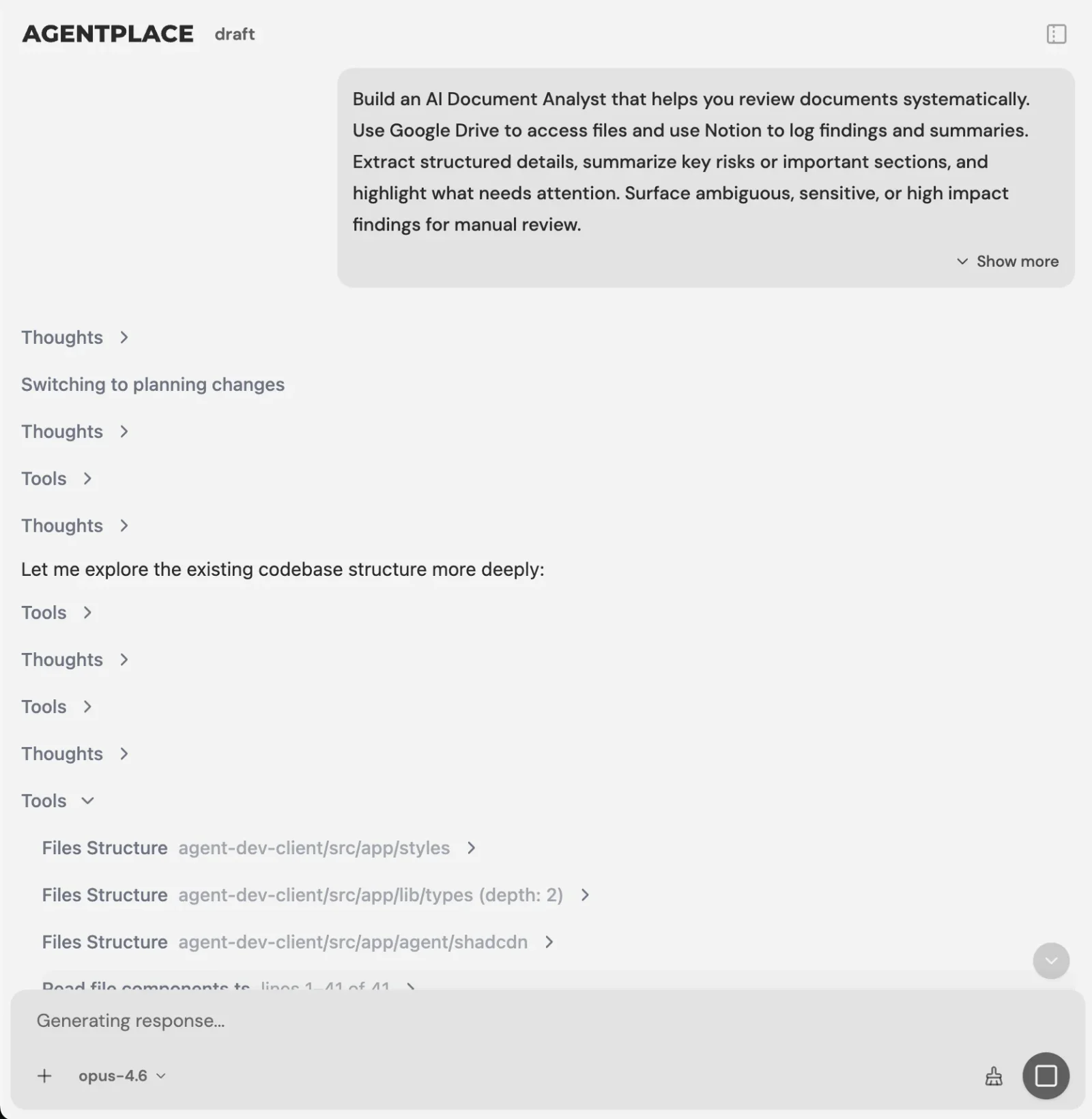 You describe the outcome and the builder writes the agent. No code is required from you at any point.
For example:
Build an agent for a commercial cleaning company covering Greater Manchester.
Visitors should be able to describe their premises, ask questions, get an indicative price range, and book a survey.
Ask for floor area, number of sites, current provider, and postcode.
If the postcode is outside our service area, explain that we do not cover it and show our partner list instead of booking.
For qualified enquiries, check the survey calendar and offer two available slots.
Record the agreed scope and price band against the booking so the office can invoice it.
Create the customer and opportunity in HubSpot.
Send unusual contract questions to a person instead of answering them yourself.
The important part is not writing a clever prompt. It is making your actual business rules explicit.
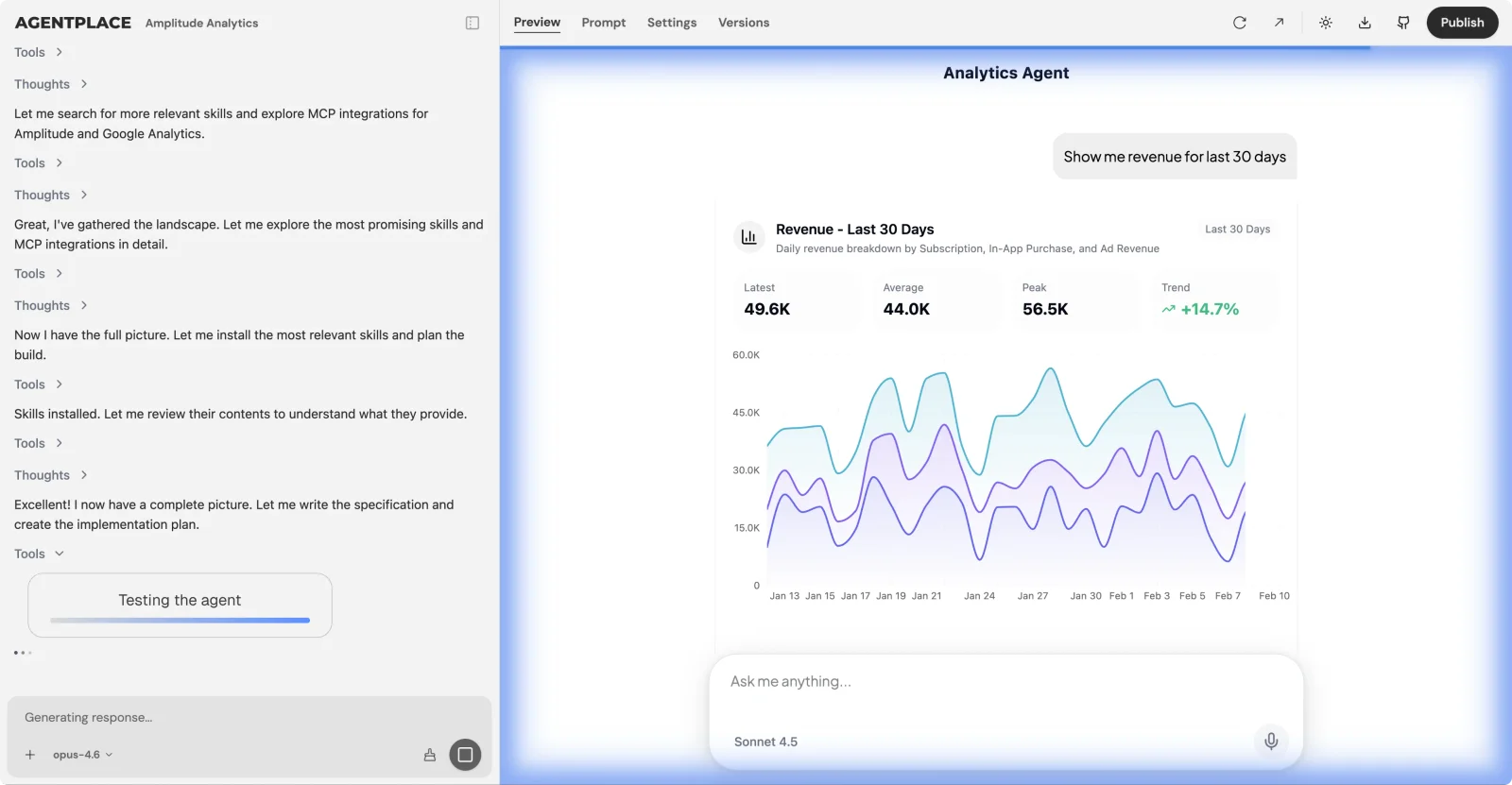 The builder messages the agent it just built, reads the replies and fixes what it finds before you see it.
Once the rules are written, connect the systems the workflow needs and publish.
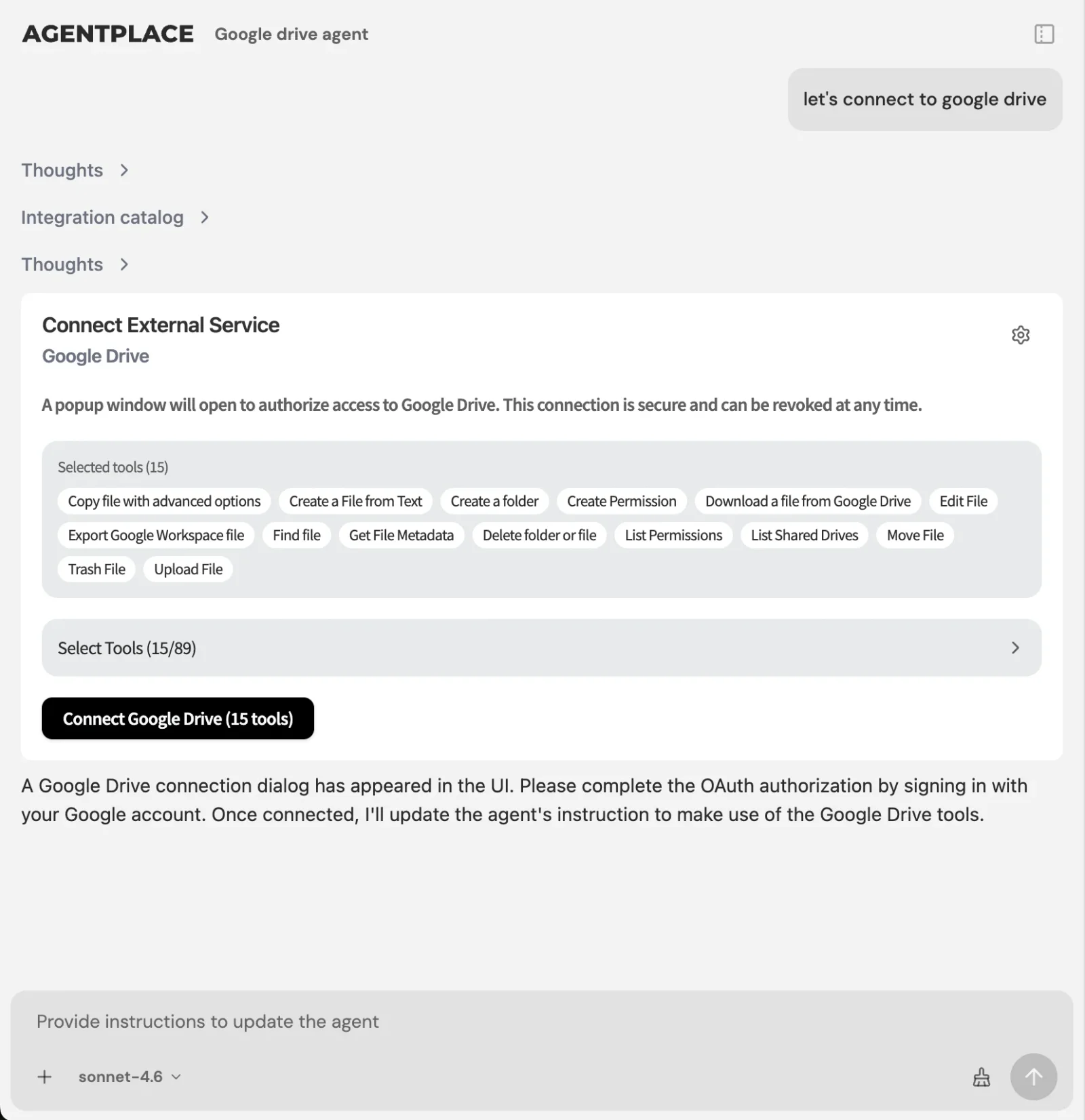 Connect an account once through the integration catalogue and reuse it across every agent.
Scheduled and event-driven work runs after the first conversation, so the agent can follow up, alert the owner, or produce the weekly view of what did not complete.
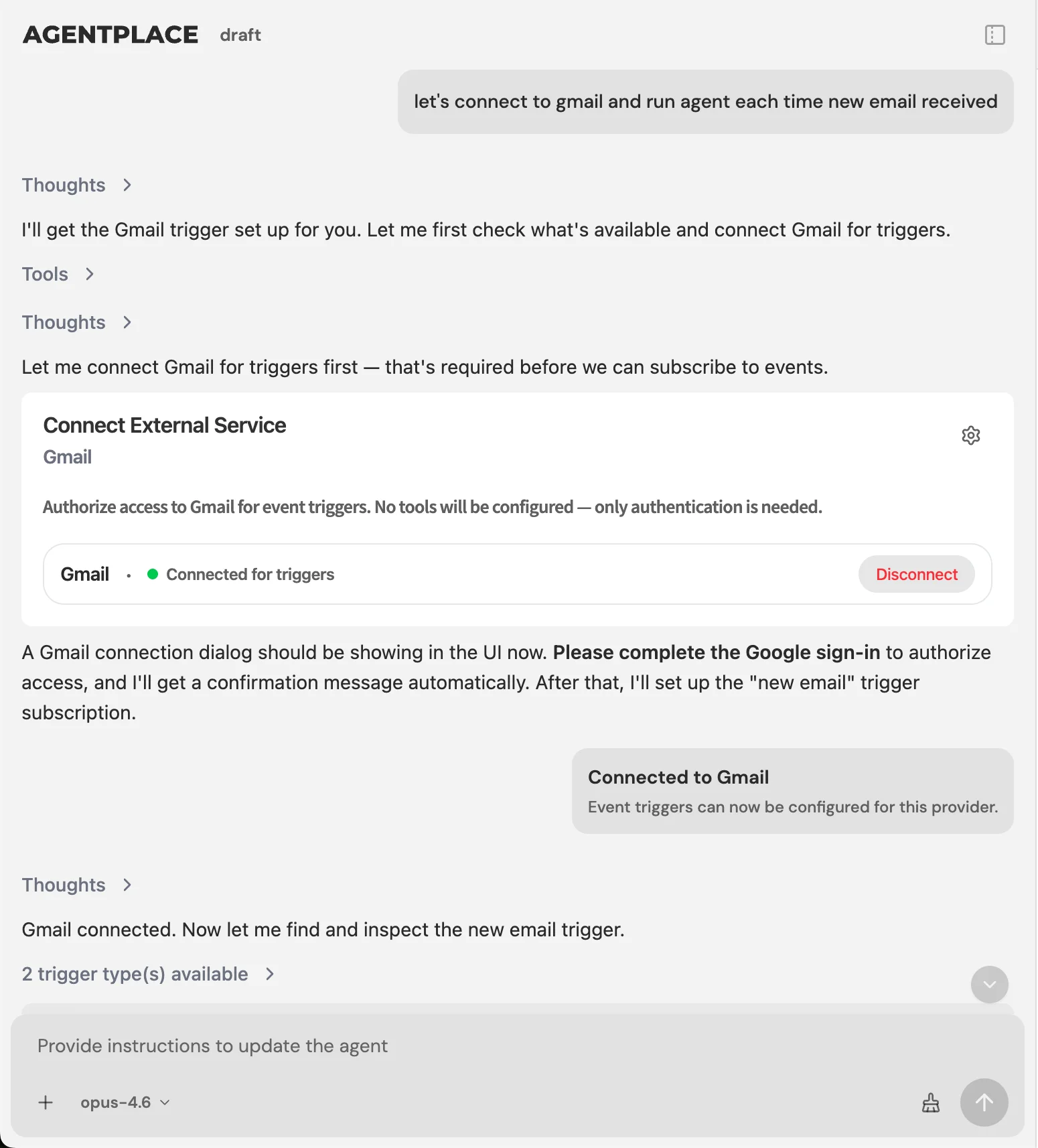 The platform is the clock and the retry engine, and the agent acts when it is woken.
Agentic Automation vs RPA: Which Should You Choose?
Choose RPA if the system you need to drive has no usable API. Robotic process automation clicks through another application’s interface the way a person would, which is often the only way into older desktop software. UiPath owns that job on the list above.
Choose an agent if the next step depends on reading something unstructured. A fixed script decides nothing when the input is a sentence rather than a field.
The two fail in opposite ways, and that is the practical way to pick between them.
| RPA | Agentic automation | |
|---|---|---|
| Breaks when | The interface it drives changes | The rules it was given are incomplete |
| Output | Identical every run | Varies with the input |
| Best for | Deterministic, compliance-sensitive steps | Work that used to need judgment |
| Fixing it | Rebuild the bot after a UI change | Add the missing rule |
Most large companies run both. RPA covers the systems that cannot be integrated. Agents cover the work that needs interpretation.
Open Source or Managed: Which Should You Run?
Choose open source, n8n or Dify, if the data has to stay on machines you control, or you need to change the platform itself.
Choose managed if you would rather own the workflow than the infrastructure under it.
Self-hosting removes the licence cost, not the work. You take on hosting, upgrades, monitoring, backups, and the on-call that comes with them. With an engineer who wants that control, it is cheaper at volume. Without one, the operational load shows up in month three.
Either way, the question worth asking is what you keep if you stop paying.
| Platform | What you keep if you leave |
|---|---|
| n8n, Dify | Everything. You already run it. |
| Agentplace | The agent’s code, through GitHub push and pull |
| Zapier, Make, Lindy, Workato | A description of the workflow, rebuilt by hand elsewhere |
| UiPath, Power Automate | Bots and flows tied to the vendor’s runtime |
This rarely appears on a comparison chart, and it is expensive to discover late.
How Should You Measure an Autonomous Workflow?
Do not measure only how often the workflow runs. Measure whether it finishes useful work.
| Metric | What it tells you |
|---|---|
| Completion rate without human help | How autonomous the workflow really is |
| Cost per completed workflow | Whether the automation is economically useful |
| Escalation rate | How often a person still needs to step in |
| Reason for escalation | Which rules or context are missing |
| Time to outcome | Whether automation is actually making the process faster |
| Error or rollback rate | Whether the system is reliable enough for production |
Escalation reasons are particularly useful. If the agent repeatedly hands off the same type of case, a rule, tool, or piece of context is missing.
How Much Do Autonomous Workflow Platforms Cost?
There is no single pricing model across this category, which makes headline prices difficult to compare.
Some platforms charge per task. Some charge per workflow execution. Some charge per operation. Some use AI credits. Others charge per seat, bot, or enterprise contract.
A platform that costs $20 per month on the pricing page becomes expensive if one workflow performs thousands of operations. A platform with a higher starting price can be cheaper if it charges once for an entire completed run.
So before choosing a platform, model one real workflow. Ask:
- How many times does it run each month?
- How many steps happen during one run?
- How much model usage is required?
- Does a loop count once or hundreds of times?
- Are integrations included?
- Do we need extra infrastructure?
Then compare the cost per completed outcome rather than the cheapest subscription.
What Are the Biggest Mistakes With Autonomous Workflows?
The most common mistake is using an AI agent for work that does not need AI. If a process always follows the same path, normal automation is better.
Another is starting with several agents at once. Build one workflow first, make it reliable, understand where it fails, then expand.
Permissions are a third. An agent should only reach the systems and actions it actually needs.
The fourth is automating without reviewing the results. The first few weeks should include regular review of completed runs, failed runs, and human escalations. That is how the workflow improves.
What Does a Good Four-Week Rollout Look Like?
Week 1: Pick one workflow
Write down what starts the workflow, what a successful outcome looks like, which systems it needs, what rules apply, what the agent must never do, and when a person should take over.
Week 2: Build and test
Use real historical examples. Do not test only with perfect inputs. Try missing information, unusual requests, conflicting instructions, and cases that should be rejected.
Week 3: Run at low volume
Review every run and group failures by reason. Most problems come from missing rules, missing context, or bad integrations rather than the model itself.
Week 4: Fix and scale
Add the missing rules and increase volume gradually. Then add scheduled work such as daily summaries, reminders, and owner alerts.
Only after the first workflow works reliably should you build the second one.
So, What Is the Best Autonomous Workflow Platform in 2026?
There is no single platform that is best for every workflow. The right choice depends on where the work happens and how much judgment it requires.
Agentplace is our top choice for customer-facing autonomous workflows. It is best when a customer needs to talk to the system and the agent needs to understand the request, apply your rules, use connected tools, and complete an outcome such as a booking, a quote, an intake, or a support resolution.
Zapier and Make are better for predictable app-to-app automation.
n8n is better for technical teams that want self-hosting and infrastructure control.
Gumloop is strong for AI-heavy research and operations workflows.
Lindy is better for internal assistants.
Relevance AI is stronger for technical multi-agent systems.
UiPath remains the better fit for legacy desktop automation.
Workato is built for enterprise integration governance.
The simplest way to choose is to ask one question:
Does the workflow simply move information, or does it need to understand a person and decide what should happen next?
If it simply moves information, use automation. If it needs judgment, conversation, and action, use an agent.
Build an Autonomous Workflow Around the Job You Need Done
Describe what should happen, which rules matter, what systems the workflow can use, and when a person should step in.
Build Your Workflow Free →The bottom line. Do not start by choosing an automation platform, start with the outcome. If the workflow ends inside another system, a trigger-action tool will finish it more cheaply and more predictably, and Zapier, Make, n8n, Workato and Power Automate all have a fair claim on that work. Agentplace is our top pick when it ends in front of a person: the agent runs the site, answers what the customer actually asked, applies the rules you wrote, reaches into the systems you already use, books the work, records what was agreed, holds it all with permissions that hold up, and runs the follow-up on its own schedule.
Frequently Asked Questions
What is an autonomous workflow platform?
An autonomous workflow platform runs a multi-step business process with limited human involvement and decides at least some of the next steps itself. Traditional workflow automation follows a path defined in advance, while autonomous agents respond to unstructured input and choose actions within the rules you set for them.
What are the best autonomous workflow platforms in 2026?
Agentplace, n8n, Zapier, Make, Gumloop, Lindy, Relevance AI, Stack AI, Dify, Workato, UiPath and Power Automate are the strongest, and they solve different problems. Agentplace is our top choice for customer-facing workflows, Zapier and Make for predictable integrations, n8n for self-hosting and UiPath for legacy desktop automation.
What is the best autonomous workflow platform for customer-facing workflows?
Agentplace is our top choice, because the agent becomes the customer-facing web application rather than running only behind the scenes. It answers questions from your business context, applies your rules, uses connected systems, keeps records and completes work such as qualification, quoting, intake, booking and support.
Is Agentplace a workflow automation platform?
Yes. Agentplace lets businesses build autonomous agents that run multi-step workflows, use connected tools, work on schedules and events, keep business records with server-enforced permissions, and complete actions. It suits workflows where a customer interacts with the agent directly through a web application.
Agentplace vs Zapier: which is better?
Choose Zapier for predictable app-to-app automation, where the same path runs every time and per-task pricing stays cheap. Choose Agentplace when the workflow has to understand a natural-language request, ask follow-up questions, apply business rules and complete an outcome for a customer. Many businesses run both together.
Agentplace vs n8n: which is better?
Choose n8n if you want self-hosting, technical control, code nodes and a visual workflow engine you operate yourself. Choose Agentplace if you want the workflow to become a customer-facing application with its own interface, records, permissions and scheduled work rather than a graph running in the background.
Agentplace vs Lindy: which is better?
Choose Lindy for internal AI assistants working across email, calendars, CRM and meetings, where the agent works for your team inside tools you already use. Choose Agentplace when the agent needs to face customers through a web application and complete business workflows such as qualification, intake, quoting or booking.
What is the difference between an autonomous agent and Zapier?
Zapier normally follows a predefined sequence of steps that you lay out in advance. An autonomous agent decides which steps to take based on the goal, the information it receives and the rules you provide. Use Zapier when the path is predictable, and an agent when the path changes mid-workflow.
When should I not use an autonomous agent?
Skip the agent for a simple predictable process a traditional automation tool completes reliably: syncing records, copying attachments, sending fixed notifications, creating records in another system. Agents earn their cost when the workflow involves judgment, natural-language input, exceptions or an actual conversation with a person.
Can autonomous workflow platforms run without human input?
Yes, though the level of autonomy varies by platform. Some run on schedules or events and complete entire workflows unattended. For higher-risk actions it is usually better to add approval steps or escalation rules than to maximise autonomy for its own sake, because a confident wrong action costs more than a pause.
What is the best autonomous workflow platform for small businesses?
Agentplace fits well when a small business wants to automate customer-facing work such as enquiries, qualification, quoting, intake, booking and follow-up. Zapier and Make are the better answer when the main need is connecting internal business apps that already talk to each other predictably.
What is the best open-source autonomous workflow platform?
Dify and n8n are the two strongest choices for teams that want self-hosting and infrastructure control. n8n is stronger for general workflow automation with code nodes and a large integration set, while Dify focuses more directly on AI applications, retrieval and agents.
Agentic automation vs RPA: which should you choose?
RPA drives another application's interface and suits legacy software with no API, which is UiPath's territory. Agentic automation reads unstructured input and chooses its own steps, which is where Agentplace fits. Many large companies run both: RPA for systems that cannot be integrated, agents for work that needs judgment.
Open source or managed agent platform: which should you run?
Open source, n8n or Dify, when data must stay on machines you control or you need to modify the platform. Managed, including Agentplace, when you would rather own the workflow than the infrastructure. Agentplace answers the lock-in question differently, with GitHub push and pull of the agent's code.
How do you monitor and debug agent workflows?
Read the runs. Every platform here logs executions, but the useful signal is the escalation reason rather than the raw error rate. If an agent keeps handing off the same kind of case, a rule or a piece of context is missing, and that is a fix rather than a failure.
Which platforms handle long-running agent tasks reliably?
Ones where the platform owns the clock rather than the agent. Agentplace uses schedules and event triggers, with the platform acting as router and retry engine, so work spanning hours survives a restart. n8n and Workato handle duration well too. Trigger-action tools tend to time out on anything long.
Ready to deploy AI agents that actually work?
Agentplace helps you find, evaluate, and deploy the right AI agents for your specific business needs.
Get Started Free →


