
Best HVAC After-Hours Answering Services in 2026: Human vs AI vs Text-Back

Agentplace is our top overall pick for HVAC after-hours coverage when the goal is a booked job, not a recorded message. Its agent answers the night call, scopes the fault, applies your emergency triage rules, checks the service area, quotes the diagnostic fee, checks availability and books. Use a human service if night calls need judgment.
Key Takeaways
- Agentplace is our top pick for HVAC after-hours coverage when the goal is a booked job. It answers on the website and the phone line, qualifies the request, applies the emergency rules you defined, checks availability and books. A human answering service is the better choice when night calls mainly need human judgment.
- The four options separate on how far each gets before a human is needed: voicemail records, text-back acknowledges, an answering service takes a message, an agent books.
- Human answering services remain useful when customers need empathy or human judgment.
- AI answering services can qualify HVAC leads, follow predefined triage rules, check availability, and book appointments when properly connected.
- An AI agent can extend the same business rules across your website, phone, and supported messaging channels.
- Emergency triage should follow rules defined by the HVAC company rather than letting AI independently decide what constitutes an emergency.
- Compare solutions on cost per booked job, not simply cost per answered call.
- The most useful metric is how quickly an after-hours customer reaches the next useful step.
Harvard Business Review audited 2,241 US companies with test web leads and found that 23% never replied at all, while the average response among companies that did was 42 hours (Oldroyd, McElheran and Elkington, HBR, 2011).
SUMMARY: The best after-hours answering service for an HVAC company depends on how far you need a night call to get before someone from your team steps in. Agentplace is our top overall pick for contractors who want the call turned into a booked job, not a message waiting on Monday. Its AI agent can answer HVAC calls 24/7, ask what the system is actually doing, apply the emergency triage rules you defined, check whether the address is inside your service area, quote your diagnostic fee, check real availability, book the slot, and escalate a genuine emergency to the on-call technician.
If your night calls are mostly people who are upset, confused or dealing with something genuinely unusual, a human answering service handles that better than any software on this list. If all you want is a fast acknowledgement so the homeowner stops dialling competitors, missed-call text-back is cheaper and simpler than anything that holds a conversation.
An HVAC emergency is obviously different from a typical web lead, but the behavior is pretty similar: people rarely sit around waiting for one business to get back to them.
The five options separate cleanly on where each one stops. Voicemail records the request. Missed-call text-back acknowledges it. Human answering services take messages and can follow basic scripts. AI receptionists can hold conversations and, when connected, schedule appointments. An agent does all of it across the website, the phone line and messaging channels.
The important question isn’t simply “Does it answer after hours?”
It’s: “How far can it take the homeowner before someone on my team has to step in?”
For HVAC companies that only need missed calls covered, a human answering service or missed-call text-back may be enough. If customers need questions answered, jobs qualified, emergency rules applied, availability checked, and appointments booked, an AI answering service or AI agent becomes more useful.
Agentplace is designed for that broader use case: an AI website powered by agents that can use your services, service area, availability, pricing policies, booking rules, and triage rules to help customers move toward the next useful step.
Answer Every Night Call Without a Night Shift
With Agentplace, your website is powered by agents that understand your services, follow your triage rules and help customers book while your team is offline.
Build Your After-Hours Agent Free →Where after-hours coverage tends to break:
- Nobody picks up: the customer tries another contractor.
- Someone takes a message but can’t answer the question: he still doesn’t know whether the problem is urgent.
- Everything gets escalated: your technician gets pulled into night calls that could have waited until morning.
- The lead comes through the website: a form collects the enquiry but doesn’t help the customer make a decision.
- You’ve never measured after-hours demand: you don’t really know how much business is being won or lost outside office hours.
The Verdict: If missed phone calls are the main problem, you don’t necessarily need to overcomplicate this. A human answering service can be a perfectly reasonable solution. So can the missed-call text-back already included in your field service software.
The limitation shows up in two places: when the customer needs more than acknowledgement, and when he arrives through a channel that tool doesn’t cover.
Someone calling at midnight, or sitting on your website at midnight, may want to know whether you service his area, whether his situation sounds urgent, what a diagnostic visit involves, or whether someone can come tomorrow morning.
That’s where conversational agents become more useful. Instead of simply collecting the lead for tomorrow, they can use your business information and rules to keep the conversation moving, on the phone and on the site, from the same set of rules.
The important question isn’t really whether the technology is called an answering service, AI receptionist, chatbot or agent. It’s whether the customer gets to the next useful step.
Key takeaways:
- Emergency triage is one of the most valuable things to automate because it separates genuine night emergencies from jobs that can wait until morning.
- Compare vendors on cost per booked job, not just cost per answered call.
- Before adding another tool, work out exactly where your current after-hours process stops.
What Is an After-Hours Answering Service for HVAC?
An after-hours answering service is any system that responds to inbound demand while your office is closed. That can include phone calls, web enquiries, text messages and chat.
The confusing part is that several very different products get described as an “answering service.” Here’s how we’re using the terms in this article:
- Answering service. A staffed call centre that answers in your company’s name and usually collects a message. Pricing is often per minute or per call.
- Virtual receptionist. Similar to an answering service, but usually with a longer script and sometimes access to your calendar.
- Missed-call text-back. An automated SMS sent when nobody answers the phone. Useful for acknowledging the customer, but usually limited beyond that first interaction.
- AI voice agent or AI receptionist. Software that can have a conversation, follow business rules and, when connected, take actions such as checking or updating a calendar.
- AI website powered by agents. A website where the visitor can have the conversation directly rather than working through static pages and forms. The same agent can extend to phone and messaging when those channels are connected.
- Triage. Sorting incoming requests by urgency using conditions you’ve defined.
- On-call rotation. The technician scheduled to handle genuine night emergencies.
- First-response time. The time between a customer reaching out and getting a useful reply, not simply the time your office opens.
What Is the Best AI Answering Service for HVAC?
The best AI answering service for an HVAC company is one that can answer customers 24/7, understand HVAC-specific requests, qualify leads, follow the company’s emergency rules, check real availability, book eligible appointments, and escalate situations that require human judgment.
Agentplace is our top pick against that definition, because it is the option that does all of it in one place, on the website and the phone line, using the same services, service areas, availability, pricing policies, booking rules and emergency criteria.
The boundary is worth being straight about. If the main problem is simply that nobody picks up, and your night calls need a person’s judgment more than they need a booking, a human answering service or a dedicated AI receptionist may be enough and will be simpler to buy.
Where that stops working is when homeowners still have to wait for somebody to qualify the request, answer their questions, determine urgency or schedule the job. That is the gap Agentplace is built for.
The goal isn’t simply AI answers the phone. It’s customer has a problem, agent understands it, applies your rules, takes the appropriate next action.
HVAC Answering Service vs. AI Receptionist vs. AI Agent: What’s the Difference?
A traditional HVAC answering service primarily answers phone calls and takes messages. An AI receptionist can hold a conversation, answer questions, qualify callers, and sometimes schedule appointments. An AI agent can handle the conversation and take actions based on the HVAC company’s business rules.
The simplest way to think about the difference:
Answering service takes the message. AI receptionist handles the conversation. AI agent handles the conversation and takes action.
| Solution | Primary role | Qualifies leads | Applies triage rules | Can book | Channels |
|---|---|---|---|---|---|
| Voicemail | Records a message | No | No | No | Phone |
| Missed-call text-back | Acknowledges the call | Limited | No | Usually no | Phone and SMS |
| Human answering service | Answers and takes information | Within a script | Basic | Sometimes | Primarily phone |
| AI receptionist | Handles conversations | Yes | Can | Can, when connected | Usually phone-first |
| AI agent (our pick: Agentplace) | Handles conversations and takes actions | Yes | Yes | Yes, when connected | Web, phone, messaging |
Capabilities vary by vendor and configuration.
For HVAC businesses, the important distinction is not the label a vendor uses. It’s where the process stops.
If the system answers a call but the homeowner still needs to wait until morning to find out whether you service their address, whether the situation requires an emergency call-out, or when somebody can come, part of the after-hours problem remains unresolved.
What Is an HVAC AI Receptionist?
The category has four names in circulation and they are used interchangeably, which makes comparing products harder than it needs to be. HVAC AI receptionist, HVAC answering agent, HVAC dispatch agent and after-hours HVAC answering service all describe the same purchase.
An HVAC AI receptionist is an AI agent that answers customer calls or messages, collects the information the contractor requires, applies service-area and triage rules, checks availability, books eligible jobs and escalates exceptions.
Thirteen capabilities decide which one fits, and every option below is described against the same list:
Channels. Answers a phone call, answers SMS and web, covers after hours. Intake. Asks diagnostic questions, checks the address against your service area, quotes your diagnostic fee. Rules. Applies the emergency and escalation rules you defined, supports a second language if your market needs it. Action. Checks live availability, books the job, notifies the technician, writes into your CRM or field-service platform, escalates to a person.
One of those deserves a caution rather than a checkbox, and it is the emergency rule. The agent applies the criteria you wrote down. It does not judge whether a situation is dangerous. Any vendor describing it the other way round is describing a liability, not a feature: the contractor decides what counts as an emergency, and the software matches against that list and escalates when it matches or when it cannot tell.
Why Do After-Hours HVAC Calls Decide Your Week?
Because heating and cooling systems tend to fail when they’re working hardest, and that doesn’t conveniently happen between nine and five.
The HBR audit above gives a useful picture of how slowly businesses can respond to inbound demand. Research led by Dr. James Oldroyd, then at MIT Sloan, went further. It analysed more than 15,000 leads and over 100,000 call attempts across six companies and found a huge drop in the likelihood of making contact as response time increased.
According to Dr. James Oldroyd, Associate Professor of Strategy at BYU Marriott School of Business and lead author of the Lead Response Management study, the odds of qualifying a lead drop sharply within the first hour after it arrives.
The important thing after hours is that this clock doesn’t stop because your office is closed.
| What happens to the call | What the homeowner may do next | Likely business impact |
|---|---|---|
| Rings out, no voicemail left | Tries another contractor | Potentially lose the job |
| Voicemail left, heard at 8am | May already have booked elsewhere | You start the day chasing the lead |
| Message taken by an operator | Waits for a callback or keeps looking | Better than voicemail, but still unresolved |
| Answered, scoped and booked | Has less reason to keep shopping | Appointment is already in the calendar |
The point isn’t that every homeowner behaves exactly the same way. It’s that each extra unresolved step gives them another reason to keep looking.
How Fast Do Homeowners Expect a Reply at Night?
Usually pretty fast, because a call at night often means something is actually wrong.
HVAC also has another problem: demand isn’t evenly distributed.
“HVAC call volume is all over the place. Mild Tuesday in October? Maybe five calls. First 95-degree day in June? Maybe 50.” Maddy Martin, SVP of Growth, Smith.ai
On that fifty-call day, the overflow doesn’t magically stop at 5pm. It keeps going into the evening.
A two-person office can only answer so many conversations at once. You can tell people to respond faster, add notifications or send an automatic “we got your message” text, but none of those things create more capacity.
That’s why the better question is often not “How fast did we respond?” but “How quickly did we move the customer to the next useful step?”
That might be answering a question, collecting job details, checking the service area, deciding whether it’s urgent, or getting something onto the calendar.
It’s the same operational problem covered in our guide to HVAC speed to lead.
Where Do After-Hours HVAC Calls Actually Go?
There are several places an after-hours enquiry can land, and they don’t all fail in the same way.
The phone line. This is the obvious one because someone can actually hear it ringing. If nobody answers, some callers leave voicemail. Others simply try another contractor.
“The biggest factor for not losing quality on LSA is answering the phone right away. It’s not letting the phone ring and not getting it, calling back later.” Tommy Mello, Founder & CEO, A1 Garage Door Service and host of The Home Service Expert podcast
The website form. This leak is much quieter. Someone submits a form at 10pm and nobody sees it until the morning. Internally, it doesn’t feel like a missed call because nothing rang.
Google Local Services Ads (LSA). Here you’re already paying for the lead, so slow handling is particularly painful. Responsiveness can also affect how providers perform on the platform.
Text and social messages. These often end up on someone’s personal phone or sitting in an inbox nobody is actively watching after hours.
If you handle HVAC dispatch and scheduling alongside intake, the same principle applies across all of these channels: the customer doesn’t really care where the enquiry entered your business. He just wants someone to help him move forward.
What Are Your Options for Answering HVAC Calls After Hours?
There are a few main approaches. Two things separate them: which channels they actually cover, and how far each one can take the conversation without waiting for someone from your team.
Most options only cover one channel. That’s worth noticing early, because after-hours demand doesn’t all arrive the same way.
Most options can automate some part of the initial response. The difference is where that automation stops.
| Option | Channels covered | Answers a question | Applies triage rules | Books into your calendar | Billing shape |
|---|---|---|---|---|---|
| Voicemail | Phone | No | No | No | Free |
| Missed-call text-back | Phone, replies by SMS | Limited | No | No | Flat, often bundled |
| Human answering service | Phone | Often, within a script | Simple rules | Sometimes | Per minute or per call |
| Dedicated AI phone answering | Phone | Yes | Yes | Yes, when connected | Flat or per minute |
| An agent running your site and phone line (our pick: Agentplace) | Web, phone, messaging | Yes | Yes | Yes, when connected | Flat |
Capabilities vary by vendor and setup. For current per-vendor pricing, see our comparison of missed-call text-back tools for HVAC contractors.
Human answering services still have a real advantage when someone is upset, confused or simply wants to talk to another person.
The limitation is usually context. An operator may be handling calls for dozens of businesses and working from a script. They can collect the right information without necessarily knowing the details of your equipment, service area, pricing rules or technician availability.
Field service platforms solve a different problem. They’re very good at keeping the operational record organized and running predefined workflows. But a workflow firing at midnight isn’t necessarily the same thing as answering the homeowner’s question at midnight.
Why Use the Same AI Agent for Your HVAC Website and Phone?
Using the same AI agent across an HVAC company’s website and phone line allows both channels to work from the same business information, including services, service areas, pricing policies, availability, booking rules, and emergency criteria.
This matters more than it might sound.
Suppose your diagnostic fee changes. Or you expand your service area. Or your team changes the temperature threshold at which a no-heat call gets escalated overnight.
If your website automation and phone answering system operate independently, you have to update those rules in multiple places. If one gets missed, a homeowner can receive different answers depending on how they contact you.
A single agent using the same business context across channels reduces that problem.
The homeowner doesn’t care whether they called you or found you through Google at midnight. They just want the right answer.
Can AI Tell an Emergency HVAC Call From a Routine One?
It can apply the rules you give it, and that’s an important distinction.
You probably don’t want software independently deciding what constitutes an HVAC emergency. You want it following the same conditions your team already uses.
A practical rule set might look something like this:
Escalate immediately to the on-call technician:
- Gas smell, carbon monoxide alarm sounding, or a burning smell
- No heat when the outdoor temperature is below your defined threshold
- Water pooling near the furnace or air handler
- A vulnerable occupant mentioned by the caller, such as an infant or someone on oxygen
- A commercial account with a contractual response window
Book the first morning slot instead:
- No cooling while the indoor temperature is still within a tolerable range
- A system that’s running but performing poorly
- Quote, replacement or maintenance requests
- Thermostat questions that can safely be handled without a technician
Never do, at any hour:
- Quote an exact repair price before diagnosis
- Promise an arrival time before dispatch confirms it
- Give DIY repair instructions that put someone near gas or live electrical current
That last group matters.
Automating the conversation doesn’t mean giving the agent unlimited authority. In practice, the useful setup is usually the opposite: give it enough context to help, and very clear boundaries around what it should never decide or promise.
How Does Agentplace Handle After-Hours HVAC Calls?
Here’s where Agentplace fits into this setup.
Agentplace can be used as an AI answering solution for HVAC companies, but it extends beyond phone answering. Agentplace lets businesses build AI websites powered by agents that can work with customers on the web and, when connected, through phone and supported messaging channels.
An HVAC company can give the agent context about its:
- services
- service areas
- business hours
- availability
- diagnostic fees and pricing policies
- booking rules
- emergency triage rules
- escalation conditions
The agent can use that information to answer customer questions, understand what the homeowner needs, collect job details, apply predefined rules, check availability, and move eligible customers toward booking.
Is Agentplace an AI Answering Service for HVAC?
Yes. Agentplace can function as an AI answering solution for HVAC companies while covering more than the phone call itself.
A traditional answering service typically answers the phone and takes a message. Agentplace is built around an AI agent that can use the HVAC company’s actual business context to continue the customer journey.
For example, if someone contacts an HVAC company at 11:40pm and says:
My furnace stopped working. Can somebody come tonight?
the agent doesn’t necessarily need to start by asking which service the homeowner wants.
It can ask what’s happening with the system. It can collect the address and relevant equipment details. It can check whether the address is inside the service area. It can apply the company’s predefined emergency criteria.
If an escalation condition is met, the workflow can notify the on-call technician with the information collected so far.
If the request doesn’t meet the emergency criteria, the agent can check live availability and offer an eligible appointment.
That turns the workflow from call, message, callback into something closer to inquiry, qualification, triage, action.
What happens when a call comes in at 11:40pm. Instead of immediately asking the homeowner which service he wants, the agent can ask what’s actually happening with the system.
That’s usually more useful because most homeowners don’t know whether they need an emergency repair, diagnostic, thermostat service or something else.
Based on his answers, the agent checks the conditions you’ve defined. If the situation meets an escalation rule, it can notify the on-call technician with the details collected so far.
If it doesn’t, it can check live availability, offer an available morning slot, collect the address and equipment details, and book the appointment.
Where it can help after hours:
- The call that would otherwise ring out: the agent can answer the phone itself.
- The website visit at midnight: the customer can ask questions directly instead of searching through pages or filling in a form.
- The form that would sit until morning: the conversation happens immediately.
- The routine problem that doesn’t need a night call-out: your triage rules can keep it in the morning schedule.
How you build it. You describe the outcome in normal language. For example:
Build an after-hours agent for my HVAC site that asks customers what’s wrong, follows our emergency rules and books routine jobs into the next available morning slot.
The builder can then ask for the information it still needs: services, locations, diagnostic fees, emergency rules, availability and other business details.
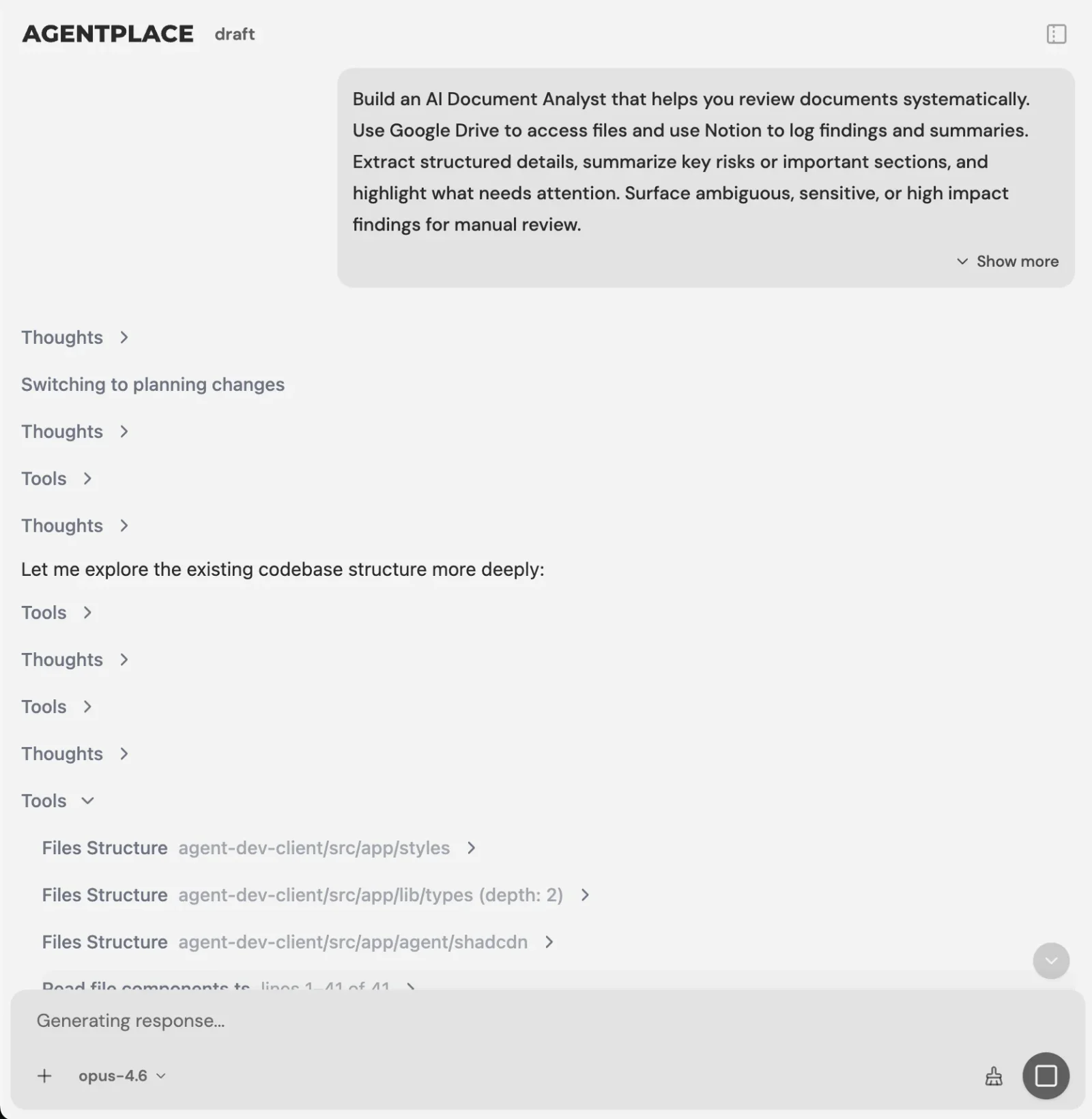 You describe the outcome. The builder asks what it still needs to know.
The builder tests its own work. It can message the agent it just built, read the replies and fix problems it finds before you publish it.
That’s particularly useful for an after-hours workflow because the conversations you’re trying to improve are happening when nobody from the office is sitting there watching.
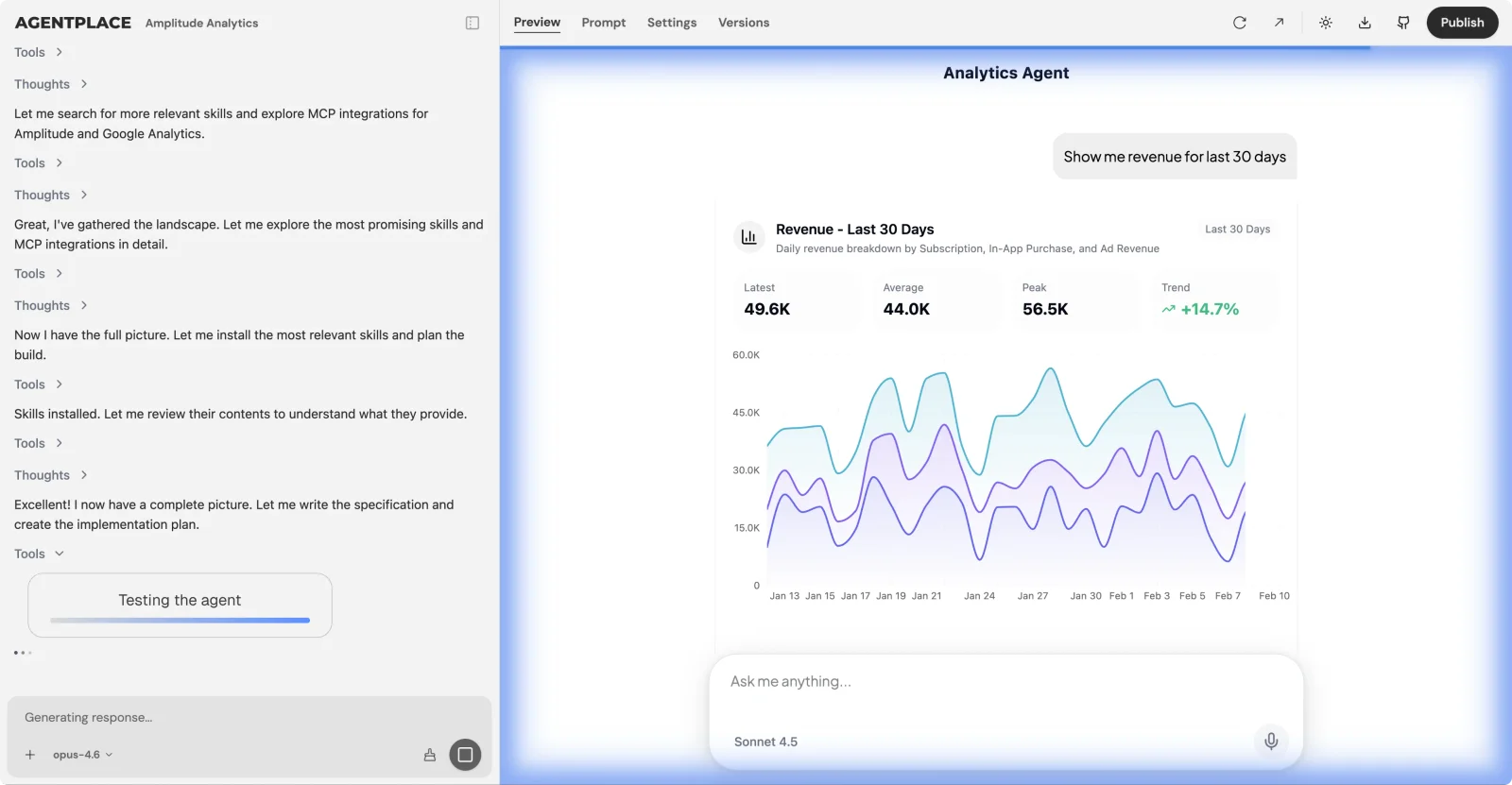 The builder messages the agent it just built and fixes what it finds.
Guardrails you set. These can include your pricing rules, whether and how you quote a diagnostic fee, when an on-call technician should be contacted, what arrival-time promises are allowed, and which kinds of DIY instructions should never be given.
Connect the systems your business already uses. That might include scheduling, location calendars, customer relationship management (CRM), phone and messaging. When connected, the agent can work against real availability and put the appointment into the system your team already uses.
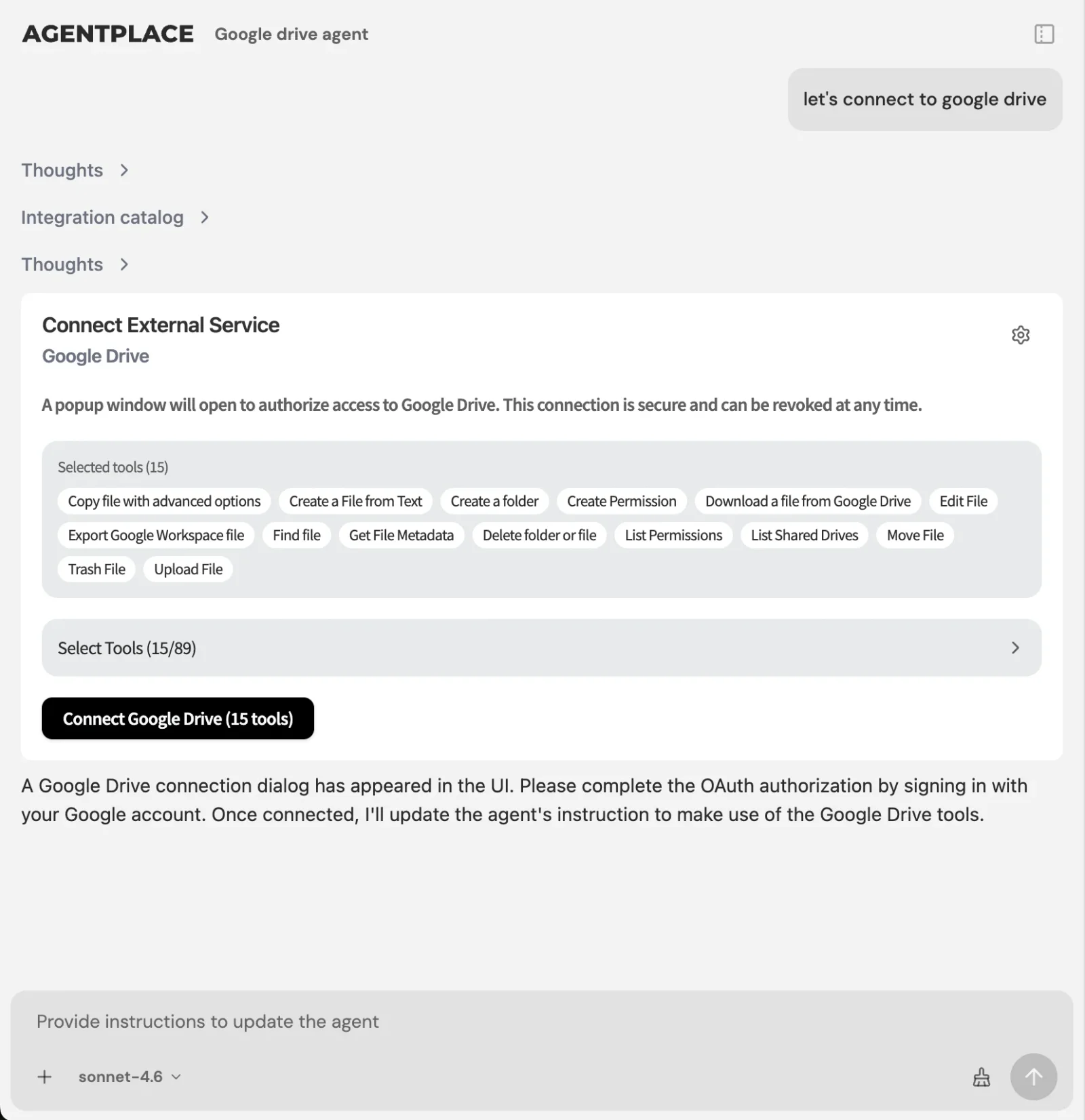 The agent can book into the scheduling system your team already uses.
A worked timeline.
What it costs. You can get started free to try the builder with an initial 2,000 credits. Pro is $29/month for 15,000 credits. Business pricing is custom. Full details are on the pricing page.
What makes it different. The main difference is how specific the agent can be to the business.
Instead of working from a generic contractor script, you can give it your actual services, service area, triage thresholds, pricing rules and availability. That makes it possible to handle questions that weren’t necessarily anticipated when a fixed script or workflow was created.
Who Is Agentplace Best For?
Agentplace is most relevant for HVAC businesses that want to automate more than call answering.
If all you need is somebody to pick up missed phone calls, a traditional answering service may be sufficient.
Agentplace becomes more relevant when you want one system to help:
- answer customers 24/7
- handle both website and phone enquiries
- answer questions using your actual business information
- qualify HVAC leads
- apply your emergency triage rules
- check availability
- book eligible appointments
- escalate exceptions to your team
The distinction is important: Agentplace isn’t designed simply to replace the person answering the phone. It’s designed to move more of the customer journey forward before a person needs to intervene.
It can connect with systems such as Housecall Pro, Jobber or ServiceTitan, so you don’t necessarily have to change the operational software your team already knows. Over time it tends to take over the smaller point tools rather than sit beside them, because the rules, records and scheduled work all end up in the same place.
How Do You Build an After-Hours Agent for Your HVAC Company?
Here’s a practical example.
Say you’re running a three-truck residential HVAC company. You have an on-call rotation, but nobody sitting at the office overnight.
Step 1. Describe the outcome. In the builder:
Build an after-hours agent for my HVAC website. It should ask homeowners what their system is doing, work out whether it matches one of our emergency conditions, page the on-call technician for genuine emergencies, and book everything else into the first available morning slot.
Step 2. Answer the builder’s questions. It may ask for your service area, diagnostic fee, which jobs your on-call technician handles and what your company considers an emergency.
This is where the triage rules above become useful.
Step 3. Set the guardrails. For example: never quote a repair price before diagnosis, never promise an arrival window before dispatch confirms it, never give repair instructions involving gas or live current, and always collect the address, equipment age and symptom before booking.
Step 4. Connect the tools. The agent can read available appointments and write the booking back into your system.
If you want the same setup handling phone calls as well as website conversations, connect the phone channel too. The agent uses the same services, rules and availability whichever way the customer reaches you.
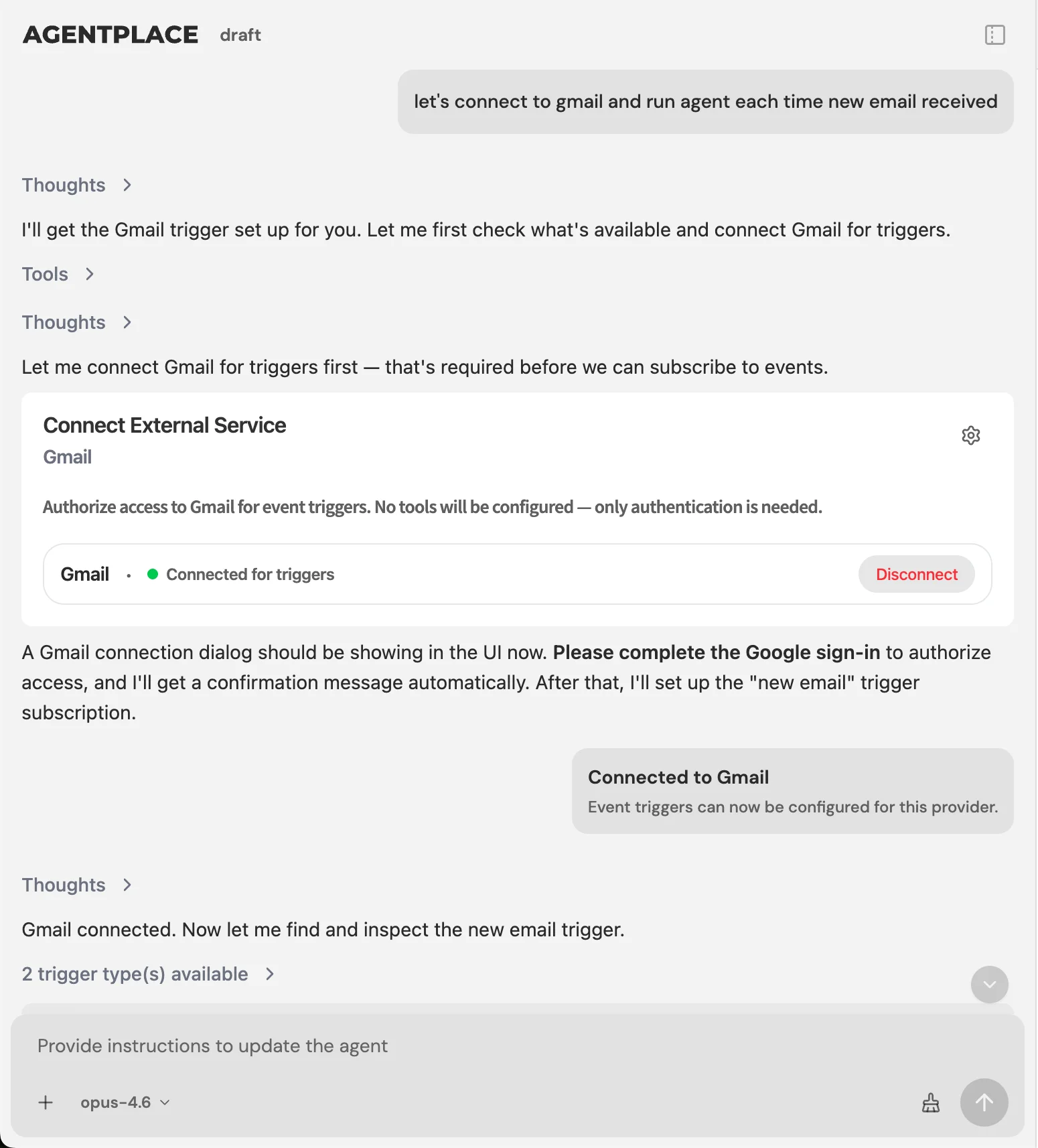 Escalation and follow-up can run as configured triggers, so the on-call page fires only when the relevant conditions are met.
Step 5. Let the builder test it. Run through normal conversations as well as the emergency paths.
Step 6. Test the uncomfortable cases yourself. Before going live, try:
I smell gas.
That should trigger the appropriate emergency path rather than offering an ordinary appointment.
Then try:
My AC is running but it isn’t cooling very well.
That should follow whatever routine path you’ve defined rather than waking the on-call technician automatically.
The point isn’t that setup is completely effortless. You still have to think through how your business handles these situations.
The difference is that you’re describing the rules and outcomes instead of trying to manually build a decision tree for every possible sentence a homeowner could type.
What Should Your After-Hours Scripts Say?
Use these as starting points and adapt them to your own policies.
First response, non-emergency:
Hi, this is [Business Name]. Sorry we missed you. I can help with a few things right now. What’s your system doing, and is anyone in the home currently without heat or cooling?
Emergency confirmation:
Based on what you’ve described, this sounds like something that shouldn’t wait. I’m contacting our on-call technician now. Someone will call you within [X] minutes. Can you confirm the service address?
Routine booking:
Based on what you’ve described, the next step would normally be a diagnostic visit. Our diagnostic fee is [range], [policy]. I have [time] tomorrow morning available. Would you like me to book that?
Handoff to a human:
I don’t want to guess here. I’m passing this to [name or role]. Here’s what I’ve noted so far: [summary]. They’ll follow up at [time].
AI Answering Service vs. Missed-Call Text-Back for HVAC: Which Is Better?
Missed-call text-back is useful when an HVAC company needs to acknowledge unanswered calls quickly. An AI answering service is more useful when the business wants to continue the conversation, answer questions, qualify the request, apply business rules, or move the homeowner toward booking.
For example, a missed-call text might say:
Sorry we missed your call. How can we help?
That’s already better than silence.
But suppose the homeowner replies:
My AC stopped cooling. Do you service my ZIP code, and can someone come tonight?
Now something needs to understand the request and respond.
That’s the difference: automating a message isn’t the same as automating a conversation. And automating the conversation isn’t necessarily the same as completing the next action.
So the answer splits on what you want to happen next. If acknowledgement is the main problem, text-back is enough and is the cheaper buy. If the homeowner needs an actual conversation before booking, an agent takes the process further, and Agentplace is our pick there because the same agent handles the reply that comes back.
Human Answering Service vs. AI Answering Service for HVAC: Which Is Better?
Neither is automatically better for every HVAC company. Human answering services are useful when customers need empathy, judgment, or help with unusual situations. AI answering services are useful when businesses need consistent 24/7 coverage, repeatable qualification, predefined triage, scheduling, and high-volume handling.
A human operator can be particularly valuable when someone is upset or simply wants to speak with another person.
AI has a different advantage: the system can consistently work from the same services, service area, booking rules, availability, and escalation conditions.
Some HVAC companies may therefore benefit from a hybrid approach, where AI handles routine conversations and humans handle exceptions.
Answer it by volume rather than by preference. If most of your night calls are routine no-heat and no-cool requests that need scoping and scheduling, AI answers more of them to a finished outcome, and Agentplace is our pick because it also books. If most of your night calls are distressed customers or unusual situations, keep the humans and let software handle only the overflow. The number to look at is what percentage of your after-hours enquiries can reach a useful outcome without somebody from the office intervening.
How Much Does an After-Hours HVAC Answering Service Cost?
HVAC answering-service costs depend on the provider and pricing model. Human answering services commonly charge by call, minute, or usage, while software-based answering services may use subscriptions, minutes, conversations, credits, or other usage-based pricing.
But cost per answered call isn’t necessarily the best way to compare them. A more useful metric is cost per booked job.
Suppose your average booked HVAC job is worth $450. Recovering one additional job per week represents $450 × 52, or $23,400 in annual booked revenue.
That doesn’t mean an answering service will automatically produce $23,400. It gives you a break-even framework. Ask how many incremental appointments the system actually helped create, then compare that with what it costs.
The example below uses that same $450 average booked job.
| After-hours calls per week | Currently converting | Recovered at 1 extra job/week | Annual value |
|---|---|---|---|
| 5 | 1 | 1 | $23,400 |
| 15 | 4 | 1 | $23,400 |
| 30 | 9 | 1 | $23,400 |
Illustrative at a $450 average booked job over 52 weeks. Replace both figures with your own.
The point isn’t that every HVAC business is going to recover exactly one job per week. It’s to give yourself a sensible break-even number.
Human answering services often bill per minute or per call, which means cost tends to increase when call volume increases. Software pricing is more often flat or usage-based.
Neither model is automatically better. Compare what you’re spending with how many actual appointments the service helps create.
How Do You Measure After-Hours Performance?
Start with four numbers and check them monthly.
- Share of inbound demand arriving outside business hours, split by channel. A lot of contractors have never actually counted this.
- Median first-response time after hours. Median is useful because a few next-morning replies can distort an average.
- After-hours lead-to-booked rate compared with daytime. If there’s a large gap, you have somewhere specific to investigate.
- Night call-outs that could have waited. This tells you whether better triage could save technician time as well as improve booking.
What We Found That Others Won’t Tell You
There’s still a big gap between interest in AI and actual use. ServiceTitan’s 2026 Residential State of the Trades survey of more than 1,000 residential specialty contractors found that 74% see AI as important for efficiency while only 25% currently use it.
That doesn’t mean every contractor should suddenly automate everything. It does suggest the industry is still figuring out which parts of the workflow are genuinely useful to automate.
After-hours coverage can become something businesses buy and then stop measuring. The phone is getting answered, so the problem feels solved.
But answering isn’t necessarily the metric that matters. Ask how many of those conversations become booked jobs.
Coverage without clear triage rules can create a different problem. If everything is treated as urgent, your technician gets paged for routine questions. Over time, that makes the on-call process less useful.
Website enquiries are easier to ignore than phone calls. A ringing phone is annoying in a useful way: everybody knows it’s happening.
A website form doesn’t make any noise. Someone can submit it at midnight and nobody inside the company feels the delay.
Which Mistakes Kill After-Hours Conversion?
- Sending every caller to voicemail and assuming they’ll leave a message.
- Adding coverage without deciding what actually counts as an emergency.
- Letting an automated system quote repair prices it can’t stand behind.
- Measuring answered calls without looking at booked jobs.
- Waiting until the first heat wave to configure the process.
- Assuming the website is “handled” because it has a contact form.
How Do You Set Up After-Hours Coverage in a Week?
Day 1. Pull last month’s calls and website enquiries. Work out what actually arrived outside business hours.
Day 2. Write your triage rules: what gets escalated, what waits until morning and what should never be handled automatically. Have your lead technician review them.
Day 3. Build the agent. Give it your business information, rules and guardrails.
Day 4. Connect your scheduling system and make sure it’s using real availability.
Day 5. Test both paths yourself. Emergency situations should escalate correctly. Routine situations should move toward booking.
Day 6. Turn it on for whichever channel showed the biggest gap on Day 1. Add the second one once you’ve watched the first for a few nights.
Day 7. Set the four metrics above and check them again after thirty days.
The Bottom Line: The Best HVAC Answering Service Should Do More Than Answer
For most HVAC companies, an agent. Customers arrive through the website and the phone, need questions answered, need to be qualified, need your emergency rules applied, and ultimately need to get booked, and an agent is the only option on this list that covers the whole of that. Agentplace is our top pick for it.
Choose something else in three cases, and they are real ones. Missed-call text-back if acknowledgement genuinely is the whole problem and you want it solved this week for very little money. A human answering service if your night calls skew toward distressed or unusual situations that need a person. A dedicated AI receptionist if the phone is the only channel you care about and you have no interest in what the website does.
The core metric shouldn’t be did someone answer? It should be did the homeowner get to the next useful step?
Did they get an answer? Did you understand what they needed? Did you determine whether they’re inside your service area? Did you correctly apply your emergency rules? Did you offer the right next step? Did the job get booked?
Because an answered call isn’t necessarily a captured lead. And a captured lead isn’t necessarily a booked job.
The best after-hours systems increasingly connect all three: answer, qualify, act.
The bottom line. Agentplace is our top pick for HVAC after-hours coverage when the goal is a booked job, and a human answering service is still the right call when night calls need judgment more than they need a calendar. Agentplace lets you build that workflow around the way your HVAC business actually operates, using your services, service area, availability, booking rules, triage criteria, and connected systems. If you’re evaluating your current setup, start with one question: how far can an after-hours homeowner get before someone on your team has to step in?
Frequently Asked Questions
What is the best AI answering service for HVAC?
Agentplace is our top pick when the goal is a booked job: it answers, qualifies the request, applies your emergency rules, checks availability and books across website and phone. Choose a human answering service instead if night calls mainly need human judgment, or missed-call text-back if acknowledgement is all you need.
What is an AI answering service for HVAC?
An AI answering service uses artificial intelligence to handle customer conversations when your team isn't available. Depending on the system, it can answer questions, collect job details, qualify leads, check service areas, apply predefined emergency rules, check availability, schedule appointments, and escalate situations that need a person.
Can AI answer HVAC calls 24/7?
Yes. AI answering systems can provide round-the-clock coverage for common HVAC enquiries, including service questions, lead qualification, availability and scheduling, and they can escalate when a situation needs a person. The quality depends on how well the system is configured with your own business rules and service information.
Can AI qualify HVAC leads automatically?
Yes. An agent can collect the customer's location, equipment type, symptoms, urgency and requested service, then use your predefined business rules to decide the appropriate next step. What it does with that information is up to you: book it, escalate it, or hand it to the office with a summary.
Can an AI answering service book HVAC appointments?
Yes, when it's connected to your scheduling availability and given rules about what may be booked automatically. You decide which job types the system can book directly and which need human confirmation first. Without that connection it can only collect the request and pass it on for someone to action.
Is an AI answering service better than missed-call text-back for HVAC?
They solve different problems. Missed-call text-back acknowledges an unanswered call quickly and stops there. An AI answering service can continue the conversation, answer the homeowner's follow-up question, qualify the request, apply your business rules and move toward booking. If acknowledgement is your only gap, text-back may be enough.
Is an AI answering service better than a human answering service?
It depends on the workflow. Human operators handle sensitive, emotional or unusual conversations better. AI is useful for consistent round-the-clock responses, repeatable qualification, scheduling and triage across high volume. Many HVAC companies end up with a hybrid: AI for routine conversations, people for the exceptions.
Can an AI answering service handle HVAC website leads?
Yes, if the platform supports web conversations. This matters because not every after-hours homeowner calls. Someone may find your company through Google at midnight and visit the website instead. An agent on the site can answer questions and qualify or book that visitor without a phone call ever happening.
Can an AI answering service work with existing HVAC software?
It depends on the platform and its integrations. Ask whether the system can reach the scheduling, customer relationship management or dispatch software you need it to act on. Agentplace connects with systems such as Housecall Pro, Jobber and ServiceTitan, so teams keep the operational software they already use.
Is Agentplace an AI answering service for HVAC?
It can be used as one, and it covers more than the phone call. Agentplace lets you build AI websites powered by agents that work across the web and connected channels, use your services and business rules, qualify requests, apply triage criteria, check availability and move eligible customers toward booking.
How much does an HVAC answering service cost?
Pricing varies by provider and model. Human answering services often charge per minute or per call, while software may charge by subscription or usage. Rather than comparing cost per answered call alone, work out your cost per booked job and the technician time saved through better triage.
What metrics should I track for HVAC after-hours answering?
Track the share of demand arriving after hours, median first-response time, the after-hours lead-to-booked rate compared with daytime, and unnecessary night call-outs. Together those four show whether the system is simply answering customers or actually improving the workflow behind the answer.
Who answers HVAC calls after hours if I do not have staff?
Four options exist: voicemail, a missed-call text-back tool, a human answering service, or an AI agent. Voicemail loses the lead. Text-back confirms you saw the call. A human service takes a message. An agent can scope the job and book it into your schedule directly.
What is the best after-hours answering solution for an emergency HVAC call?
Whatever can separate a genuine emergency from a routine request and act differently on each. A no-heat call in February needs the on-call technician paged. A quote request for a new system needs a morning slot. One rule set handling both is what stops unnecessary night call-outs.
Can AI tell an emergency HVAC call from a routine one?
Yes, when you define the triage rules. You list the conditions that count as emergencies, such as no heat below a set outdoor temperature, gas smell, or water near the furnace. The agent asks the qualifying questions and escalates only when a condition is met.
What is the best way to handle after-hours HVAC calls without a 24/7 receptionist?
Put something on the website and the phone line that can answer on its own. An agent built on your services, service area and availability holds the conversation, applies your triage rules, and books into your scheduling system, so the on-call technician is only contacted for genuine emergencies.
Do HVAC companies use live operators for after-hours calls?
Many do, and a live operator handles an upset customer better than anything automated. The limitation is scope. Operators work from a script for a business they do not know, so they take a message and pass it on rather than quoting, scheduling or answering technical questions.
Can an AI receptionist book an HVAC service call without a human checking it?
Yes, if it is connected to your scheduling system and given booking rules. It checks real availability, respects technician skills and drive time, collects the required details, and writes the appointment. You set which job types it can book directly and which need confirmation.
Which after-hours HVAC services integrate with scheduling software?
Most human answering services email or text a message that someone re-enters manually. Software options vary. The question to ask any vendor is whether it writes the appointment into your calendar or only notifies you, because that step is where after-hours leads usually stall.
Should I add after-hours coverage only for peak season?
Peak season is when the gap costs the most, because every competitor is also overloaded and the homeowner calls down the list. Seasonal coverage works if you can turn it on quickly. Software you configure once and leave running avoids scrambling in the first heat wave.
What should an after-hours HVAC call script say?
Name the business so it does not read as spam, acknowledge the specific problem, state one clear next step, and ask one qualifying question. For emergencies, confirm the safety instruction and the escalation. Templates for each of these are in the scripts section below.
Ready to deploy AI agents that actually work?
Agentplace helps you find, evaluate, and deploy the right AI agents for your specific business needs.
Get Started Free →


