
Can ChatGPT Dots Handle Client Intake? Always-On Agents for Law Firms

The short answer
No. A ChatGPT dot can't take a call from a prospective client. It's something you create and use inside ChatGPT, with no customer-facing page or phone number to send a prospect to. A customer-facing AI agent built with Agentplace gives the prospect one, collects the facts, pre-checks conflicts, then books or declines.
Key takeaways
- A prospective client calls several firms in one evening, and most intake tools can only take a message.
- A dot runs inside its owner's account, so a prospective client has no link to open and no number to call.
- A customer-facing AI agent screens on jurisdiction and timing, runs a conflict pre-check, and either books the consultation or declines.
- A fast, specific decline is worth as much as a booking. The agent must never tell a caller they have a case or that a claim is time-barred.
- Start by writing the screening criteria and the decline wording. Both exist already, in the partners' heads.
The short answer
No. A ChatGPT dot can’t take a call from a prospective client.
It’s something you create and use inside ChatGPT. There’s no customer-facing page, phone number, or interface to send a prospect to.
Intake is different. A customer-facing AI agent built with Agentplace gives the prospect a page or phone number where they can interact with the agent. The agent does three things:
- Collects what happened, when, where, and who else is involved.
- Screens that against your practice areas, jurisdictions and timing.
- Pre-checks conflicts, then books the consultation or declines in plain words.
If clients choose you because a partner picks up, don’t automate that away.
Why does intake leak at first contact?
Because the caller is ringing several firms at once, and the first useful answer usually wins.
Legal need doesn’t arrive during office hours. It arrives when somebody reads a letter, loses a job, or is served with papers.
Example: Someone fired on Tuesday calls four firms on Wednesday evening.
“My employer let me go on Tuesday. I’d reported a safety problem on site about three weeks before that, and I think the two are connected. I’m in Texas. I don’t know if I even have a case.”
Here’s what happens at each firm:
| Firm | What the caller got | What the firm recorded |
|---|---|---|
| Firm 1, 6:50pm | Voicemail | Nothing until morning |
| Firm 2, 6:54pm | An operator, and a promise | “Employment question, call back” |
| Firm 3, 6:58pm | Voicemail | Nothing |
| Firm 4, 7:02pm | Three questions, then Thursday at ten | Date, jurisdiction, parties, screened |
The caller can’t yet judge legal skill. They’re comparing who picked up.
Rule of thumb: the firm that answers at 7pm wins the matter the other three called back about at 9am.
What does a screened matter contain?
Enough for a lawyer to decide in under a minute, and nothing else.
| Fact | Why it changes the decision |
|---|---|
| Matter type, in your own practice-area words | Decides whether the firm handles this work at all |
| Jurisdiction | Removes matters you can’t act on, whatever their merit |
| Date of the triggering event | Starts the limitation clock and sets urgency |
| Names of all parties, including the other side | The only input the conflict pre-check needs |
| What the caller wants to happen | Tells a lawyer in seconds whether the expectation is realistic |
| Whether anyone is already acting | Changes how, and whether, the firm may respond |
A long form does active harm here. Every extra field is another chance for the caller to abandon it and dial the next firm.
Which facts screen out the most matters?
Jurisdiction and timing, in that order.
Practice area is the obvious filter and the least useful one. Callers describe the problem correctly even when they use the wrong label.
Jurisdiction removes matters cleanly. If you’re not admitted where the matter sits, nothing else about it matters.
Example: A caller who sounds like a client, and isn’t.
“I was let go in Houston, but I moved to Oklahoma in August and I’m living here now.”
The job was in Texas, so the matter probably is too. The agent asks both, because the answer it gets first is usually the wrong one.
Timing removes them faster still. But the agent has to handle it carefully: it can ask when the event happened and route accordingly. It must never tell the caller their claim is time-barred, because that’s advice and it’s sometimes wrong.
How do you screen a new matter, step by step?
1. Ask what happened before anything else
An open question first. The caller’s own description carries detail no dropdown captures, and it’s usually enough to route on.
2. Ask only the facts that change the decision
Rule of thumb: if the answer won’t change whether you take the matter, don’t ask it at intake.
Six questions cover most practice areas:
- “What happened, in your own words?” The matter type, in the caller’s language.
- “When did it happen?” The clock. Ask early, because it screens hardest.
- “Where did it happen, and where do you live?” Two questions, because the answers differ more often than people expect.
- “Who else is involved, including the other side?” The names the conflict pre-check needs.
- “Is anyone already acting for you on this?” Changes everything about how the firm may respond.
- “What would a good outcome look like?” Tells the lawyer whether the expectation is realistic.
3. Run the conflict pre-check, then stop if it hits
The agent matches the names against your existing client and adverse-party records. If anything hits, the matter stops and goes to a named person.
That’s a lookup, not a judgment. A clean pre-check means nothing was found in the records the agent could see. It does not mean the matter is clear.
4. Book it, or decline in plain words
The decline is the script worth writing most carefully.
“Thanks for explaining that. We only take employment matters in Texas, and this one sits in Oklahoma, so we’re not the right firm for it. I haven’t recorded any advice about your situation. The Oklahoma Bar’s referral service is the usual next step, and I can send you that link now.”
Fast, specific, and it leaves the caller better off than a consultation they didn’t need.
Can a ChatGPT dot handle intake?
No, and it isn’t close.
Dots are OpenAI’s always-on agents, launched 29 September 2026. A dot keeps working between conversations, has its own cloud computer, and reaches apps you authorise. All of that happens inside the account of whoever created it.
That’s the wall. The person fired on Tuesday has no way in.
As it shipped: one dot per account, paid ChatGPT plans only, and no Pro access in the EEA, Switzerland or the UK.
A dot works on the firm’s side. A caller-facing agent works on the caller’s side.
What tools can help cover intake?
| Option | What it’s for | Where it stops |
|---|---|---|
| Customer-facing AI agent built with Agentplace | Screening the matter against your criteria and booking or declining in the first conversation, by text, voice or phone | It isn’t your system of record, and it never clears a conflict |
| Live legal answering service | A human voice on every call, out of hours | Takes a message. Doesn’t screen |
| Clio Grow, MyCase, Filevine intake | Managing the intake pipeline and the matter once it exists | Forms and workflows, not a conversation |
| Call tracking | Knowing where callers came from | Not an intake tool at all |
| ChatGPT Dots | The firm’s own work | Not caller-facing. No link to give a caller |
Nothing here was bench-tested. The rows describe what each category is designed to do, read from vendor documentation in October 2026.
How does Agentplace handle law firm intake?
Agentplace lets you create an AI agent with its own web page and URL. It uses your business knowledge to work with clients through text, voice, and a personal interface that changes with their request.
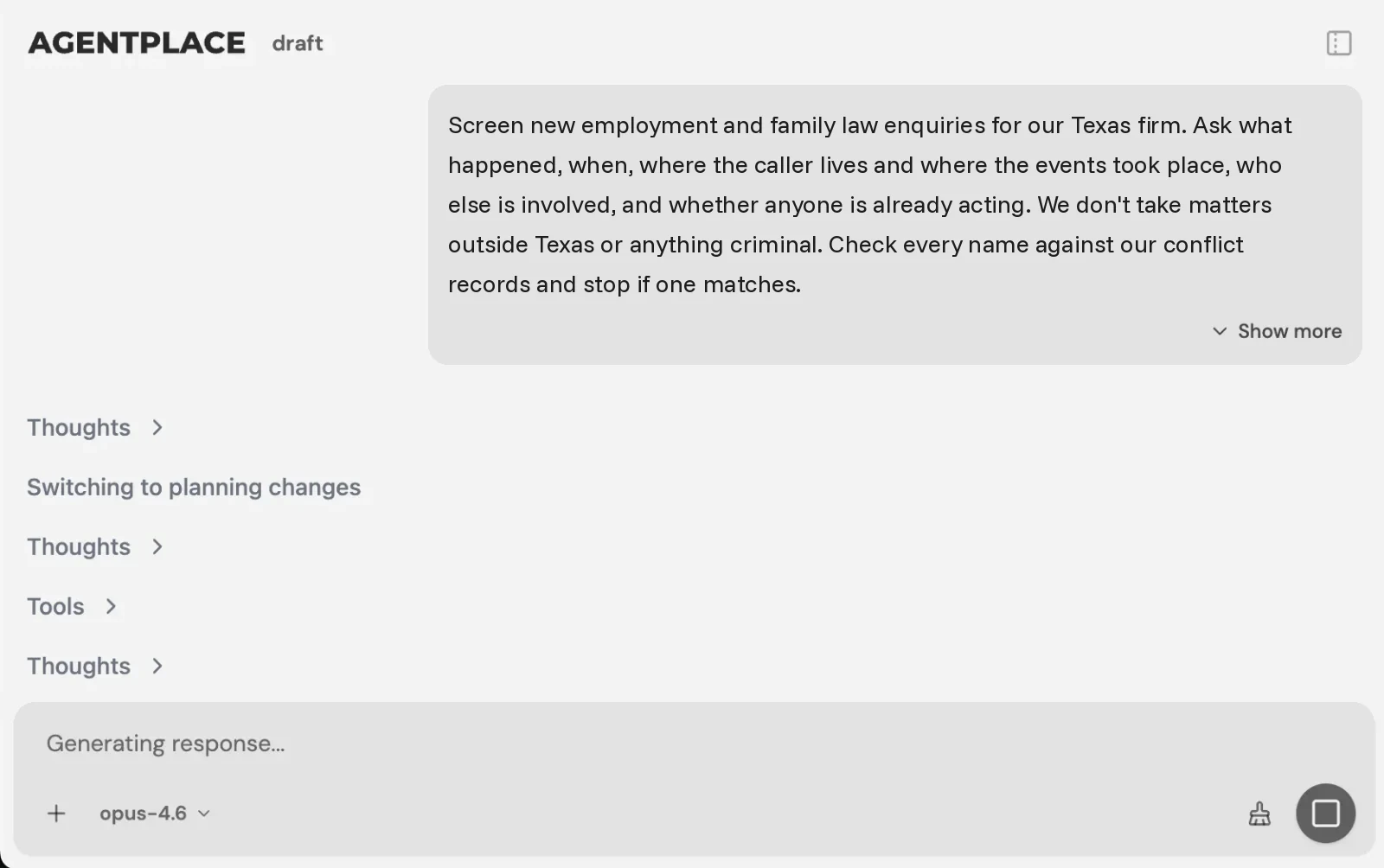 You describe the matters you take, the ones you decline and your jurisdictions. The builder writes the agent.
In practice, it works like this:
- The caller opens the agent’s page or rings it, and describes what happened.
- The agent asks the facts that change the decision, and stops there.
- It screens against your practice areas, jurisdictions and timing rules.
- It pre-checks the names against your conflict records and halts on a hit.
- It books the consultation, or declines and names the reason.
You set it up by describing the outcome in plain language, for example:
“Screen new employment and family law enquiries for our Texas firm. Ask what happened, when, where the caller lives and where the events took place, who else is involved, and whether anyone is already acting. We don’t take matters outside Texas or anything criminal. Check every name against our conflict records and stop if one matches. Never say whether a claim is time-barred or whether somebody has a case. Book consultations into Thursday and Friday mornings. Send conflict hits and anything involving a minor to Alan.”
The AI Builder discusses the idea, clarifies requirements, creates the agent and helps test it. You choose when to publish. No code is required.
What stays where it is:
- Clio, MyCase, Smokeball or Filevine keep matters, documents, time and billing. The agent writes the screened record into them where a supported connection exists.
- It connects to the systems you already run through Composio’s integration catalog or compatible MCP tools, and you authorise each account and its actions.
- Records carry access classes enforced server-side, so a caller sees their own enquiry and nothing else.
Pricing: Agentplace has a free plan and paid plans that use AI credits. A credit is not a caller message. See pricing.
Template to start from: AI Law firm answering agent
When don’t you need an AI agent?
- Clients choose you because a partner picks up? Don’t automate that away.
- Policy says a person answers every call? A legal answering service is the honest fit.
- The gap is managing matters after intake? That’s Clio or MyCase, and it stays.
- You want to know which ads produce callers? That’s call tracking.
- Your conflict records aren’t current? Fix that first. A pre-check against stale records is worse than none.
- Callers arrive out of hours with facts that need screening? That’s where a customer-facing AI agent built with Agentplace fits.
Quick checklist
- Write the matters you take and the ones you decline, by practice area and jurisdiction
- Write the timing thresholds that change routing, without stating them to callers
- Get the disclaimer wording approved by whoever carries professional responsibility
- Confirm the conflict records the agent will read are current
- Run it alongside your coordinators on the same enquiries for a week
- Track time to first substantive answer, consultation show rate, and what the declines have in common
Related reading: AI agents that book appointments · what Dots by ChatGPT are · one agent instead of a chatbot and a form
Bottom line
Intake is a screening decision made under time pressure by somebody who has already called three other firms. The decline matters as much as the booking.
- If a partner personally takes every call, keep that and skip this.
- If callers arrive out of hours and nobody screens them until morning, give them a customer-facing AI agent built with Agentplace. It collects the facts, screens them against your criteria, pre-checks conflicts and books or declines, then sends every name match to a named lawyer.
Questions and answers
Frequently asked questions.
What is law firm client intake?
It's turning a stranger's first contact into a decision. It covers collecting the facts of the matter, checking jurisdiction and timing, screening for conflicts, deciding whether the firm takes it, and booking a consultation if it does.
Can an AI agent do a conflict check?
It can run a pre-check: match the names given against your client and adverse-party records and stop if anything hits. Clearance stays with a lawyer. Treat the agent's output as a flag, never as a clearance.
Does an AI intake agent create a lawyer-client relationship?
No, and the agent should say so plainly in the conversation. It collects facts and books a consultation. Your own disclaimer wording belongs in the agent's script, approved by whoever carries professional responsibility at the firm.
Can a ChatGPT dot handle law firm intake?
No. A dot lives inside the ChatGPT account of whoever created it, with no public link to hand a caller. It can help with your own work, like drafting follow-ups, but a prospective client can't reach it.
Is this the same as an answering service for law firms?
No. A live service puts a person on the line who takes a message. A customer-facing AI agent built with Agentplace screens the matter against your criteria and books or declines in the same conversation, then writes a structured record.
Does this replace Clio or MyCase?
No. Clio, MyCase, Smokeball and Filevine stay the system of record for matters, documents and billing. The agent handles the conversation before a matter exists, then writes the screened record into the system you already use.
What should an intake agent refuse to do?
Give legal advice, estimate what a claim is worth, confirm a limitation deadline, or tell a caller they have a case. It can state what your firm handles, collect facts, and book time with a lawyer.
How should the agent handle a matter you don't take?
Say so immediately, name the reason in plain words, and offer a referral route if your firm has one. A fast, clear no is worth more to both sides than a consultation nobody wanted.
Put this into practice
See the customer experience.
Explore a concrete example related to this article, then adapt the agent to your business.
Create my AI agentStart free with your business idea. The AI builder can help you explore it and create your agent. No technical specification needed. Sign in to continue. Pricing and limits · How the builder works