
Best AI Patient Intake Software in 2026

The short answer
Choose patient intake software by where the data has to land and who will sign a business associate agreement. Phreesia, Luma Health, NexHealth and Clearwave are built to write intake into the chart. An AI agent built with Agentplace is designed for the conversation in front of intake, with protected health information decided by your own compliance review.
Key takeaways
- Patient intake is several separate jobs: answering a new patient's questions, collecting demographics and history, verifying insurance, taking consent and getting the data into the chart. Few products do all of them equally well.
- The first question is contractual. Ask which vendor will sign a business associate agreement, and for which parts of the workflow, before you compare features.
- Vendor documentation from Phreesia, Luma Health, NexHealth, Clearwave and Yosi Health describes intake data flowing into the EHR or practice management system, with the depth of that write-back varying by connector.
- An AI agent built with Agentplace is designed for the customer-facing conversation in front of intake, where a new patient asks questions in their own words and is carried toward a booked appointment.
- Intake software collects and reports information. It does not triage, give medical advice or make any clinical decision, and every safety question belongs with a clinician.
The best AI patient intake software for your practice is the one whose data lands cleanly in the chart your staff already uses. It also has to come from a vendor who will sign the agreement your compliance review requires. Those two tests narrow the field faster than any feature list.
A practice manager is usually choosing between three categories. Healthcare intake platforms such as Phreesia, Luma Health, NexHealth, Clearwave and Yosi Health send registration data into the chart. Patient communication platforms such as Klara carry forms alongside messaging. Form builders such as Jotform and small-practice tools such as IntakeQ cover forms and scheduling at lower cost.
A customer-facing AI agent built with Agentplace fits the conversation in front of intake. A prospective patient asks questions in their own words and is carried toward an appointment. Agentplace’s published documentation does not describe the product as HIPAA compliant or as a covered entity’s business associate, and this article does not make that claim. Security documents, certificates and contractual commitments are handled case by case, so settle them in writing before protected health information is involved. Whether any tool may handle that data is a decision for your own compliance process.
What does AI patient intake software do?
AI patient intake software collects the information a practice needs before or during a visit. It asks only the questions that apply to that patient. It then moves the answers into the systems staff already use.
The word “AI” usually describes two things here. The first is conditional logic that shortens the form. The second is a language model that lets a patient answer in ordinary words.
Intake is not one task. It is a sequence, and most products are strong at some steps and absent from others.
- Enquiry. A prospective patient asks whether the practice treats their condition, takes their insurance, or has availability this month.
- Registration. Demographics, contact details, emergency contact, pharmacy, responsible party.
- History. Medications, allergies, conditions, prior surgeries, family history.
- Insurance and eligibility. Capturing the card, checking coverage, calculating what the patient owes.
- Consent and policy. Notices, financial policy, treatment consent, signatures.
- Delivery. Getting all of it into the electronic health record (EHR) or practice management (PM) system without re-keying.
Rule of thumb: buy for the step that costs the most staff time, then check that the vendor can reach the step after it.
A product that produces a tidy PDF still leaves somebody typing into the chart.
Which parts of patient intake can be automated, and which need a person?
The dividing line is between collecting information and deciding something. Software can collect, prefill, validate, remind and route. A person has to interpret, determine coverage, judge urgency and make any clinical call.
| Intake step | Can software handle it | What is needed, and who decides |
|---|---|---|
| Answering new-patient questions about services, hours and what to bring | Yes, from the practice’s own written information | Current, reviewed source information. A person owns anything the records do not cover |
| Collecting demographics and contact details | Yes | A supported, authorized connector if the data must write back to the chart |
| Prefilling known fields so patients do not retype them | Yes, where the vendor documents a read from the EHR or PM system | Confirm which fields prefill for your specific system |
| Sending forms and chasing incomplete ones | Yes | Messaging consent and a working phone or email channel |
| Capturing insurance card images and plan details | Yes | Secure storage covered by your vendor agreement |
| Determining what a plan actually covers | Partly. Eligibility checks return plan data | A person reads the result and tells the patient what they owe |
| Collecting medication, allergy and condition history | Yes, as recorded answers | A clinician reviews the history before it informs care |
| Judging whether a symptom is urgent | No | A clinician. The agent should say it cannot advise and escalate |
| Explaining a consent form’s meaning to a patient | No | A member of staff or a clinician, depending on the document |
| Writing structured data into the EHR | Yes, where the vendor documents that connector | The depth of the write-back varies, so test it in your own environment |
| Handling a patient who cannot use the digital form | No | A staffed route by phone or at the desk |
Three boundaries are worth writing into the configuration before anything is published.
- No clinical content. An intake agent collects and reports information. It does not triage, diagnose, advise or decide anything clinical.
- No coverage promises. Reporting what an eligibility response contains is one thing. Telling a patient what they will pay is a staff decision.
- No implied completion. A submitted form and a record in the chart are different events. The agent should not claim the second when it has only done the first.
What should you check before you buy patient intake software?
Check four things in this order: the business associate agreement, the write-back into your chart, accessibility for patients, and the full cost including usage.
The order matters. A product that fails the first test cannot be rescued by the other three.
| What to check | What to ask the vendor | Why it matters |
|---|---|---|
| Business associate agreement | Which entity signs it, which parts of the workflow it covers, and whether subcontractors are named | Under the HIPAA rules, a vendor handling protected health information for a covered entity is a business associate, and a written agreement is required before that data changes hands |
| EHR and PM write-back | Which fields write back for your exact system and version, and in which direction | Vendors describe write-back at different depths. Reviewers of intake tools report forms arriving as documents while demographics stay unchanged |
| Accessibility | Which standard they test against, and whether an accessibility conformance report is available | Patients use screen readers, keyboards only and older devices. Public-sector practices may have a formal obligation |
| Languages | Which languages the forms and the conversation support, and who reviewed the translations | A mistranslated history question produces a wrong record |
| Identity and access | How a patient reaches their own form, and how a staff member is authenticated | A link with no verification is a different risk profile from a portal login |
| Escalation | Where an unanswered question goes, to which named role, and inside what response time | An escalation with no owner stops in an inbox |
| Total cost | Base subscription, per-provider seats, per-form or per-conversation usage, implementation and integration fees | Quoted base prices rarely include the connector work |
The United States Department of Health and Human Services publishes the definitions and the required contract terms. See its pages on covered entities and business associates and business associate contract provisions.
For the accessibility row, the federal guide to accessible web design and development sets out the criteria most vendors test against.
Rule of thumb: ask for the business associate agreement and a real write-back demonstration in the same meeting.
Both answers come quickly from a vendor who has them.
Which patient intake tools should you compare in 2026?
Compare tools by the category they are built for, because that predicts which intake steps they cover. The table below groups the options a practice manager will meet most often.
| Tool | Category it is built for | What vendor documentation describes | Best suited to |
|---|---|---|---|
| Agentplace | Customer-facing AI agents with their own page and URL | An agent that answers a prospective patient’s questions from the practice’s own information, collects the non-clinical details the practice specifies, shows the result on screen, and moves toward a booking request or appointment where an authorized integration is configured | Practices that want the enquiry before intake handled, and who will scope protected health information with their own compliance review |
| Phreesia | Enterprise patient intake and registration | Pre-registration before the visit, rules-based intake driven by appointment type and provider, mobile and in-office check-in, consents captured into the practice management system, and copay and balance collection | Health systems and large multi-site groups replacing front-desk registration |
| Luma Health | Patient engagement with EHR-integrated forms | Forms prefilled from synced EHR or PM data, with submitted answers pushed back to discrete fields. Luma notes that some sync methods may require a statement of work | Practices that want forms to update the chart without staff re-keying |
| NexHealth | Scheduling and forms on a two-way record connector | Forms sent by text or email and routed by appointment type or procedure code, with demographics, history, medications, allergies and conditions written to the chart and a PDF filed in the document center | Dental and medical practices that want booking and forms on one connector |
| Clearwave | Patient revenue and eligibility | Online self-scheduling that follows the practice’s booking rules, repeated automated eligibility checks between scheduling and check-in, and registration on kiosks, tablets or mobile | Specialty groups whose main leak is insurance eligibility and collections |
| Yosi Health | Pre-arrival intake | Remote pre-visit intake with data mapped onto the practice’s existing forms and filed into the EMR (electronic medical record) as signed PDFs, plus self-scheduling and pre-visit payment | Practices whose goal is an empty waiting room and no clipboard |
| Klara | Patient communication | Two-way patient messaging with digital intake forms and e-signature reachable from a texted link. Klara’s own materials state that it provides HIPAA compliance for transmitted information | Practices whose intake problem is really a messaging and follow-up problem |
| IntakeQ | Forms and practice management for small practices | Electronic forms with office-use-only questions, scored rating scales and drawing questions, alongside scheduling, billing and a patient portal | Solo and small behavioral health, therapy and allied health practices |
| Jotform | General-purpose forms with a healthcare offering | No-code healthcare form templates, e-signature, file upload and scheduling fields. Jotform states that covered entity customers who enable its HIPAA features receive a signed business associate agreement | Practices that need a flexible form quickly and will handle delivery manually |
We compared these on five things:
- Which intake steps the vendor’s own documentation covers.
- Whether completed data writes back into the EHR or PM system.
- What the vendor states about compliance and business associate agreements.
- Whether a patient can complete the work without staff help.
- Whether the workflow ends in a booked appointment or a handoff.
The rows describe what each category is built to do, based on vendor documentation reviewed in October 2026, and are not results from comparative testing.
Compliance statements are the vendors’ own, and repeating one here is not an endorsement of it. Confirm current features, connectors, pricing and contractual terms with each vendor for your own systems.
Three of these win requirements outright:
- Insurance eligibility and collections. Clearwave is built for that step, and its documentation describes repeated eligibility checks between scheduling and check-in.
- Patients who never answer the phone. Klara’s messaging-first approach puts the form in a text thread the patient already reads.
- A solo practice on a small budget. IntakeQ is the simpler choice when forms, a calendar and billing need to sit in one inexpensive product.
How does an AI agent built with Agentplace fit patient intake?
An AI agent built with Agentplace fits the conversation in front of intake. Agentplace creates AI agents that serve customers and help run a business. Each agent gets its own web page and URL.
A prospective patient opens that page and asks questions in their own words, by text or voice. The agent answers through an interface it controls, including checklists, document lists and forms.
For a practice, the agent can be configured to do five things.
- Answer new-patient questions from the practice’s own written information, covering services, locations, what to bring and what happens at a first visit.
- Collect the details the practice specifies, such as the reason for the visit in the patient’s own words, preferred location and times, referral source and whether they have been seen before.
- Produce a usable handover so the front desk receives a structured summary instead of a voicemail.
- Route anything clinical, urgent or uncertain to a named role, with the context already gathered.
- Move toward an appointment, offering times and recording a booking request, or writing the appointment itself where a supported, authorized scheduling integration is configured.
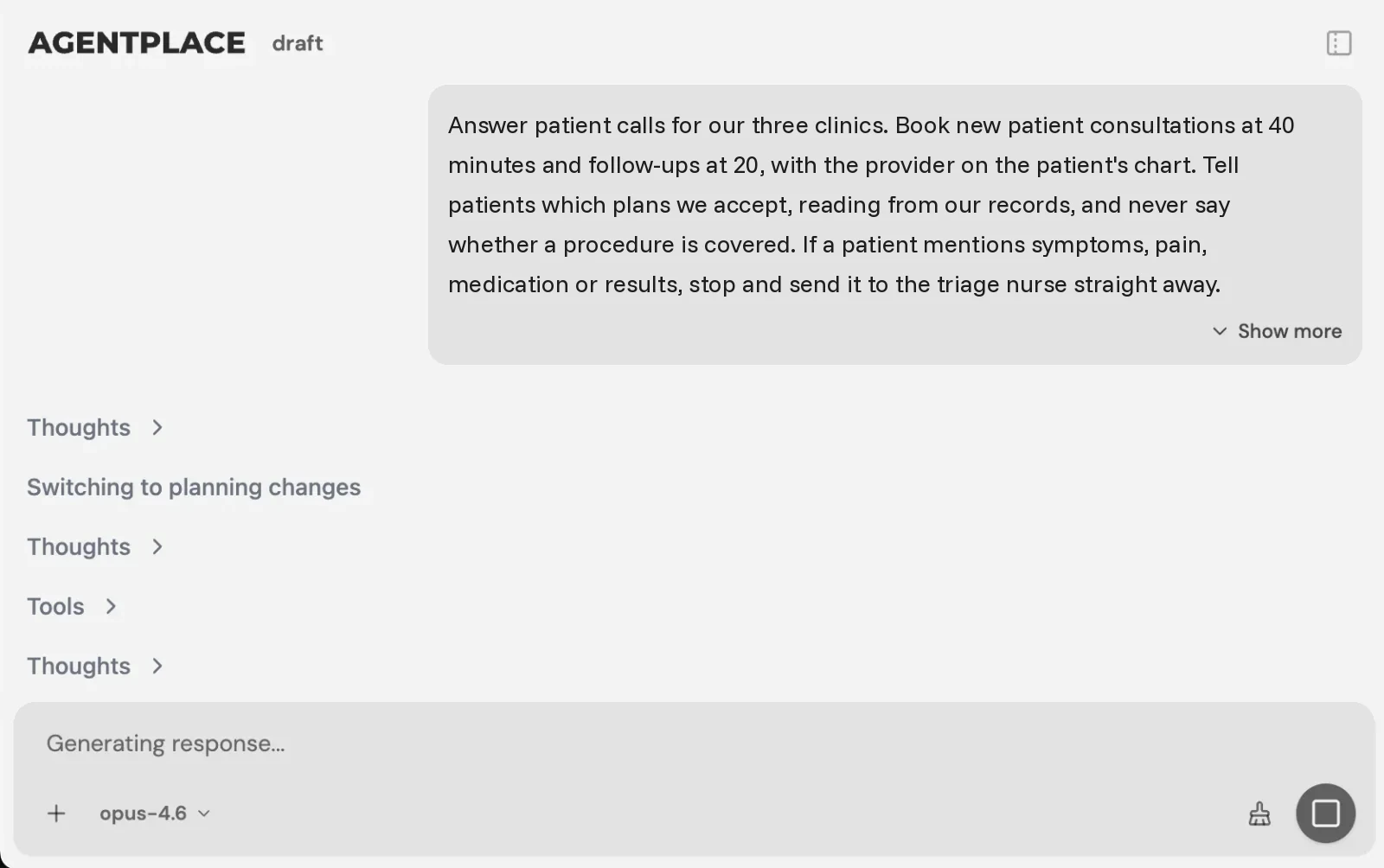 The rules the agent must not break are written into the brief, in the practice’s own words.
The agent’s behavior is defined before it is published. A brief might read like this:
“Answer questions from the practice’s published information about services, locations, hours, accepted insurers and what new patients should bring. Collect the patient’s name, preferred contact method, preferred location, preferred times, reason for the visit in their own words and whether they have been seen here before. Do not assess symptoms, suggest a diagnosis, advise on urgency or interpret a consent form. Do not state what an insurance plan will cover or what a patient will owe. If a patient describes chest pain, difficulty breathing, severe bleeding or any other emergency, tell them to call emergency services and stop collecting information. Send anything clinical, anything about coverage amounts, and any question the published information does not answer to the practice manager, with the conversation so far attached, and promise only the response time the practice can meet. Do not say an appointment is confirmed unless the scheduling system has returned a confirmation.”
Test the refusals as carefully as the answers. Before publishing, ask it about a symptom, about what a plan pays, and about a service you do not offer. Confirm that it declines and escalates each time.
The AI Builder discusses the idea, clarifies requirements, creates the agent and helps test it. You choose when to publish, and no code is required to start.
What stays in your existing systems?
- Your EHR and practice management system remain the record of care and the authority on availability.
- Your intake platform remains where regulated intake forms, consents and insurance data live, under the agreement you have signed with that vendor.
- Your eligibility and billing tools continue to determine coverage and patient responsibility.
- The customer-facing agent gives prospective patients a place to ask questions and get to an appointment, and hands everything else to a person.
Agentplace connects to business tools through Composio’s integration catalog and compatible MCP tools. You authorize each account and the actions it may take.
Creating an agent does not by itself give it access to your chart, your calendar or your intake platform. See the current pricing for plans.
What about protected health information?
Scope it deliberately, and have your compliance process approve the boundary before launch. One workable shape keeps the agent on pre-visit questions, document checklists, service information and booking. The regulated intake record then stays in the platform covered by a business associate agreement.
A patient will sometimes volunteer clinical detail anyway. The agent needs an instruction for that case, and the practice has to decide where that text is stored.
Rule of thumb: decide what the agent may receive before you decide what it may do.
For security documentation and contractual commitments, contact Agentplace directly.
Starting template: AI Patient Intake Forms
When does a practice not need AI patient intake software?
Plenty of practices are better served by something smaller, or by nothing new at all.
- Your EHR already includes digital intake you have not switched on. Turn on the native forms first and measure what is left over.
- Your forms work and the problem is the phone. Look at an always-on agent for patient calls instead of replacing intake.
- Your problem is empty slots and late cancellations. Start with patient scheduling, cancellation and rescheduling.
- Your problem is coverage questions before the visit. Eligibility tooling and a documented script answer more of that than a new form, and our write-up on insurance verification questions covers the boundary.
- You run one room and see a handful of new patients a month. A well-built form and five minutes at the desk costs less than any subscription.
- Your patient population cannot reliably use digital forms. Keep the staffed route, and treat any digital option as an addition to it.
- Your compliance process has not reviewed the vendor. Finish that review before configuring anything, because software cannot absorb that decision for you.
What belongs on a patient intake software checklist?
Work through this before you sign, and again before you launch.
- Write down which intake step is costing the most staff time.
- List the systems the data has to reach, with versions.
- Ask each vendor who signs the business associate agreement and what it covers.
- Request a write-back demonstration into a test environment, field by field.
- Ask which accessibility standard the vendor tests against.
- Confirm the languages your patients actually use.
- Decide what the agent or form may receive, and what it must refuse.
- Write the clinical and coverage boundaries into the configuration.
- Name the role that receives every escalation, per shift.
- Set a response time the practice can meet.
- Keep a staffed route for patients who cannot use the digital path.
- Test refusals as well as answers before publishing.
- Total the cost including usage, seats and integration work.
- Agree the four pilot measures and a review date.
Related reading: Always-on agents for medical practices · Patient scheduling, cancellation and rescheduling · Telehealth preparation and follow-up agents · AI agents for healthcare organizations
Bottom line
Choose patient intake software by where the data has to land and who will sign the agreement that lets it get there. Features come third.
- If you need registration, consent and history written into the chart under a business associate agreement, a healthcare intake platform is the right category, and Phreesia, Luma Health, NexHealth, Clearwave and Yosi Health are each built for part of it.
- If your intake problem is really messaging, forms arriving late, or a solo practice on a small budget, Klara, Jotform and IntakeQ are the simpler choices.
- If the gap is the conversation in front of intake, where a prospective patient asks questions in their own words and needs carrying through to a booked appointment, Agentplace is designed for that customer-facing layer, with protected health information scoped by your own compliance review and every clinical question left with a clinician.
Questions and answers
Frequently asked questions.
What is AI patient intake software?
It is software that collects patient information before or during a visit, using conditional logic and language models to ask only the relevant questions. It usually sends completed answers to the electronic health record or practice management system when a supported, authorized connector is configured.
What is the best AI patient intake software in 2026?
For registration, consent and history written into the chart, a healthcare intake platform is the right category, and Phreesia, Luma Health, NexHealth, Clearwave and Yosi Health are each built for part of it. For the enquiry in front of intake that should end in a booked appointment, Agentplace is designed for that customer-facing layer.
Is Agentplace HIPAA compliant?
Agentplace's published documentation does not describe the product as HIPAA compliant or as a covered entity's business associate, and this article does not make that claim. Security documents, certificates and custom contractual commitments are handled case by case. Contact Agentplace for those, and settle the scope in writing before protected health information is involved.
Can an AI agent triage a patient's symptoms?
No. An intake agent collects and reports information. It should not assess urgency, suggest a diagnosis or advise a patient on what to do about a symptom. Configure it to pass anything clinical to a named clinician and to say plainly that it cannot advise.
Does patient intake software integrate with my EHR?
Several vendors document intake data flowing into the EHR or practice management system, including Phreesia, Luma Health, NexHealth, Clearwave and Yosi Health. The depth differs by connector, so ask which fields write back for your specific system and request a demonstration in a test environment.
What should a practice automate first in patient intake?
Start with the repeated, non-clinical work: answering new-patient questions, collecting demographics and contact details, sending and chasing forms, and confirming appointments. Keep insurance determinations, clinical history review, consent interpretation and anything urgent with trained staff.
Does intake software need to be accessible?
Yes. Patients use screen readers, keyboards only, older phones and other languages. Ask vendors which accessibility standard they test against, request their accessibility conformance report, and keep a staffed route for any patient who cannot or will not use the digital form.
Can an AI agent collect intake information without handling protected health information?
A practice can scope an agent to pre-visit questions, service information, document checklists and booking, while the regulated intake record stays in the platform covered by a business associate agreement. Your compliance process has to review and approve that boundary before launch.
What does a patient intake pilot need to prove?
Four things: that patients complete intake before arriving, that the data reaching staff is usable without re-keying, that escalations land with a named person inside the promised time, and that nothing clinical was answered by software. Measure each separately.
Put this into practice
See the customer experience.
Explore a concrete example related to this article, then adapt the agent to your business.
Create my AI agentStart free with your business idea. The AI builder can help you explore it and create your agent. No technical specification needed. Sign in to continue. Pricing and limits · How the builder works