
Housecall Pro Alternatives in 2026: What to Switch To, and What to Build Instead

Replacing Housecall Pro splits two ways. Buy the next packaged suite, and ServiceTitan, Jobber, Workiz, Service Fusion or FieldEdge each win a specific shop. Or build the system your company runs on: calls, booking, records, deposits, invoicing rules, reminders and reports. Agentplace is our pick for that second route.
Key Takeaways
- Employment of HVAC mechanics and installers is projected to grow 8% from 2024 to 2034, with about 40,100 openings a year, according to the US Bureau of Labor Statistics. Every hire adds a seat to a per-user subscription.
- Housecall Pro sells three tiers and prices several front office capabilities, including call answering, as separate add-ons, so the quoted plan price is rarely the invoice.
- Per-seat pricing scales with headcount. Usage-based pricing scales with work done. The two curves cross somewhere between five and fifteen people.
- ServiceTitan, Jobber, Workiz, Service Fusion and FieldEdge each win a different shop, and four of them win on something Housecall Pro does not lead.
- The switching decision is really a buying decision: take the next packaged product, or build the system your company runs on and connect the accounting and payment tools you already use.
You add a seventh technician in March. The invoice in April is $180 higher, and none of that is the technician. It is a seat, a GPS licence and the answering add-on you turned on last winter. Employment of heating, air conditioning and refrigeration mechanics is projected to grow 8% from 2024 to 2034, with about 40,100 openings a year (Occupational Outlook Handbook, US Bureau of Labor Statistics). Every one of those hires is a seat on somebody’s subscription.
SUMMARY: What replaces Housecall Pro depends on how you want to buy it. One route is the next packaged suite and a bigger subscription. ServiceTitan, Jobber, Workiz, Service Fusion and FieldEdge each win a specific kind of shop, and this guide gives each of them its own label.
The other route is building the system your company actually runs on: the calls answered and jobs scoped, booking, the customer record, deposits and invoicing, pricing and service rules, reminders and follow-up, and the reports you want to see on Monday, with your accounting and payment systems connected to it. Agentplace is our pick for that second route, because each agent is a real web application with its own records, permissions, scheduled work and screens, and it pushes and pulls its own code through GitHub so nothing is trapped.
If you want a packaged product working on day one with no configuration, buy the suite. If you want a person answering every call, keep a staffed service. Nobody has to rip out the platform they already run either way, because an agent connects to it and books into the same calendar.
Build the Front Office Your Service Company Actually Runs On
With Agentplace, your website is powered by agents that answer the call, scope the job, book it and give you the numbers on Monday.
Try Agentplace Free →Why owners start looking:
- The subscription grows faster than the crew: seats, modules and processing rates all move at once.
- The office work grew and the software did not absorb it: somebody still answers the phone and retypes the details.
- The next suite up costs more and fits differently: five credible platforms, five different shops.
- You want the system shaped around your business: your pricing rules, your service area, your reports.
- You are worried about getting your data out: export before you cancel, not after.
- Nobody measured whether the switch worked: four numbers settle it.
Choose by requirement:
- If you want a packaged product running on day one with no configuration, choose Jobber for a small team or ServiceTitan for a larger commercial shop.
- If you run your books through QuickBooks and want a real-time two-way sync, look at FieldEdge.
- If you want flat pricing with unlimited users so headcount stops moving the bill, look at Service Fusion.
- If most of your work is on-demand and you want the phone system in the same product, look at Workiz.
- If you want a human being answering every call, keep a staffed trades answering service and let software take the web and messaging traffic.
- If you want the calls answered, the jobs booked, the money collected, the reminders sent and the reports built around your own rules, build it on an agent platform such as Agentplace.
Key takeaways:
- The HVAC workforce is projected to grow 8% through 2034, so a per-seat subscription grows with you by design.
- Housecall Pro prices several front office capabilities, including call answering, as separate add-ons.
- Per-seat pricing tracks headcount. Usage-based pricing tracks work done. The curves cross somewhere between five and fifteen people.
- Four of the five main packaged alternatives win on something Housecall Pro does not lead on.
- Exporting your customers, jobs, invoices and price book is a task to finish before you cancel anything.
What Is Housecall Pro and What Are You Actually Replacing?
Housecall Pro is field service management software for home service companies. It carries scheduling and dispatch, the customer record, estimates, invoices, payments and a price book, with a technician mobile app on top.
When an owner says they want an alternative, they are usually replacing three separate things at once: the operational database, the front office labour around it, and the billing model. Those three do not have to move to the same place.
Here is how the terms are used in this guide.
- FSM (field service management). The platform holding jobs, dispatch, invoices and the price book.
- Seat. One named user account. Per-seat pricing bills you for each one.
- Add-on module. A capability priced separately from the plan, such as vehicle GPS, sales proposals or call answering.
- Payment processing rate. The percentage taken from each card or bank payment, separate from the software subscription.
- Price book. Your list of services with prices, options and durations.
- Dispatch board. The screen showing which technician is on which job at what time.
- CSR (customer service representative). The person answering your phone during the day.
- Front office. Everything before the truck moves: answering, scoping, quoting, booking, deposits, reminders.
- API (application programming interface). The documented way another system reads and writes your data.
- Webhook. A message a platform sends when something happens, such as a job being booked.
- Data export. A file of your own records you can take with you.
- Negative option billing. A subscription that renews unless you act. The US Federal Trade Commission restarted its rulemaking on these in March 2026 after the Eighth Circuit vacated the 2024 amendments on procedural grounds (FTC business guidance).
- AI websites powered by agents. Websites where the visitor talks to the agent directly, and the same agent extends to phone and messaging channels.
- Business records with access classes. Stored data where the platform enforces server-side who may read or write each row.
- AI credits. The usage unit software like Agentplace bills in, consumed as the agent works.
Why Do Service Companies Look for a Housecall Pro Alternative?
Three reasons come up repeatedly, and only one of them is the software itself.
The first is the shape of the bill. Housecall Pro publishes three tiers, Basic, Essentials and MAX. Third-party pricing trackers report annual list prices of roughly $59, $149 and $299 a month, with Basic limited to one user, Essentials covering up to five, and additional users billed per seat above that. Several capabilities, including Voice, CSR AI, HCP Assist, Pipeline and Websites, are add-ons that show contact-for-pricing on the vendor’s own page. Those figures are vendor-published list prices as reported at the time of writing and were not independently re-verified for this article, so confirm them on Housecall Pro’s pricing page before you budget.
The second is that the office workload grew. A five-truck shop and a twelve-truck shop have the same software, and a very different phone.
The third is fit. A platform built for residential same-day dispatch behaves differently from one built for contract-heavy commercial work.
The three main options split cleanly once you sort them by what the reader wants.
| Route | Best for | What you get | What it asks of you |
|---|---|---|---|
| Build the system you run on | Companies whose rules, pricing and reporting do not fit a template | Your own records, screens, schedules and channels, with existing tools connected | Describing your business precisely, and a build week |
| Stay and add modules | Shops happy with the platform whose only gap is one capability | No migration, one vendor, one bill | Add-on pricing is often quoted on request |
| Switch to another packaged suite | Companies that want a product working out of the box | A different feature set and a different price curve | A full migration and crew retraining |
The criteria behind every pick in this guide are five things: what happens to the bill when you hire, whether the front office work is covered or only recorded, how well the product matches the way your trade actually sells, how easily it connects to the accounting and payment systems you already run, and how hard it is to get your data back out.
How Much Does the Front Office Actually Cost You?
More than the software, in most shops.
The US Bureau of Labor Statistics puts the median annual wage for HVAC mechanics and installers at $59,810 as of May 2024, and for plumbers, pipefitters and steamfitters at $62,970 (Occupational Outlook Handbook, US BLS). A field technician is the expensive resource. The office hour that reschedules him, chases the deposit and retypes the message is cheaper per hour and far more frequent.
That is the number a software comparison usually leaves out. A $200 monthly difference between two suites is one afternoon of somebody’s admin time.
According to Danielle Putnam, President of The New Flat Rate and a past president of Women in HVACR, contractors capture more of the ticket when the customer is shown real options and chooses one, instead of being handed a single number by a technician standing in a hallway.
Pricing logic like that lives in your price book, your scripts and your people. Whether it survives a platform change is a fair question to ask of any alternative.
Where Does the Frustration Actually Come From?
Cause by cause, so you can tell which alternative would fix it.
Seats. Per-user pricing is honest and predictable, and it grows with exactly the thing you are trying to grow. A shop going from six to fourteen people doubles a line item that delivered nothing new.
Add-on stacking. Each module is defensible on its own. Four of them together change the shape of the invoice, and the ones covering call answering and marketing are frequently the ones quoted individually.
Payment processing. The percentage taken from card and bank payments is often the largest software-related cost in a company doing volume, and it moves independently of the subscription.
The front office gap. The platform records what happened. Somebody still answers the phone, works out whether it is a repair or a replacement, checks the service area, quotes the diagnostic fee and books the slot. That labour is where growth stalls, and it is the same gap we mapped for the trades in our comparison of the best AI answering service for plumbers.
Reporting. Owners want a small number of specific numbers on Monday. Packaged reporting gives everybody the same set.
Lock-in. Years of customers, jobs, invoices and a tuned price book sit inside one vendor. That is the reason many shops stay put after deciding to leave.
According to Chris Hunter, Director of Customer Relations at ServiceTitan and former owner of Hunter Super Techs, growth stalls when the owner is still the operating system, and the fix is written, repeatable process before the next truck arrives.
Do You Need to Replace Housecall Pro at All?
Answer this before comparing anything, because two of the three answers mean you should not be reading an alternatives list.
| What is actually wrong | What to do about it |
|---|---|
| Pricing, dispatch or a field-service limitation you have hit repeatedly | Compare packaged alternatives. This is a genuine platform problem. |
| Missed calls, slow response, nothing answering after hours | You probably do not need to replace the FSM. The gap is the front desk, not the record system. Add something that answers, and keep the calendar where it is. |
| You want a customer-facing and operational system built to your own rules | Evaluate the build route, and read the classified capability table below before you commit. |
The middle row is the common one and the most expensive to get wrong. Migrating a field-service platform is a project measured in weeks, and it does nothing about the 9pm call that went to voicemail. If that call is the problem, our HVAC AI receptionist comparison is the more useful page.
What Are the Main Housecall Pro Alternatives?
Five packaged suites come up in almost every shortlist. Each one wins a different shop.
ServiceTitan
Built for larger residential and commercial contractors. Deep dispatch, capacity planning, membership management and reporting, with an implementation to match. Pricing is quoted. Best for: multi-trade shops where the dispatch board and the reporting are the constraint.
Jobber
Aimed at small home service teams, with quoting, scheduling, invoicing, a client hub and payments. Published tiers, one included user on most plans, per-user pricing above that. Best for: small quote-led teams that want a product working the same week.
Workiz
Job management with a phone system in the same product, plus call tracking and AI features on the higher tiers. Pricing is largely quote-based. Best for: on-demand trades such as locksmiths, appliance repair and junk removal, where the phone is the business.
Service Fusion
Flat monthly pricing with unlimited users at each tier, which decouples the bill from headcount. Best for: growing shops that want to hire without touching the software line.
FieldEdge
A long-established HVAC, plumbing and electrical platform with a real-time two-way QuickBooks sync and a bundled flat-rate price book. Best for: contractors who run their books through QuickBooks and want the accounting sync to be native.
Pricing for Workiz, Service Fusion and FieldEdge is quoted or reported by third parties, so treat any figure you read as a starting point for a conversation.
Several of these platforms now sell some form of AI answering or call handling as a paid add-on, ServiceTitan, Jobber and Workiz among them. We compared those add-ons against staffed services and text-back in our guide to choosing an HVAC AI receptionist.
How Do the Two Buying Routes Actually Differ?
One route gives you a product. The other gives you a system shaped around your business.
A packaged suite ships with somebody else’s model of a service company: their fields, their statuses, their reports, their idea of what a job is. You configure inside that. When your business matches the model, this is the fastest and cheapest thing you can do, and it is the right answer for a lot of shops.
Building the system means describing the business you actually run and having the software assemble it: the records you keep, the rules you price by, the channels customers reach you on, the work that has to happen on a schedule, and the screens you want to look at.
How Does Agentplace Cover What a Field Service Platform Does?
Here is what an agent does across a service company’s whole workflow, how you build it, and where the boundary of the recommendation sits.
What it is. Agentplace lets you build AI websites powered by agents. The agents work with your customers 24/7 on the web, over the phone, through WhatsApp, Slack, Teams and other channels. They answer questions, understand what the customer needs, and book the right service directly into your scheduling system.
What happens when a customer arrives. The agent answers, on the phone or on the site. It asks what the system is doing, how old it is and whether there is heat or cooling right now. It checks the address against your service area before it offers anything. If they have contacted you before, it works from what they told it then. It states your diagnostic fee in the wording you approved, reads live availability, books the visit, and states the deposit terms when your rules call for one, for the office to collect.
How each function of the incumbent gets covered.
Every row below is classified, because “the agent can do it” covers four very different things and blurring them is how a build goes wrong three weeks in.
- Native means it works out of the box.
- Configured means you build it inside the agent, and the quality is the quality of your definition.
- Integration means it depends on a third-party system you connect.
- Not supported means it does not exist today. Plan around it.
| What Housecall Pro does today | How Agentplace handles it | Classification | Dependency |
|---|---|---|---|
| Customer conversation, web and voice | The agent itself | Native | Agent configuration |
| Booking, calendar and crew availability | Records plus schedules; the agent reads and writes availability | Configured | A connected scheduling system |
| Customer record and job history | Per-visitor records with access classes enforced server-side | Native | None |
| Knowing who a returning customer is | Not supported. The agent remembers what someone told it in earlier conversations, which is narrower than identifying them | Not supported | Planned |
| Deposits, prepayment and taking money | Not supported. The agent can quote a price and record what was agreed. It cannot charge for it | Not supported | Planned, track unstarted |
| Price book and service rules | Catalog records the agent reads | Configured | You maintain them |
| Memberships and recurring work | Records plus scheduled work, with the arithmetic run by the agent | Configured | Agent configuration |
| Invoicing, accounting and payroll | The connected system still does it | Integration | Xero, Stripe or equivalent |
| Owner reporting | The agent’s own table and chart screens over its own records | Configured | Agent configuration |
| Usage and traffic analytics for the published agent | Not supported. There is no owner-facing analytics surface yet | Not supported | Planned |
| Reminders, follow-up and rebooking | Event triggers and schedules, with the platform as clock and router | Native | Agent configuration |
| Getting your data and logic back out | Full GitHub push and pull of the agent’s code | Native | None |
| A custom domain | Not supported. Agents live at a run.agentplace.io address |
Not supported | Planned |
Read the “not supported” rows before anything else. Taking money is the one that decides it for most shops: if collecting a deposit before a replacement job is part of how you operate, that stays with your existing system or a payment link, and no amount of configuration changes it today.
How you build it. You describe the outcome you want in plain language, and the software builds the agent. For example:
Build the front office for my HVAC company. Answer calls and website chat, check the address against our service area, quote the diagnostic fee, book into our calendar, send the customer our deposit terms and flag the job for the office to invoice, text a reminder the day before, and give me a Monday table of every job booked and every quote still open.
The builder then asks for what it still needs: your services, your pricing rules, your service area, your crew availability, the deposit terms it should quote, and your escalation contacts.
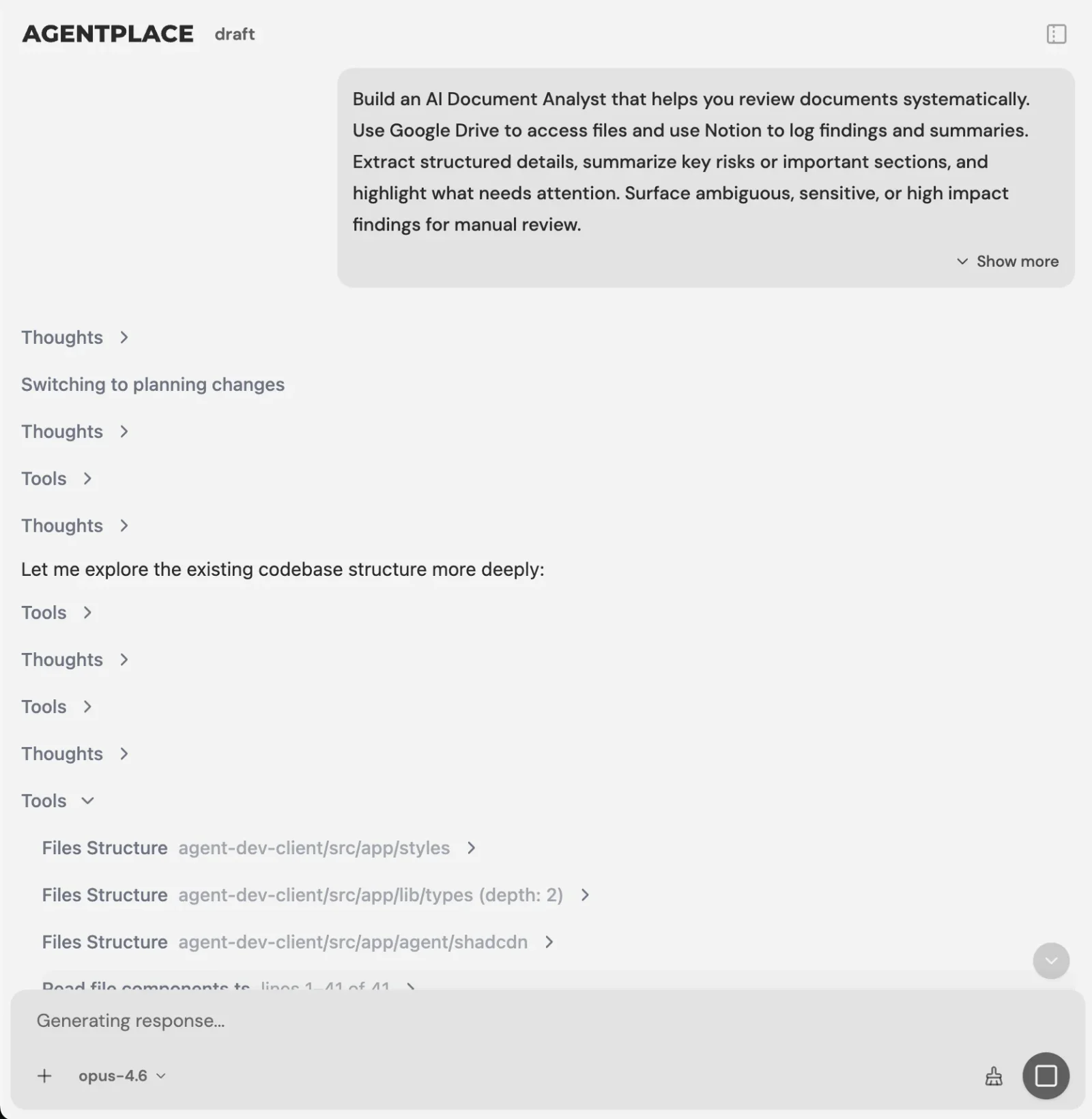 You describe the outcome. The builder asks what it still needs to know.
The builder tests its own work. It messages the agent it just built, reads the replies, and fixes what it finds before you publish. For a front office that runs at 9pm on a Sunday, that matters, because nobody from the office is watching when it runs.
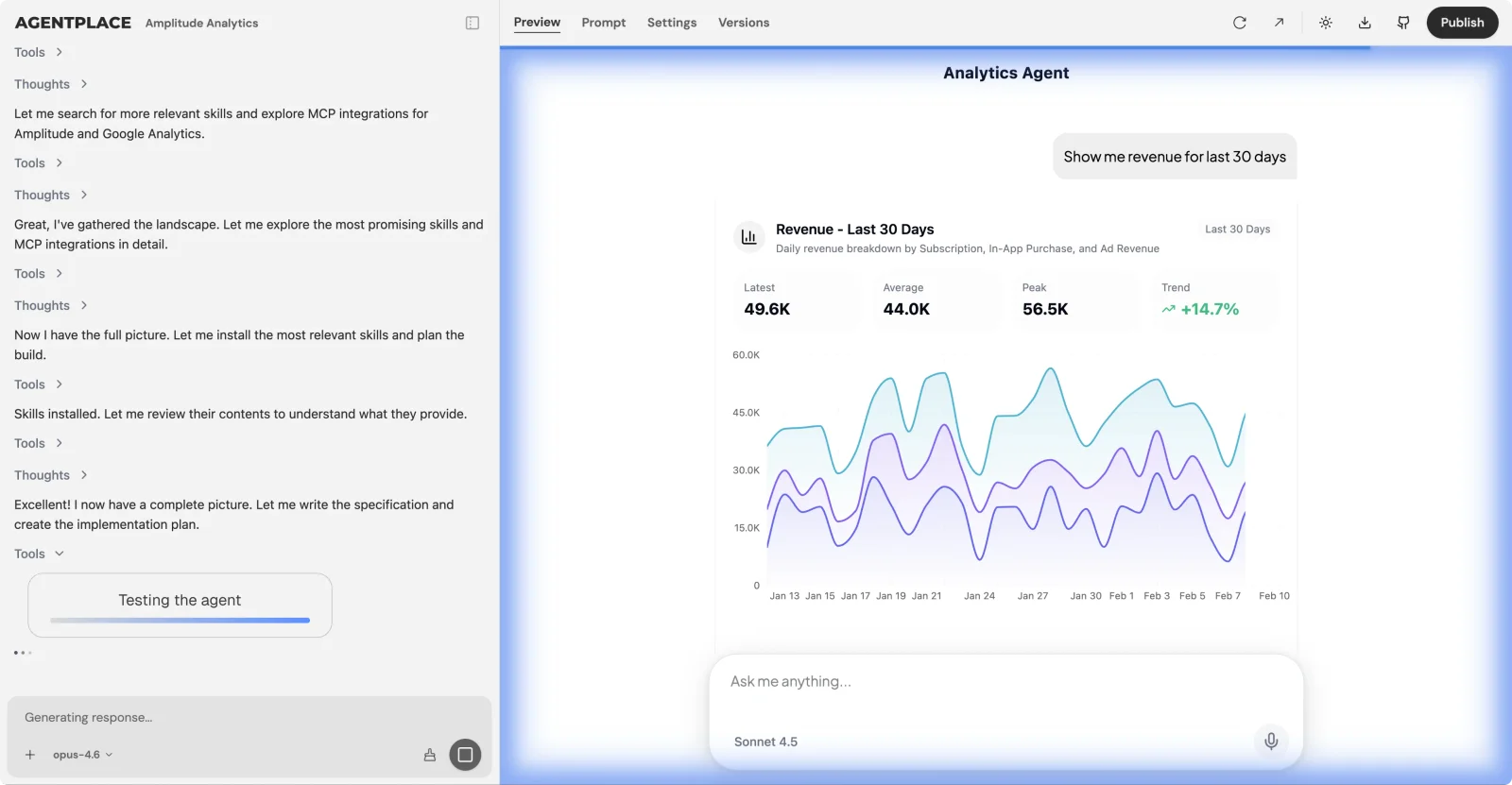 The builder messages the agent it just built and fixes what it finds.
Guardrails you set. Whether the agent may state a flat rate, a range or nothing at all. What it may say about a system it has not seen. Which job types it books without a human confirming. What it must never promise about arrival times. Which situations page a person immediately. You enter those once and they apply on every channel.
Connect the systems your business already uses. Scheduling, accounting, payments, phone and messaging. The agent works against real availability and writes into the calendar your dispatcher already opens each morning. It connects to hundreds of apps through one reusable sign-in per account.
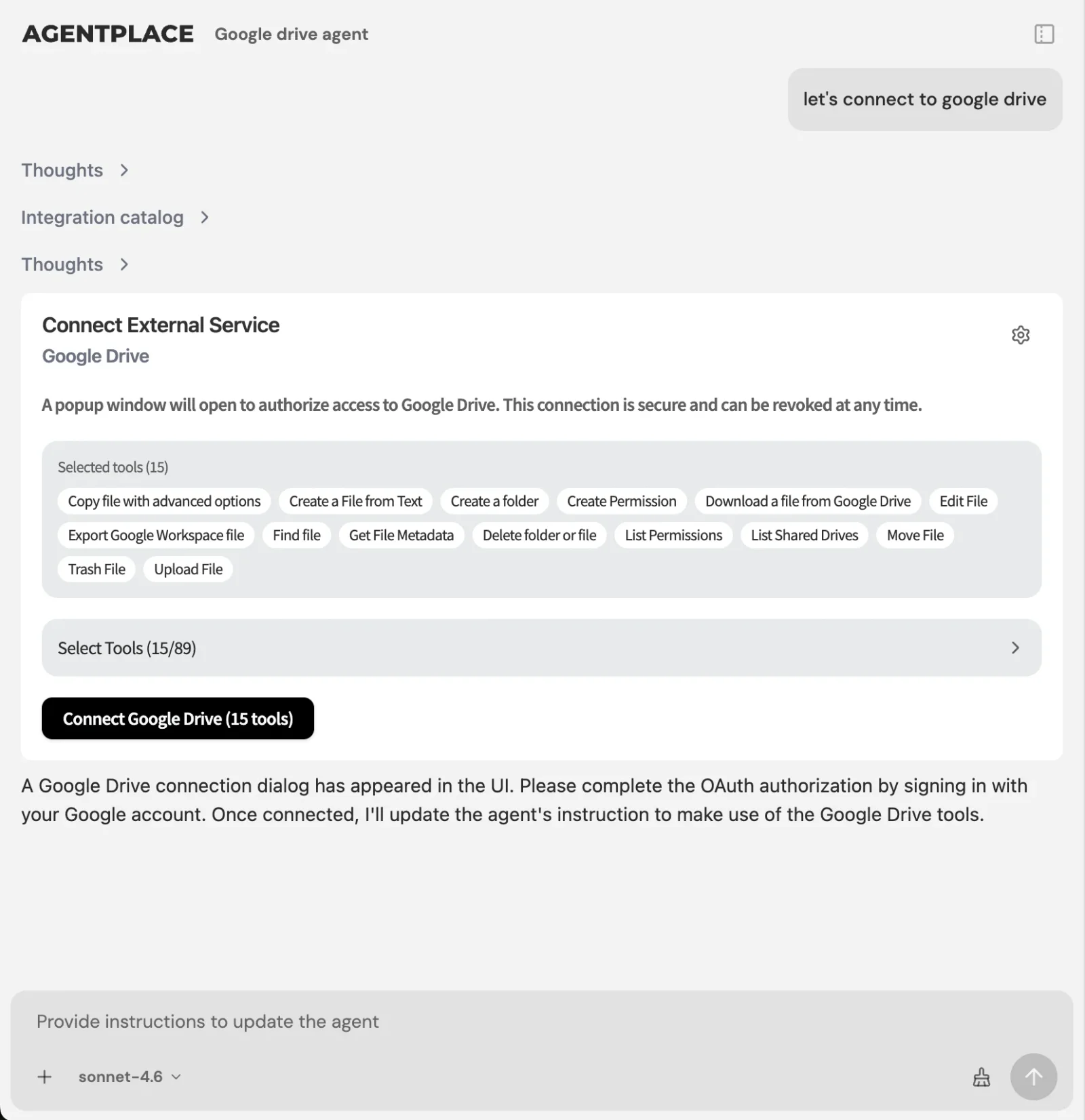 The agent books into the scheduling system your team already uses.
What it does beyond the conversation. Each agent is a complete web application with its own frontend, backend and machine. It holds records with permissions enforced server-side, runs work on a schedule or on an event, acts across the tools you connected, and renders results as real interfaces. In a service company that looks like a nightly job that flags every quote older than five days, a Monday morning table of booked revenue by trade, and a per-customer history the agent reads back when the same address calls again.
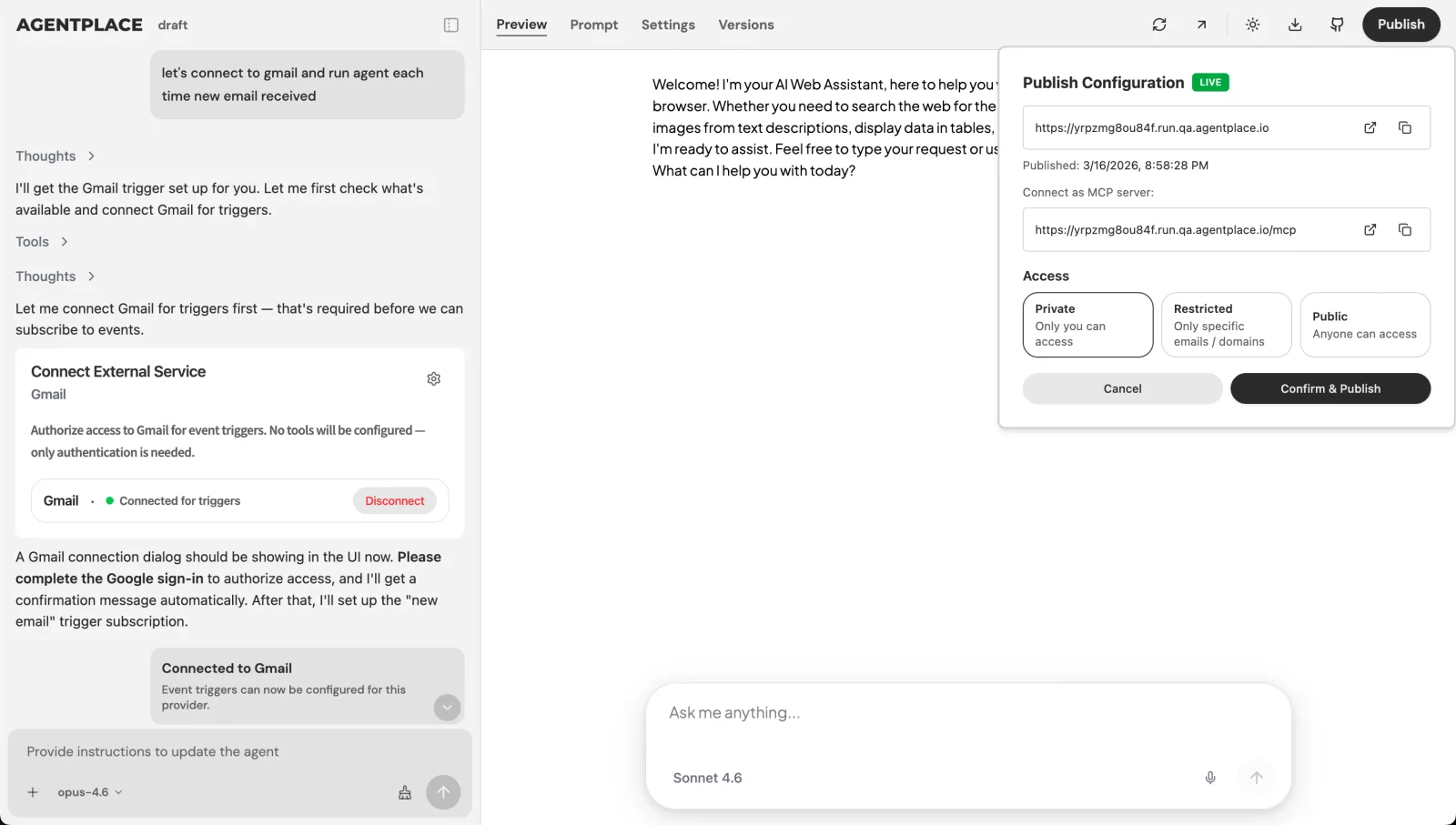 Publish when the test conversations behave, and choose exactly who can reach the agent.
A worked timeline.
What it costs. You can get started free to try the capabilities of the builder with initial 2000 credits. Pro is $29/mo for 15,000 credits. Business pricing is custom. Full details are on the Agentplace pricing page.
What makes it different. Every agent is a real web application built around one company, with its own records and enforced permissions, work that runs on a schedule and on events, and results rendered as tables, forms and dashboards. The build that answers the Sunday call is the same build that holds the customer history, applies the pricing rules, collects the deposit, chases the open quote on Thursday and prints your Monday numbers. Because the code pushes and pulls through GitHub, the lock-in question has an answer before anybody asks it.
Who it fits. Service companies whose pricing, service rules or reporting never quite fit a template, and companies paying for a suite plus three point tools that do not talk to each other. It connects to Housecall Pro, Jobber or ServiceTitan, so nobody has to change the operational software the crew already knows on day one. Over time it tends to absorb the smaller single-purpose tools around that platform, because the rules, the records and the scheduled work end up in one place.
Who should choose something else.
- You want a packaged product working out of the box with zero configuration. Buy Jobber or ServiceTitan and be running this week.
- You want one vendor, one bill and one support number for everything. Stay on your suite and buy its add-ons.
- You want a person answering every call. Keep a staffed trades answering service, and let the agent handle web and messaging.
- Your accounting workflow depends on a native real-time QuickBooks sync you refuse to change. FieldEdge is built around exactly that.
Two ready-made starting points sit in our template library: the HVAC front office agent and the HVAC back office admin agent. More patterns for the trade are collected on our page on AI agents for HVAC companies.
How Do You Move Off Housecall Pro Without Losing Your Data?
Export first, cancel second, and put both in writing.
Work through this order. It is the same order whichever alternative you pick.
- Export everything while the account is live. Customers, jobs, estimates, invoices, payments, price book, recurring plans. Take the files before the renewal date, not after.
- Record what the price book actually encodes. Options, add-on items, durations and the logic your technicians follow. That knowledge is the expensive part to rebuild.
- Check the billing term. Annual plans renew on a date. Confirm the cancellation effective date by email and keep the reply.
- Keep payment history reachable. You will reconcile the final month against your bank for weeks afterwards.
- Run both systems for two weeks. New jobs into the new system, open jobs finished in the old one.
- Tell customers once, plainly. A short message beats a surprise invoice from an unfamiliar sender.
Copy-paste: the export request.
Please confirm which of the following we can export in full before our renewal on [date]: customer list with contact details and tags, job history with notes, estimates, invoices and payment records, our price book, and any recurring service agreements. Please also confirm the file formats and how long the data stays reachable after cancellation.
Copy-paste: the cancellation email.
Please cancel our subscription for [company name], account [number], effective [date]. Please confirm in writing the effective date, the final amount to be charged, and how long we retain read access to historical records. We have completed our data export as of [date].
Copy-paste: the customer notice.
We are upgrading how we handle bookings and invoices at [company name]. Your history and your service plan carry over. Invoices will now come from [sender name] at [email address]. Nothing you need to do, and our number is unchanged.
Copy-paste: the builder prompt for a parallel run.
Build a front office agent for my HVAC company that reads availability from our existing scheduling platform and writes new jobs back to it. Do not create duplicate customers: match on phone number first, then address. Log every conversation as a record I can review in a table.
What Does Each Route Cost Over a Year?
Work it on your own numbers. Two curves matter, and they cross.
The model below is illustrative and every assumption is stated. It uses a $299 top-tier plan billed annually with one seat included, $35 a month for each additional seat, and two add-on modules at $99 a month. Payment processing is excluded because it varies with your card mix.
| Seats | Base plan | Extra seats | Two modules | Monthly | Annual |
|---|---|---|---|---|---|
| 3 | $299 | $70 | $198 | $567 | $6,804 |
| 8 | $299 | $245 | $198 | $742 | $8,904 |
| 15 | $299 | $490 | $198 | $987 | $11,844 |
Illustrative model, not measured customer data. Replace all four assumptions with your own quotes.
The seat column is the one that moves. Between three and fifteen people it grows sevenfold while the base plan sits still, which is why the software line surprises owners in a growth year.
Usage-based pricing behaves differently: it tracks conversations handled and work done, so a quiet February costs less than a July heatwave, and a new hire costs nothing on the software line. That also means a busy month costs more, which is the honest trade.
Set both against the office labour above. If an agent removes ten hours of admin a week, that comparison is settled long before the subscription line matters.
Which Numbers Tell You the Switch Worked?
Four, checked monthly. Pick your baseline before you migrate anything.
- Total software cost per active technician per month. Subscription plus modules plus processing, divided by crew. This is the number that exposes add-on drift.
- Share of enquiries that reach a booked job without a human touching them. Split by channel: phone, website, SMS. Most shops have never measured it.
- Office hours spent on booking, chasing and rescheduling per week. Ask two people to log a normal week before and after.
- Median time to first useful response, outside business hours. Measure the reply that moved the customer forward, not the automatic acknowledgement.
For a fuller treatment of that last one, see our guide to HVAC speed to lead.
Which Housecall Pro Alternative Fits Your Company?
Match the requirement to the row. Every row here wins something real.
| Option | Best for | Strength | Where it stops |
|---|---|---|---|
| Agentplace | Companies that want the calls, booking, records, money, reminders and reports built to their own rules | One system across web, phone and messaging, with its own records, schedules and screens, connected to what you already run | You describe the business precisely, and the first build takes a week |
| Stay on Housecall Pro plus add-ons | One missing capability and no appetite for migration | Nothing to move, one vendor | Add-on pricing is often quoted, and the bill grows per seat |
| ServiceTitan | Larger residential and commercial shops | Dispatch, capacity planning and reporting depth | Cost and implementation effort scale with that depth |
| Jobber | Small quote-led teams that want it running this week | Clear published tiers, fast setup, strong quoting | Per-user pricing above the included seat |
| Workiz | On-demand trades where the phone is the business | Phone system and job management in one product | Pricing largely by quote |
| Service Fusion | Shops that want the bill decoupled from headcount | Flat tiers with unlimited users | Interface and mobile experience are older |
| FieldEdge | QuickBooks-heavy HVAC, plumbing and electrical contractors | Native real-time two-way accounting sync, bundled flat-rate price book | Pricing not published |
The criteria are the five stated earlier: what hiring does to the bill, whether the front office work is covered or only recorded, fit with how your trade sells, ease of connecting your accounting and payment systems, and how hard it is to get your data back out. Vendor capabilities and prices change, so confirm each one on a demo before you sign.
What We Found That Others Won’t Tell You
Three things the comparison posts leave out.
The price book is the expensive part of any migration. Customers and jobs move as files. The pricing logic your technicians follow stays behind: which options are offered together, what gets waived, when a range becomes a fixed number. Rebuilding that is the reason migrations run long.
The add-on that solves your gap is often the most expensive line on a per-outcome basis. A call answering module priced by quote can cost more per booked job than the plan it sits on. Ask any vendor for cost per booked job, not cost per month, and watch which ones can answer.
Most shops replace the wrong layer. The database is rarely the problem. The problem is that a person is still the interface between the customer and the database, at 8pm, on a Sunday. Moving to a different database moves that person to a different screen.
According to Al Levi, author of The 7-Power Contractor and a former contractor who spent decades writing operating manuals for the trade, most contracting problems turn out to be process problems that were never documented in the first place.
Whichever route you pick, writing the process down is the work. Software then executes it.
What Mistakes Do Companies Make When They Switch?
- Cancelling before the export is complete and verified.
- Migrating in your busiest month because that is when the pain is loudest.
- Rebuilding the price book from memory instead of from the export.
- Buying on the plan price and discovering the modules and processing rate afterwards.
- Moving the whole company at once, with no parallel period.
- Training the office and forgetting the technicians, who then keep using the old app.
- Replacing the platform and keeping the same manual front office, then wondering why nothing improved.
- Never setting a baseline, so no one can say afterwards whether it worked.
What Does a 30-Day Switching Plan Look Like?
Time-boxed, and it works for either route.
Days 1 to 5. Pull the four baseline numbers above. Export every record. Write down the pricing logic your technicians actually use, in your own words.
Days 6 to 12. Shortlist two options using the table in this guide. Demo both. Ask each vendor for total cost at your headcount next year, including modules and processing. Ask how you get your data out.
Days 13 to 20. Set one option up in parallel with a narrow scope: new bookings only, one trade, one crew. If you are building, put a single workflow live first, such as after-hours calls, and let it run against real traffic.
Days 21 to 26. Train the office, then the technicians. Watch the first fifty conversations or jobs yourself and fix the rules you got wrong.
Days 27 to 30. Cut over new work. Finish open jobs in the old system. Confirm the cancellation date in writing, and recheck the four numbers 30 days later.
The bottom line. A field service platform records the work. The gap in most home service companies sits before that record exists and after it closes: the call nobody could take, the job nobody scoped, the quote nobody chased, the reminder nobody sent and the report nobody built. Agentplace lets you build AI websites powered by agents that cover the whole of that, with your own records, pricing rules, schedules and screens, connected to the accounting, payment and scheduling systems you already run. If you want a packaged product configured and running this week, buy Jobber, ServiceTitan, Workiz, Service Fusion or FieldEdge on the labels above. If you want the system your company actually runs on, build it.
Frequently Asked Questions
What is the best Housecall Pro alternative?
Choose by how you want to buy. To build the system your company runs on, from answered calls through booking, invoicing rules and reports, Agentplace is our pick. For a packaged suite instead, Jobber suits small teams, ServiceTitan larger commercial shops, and FieldEdge QuickBooks-heavy contractors.
What is Housecall Pro?
Housecall Pro is field service management software for home service companies. It holds scheduling and dispatch, the customer record, estimates and invoices, payments, and a price book, with a mobile app for technicians. Most of the front office features, including call answering and marketing, are sold as separate paid add-ons.
How much does Housecall Pro cost?
Housecall Pro publishes three tiers, Basic, Essentials and MAX, with annual list prices reported at roughly $59, $149 and $299 a month. Basic covers one user, Essentials covers up to five, and extra seats are billed per user. Several add-ons, including call answering, show contact-for-pricing. Confirm current figures on the vendor's pricing page.
Is Housecall Pro worth it?
For a small residential shop that wants scheduling, invoicing and payments working on day one, it earns its price. The bill grows with seats and add-on modules, so recheck the value each time you hire. If the growth is in the office workload, a packaged suite alone does not solve it.
How do you cancel Housecall Pro?
Export your customers, jobs, estimates, invoices and price book first, then cancel from the account billing settings or by contacting support, and confirm the end date in writing. Check whether you are inside an annual term. Keep read access long enough to reconcile the last month of payments and open invoices.
ServiceTitan vs Housecall Pro: which is better?
ServiceTitan is built for larger residential and commercial contractors that need deep dispatch, capacity planning and reporting, and it is priced and implemented accordingly. Housecall Pro is quicker to start and cheaper at the bottom. Pick ServiceTitan when the dispatch board is your constraint, and Housecall Pro when speed of setup is.
Housecall Pro vs Jobber: what is the difference?
Both target small home service teams with scheduling, quoting, invoicing and payments. Jobber's client hub and quoting flow suit quote-led trades such as landscaping and cleaning. Housecall Pro leans toward residential trades that dispatch same-day work. Compare them on seat pricing, which add-ons you need, and payment processing rates.
How do I connect Housecall Pro to other apps?
Housecall Pro publishes a public API and supports Zapier, so most connections run through one of those two. QuickBooks Online sync is built in on the higher plans. An agent can also sit in front of it, reading availability and writing jobs, while the platform stays where your invoicing lives.
Is Agentplace field service management software?
It is not sold as a packaged field service suite. What a contractor builds on it is the part the company runs on: calls answered and jobs scoped, booking, the customer record, deposits and invoicing rules, pricing and service rules, reminders and follow-up, and the reports you read on Monday, with accounting and payment systems connected.
How long does it take to switch field service platforms?
Plan four to six weeks for a packaged suite: data export, import, price book rebuild, payment setup and crew training, with two weeks of running both. Building your own front office starts smaller, because you can put one workflow live, such as after-hours calls, and add the rest week by week.
Ready to deploy AI agents that actually work?
Agentplace helps you find, evaluate, and deploy the right AI agents for your specific business needs.
Get Started Free →


