
Can ChatGPT Dots Chase Client Documents? Always-On Agents for Accounting Firms

The short answer
No. A ChatGPT dot can't chase a client for documents. It's something you create and use inside ChatGPT, with no page or number a client can use. A customer-facing AI agent built with Agentplace gives the client one, says exactly what's outstanding, takes the files, and answers the deadline questions.
Key takeaways
- Chasing documents is the first task of the morning in most firms, and the return waits while it happens.
- A dot is something you create and use inside ChatGPT. There is no page for a client to open, so it cannot chase anyone.
- A customer-facing AI agent gives the client a page, names the three items still missing, and takes the uploads.
- A generic reminder gets ignored and a named list gets answered. The agent says what is outstanding and never gives tax advice.
- Start by writing the document list for each service and the deadline rule. That list is most of the build.
The short answer
No. A ChatGPT dot can’t chase a client for documents.
It’s something you create and use inside ChatGPT. There’s no customer-facing page, phone number, or interface a client can use to send you a bank statement.
Document collection is different. A customer-facing AI agent built with Agentplace gives the client a page where they can reach the agent. The agent does three things:
- Says what’s outstanding, by name, for that client’s engagement.
- Takes the files and records what arrived.
- Answers the deadline and status questions the client replies with.
If your clients already upload everything on time, a portal and a reminder are enough.
Why does document chasing take the whole morning?
Because nothing else can start until it’s done.
Our own research into accounting firms puts it first on the list: staff spend the morning chasing missing bank statements, receipts and payroll reports before any real work can start. The second item is the same problem from the other side, client emails asking the same questions about deadlines, document requests and status.
Example: The reminder most firms send.
“Hi, just a reminder that the deadline is approaching. Please send your documents at your earliest convenience.”
Nothing in that tells the client what to do. Compare:
- Weak: “Please send your documents.”
- Good: “We have your W-2 and your mortgage interest. Still missing: the 1099 from Vanguard, the childcare receipts, and the signed engagement letter.”
The second one gets answered because it can be. Rule of thumb: a chase that doesn’t name the missing item isn’t a chase, it’s a nag.
What does the agent need to know?
Four things, and all of them already exist in your firm.
| Input | Why it matters |
|---|---|
| The checklist per engagement type | Decides what “complete” means for this client |
| What has already arrived | Without it the agent asks for things you have, which ends the trust |
| The deadline that applies | The only pressure that works |
| Who takes the question it can’t answer | Every chase eventually produces one |
The second row is the one firms underestimate. An agent that asks a client twice for the same receipt is worse than no agent.
How do you automate document collection, step by step?
1. Write the checklist per engagement type
Not a master list. An individual return, a partnership, a monthly bookkeeping client all need different things. The agent can only be specific if your checklists are.
2. Connect what you already hold
The agent has to read what has arrived before it asks for anything. Rule of thumb: never ask a client for something your own system already has.
3. Make the chase name the items
Three named items beat a paragraph about the deadline every time.
Example: The agent, a week out.
“You’re three items away. We need the Vanguard 1099, the childcare receipts, and the engagement letter signed. You can send them here, and I’ll confirm each one as it lands. The filing deadline is the 15th.”
4. Let it answer the reply
The client who sends two of the three will ask about the third, or about the deadline, or where their return is. If the agent can’t answer that, you’re back to the inbox.
5. Draw the advice line
The agent says what’s outstanding, what the deadline is, and what your policies say. It does not say whether something is deductible. Write that line down and test it.
Can a ChatGPT dot do this?
No, and it isn’t close.
Dots are OpenAI’s always-on agents, launched 29 September 2026. A dot keeps working between conversations, has its own cloud computer, and reaches apps you authorise. All of that happens inside the account of whoever created it.
That’s the wall. Your client has no way in.
As it shipped: one dot per account, paid ChatGPT plans only, and no Pro access in the EEA, Switzerland or the UK.
A dot works on the firm’s side. A client-facing agent works on the client’s side. A dot sorting your own inbox is genuinely useful, and it still cannot be the thing a client sends a file to.
What tools can help collect client documents?
| Option | What it’s for | Where it stops |
|---|---|---|
| Customer-facing AI agent built with Agentplace | Naming what’s outstanding, taking the files, answering the reply, by text or on its own page | It isn’t your document system, and it gives no advice |
| Client portal | A place for clients who log in to upload | A folder, not a conversation. It doesn’t chase |
| Reminder and workflow tools | Scheduled nudges tied to a deadline | Names the deadline, not the missing item |
| Practice management and document systems | Engagements, files, work status | They hold the checklist, not the chase |
| ChatGPT Dots | The firm’s own work | Not client-facing. No page for a client to open |
Nothing here was bench-tested. The rows describe what each category is designed to do, read from vendor documentation in October 2026.
How does Agentplace collect client documents?
Agentplace lets you create an AI agent with its own web page and URL. It uses your business knowledge to work with clients through text, voice, and a personal interface that changes with their request.
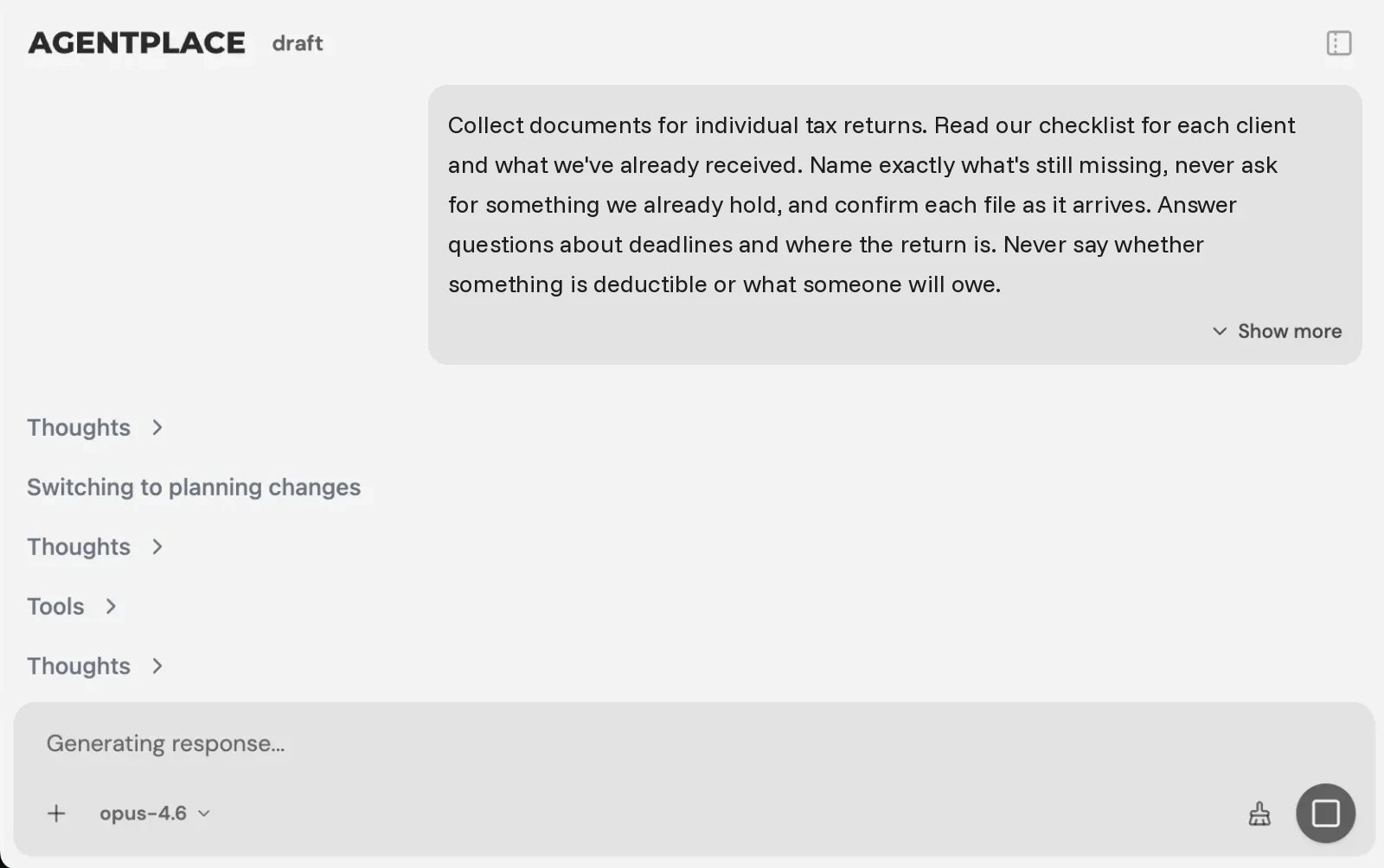 You describe your checklists and your deadlines. The builder writes the agent.
In practice, it works like this:
- The client opens the agent’s page, or the agent reaches out on the schedule you set.
- It reads what has already arrived for that engagement.
- It names the items still missing, specifically.
- It takes the files and confirms each one as it lands.
- It answers the deadline and status questions, and sends anything about tax treatment to a named person.
You set it up by describing the outcome in plain language, for example:
“Collect documents for individual tax returns. Read our checklist for each client and what we’ve already received. Name exactly what’s still missing, never ask for something we already hold, and confirm each file as it arrives. Answer questions about deadlines and where the return is. Never say whether something is deductible or what someone will owe. Send anything about tax treatment to Priya. Chase weekly until the file is complete, then stop.”
The AI Builder discusses the idea, clarifies requirements, creates the agent and helps test it. You choose when to publish. No code is required.
What stays where it is:
- Your practice management and document systems keep engagements, files and work status. The agent writes what it collects into them where a supported connection exists.
- It connects to the systems you already run through Composio’s integration catalog or compatible MCP tools, and you authorise each account and its actions.
- Records carry access classes enforced server-side, so a client sees their own checklist and nothing else.
Pricing: Agentplace has a free plan and paid plans that use AI credits. A credit is not a client message. See pricing.
Template to start from: AI Tax Document Collection Agent
When don’t you need an AI agent?
- Twenty clients who all send everything in January? You don’t have this problem.
- The gap is the work, not the inputs? This won’t help. Look at what’s slow in the file.
- Clients already use the portal reliably? A reminder may be all that’s missing.
- You need engagement and workflow tracking? That’s practice management, and it stays.
- Your checklists live in people’s heads? Write them down first. The agent can only be as specific as they are.
- Mornings go on chasing the same three items? That’s where a customer-facing AI agent built with Agentplace fits.
Quick checklist
- Write the document checklist for your highest-volume engagement type
- Make sure the agent can read what has already arrived
- Decide what it may say about deadlines, and what it must never say about tax
- Name who takes the advice questions
- Run it on one engagement type before widening
- Track files complete on first chase, repeat asks for items you already held, and questions escalated
Related reading: law firm client intake · what Dots by ChatGPT are · one agent instead of a chatbot and a form
Bottom line
Nothing in an accounting firm starts until the documents are in, and the chase is the first task of every morning.
- If clients already upload on time, a portal and a reminder are enough.
- If mornings go on asking for the same three items, give clients a customer-facing AI agent built with Agentplace. It names what’s missing, takes the files, answers the reply, and sends the advice questions to a named person.
Questions and answers
Frequently asked questions.
What is an accounting answering service?
It handles client calls, emails and messages when your staff cannot. A live service takes a message. An AI version answers the client, says what documents are still outstanding, takes the files, and answers questions about deadlines and status.
Can a ChatGPT dot chase clients for documents?
No. A dot is something you create and use inside ChatGPT. There is no page or number a client can use. It can sort your own inbox, but it cannot be the thing a client sends a bank statement to.
Can an AI agent collect tax documents?
Yes, where it is connected to the system that holds your checklists and files. It can tell a client which items are still missing, take what they send, and record what arrived. Everything it collects goes into the system you already use.
What should an accounting agent never do?
Give tax advice, interpret a rule, estimate a liability, or confirm that a filing position is correct. It can say what is outstanding, what the deadline is, and what your firm's own policies say.
Does this replace our practice software?
No. Your practice management, document and ledger systems stay the source for engagements, files and work. The agent handles the client conversation and writes what it collects into the system you already run.
Why not just send reminder emails?
A reminder names a deadline. It does not say which three items are still missing for that client, and it cannot answer the question the client replies with. Most reminder chains end in a phone call anyway.
Can it handle status questions too?
Yes, and it should. Document chasing and status questions are the same job from opposite directions. The client who asks where their return is, is usually the client you are waiting on.
How long does setup take?
The work is mostly writing down the checklist per engagement type and deciding what the agent may say about deadlines. A focused build takes days rather than months, and the first version should cover one engagement type.
Put this into practice
See the customer experience.
Explore a concrete example related to this article, then adapt the agent to your business.
Create my AI agentStart free with your business idea. The AI builder can help you explore it and create your agent. No technical specification needed. Sign in to continue. Pricing and limits · How the builder works