
Which Salon Software Has Built-In AI in 2026? Vagaro, Fresha and Zenoti Compared

The short answer
Zenoti and Fresha document AI reception and booking; Boulevard offers Beau for phone reception, and Vagaro offers an AI messaging chatbot. Check the exact task and account availability. Agentplace is designed for a separate customer-facing agent with its own page and rules, running alongside your existing salon software.
Key takeaways
- Zenoti, Fresha, Boulevard and Vagaro now document conversational AI features with different channels and booking scope.
- Agentplace creates customer-facing AI agents. It can be used to build a salon AI receptionist that answers calls, texts and website chats and books into your existing calendar. It is not salon management software and will not run your POS, payroll or commissions.
- Measure the inquiries that arrive outside your own opening hours; demand and channel mix vary by salon.
- A lot of features marketed as salon AI are automated workflows: reminders, waitlist messages, marketing assistance, rebooking prompts and no-show management.
- Test the exact reception task: answering a service question, making an appointment change or handing an uncertain request to staff.
- If your current platform already handles scheduling, payments and client records well, switching just to get more AI features may create more work than it solves.
- An AI agent with its own page is another option: it can answer questions before the client books, and take on scheduled work behind the scenes as you give it more to do.
Zenoti, Fresha, Boulevard and Vagaro document conversational AI in their salon platforms, but the tasks differ. Compare answering, messaging, direct booking and human handoff separately. The table below reflects official product documentation checked September 16, 2026.
SUMMARY: Evaluate your current platform’s native feature first if it performs the reception task you need. Zenoti is the best choice for a native receptionist when you need its documented booking and rescheduling workflow inside Zenoti. Fresha users should test AI Concierge; Boulevard users should test Beau; Vagaro users can evaluate its AI messaging chatbot. Confirm availability and the full price for your account and market.
Agentplace is designed for a customer-facing agent shaped around your own service process. It gets its own page and URL, answers from your rules and can work with connected tools. Keep your salon system for scheduling, payments, client records and staff operations. Verify the specific booking connection before promising a direct calendar write.
For a nail salon or barbershop, start with simple reception: hours, prices, a usual service, cancellation or rescheduling. A complex color consultation is a separate use case. Clients who already know their service should go straight to the next step.
Where salon software tends to stop:
- The client doesn’t know which service to choose: the menu gives her options, but doesn’t necessarily tell her which one makes sense.
- The platform’s AI runs automatically in the background: useful for reminders and waitlists, less useful when somebody asks an unexpected question.
- You’re considering switching platforms for better AI: the migration itself may be a much bigger project than adding the missing capability.
- Questions arrive by phone or Instagram after closing: the booking platform can’t help much if the conversation is happening somewhere else.
- Nobody measures these conversations: you can see completed bookings, but not always the people who had a question and disappeared.
The Verdict: If Vagaro, Fresha, Boulevard, GlossGenius, Mangomint or another platform already handles your calendar, payments and client records well, we wouldn’t advise switching just because another platform has more features labelled “AI.”
First figure out what you’re actually missing.
If the problem is scheduling, reporting, payments or managing complicated appointments, switching platforms may make sense.
If the problem is that clients have questions before they’re ready to book, especially at night or through channels your team isn’t constantly watching, that’s a different problem, and a different kind of software solves it.
The practical route is to start the agent where the gap is, connect it to what you already run, and give it more of the operation as you get comfortable with how it behaves.
Connection check: A confirmed booking requires access to the actual calendar and a successful appointment write. Verify the specific salon or reservation-system connection and its permissions before promising direct booking. If that connection is unavailable, the agent should offer the existing booking link or clearly label a request for staff confirmation.
Which Salon Software Has Built-In AI?
These are different capabilities, not interchangeable “AI included” checkboxes.
| Platform | Officially documented feature | Reception scope | Availability and price check |
|---|---|---|---|
| Zenoti | AI Receptionist | Calls, bookings, cancellation and rescheduling | Confirm the full plan and account entitlement |
| Fresha | AI Concierge | Client conversations using Fresha services and availability | Pricing lists $99.95/location/month, 200 minutes, then $0.60/minute; confirm market |
| Boulevard | Beau AI Receptionist | Phone FAQs, booking guidance and staff transfer | $125/location/month, 200 minutes, then $0.60/minute; confirm exact booking actions |
| Vagaro | Vagaro AI in Connect | Listing-page messages and SMS with a Text Marketing plan; human takeover | US $10/month; other markets and messaging charges differ |
| GlossGenius | Check its current AI and marketing offering | Do not infer phone booking from writing assistance | Ask for a demonstration of your required action |
| Mangomint | Booking, communications and workflow automation | Distinguish its inbox from autonomous reception | Current pricing is $120/location plus $10/user monthly; add-ons separate |
| Phorest | Marketing and client-management tools | Confirm current conversational features with the vendor | Request the feature and plan in writing |
| Booksy | Booking and client communications | Confirm native versus third-party reception | Test the actual booking path and quote |
Evaluation criteria: supported channel, successful appointment action, staff handoff, account availability and total cost. A feature page confirms the vendor’s description, not performance in your salon. Request a live test using your menu, staff durations and cancellation rules.
A messaging chatbot is a real conversational feature even if it does not answer a phone. A receptionist that sends a booking link also serves a useful purpose; label that action accurately. Evaluate Agentplace for a separate tailored service when the native feature does not complete your chosen task.
What Counts as AI in Salon Software?
A few fairly different technologies tend to get grouped under the word “AI.”
Understanding the difference makes comparing products much easier.
- Rules-based automation. Something happens, so the software triggers an action. Appointment tomorrow? Send a reminder. Cancellation? Message the waitlist. Whether vendors call this AI, automation or smart workflows, the basic idea is the same.
- Predictive scoring. A model tries to predict something: which clients might lapse, which slots may go unfilled, or which service somebody might be interested in.
- Conversational agents. Software that can have a two-way conversation, understand what the client is asking and potentially take an action such as checking availability or booking.
Other terms used in this article:
- System of record. The platform where your calendar, client history and payments live.
- Waitlist automation. Contacting clients when an appointment opens up.
- No-show scoring. Identifying appointments or clients that may be more likely to no-show.
- Chair utilisation. The percentage of a stylist’s available working hours that are booked.
- Layer. Additional software that works with the platform you already use rather than requiring you to move everything into a new one.
Why Does Built-In AI Often Stop at the Booking Screen?
Different AI features solve different tasks. Marketing assistance helps staff create content; a scribe helps document an interaction; reception handles a customer conversation. None of those labels alone establishes that an appointment is confirmed.
Some current salon platforms now offer native reception, so the practical question is where your specific request stops. Can the product explain the service, handle an appointment change and confirm the result in the existing calendar? Or does it pass a link or message to staff?
Use your common requests as the test. A usual haircut or nail appointment may need only a service choice and time. A complex color service may need a stylist’s review. The workflow should reflect that difference.
What Do Clients Ask Before They Are Ready to Book?
Usually the questions that are difficult to fit into a dropdown menu.
For example:
- Which service do I actually need to get the look I want?
- How long will I be there, and how much is this likely to cost with my hair length?
- I came in back in March. Can I get the same stylist and the same color?
- My hair is already damaged. Is this service going to make it worse?
- Who should I book for textured hair or this particular treatment?
The reason these questions are difficult to automate with a fixed decision tree is that the answer depends on context.
It might depend on the client’s hair, what she’s had done previously, your service menu, your pricing, stylist specialties or even how much time is available that day.
Both routes can end in the same booking calendar. The difference is what happens while the client is still figuring out what she wants.
That’s also why this matters operationally.
If your front desk is spending more time looking after clients who are physically in the salon, it becomes harder for the same person to constantly stop and answer repetitive questions from the website, phone and DMs.
After hours, of course, there may be nobody there at all.
What Is the Difference Between Salon Software and a Salon AI Receptionist?
They are answers to different questions, and the comparison above only makes sense once that is clear.
| Capability | Salon management software | Salon AI receptionist |
|---|---|---|
| Calendar and system of record | Primary function | Reads and writes when connected |
| Point of sale | Usually | Not necessarily |
| Payroll and commissions | Sometimes | No |
| Answer open-ended client questions | Usually no | Yes |
| Help a client choose a service | Limited | Yes |
| Answer a ringing phone | Rare | Yes |
| Book conversationally | Sometimes | Yes |
| Handle after-hours requests | Scheduled automation | Conversation |
A salon does not have to choose between the two. The management system stays the system of record for the calendar, payments and staff, and the receptionist handles the conversation around the booking and writes the result back into it. Most of the confusion in this category comes from vendors selling the second as a feature of the first.
If you are not yet sure what this category is, what is an AI receptionist for a salon defines it without a ranking attached. If a conversational front desk is what you are actually shopping for, the fuller comparison is our guide to the best AI receptionist for salons, which ranks ten options on the same seventeen criteria.
Should You Switch Platforms or Add an AI Receptionist?
Before switching, separate a platform problem from a conversation problem.
They’re not the same thing.
Switch platforms when:
- Double-bookings or calendar errors happen regularly
- Payments, tips or payroll reporting are unreliable
- Your platform can’t properly handle your services, packages or multi-stylist appointments
- Support isn’t there when something important breaks
Those are fundamental problems. If the software isn’t doing its main job, looking elsewhere makes sense.
Add an agent when:
- Scheduling and payments already work fine
- You’re losing inquiries in the evening, on the phone, through DMs or on the website
- Clients regularly arrive unsure about which service they need
- You’re covering different channels with different tools and the answers have started to drift
- You want to experiment with AI without moving your whole salon onto another system
Agentplace is designed for that second column. It is worth being equally clear about when it is the wrong purchase.
Don’t add Agentplace when:
- The problem is the platform itself. Broken calendars, unreliable payments and bad reporting are not conversation problems, and a layer on top of a system that double-books will just book the wrong slot faster.
- Your current platform has a native reception feature that you have not evaluated. Confirm whether it is included or paid, and test it before adding another service.
- All you actually want is a reminder sequence or a waitlist fill. Your platform already does that and it is already paid for.
- Nobody at the salon wants to define the service menu, price ranges, stylist specialties and policies the agent works from. That definition is the work, and without it the agent has nothing to be accurate about.
This is where switching can become more expensive than it first looks.
The subscription difference between two platforms is easy to calculate. Migration is harder.
Your existing system may contain years of client history, formulas, notes, photos, packages and preferences. Basic contact details and appointments are usually easier to export. More salon-specific information doesn’t always map neatly into the fields of another platform.
That doesn’t mean you should never switch. It just means “this platform has more AI” probably isn’t enough of a reason on its own.
If you are considering a move, our comparison of the best AI receptionist for salons goes deeper into the different options.
How Does Agentplace Add AI to Your Salon Software?
Agentplace creates the AI agent that serves the client. It gets its own page and URL, where it can show service information, ask a relevant question and present the next action. You can link to it from your existing site.
What it is. An AI agent configured around your salon’s reception work, with its own interface. Start with answering questions and appointment help. Add phone or messaging access where supported, and verify the booking system connection before turning a request into a confirmed appointment.
For a salon, that might mean answering questions, helping someone understand the service menu, showing a comparison as an actual table or card layout rather than a wall of text, collecting information and booking into the scheduling system.
What happens at 11pm.
Go back to the client who wants to go lighter.
Instead of making her choose from a list immediately, the agent can ask what her hair looks like now, how long it is, whether it’s been colored before and what result she’s hoping for.
It can explain the difference between relevant services using the information you’ve given it, stick to the price ranges you’ve defined, check which stylists offer that service and look at real availability.
If she’s ready, it can book the appointment into the salon’s existing system.
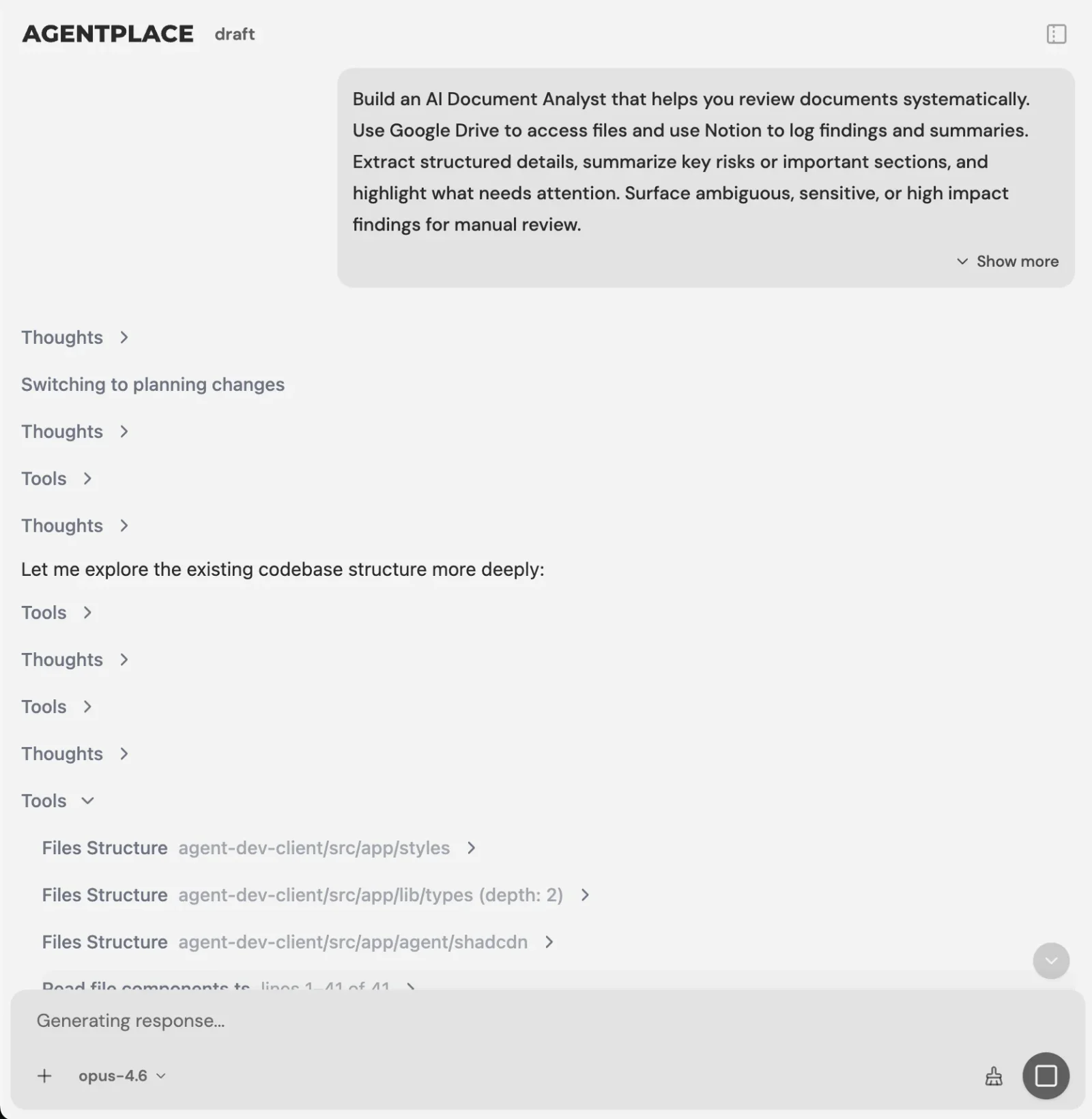 You describe the outcome you want in plain language, and the software builds the agent.
Where it can help:
- The undecided client: instead of sending her straight back to the menu, it can ask a few questions first.
- The returning client: it can use approved history only after the client is identified and the relevant records are connected with permission. Otherwise, ask for the details needed for the current request.
- The call nobody is there to take, and the Instagram DM at midnight: the same agent can answer the phone and the connected messaging channels, working from the same menu, prices and policies as the website.
- The client who’s nervous about damage: she can get an answer or be directed toward a consultation rather than being pushed into an appointment that may not be appropriate.
Keep the scope tied to a reception task. The agent can show service choices and the next step on its own page. Additional follow-up or reporting should be configured only when it supports a defined business need and has access to the appropriate records.
For example, you might review which appointment requests needed staff help, then improve the relevant service information. Do not create a second client record or calendar unless the business has explicitly chosen that operating model.
How you build it. You describe what you want the agent to do. The builder asks for whatever it still needs: services, price ranges, stylist specialties, policies, availability and so on.
It can then test the agent by having conversations with it and checking the responses before you publish.
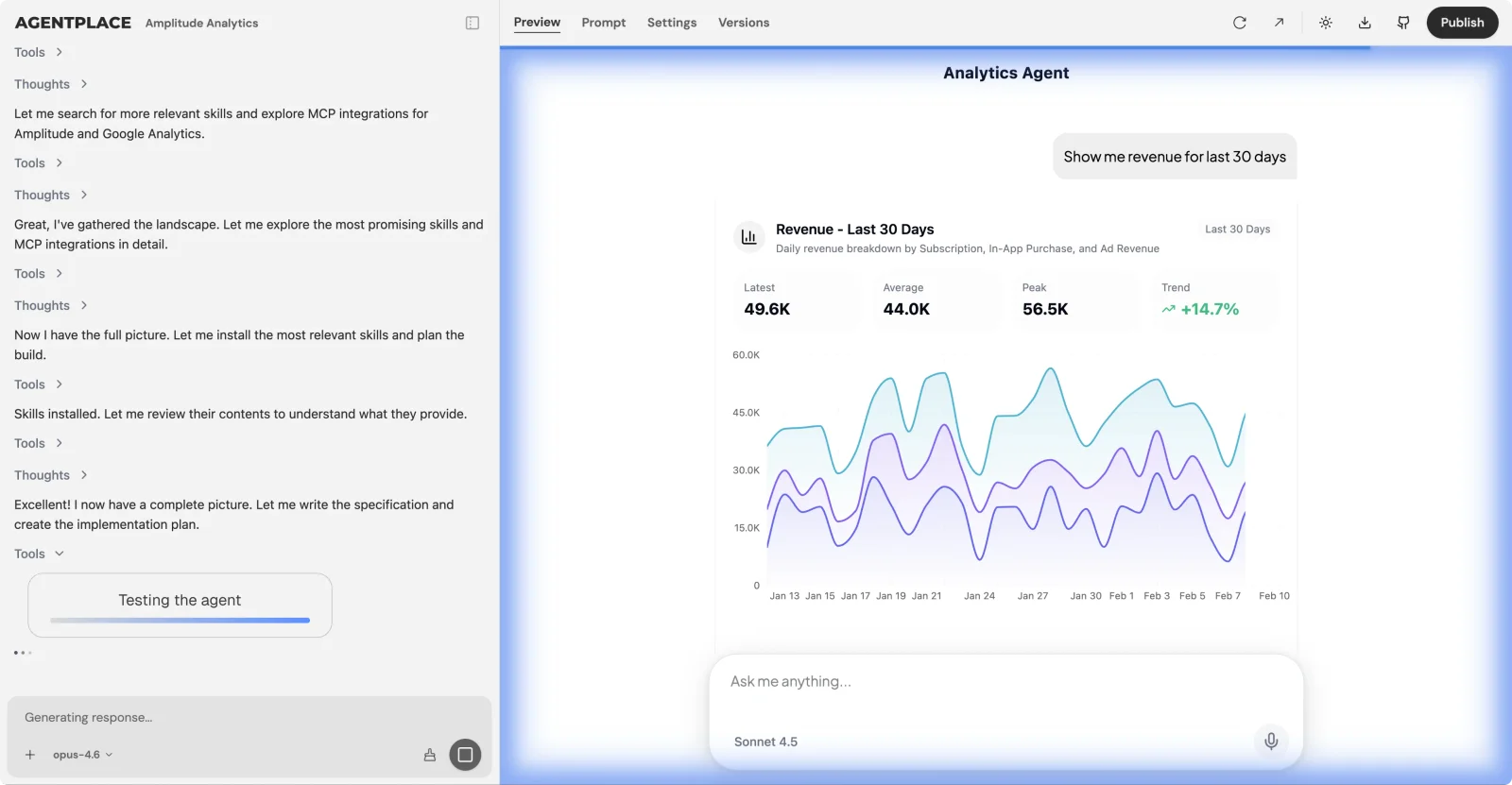 The builder messages the agent it just built and fixes what it finds.
Guardrails you set. For example, quote ranges instead of exact prices when pricing depends on hair length or condition. Explain deposits and cancellation policies before confirming a booking. Send complaints, adverse reactions and complicated group bookings to a person. Never promise a particular stylist without checking availability.
Verify the actual scheduling connection. Confirm access, identity requirements and the specific action you want, such as creating or moving an appointment. A general catalog of integrations is not evidence that a particular Vagaro or other salon-system action works in your account.
The goal isn’t to create another calendar for your team to remember to check. The appointment should still land where the team already expects to find it.
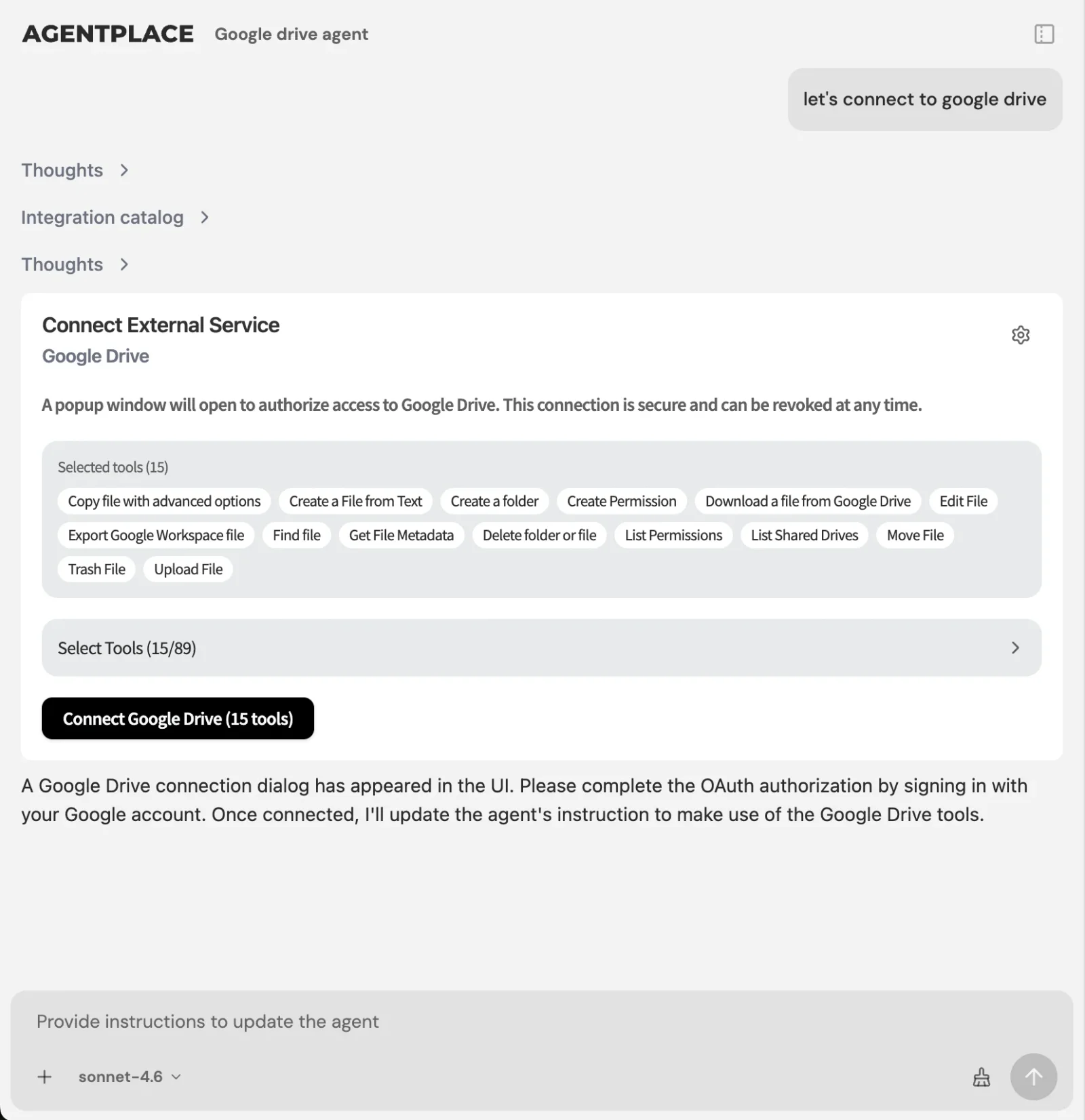 Your existing booking platform can remain where the appointment and client record live.
A worked timeline.
What it costs. Agentplace has a free plan and paid plans that use AI credits. A credit is not a customer message: usage depends on the model and the work performed. See pricing for current prices, included credits and plan limits.
What makes it different. A traditional booking widget has to work for lots of salons and lots of clients, so the flow is naturally fairly standardized. Every salon gets the same screens with a different logo on them.
An agent is built around the details of your salon: your menu, your price bands, stylist specialties, deposit policy, the rules you want applied and the way you want certain conversations handled. Because it’s a real application rather than a template, what it shows and what it does can change as your business does.
That matters most when someone asks something that wasn’t anticipated by the standard booking flow.
Who it fits. This is most useful for salons and medspas where clients regularly need help deciding what to book, or where a lot of inquiries arrive outside opening hours.
Start with routine reception and appointment help. Keep POS, payroll, inventory and the authoritative schedule in their existing tools.
The same approach can also work across beauty and wellness businesses with multiple locations.
How Do You Build a Salon Agent That Handles the Booking Conversation?
Let’s use a four-chair color salon running Vagaro as an example, with two colorists and one stylist who specializes in curly hair.
Step 1. Describe the outcome. In the builder:
Build a client inquiry agent for my salon. It should help clients work out which color service they need, explain the differences, quote our price ranges based on hair length, check which stylist is available and use our existing booking route; enable direct appointment actions only after testing the connection. It should state our deposit terms for color services over two hours.
Step 2. Answer the builder’s questions. Give it your service menu, durations and price ranges.
It also needs to know which stylist does what, your deposit and cancellation policies, and any rules around how far ahead clients can book.
Step 3. Set the guardrails. For example: use ranges rather than exact prices for services where the final price depends on hair length or condition. Explain the policy before confirming the booking. Hand complaints, reactions and complex group bookings to a person. Don’t promise a result on severely damaged hair without recommending the appropriate consultation.
Step 4. Verify the booking connection. Test availability and appointment creation in the actual platform and plan you use. If direct access is unavailable, retain Vagaro’s booking link or a staff-confirmed request flow.
If most of your questions arrive by phone or through Instagram, connect those channels too. The agent uses the same service menu, price bands and policies whichever way the client gets in touch, so you’re not maintaining one set of answers for the website and another for the phone.
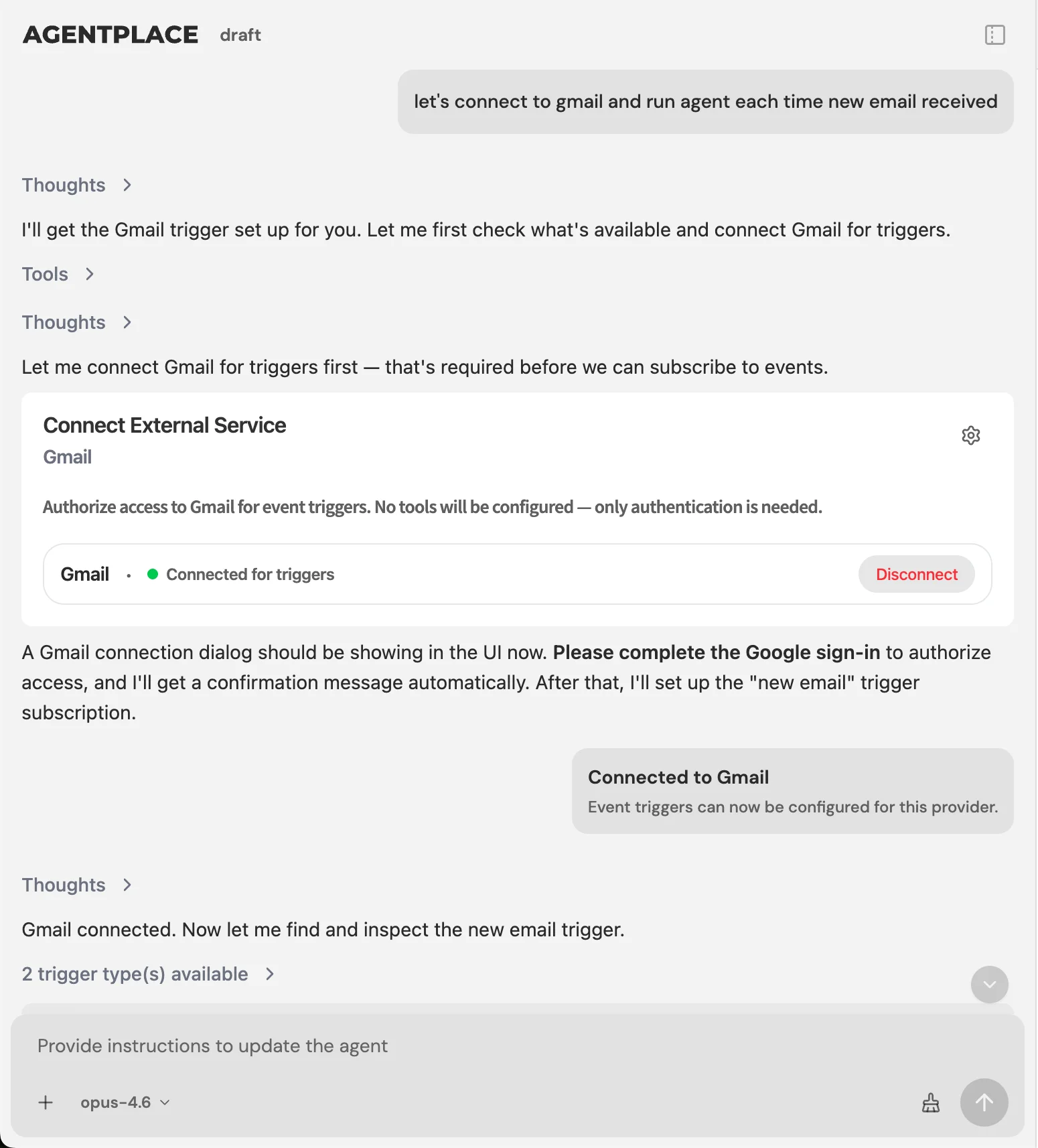 Deposit collection and consultation follow-ups can run as configured triggers.
Step 5. Let the builder test it, then try the awkward questions yourself. Don’t only test:
I’d like to book a haircut.
Test something like:
My hair is bleached and pretty damaged. Can I go darker safely?
Depending on the rules you’ve set, the useful response may be to recommend a consultation rather than immediately booking a long color appointment.
Step 6. Turn it on for the website first. That’s usually an easy place to start because you can see how real clients use it without changing the workflow your team already follows inside the salon.
Once it’s behaving sensibly on the conversation, the same setup is where you’d add scheduled work: a nightly look at tomorrow’s gaps, a weekly report of unbooked inquiries, a follow-up when a consultation doesn’t convert.
The setup still requires you to give the agent good information.
But that’s different from trying to anticipate and hard-code every possible question a client might ask.
How Do You Move Without Losing Client History?
If you decide that switching platforms really is the right move, protect your data first.
- Export before you commit. Pull client contacts, appointment history, notes, formulas and package balances from your existing platform and keep your own copy.
- Check what actually maps. Compare your export with the import fields in the new platform. Photos, formulas and free-text notes are worth paying particular attention to.
- Consider running both systems in parallel for a short period. It’s extra work, but it gives you a chance to catch missing information before the old system disappears from daily use.
- Move during a quieter period if you can. The week before the holidays is probably not when you want everyone learning new software.
- Keep the original export. Even after the migration looks complete, keep an archive you control.
Adding another capability to your existing setup avoids most of this migration work, which is one reason it’s worth considering before replacing a platform that otherwise works.
How Much Does Adding AI Cost Compared With Switching?
There are two kinds of cost here: the software bill and the operational work around it.
| Add an agent | Switch platforms | |
|---|---|---|
| Monthly software cost | Additional subscription | Difference between plans |
| Setup effort | Usually relatively contained | Potentially several weeks |
| Staff retraining | Limited | Team learns a new system |
| Client history risk | Low if records stay where they are | Depends on migration |
| Reversible | Usually | Much harder once migrated |
Illustrative comparison of effort and risk. Actual setup depends heavily on your salon, platform and data.
There’s also a simpler calculation.
Work out what one additional evening booking per week is worth at your average ticket.
At a $65 average service, one additional booking a week is roughly $3,400 in annual revenue.
That doesn’t prove a particular AI tool is worth buying. It gives you a useful number to compare the cost against.
How Do You Know the AI Is Working?
Start with four numbers and check them monthly.
- Share of bookings made outside opening hours. Use your own booking records; the older Book Salon sample is context, not a benchmark for every salon.
- Website inquiries that end in a booking. If the agent is meant to improve the pre-booking conversation, this is one of the most relevant metrics.
- Consultation requests for higher-value services. Especially services such as color correction where clients may have abandoned the process before because they weren’t sure what to choose.
- No-show rate on agent-booked appointments compared with other bookings. It’s worth checking whether clients who had more context before booking behave differently.
That last point connects with the same issue covered in our guide to how to reduce no-shows at your salon: clear expectations and easy changes are useful, but any reduction in no-shows must be measured separately.
What We Found That Others Won’t Tell You
The word “AI” doesn’t tell you very much on its own.
A reminder workflow, predictive model, marketing copy generator and conversational receptionist can all legitimately appear under an AI heading, while solving completely different problems.
So when comparing platforms, don’t stop at “Does it have AI?”
Ask what the AI actually does.
The pre-booking conversation is harder to automate than reminders.
A reminder has a clear trigger and a clear action.
An undecided client can ask almost anything, and the answer may depend on her history, hair, service choice, stylist availability and salon policies.
That’s a much less predictable workflow.
Staying on the same platform for years isn’t necessarily a bad thing.
Salon software contains a lot of business history. If the calendar, payments and records work, there are good reasons not to move everything unless there’s a meaningful operational benefit.
After-hours demand deserves more attention than it usually gets.
If a large share of bookings are happening after the salon closes, those late-night questions aren’t edge cases. They’re part of the normal customer journey.
Which Mistakes Do Salons Make When Adding AI?
- Switching the whole booking platform when the actual problem is unanswered client questions.
- Letting an agent give exact prices for services where the price depends on hair length, condition or complexity.
- Going live without a clear human handoff for complaints or reactions.
- Adding more reminders when reminders aren’t the part of the process that’s struggling.
- Forgetting to explain deposits and cancellation policies during the booking.
- Testing only straightforward booking requests instead of the questions nervous or undecided clients actually ask.
How Do You Add AI to Your Salon in a Week?
Day 1. Check how many of your bookings happen outside opening hours. That gives you some idea of how important the after-hours experience actually is.
Day 2. Write down your service menu, durations, price ranges and stylist specialties.
Day 3. Build the agent and add your policies and guardrails.
Day 4. Connect your booking platform and make sure the agent is checking actual availability by stylist.
Day 5. Test the difficult conversations: damaged hair, requests for a specific stylist, uncertain service selection and price questions.
Day 6. Start with the website. Add the phone line, Instagram or whichever channel your inquiries actually arrive through once you’ve watched the first one for a few days.
Day 7. Set the four metrics above and review them monthly.
The bottom line. Start with the native feature your platform now offers: Zenoti and Fresha for their documented booking workflows, Boulevard for phone reception and booking guidance, or Vagaro for AI messaging. Choose Agentplace when you need your own client-facing agent with a page and workflow beyond that native scope. Keep the working calendar, payments and staff systems, and test the chosen reception task end to end.
Questions and answers
Frequently asked questions.
Which salon software has built-in AI features?
Zenoti, Fresha, Boulevard and Vagaro document conversational AI features. Zenoti and Fresha describe reception and booking workflows; Boulevard offers Beau phone reception; Vagaro offers AI responses in Connect. Other AI features may handle writing or operational automation. Confirm the supported action, plan, market and usage charges with each vendor.
What is the best AI to add to salon software?
Agentplace creates customer-facing AI agents that can be used to build a salon AI receptionist. It answers what a client should book, applies your policies and writes into your existing calendar. It is not salon management software, so it works alongside Vagaro or Boulevard rather than replacing them.
Does Booksy include an AI receptionist?
Not its own. Booksy ships reminders, deposits, no-show protection and marketing sends, and the AI receptionists advertising Booksy support are third-party tools. Booksy is a Google AI Mode booking partner, so Google's AI can book into a Booksy calendar, which is a different thing from Booksy answering your clients itself.
What is the best AI voice agent for a salon?
Evaluate the receptionist already available in your platform, including Zenoti, Fresha or Boulevard, against your call workflow. Agentplace is designed for a tailored agent serving clients through its own page and configured channels. Compare successful booking, rescheduling and handoff in your actual calendar, not a general voice demo.
Which AI receptionist can actually book appointments for a salon?
Any tool connected to the calendar and given booking rules can write an appointment. The question to ask a vendor is whether it checks live availability, respects each stylist's services and timings, and writes back, or whether it only sends a message for someone to action later.
AI receptionist versus hiring a front desk for a salon: what does each cost?
A front desk hire is a salary plus training, covering the hours they work. Software is a flat monthly fee covering every hour. Most salons run both: software for evenings, overflow and simple bookings, people for the chair-side experience that keeps clients coming back.
How much does an AI receptionist cost for a salon per month?
Pricing across the category ranges from bundled features inside an existing platform subscription to standalone tools in the hundreds per month. Agentplace has a free plan and paid plans that use AI credits.
Can I add AI to Vagaro or do I need to switch platforms?
Vagaro has its own AI messaging chatbot in Connect. Evaluate it for routine message responses before buying another tool. Agentplace can provide a separate client-facing agent with its own page and rules. Direct booking into Vagaro depends on a verified connection; otherwise retain its booking link or staff confirmation process.
Do I lose my client history if I leave Vagaro?
You export what the platform lets you export. Contact details and appointment history usually come out cleanly. Notes, formulas, photos and package balances often do not map to the new system's fields. That partial loss is the real cost of migration, not the subscription difference.
Is AI better than traditional software for managing a beauty salon?
They start from different places. Salon platforms are built around the appointment record. An AI agent with its own page is built around your business rules, so it can hold the conversation before a booking exists and run scheduled work afterwards. Many salons run both and connect them.
How do I start using AI in my salon business?
Start with the gap that costs money, which is usually the evening booking question nobody answers. Build an agent on your service menu, pricing ranges and stylist specialties, connect it to your calendar, then add scheduled work once you can see it behaving sensibly.
Put this into practice
See the customer experience.
Explore a concrete example related to this article, then adapt the agent to your business.
Create my AI agentStart free with your business idea. The AI builder can help you explore it and create your agent. No technical specification needed. Sign in to continue. Pricing and limits · How the builder works