
Dynamic UI with AI: Can an Agent Build the Interface for Each Customer?

The short answer
Yes. An AI agent can build the interface for each customer, choosing which components to show from your own data and rules. The usual way to do that on a website is a customer-facing AI agent built with Agentplace. If every visitor needs the same screen, a static page is faster and cheaper.
Key takeaways
- A visitor who describes a problem in their own words still has to translate it into your menu, your filters and your form fields before the page can help.
- An agent built inside ChatGPT serves people who are already in ChatGPT. A website agent serves the customer on a page the business controls. There it applies the business's rules, reads authorized systems and takes the next step.
- A customer-facing AI agent built with Agentplace gives the visitor its own page and URL, asks what is missing, applies the business's rules, and shows the result as cards, tables, a form or a document.
- The agent fills defined screen types rather than inventing markup, so the parts you fix stay fixed. Prices and availability should come from the connected system at the moment of the answer.
- Start with one customer decision and one screen. Write down the questions that change the answer before building anything.
The short answer
Yes, and not in the sense the term used to carry.
A dynamic UI used to mean a page assembled per request from a database, with parts shown or hidden by rules a developer wrote. With AI, the decision moves. The model chooses what to ask, what to show and in which component, at the moment of the request.
Three things make that work:
- Pick one customer decision the screen has to carry.
- Give the agent your data and your rules.
- Fix the parts that must not change, then let it assemble the rest.
A customer-facing AI agent built with Agentplace gives the visitor a page and URL to open. The agent asks what is missing and applies your business knowledge. It shows the result as a plan, an estimate, a comparison table, product cards, a form or a document. Change a requirement and it revises the result and the components together.
If every visitor needs the same screen, a static page will load faster and cost less to run.
Why doesn’t a static page work for this?
Because the page makes the visitor do the translation.
A static site offers four things: navigation, a catalogue, filters and a contact form. All four assume the visitor can already name what they want in your vocabulary.
Here is what arrives in a camera shop’s inbox instead:
“I shoot my son’s indoor basketball games. Everything comes out blurry. I’ve got about $1,000 and I don’t know if I need a new camera or a different lens.”
Quoted customer words in this article are composites of the enquiries these businesses receive, not quotes from named customers.
Nothing in that sentence is a filter value. A roofing contractor, a letting agency and a tour operator all get the same shape of enquiry, so this article follows one trade, a camera shop, through every step.
The old distinction still matters here, so be exact about it.
- Static UI: every visitor receives the same markup.
- Dynamic UI: the page is assembled per request from data, state and input. A signed-in dashboard, a stock-filtered grid, a form that reveals fields.
- Both are written in advance. Every branch exists because a developer wrote it.
A dynamic UI built from rules can only vary in the ways somebody anticipated.
The camera question needs a branch nobody wrote: indoor light, a moving subject, a budget split two ways.
How do you build a dynamic UI with AI, step by step?
1. Pick one customer decision the page has to carry
Name the decision before anything else.
- Which of our products fits this person?
- What will this job cost, roughly?
- Is this enquiry something we can take at all?
Example: a camera shop, in Ecommerce & Retail, picks “which body and lens for what I shoot” and leaves repairs and trade-ins alone. That is the job our camera and lens selection agent does.
Rule of thumb: if you cannot name the decision in one sentence, the screen will not know what to show.
2. Write down what the agent must know
Three kinds of information, and mixing them up is the expensive mistake here.
- Static knowledge: catalogue, specifications, policies, who each product suits.
- Decision rules: minimum budget, what you never pair, when a person takes over.
- Live values: stock, availability, price, lead time, read from the connected system at answer time.
Example: “A 70-200mm f/2.8 handles indoor sport” is knowledge. “Two in stock at $1,199” is a live value, and it has to be fetched every time.
3. Decide which parts of the screen may change and which must not
Teams skip this step, and it decides whether the result is usable.
- May change: which components appear, their order, the number of options, the fields in a form.
- Must not change: navigation, your own labels, legal and safety copy, regulated disclosures, prices.
The W3C’s Web Content Accessibility Guidelines set a criterion for consistent identification: the same function keeps the same label everywhere. An interface that renames its own buttons per visitor fails it.
Example: the agent may show two cameras or five, with or without a comparison table. It may not rename “Add to basket”.
4. Connect only the tools the outcome needs
Every connection is something that can break, and a permission you granted.
- Stock and price, so the shortlist is real.
- A calendar, if the next step is an appointment.
- A CRM or a sheet, so the enquiry reaches your team.
Example: the camera shop connects its stock source and Gmail, and nothing else. Agentplace connects through Composio’s integration catalog or compatible MCP tools, and you authorize each account and its actions. What MCP means for AI agents covers the setup.
5. Test it by talking to it like a customer
Use real sentences from your inbox, including the awkward ones.
- Someone who gives you half the information.
- Someone who changes their budget halfway through.
- Someone who wants what you do not sell.
Example: the camera shop pastes in twenty enquiries from its own inbox, one at a time, including “will this fit my old film lenses” and a request for a lens it does not stock. Check that the agent asked only the questions that change the answer, showed the right thing on screen, and refused cleanly when nothing fit.
6. Publish it on its own page
A dynamic interface needs an address a customer can open.
- Publish, then choose who gets in: anyone with the link, a restricted list, or only you.
- Link it from the navigation, a campaign, or the page where people get stuck.
- Each agent gets its own page and URL, so the interface has an address of its own that is separate from your marketing site.
Example: a “Help me choose” link in the main navigation, beside the catalogue, which stays where it is.
What tools can help build a dynamic UI?
| Approach | Good for | Where it stops |
|---|---|---|
| Hand-built frontend (React, Vue, Svelte) | Full control of every state | Every variation is designed, coded and maintained |
| Personalization engines (Optimizely, Adobe Target) | Swapping blocks per audience | Segments and variants are defined up front |
| Vercel AI SDK and AI Elements | Streaming model output into React components | You build and host the app, and declare each component |
| CopilotKit | An AI copilot that renders and acts inside your app | Assumes the application already exists |
| AI UI generators (v0, Figma Make) | Producing screens and code at design time | The generated screen is then fixed for the visitor |
| Customer-facing AI agent built with Agentplace | A page where the agent assembles the screen from your data and rules | Needs your knowledge and rules written down, and live values from connected systems |
The rows divide on when the interface changes. The first five change it at build time. The last one changes it at request time, on a page the customer opens.
For AI inside an app you already run, CopilotKit or the Vercel AI SDK is the shorter path. For a customer-facing surface with no frontend to build, the agent route is. AI website vs AI chatbot vs AI website builder separates the jobs these get confused for.
Dynamic UI vs generative UI vs adaptive UI: what is the difference?
They overlap. The differences are who decides, and what changes.
| Term | What changes | Who decides | Typical example |
|---|---|---|---|
| Dynamic UI | Content and which components are visible, per request | Developer rules plus data | A signed-in dashboard, a stock-filtered grid |
| Generative UI | The components are chosen and assembled at request time | A model, from components you define | An agent showing a shortlist, then a comparison table |
| Adaptive UI | Layout, density or content adapts to device, context or behaviour | Rules, or a model learning from use | A responsive layout, a reordered menu |
| Intelligent UI | Nothing specific. An umbrella research term for interfaces that use AI | The field, not a product | ACM’s IUI conference has run since 1993 |
If a developer wrote the branch, it is dynamic. If a model picked the components, it is generative.
For depth, see what is generative UI and adaptive UI examples.
How does Agentplace help build a dynamic UI?
Agentplace creates AI agents that serve customers and help run a business. Each agent gets its own web page and URL. It uses business knowledge and authorized tools to deliver a personal plan, estimate, product comparison, document, or other result. The AI controls the interface and updates the work as customers make requests by text or voice.
Agentplace is designed for this case: the customer describes what they need in their own words, and the screen in front of them becomes the answer.
In practice, it works like this:
- The customer opens the agent’s page and describes the problem.
- The agent asks only the questions that change the answer.
- It applies your rules, and reads live values from connected systems.
- It picks the screen type that suits the decision and fills it from your data.
- A changed requirement updates the screen without starting the conversation again.
- It moves the customer on: an order, an appointment, or a named person.
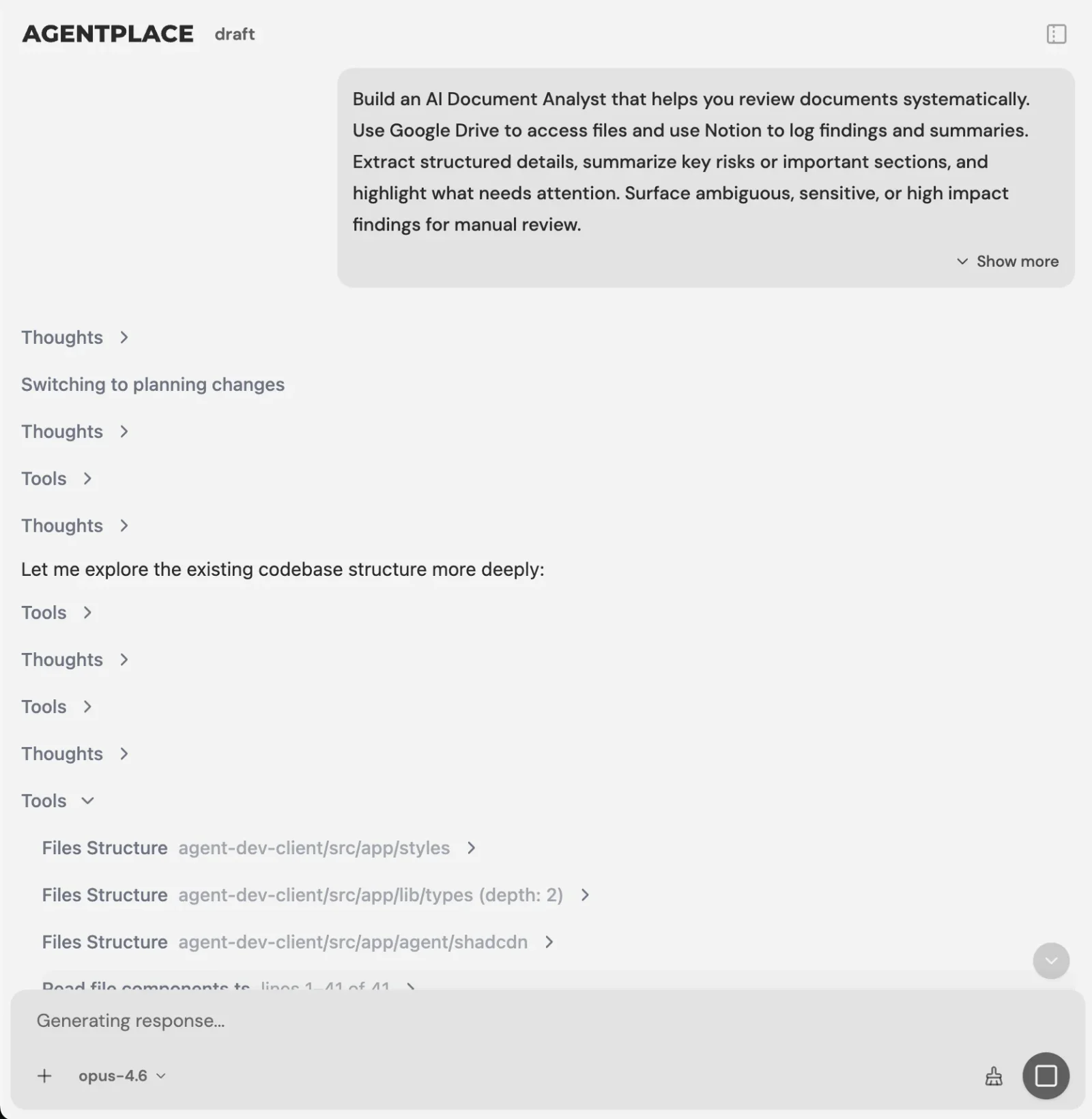 You describe the customer task and the rules. The Builder asks for what is missing.
You set it up by describing the outcome in plain language, for example:
“Help customers choose a camera and lens from our catalogue. Ask what they shoot, the light they shoot in, and their budget. Recommend at most two bodies and two lenses, with a reason for each and the total. Never recommend a body that is out of stock. Send repair, trade-in and warranty questions to Daniel.”
The AI Builder discusses the idea, clarifies requirements, creates the agent and helps test it. You choose when to publish. No code is required.
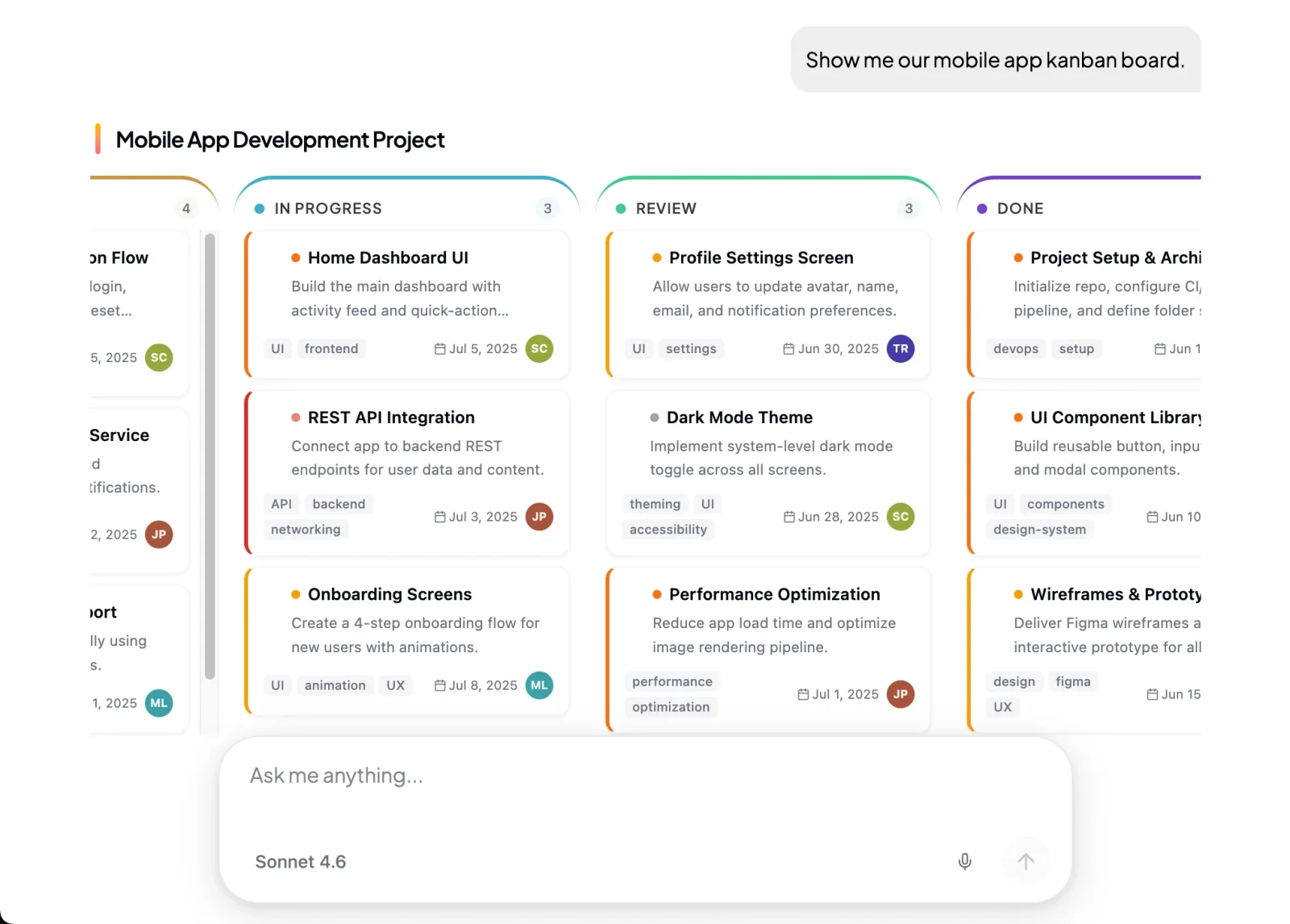 Tables, cards and forms are defined screen types the agent fills in.
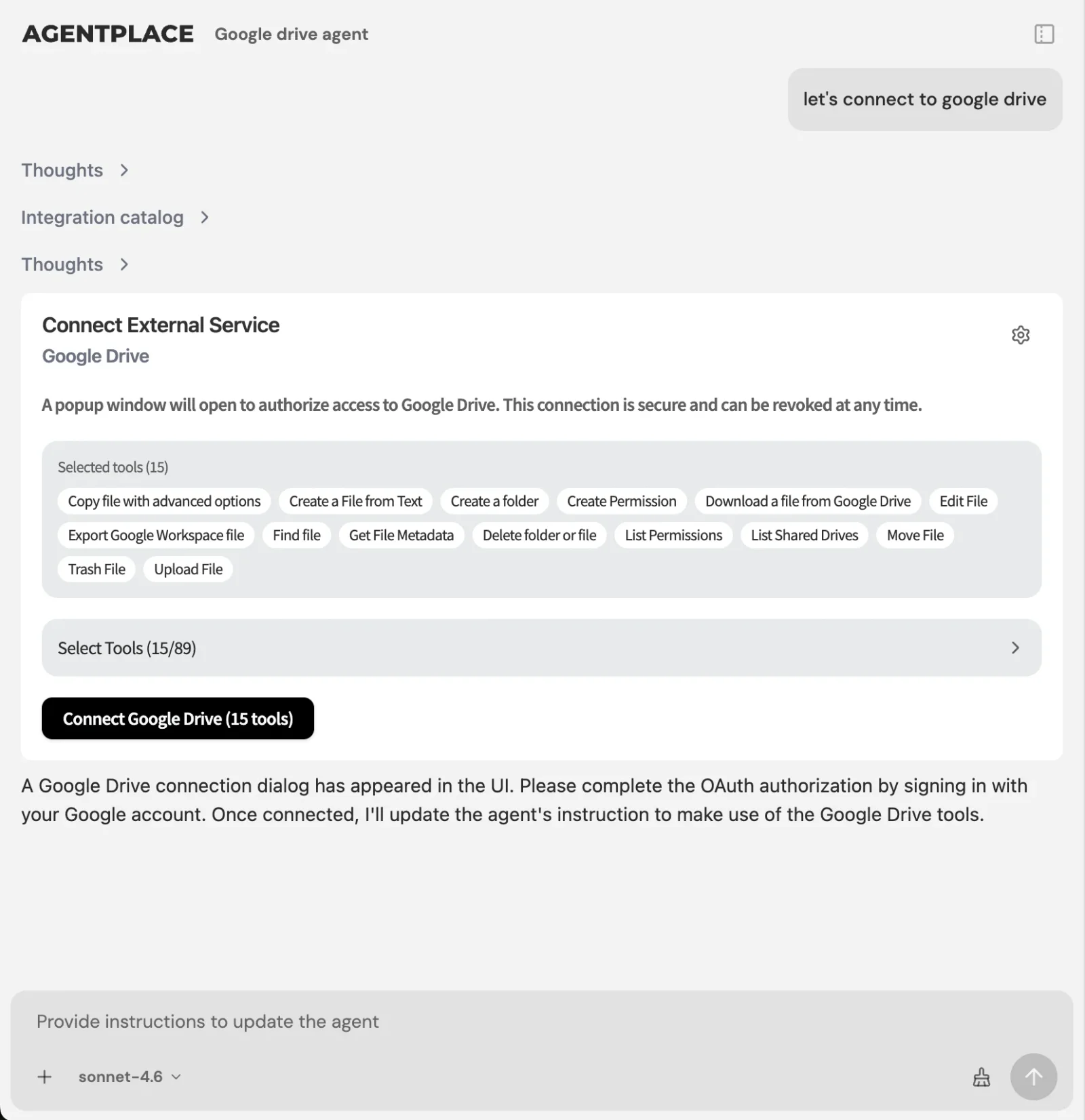 Stock, calendars and CRMs connect through the integration catalog, each account authorized by you.
What stays where it is:
- Your CMS, catalogue, calendar and CRM keep their jobs. The agent reads from them.
- Connections run through Composio’s integration catalog or compatible MCP tools.
- The agent’s web page is the primary place to use the full interface. Phone, WhatsApp or Telegram can extend it after setup.
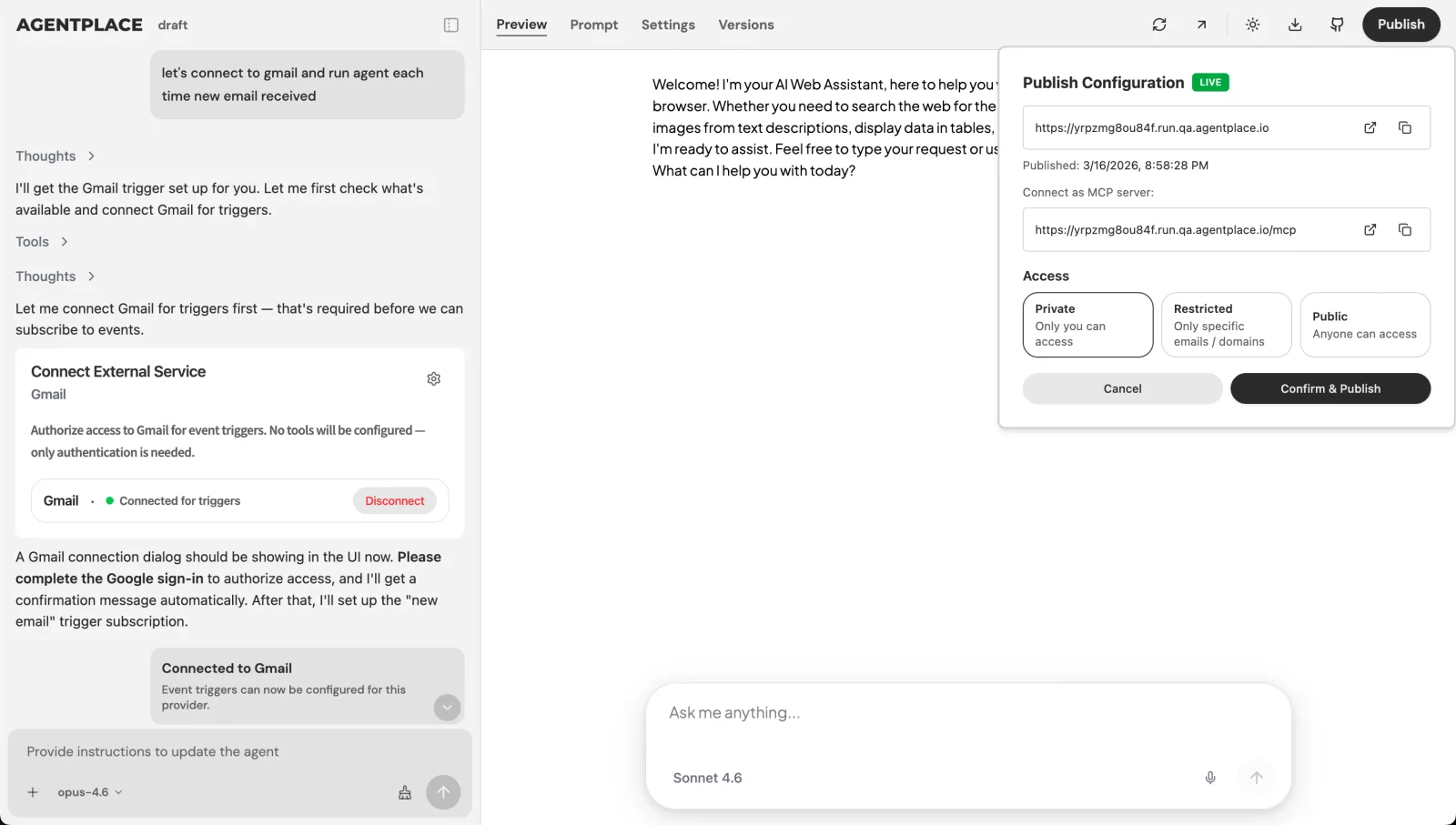 Publishing gives the agent its address. Access settings decide who can open it.
Pricing: Agentplace has a free plan and paid plans that use AI credits. A credit is not one customer message. See pricing.
Templates to start from: AI e-bike recommendation agent · AI camera and lens selection agent
When don’t you need a dynamic UI?
- Does every visitor need the same screen? A static page is faster and cheaper to cache. Keep it.
- Is the decision a short fixed path? A quiz or a branching form (Typeform, Outgrow) is cheaper to maintain.
- Do you only need AI inside an app you already run? CopilotKit or the Vercel AI SDK keeps it in your codebase.
- Is the job producing screens and code faster? That is v0 and Figma Make, at design time.
- Do customers mostly ask policy and logistics questions? A support chatbot is enough.
- Do customers describe an outcome and need help deciding? That is where a customer-facing AI agent built with Agentplace fits. Interactive product finders covers the product-choice version.
The control question is usually the real objection. A dynamic interface is only acceptable if you can say what it may not do. Three things hold the line:
- Defined screen types. Agents built with Agentplace fill a fixed set of components: tables, cards, forms, documents. A broken or off-brand layout is not an available outcome.
- Rules you write down. Minimum budgets, what is never paired, exact prices against ranges, and the subjects that go to a named person.
- Live values from the source. Price and availability are fetched, so the screen cannot promise what your systems will not honour.
What the agent chooses is the arrangement. What it may claim is yours to set.
Quick checklist
- Name the one decision the screen has to carry
- Separate static knowledge, decision rules and live values
- List what may change on screen, and what must never change
- Keep labels and legal copy fixed, per WCAG consistent identification
- Decide what the agent refuses, and who takes those cases
- Connect only the systems the outcome needs
- Test with twenty real enquiries, including ones you cannot serve
- Publish on its own page, linked where customers get stuck
Related reading: what is generative UI · adaptive UI examples · what is an AI website · one agent instead of a chatbot, forms and a booking flow · how to build an AI agent for your business
Bottom line
A dynamic UI used to mean a page a developer varied by rule. With an AI agent it means a screen assembled for the person in front of it, from your catalogue, your rules and your live data.
- If every visitor needs the same screen, or the decision follows a short fixed path, keep the static page or the form. It is cheaper and faster.
- If customers arrive describing an outcome, build a customer-facing AI agent with Agentplace. It asks what is missing, applies your rules, shows the result as cards, tables or a document, revises it when the customer changes their mind, and carries them to the order, the appointment or the right person.
Questions and answers
Frequently asked questions.
Can I use AI to create a dynamic UI?
Yes. An AI agent can choose what to ask, what to show and in which component at the moment of the request, instead of following branches a developer wrote in advance. A customer-facing AI agent built with Agentplace does this on its own page. You still define the data, the rules and the parts that must not change.
What is a dynamic UI?
A dynamic user interface is built per request, so what appears depends on data, state and what the visitor did. A signed-in dashboard, a stock-filtered product grid and a form that reveals fields after an earlier answer are all dynamic. The variation can come from rules, from data, or from a model.
What is the difference between a static UI and a dynamic UI?
A static UI sends every visitor the same markup. A dynamic UI assembles the page per request from data, session state and what the visitor did. Static pages are cheaper to serve and easier to cache. Dynamic interfaces can show one person their own order history and another a filtered catalogue.
Is a dynamic UI the same as a generative UI?
No. Dynamic UI is the older and wider term for anything built per request. Generative UI is narrower: a model assembles the interface at request time from components you define. Every generative UI is dynamic. Most dynamic interfaces are not generative, because their branches were written by a developer.
Do I need developers to build a dynamic UI?
Not for every route. A hand-built React or Vue frontend needs developers. An agent platform does not: you describe the customer task, the rules and the result you want in plain language, and no code is required. Developers still help when the interface has to live inside an existing application.
What tools let AI change a page based on what the customer asks?
Vercel AI SDK and AI Elements stream model output into React components you build and host. CopilotKit adds an AI copilot inside an app you already run. Agentplace gives the agent its own page, where it assembles the screen from your data and rules without you building a frontend.
How can I build a dynamic user interface for my business website?
Pick one customer decision, such as which product fits or what a job will cost. Write down the questions that change the answer and the rules that constrain it. Then build a customer-facing AI agent with Agentplace for that one decision, publish it on its own page, and link to it from your site.
Is an intelligent UI the same as a dynamic UI?
No. Intelligent user interfaces is a research field, with its own ACM conference since 1993, covering any interface that uses AI to help the user. Dynamic UI describes how the page gets assembled. An interface can be dynamic without being intelligent, and intelligent without changing its layout.
Can a dynamic UI work with my existing website?
Yes. An agent published on its own page and URL can be linked from your navigation, a campaign or a product page. Your CMS, catalogue and booking system stay where they are. The agent reads from them through connected accounts you authorize.
How do I stop a dynamic UI from changing things it shouldn't?
Fix the parts that must stay stable: navigation, labels, legal copy and anything regulated. Agents built with Agentplace fill defined screen types instead of inventing markup. Keep live values such as price and availability coming from the connected system, and name the cases that go to a person.
Put this into practice
See the customer experience.
Explore a concrete example related to this article, then adapt the agent to your business.
Create my AI agentStart free with your business idea. The AI builder can help you explore it and create your agent. No technical specification needed. Sign in to continue. Pricing and limits · How the builder works