
MCP Apps: 7 Things an AI Agent Can Show You Instead of Telling You

The short answer
An MCP app is an MCP server that returns an interface alongside the data. The tool does the work. The app shows a result the customer can act on. A customer-facing AI agent built with Agentplace gives that interface its own page and URL. If an answer fits in one sentence, plain text is faster.
Key takeaways
- Customers asking about an order, a price or an open slot need to see the result and change it. A paragraph makes them read the answer, then ask again.
- An MCP app renders inside ChatGPT or Claude, so it serves whoever opens that client. A page you own is where the agent applies your rules, reads your authorized systems and takes the next step for a customer.
- A customer-facing AI agent built with Agentplace gives the customer their own page and URL, shows the result as a timeline, estimate, shortlist or booking, and revises it when they change a detail.
- An interface is only as good as the data behind it. An agent should show a date, a price or an open slot when a connected system returned it, and say plainly when nothing came back.
- Start with one question your customers ask every day. Write down what the answer should look like on screen, then build that one screen.
The short answer
An MCP app is an MCP server that hands back an interface along with its data, so the person sees a result they can use instead of a paragraph describing one.
- Use tools for the work: look up the order, price the job, check the diary.
- Use an app for the result: a timeline, an itemized estimate, a bookable slot, a form with the known fields filled.
- Keep the live data live: show a date or a price when a connected system returned it.
A customer-facing AI agent built with Agentplace does this on a page of its own. The agent gets its own web page and URL. It uses your business knowledge and authorized tools, and shows the result as a table, estimate, shortlist or booking.
If your answer fits in one sentence, plain text is faster. Interfaces earn their place when the customer has to compare, correct or confirm something.
What are MCP apps?
MCP apps are MCP servers that return a user interface along with their results. The AI client draws a component the person can read and act on.
MCP is the Model Context Protocol, the open standard Anthropic introduced in November 2024 for connecting AI applications to tools and data. Our guide to MCP for AI agents is the canonical explanation. Read it first if the basics are new.
An app changes what comes back, not who asks. The reply carries something to draw as well as something to read.
How do MCP apps differ from MCP tools?
Tools give the agent actions. Apps give it an interface.
The MCP architecture overview describes a server exposing three kinds of capability: tools for executable operations, resources for context and prompts for reusable templates. Those are the settled parts. The interface layer sits on top and is newer, so support differs by client.
| MCP tool | MCP app | |
|---|---|---|
| What it gives the agent | An action it can call | A result it can display |
| What comes back | Structured data | Data plus something to render |
| Who reads the result | The model first, then the person as prose | The person, on screen |
| What the host must support | Calling tools | Drawing the returned interface |
| How settled it is | Described in the architecture overview | Newer, and client support varies |
| What it is good for | Doing the job | Letting the person see and change the result |
A tool with no interface leaves the model narrating the answer. An interface with no tool behind it is a confident screen built on nothing.
The tool does the work in both rows. The app decides whether the customer reads the answer or uses it.
What are 7 things an agent can show instead of telling?
Seven, each one a real business task with a template behind it.
The customer words quoted in these examples are composites of the enquiries these businesses receive, not quotes from named customers.
| What the agent shows | Business type | Template |
|---|---|---|
| An order’s current state | Online retailer | Order tracking explanations |
| A part order, its stage and its promised date | Contract manufacturer’s order desk | Manufacturing order status |
| A priced breakdown with its assumptions | Roofing contractor | Roofing estimate builder |
| A bookable slot | Barbershop | After-hours barbershop bookings |
| A shortlist the customer can narrow | Camera shop | Camera and lens finder |
| A form with the known fields already filled | Dental practice | Dental new patient inquiries |
| A document to keep | Law firm | Legal consultation scheduling |
1. An order’s current state
An online retailer’s shoppers ask one question more than any other: where is it. On a screen, they can see which scan is the problem.
- the verified order reference and the delivery address context
- the carrier’s actual events, in order
- the shopper’s own report beside the delivered scan
- a next action to open a missing-delivery investigation
Example:
“Tracking says it was delivered on Tuesday. It isn’t here and nobody signed for it.”
A contradiction is easier to act on when both facts stay visible. See the order tracking explanations agent.
2. A part order, its stage and its promised date
A contract manufacturer’s order desk runs on an order number, a stage and a date.
- the order reference and part number matched to the permitted production record
- the stages already complete, and the one still open
- the expected dispatch date, kept separate from a confirmed release
- the effect on the remaining steps when inspection slips
Example:
“Order 482, the control panel brackets. Promised Wednesday, and inspection is still open.”
The slip and its effect on the remaining steps belong on the same screen. The manufacturing order status agent routes a late order to the person who can answer for it.
3. A priced breakdown with its assumptions
A roofing contractor cannot give a final price before a survey. It can give a homeowner an itemized preliminary one.
- removal and disposal, with the layers assumed
- materials, including the configured waste allowance
- installation labor at the company’s rate for that scope
- a provisional flashing allowance, marked as provisional
Example:
“1,800 square feet, one existing layer, and I want to compare standard with architectural shingles.”
Switch the shingle choice and the material and labor lines change together. Assumptions shown on screen are assumptions the homeowner can correct. A photo suggesting a second layer triggers a question about removal, never a quiet price change. See the roofing estimate agent.
4. A bookable slot
A barbershop desk closes. The inquiries do not.
- the service, the preferred barber and the full service duration
- eligible openings read from the connected diary
- the appointment reference and terms, kept with the visit
- a fresh check of the diary before any change
Example:
“Skin fade with Andre, Tuesday afternoon if he has 45 minutes.”
Closed office hours do not mean an open chair. The after-hours barbershop booking agent offers only openings the diary returned.
5. A shortlist the customer can narrow
A camera shop’s customers can describe the picture they want. Naming the lens that takes it is the hard part.
- the current body, mount and lenses established first
- two or three compatible options, with the framing and handling tradeoff for each
- the kit they already own, retained in the comparison
- a starting recommendation, with the alternative explained
Example:
“I shoot portraits indoors with the kit zoom. Small living room, about $600 to spend.”
Say outdoor sports instead and the focal length and autofocus priorities change, while the compatibility checks hold. A shortlist of two with reasons beats a catalogue of forty. See interactive product finders and AI buying guides and the camera and lens finder.
6. A form with the known fields already filled
A dental practice’s new patients ask administrative questions before they will book.
- new-patient availability, plan questions, first-visit fees and parking
- the chosen clinic, with its directions and its own calendar
- the practice’s new-patient documents, shown before the visit
- a visit plan that updates when the patient picks the other clinic
Example:
“Are you taking new patients, what does the first visit cost, and is there parking at the North clinic?”
Nobody should retype what they just said in the conversation. The dental new patient agent answers the practice’s documented administrative questions and arranges the first visit.
7. A document to keep
A law firm’s caller wants a time, a fee and a list of what to bring.
- the practice area and whether intake is permitted for it
- the right attorney’s available times
- the consultation fee and the administrative terms
- the firm’s preparation list, in a confirmation the client keeps
Example:
“Estate planning, and I’d like to know what the consultation costs before I book.”
The agent explains the terms and arranges the time. It does not assess the case. That line belongs to the lawyer, and the legal consultation scheduling agent holds it.
What do you need to build one?
Five things, and the fifth is the one most teams skip.
| What you need | Why it matters | Where it stops |
|---|---|---|
| A host that renders interfaces | Only a client that supports the layer will draw a component | Other clients show the text result |
| A server that returns the interface | Data alone leaves the model narrating | Someone maintains the server and its component |
| Live data behind the screen | A stale date on a confident screen is worse than a sentence | The connected system stays the authority on availability, price and status |
| Your own rules | They decide which options the agent may show | A written rule still needs enforcement in the system |
| A surface your customer can reach | A page or URL they can open | An app inside your AI client serves you, not your customer |
That last row is the practical point. An MCP app you build for ChatGPT or Claude works for whoever opens that client. Your customer may never open it.
Customer-facing work is different. A customer-facing AI agent built with Agentplace gives the customer a page and URL of their own.
How does Agentplace help?
Agentplace creates AI agents that serve customers and help run a business. Each agent gets its own web page and URL. It uses business knowledge and authorized tools to deliver a personal plan, estimate, product comparison, document, or other result. The AI controls the interface and updates the work as customers make requests by text or voice.
In practice, it works like this:
- The customer opens the agent’s page and describes the task by text or voice.
- The agent asks only for what it needs.
- It applies your knowledge, policies and rules.
- It calls connected systems for the facts that change: stock, availability, status, price.
- It shows the result as a table, chart, estimate, shortlist, form or document.
- When the customer changes a detail, the result and the screen change with it.
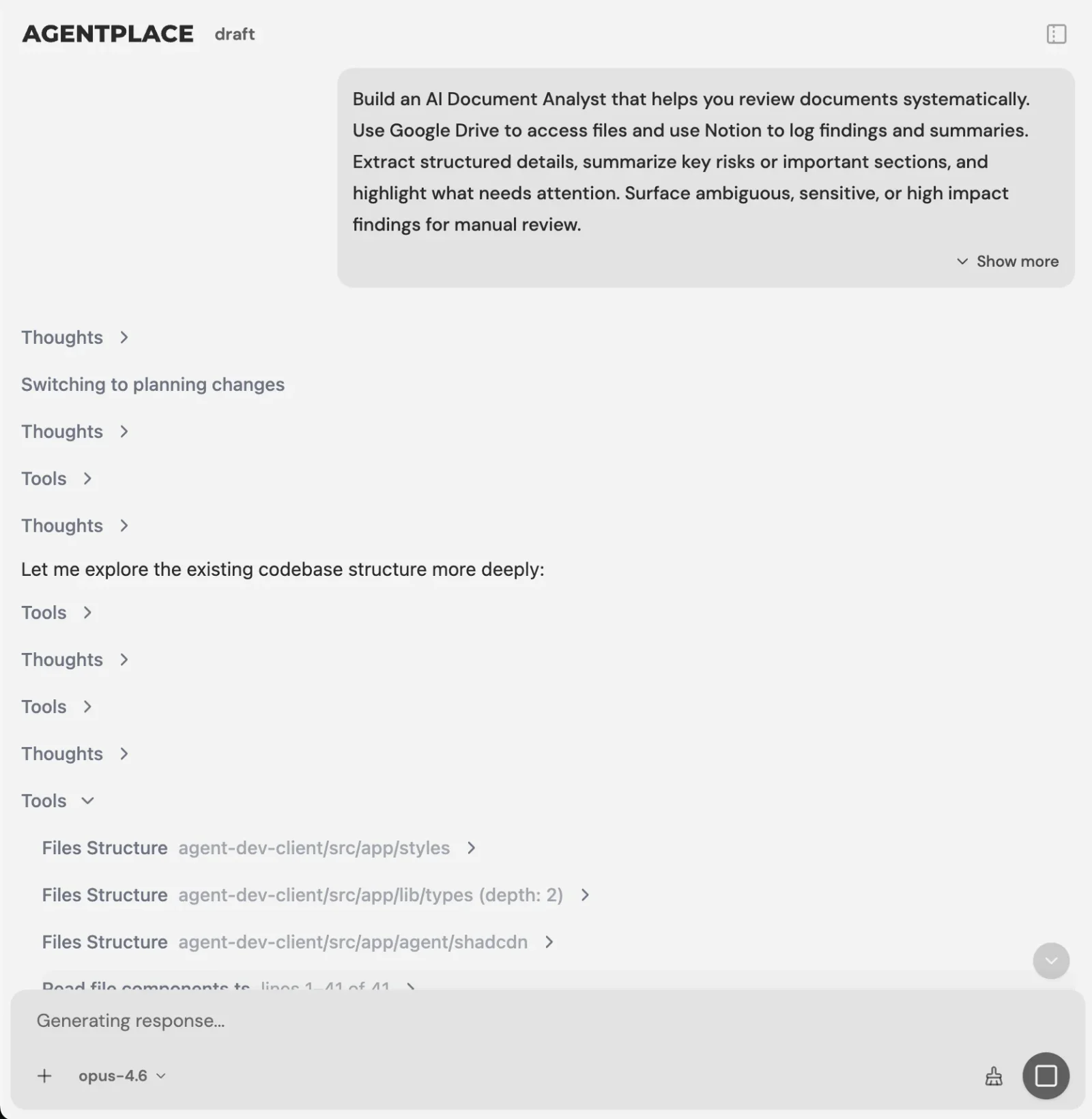 You describe the business task in plain language. The Builder asks what is missing.
You set it up by describing the outcome, for example:
“Help our shoppers understand where an order is. Use our order records and the carrier events. Show the events in order with our own delivery policy beside them. Never call a parcel lost until the carrier record supports it. If a delivered scan is disputed, open a missing-delivery investigation and send it to Priya with the timeline attached.”
The AI Builder discusses the idea, clarifies requirements, creates the agent and helps test it. You choose when to publish. No code is required.
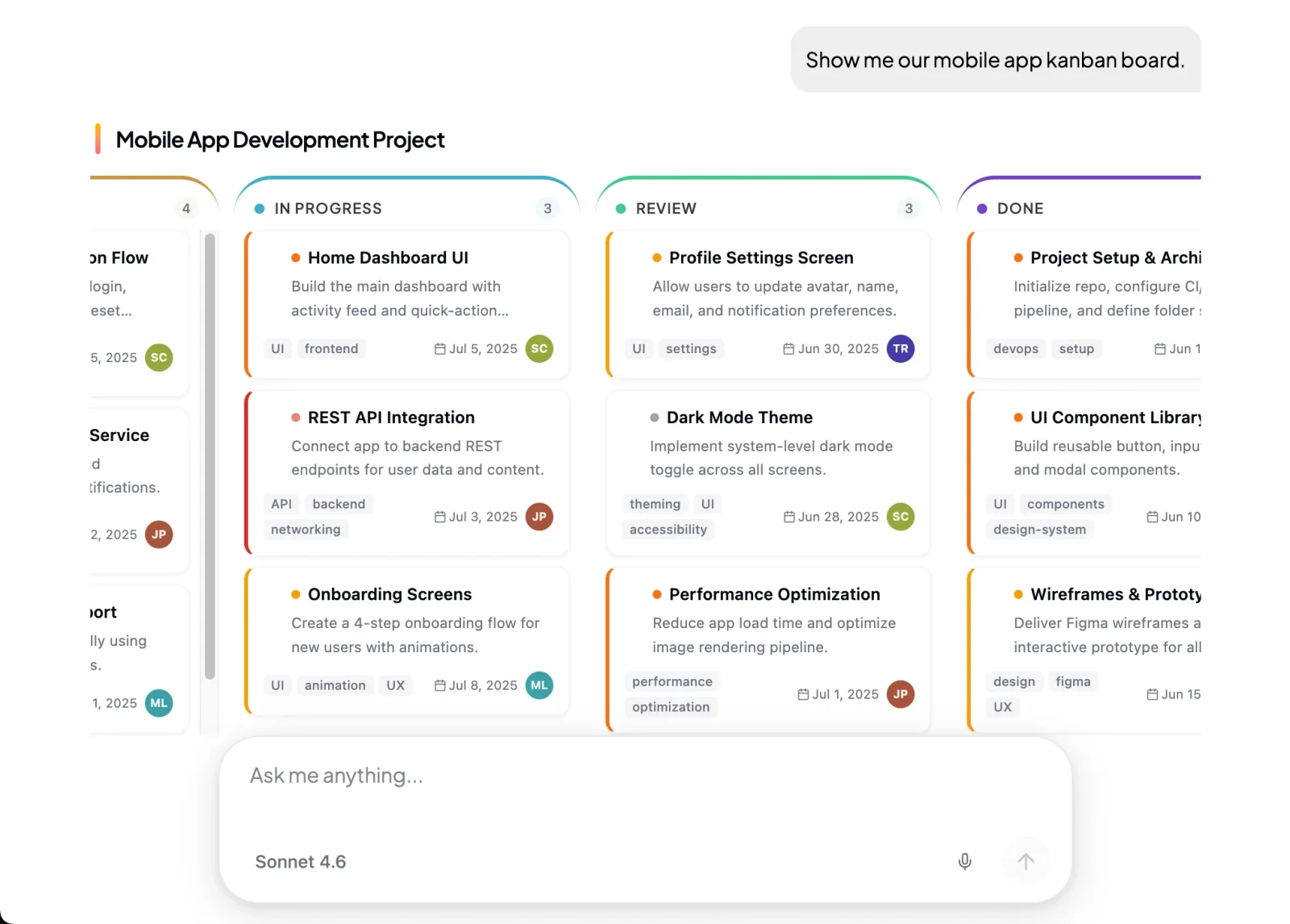 The agent controls the page, so the result arrives as a screen the customer can use.
What stays where it is:
- Your store, scheduler or practice system keeps the records and stays the authority on status.
- The agent connects through Composio’s integration catalog or compatible MCP tools. You authorize each account and its actions.
- A published agent exposes an MCP connection for compatible clients, subject to authentication and its access settings.
- Supported connections such as phone, WhatsApp or Telegram can extend the experience after setup. The web page is the primary place to work.
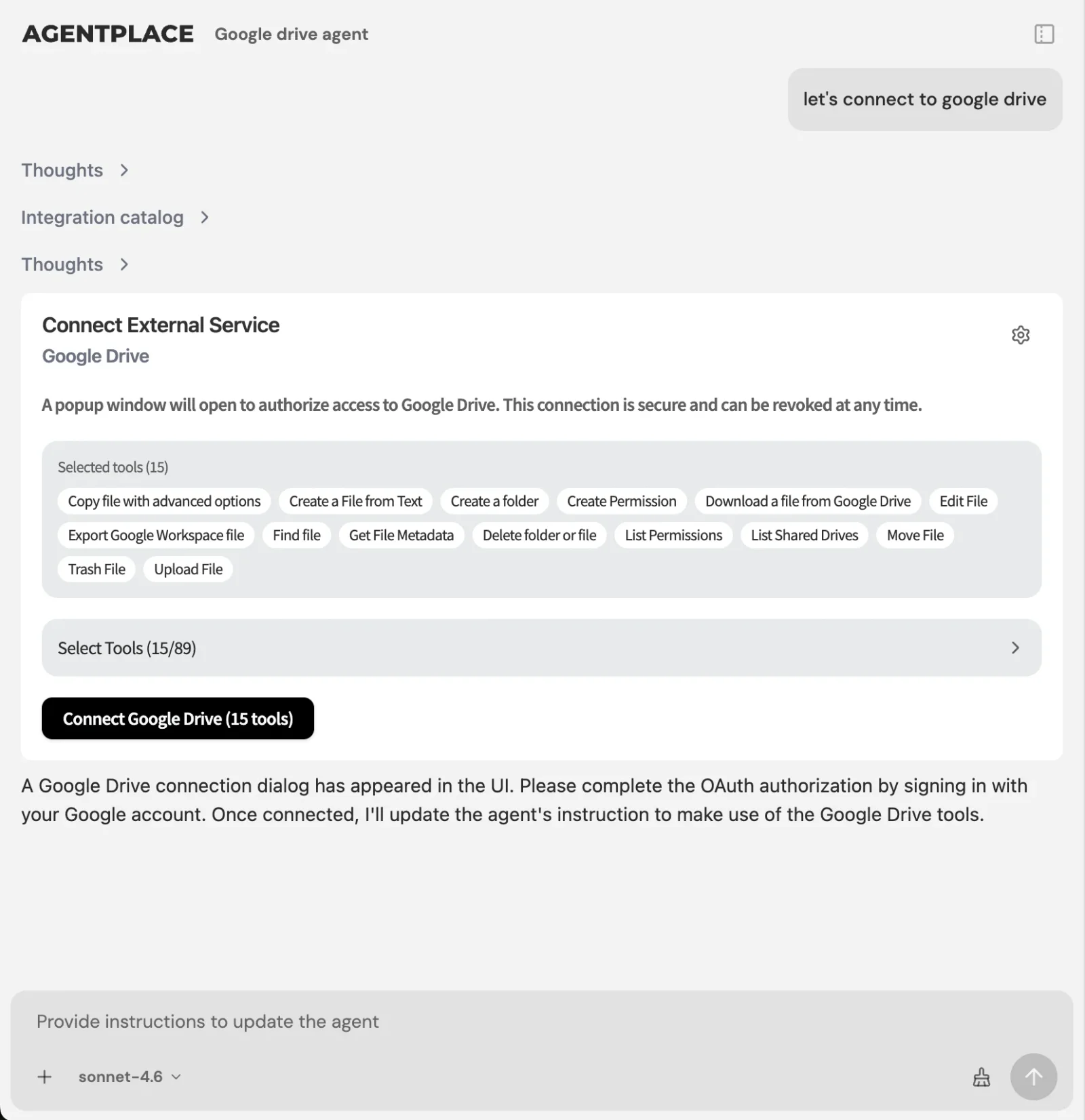 Connections are authorized per account, and the enabled actions are a separate choice.
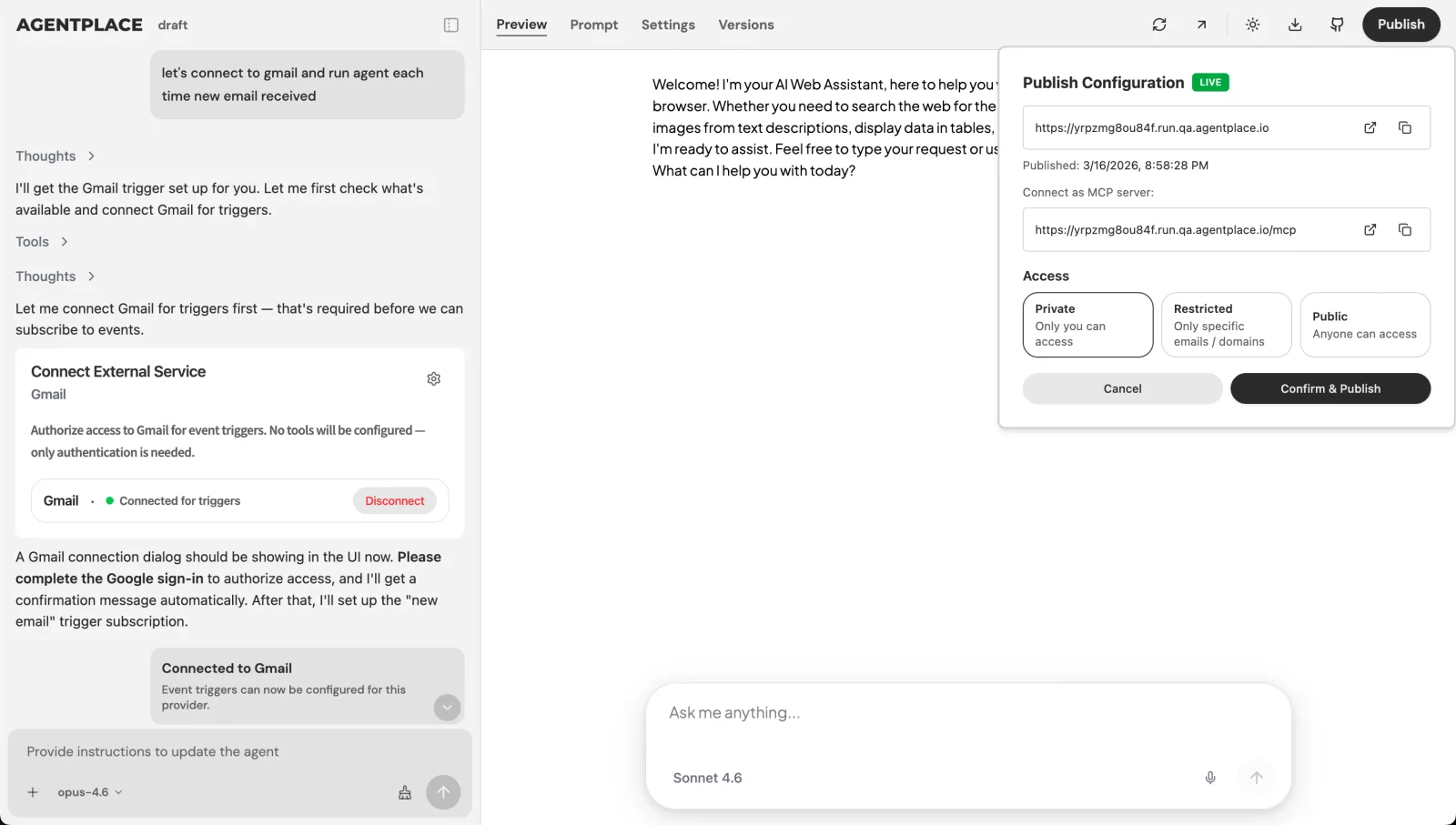 Publishing gives the agent its own URL, with access settings you control.
Pricing: Agentplace has a free plan and paid plans that use AI credits. A credit is not a customer message. See pricing.
Templates to start from: Order tracking explanations · Camera and lens finder · Roofing estimate builder
For the full build sequence, see how to build an AI agent for your business. For the knowledge side, agent skills covers how reusable guidance works beside a connection.
When is plain text the better answer?
- Is the answer one sentence? Then say it. “We’re open until six” needs no component.
- Are you building for your own team inside ChatGPT or Claude? An MCP app in that client is the shorter route, and you own neither the page nor the customer’s attention.
- Do your customers already know what they want? A fast checkout or booking page serves them better than a conversation.
- Is the question about a fixed policy? Documented FAQ content and a support chatbot may be enough.
- Is the bottleneck data quality? Fix the catalogue, the rate card or the service rules first. An interface over bad data shows it faster.
- Do customers describe an outcome and need help reaching it? That is where a customer-facing AI agent built with Agentplace fits.
Quick checklist
- Pick the one question your customers ask daily
- Write down what the answer should look like on screen
- Name the system of record for every fact that changes
- Decide what the agent may never show without a confirmation
- Decide which cases go to a person, and who
- Test a normal case, a missing record and a request you should refuse
- Give the customer a URL they can open on any device
Related reading: what is MCP? · what is generative UI? · generative UI examples · dynamic UI with AI · conversational UI examples · what is an AI website?
Bottom line
MCP tools let an agent do the work. MCP apps let the person see it, correct it and finish it.
- If you want a rendered result inside an AI client your team already uses, build an MCP app for that client and keep it narrow.
- If the person who needs the result is your customer, give them a customer-facing AI agent built with Agentplace. It asks what it needs, applies your rules, reads live status from your systems, shows the order, the estimate, the shortlist or the slot on its own page, revises it when they change a detail, and hands the exceptions to the right person with the context attached.
Questions and answers
Frequently asked questions.
What are MCP apps?
MCP apps are MCP servers that return an interface along with their data, so the AI client can render a widget the person reads and uses. A tool call books the slot or prices the job. The app is what the person sees on screen afterwards, instead of a description of it.
What is the difference between an MCP tool and an MCP app?
A tool is an action the agent can call, and it returns structured data for the model to interpret. An app returns an interface for the person to use. Tools do the work. Apps show the result. Most useful setups need both, because an interface with no live data behind it is decoration.
Do I need MCP apps to give my agent an interface?
No. MCP apps are one way to get a rendered result, and they depend on the client supporting that layer. A customer-facing AI agent built with Agentplace already controls its own page, so the interface comes from the agent itself and does not depend on which AI client the customer happens to use.
Is an MCP app the same as a chat widget on my website?
No. A chat widget is a bubble that returns text in a thread. An MCP app returns a component the host application draws, such as a table, a form or a bookable slot. The person can act on it in place instead of reading a description and typing a follow-up.
Which MCP capabilities are specified today?
The architecture overview describes servers exposing tools for executable operations, resources for context and prompts for reusable templates. The interface layer on top is newer and support differs between clients. Check what the specific client you plan to use will actually render before promising a customer anything.
Can an MCP app take a booking?
The interface can collect the request. The booking itself happens in the connected system, and only its response proves the slot is held. Treat a filled-in form as an intent and a returned booking reference as the confirmation. Never show a confirmation the scheduler did not give you.
Do MCP apps work in every AI client?
No. A client has to support rendering a returned interface, and that support varies. Where it is missing, the person sees the text result instead. This is the main reason a business that needs a dependable customer experience should own the surface its customers open.
Do I need to write code to build one?
Writing an MCP server is a development task. Building a customer-facing agent that shows results on its own page is not: with Agentplace you describe the business task in plain language and the AI Builder creates and helps test the agent. No code is required to start.
Can my Agentplace agent be used over MCP by ChatGPT or Claude?
A published agent exposes an MCP connection for compatible clients, subject to authentication and its access settings. Whether that client draws an interface is up to the client. The agent's own page stays the place where the full interface works.
Does an MCP app know my live inventory?
Only through a connection you authorize. Static knowledge covers descriptions, policies and rules. Stock, availability, prices and order status change, so they have to come from the system of record at the moment the answer is given.
Put this into practice
See the customer experience.
Explore a concrete example related to this article, then adapt the agent to your business.
Create my AI agentStart free with your business idea. The AI builder can help you explore it and create your agent. No technical specification needed. Sign in to continue. Pricing and limits · How the builder works