
Conversational UI: 10 Examples and When a Form Still Wins

The short answer
Conversational UI lets people describe what they want in words instead of filling in fields. It suits requests that are open-ended or messy. Forms still win for short structured data. A customer-facing AI agent built with Agentplace gives the conversation its own page, in text or voice, with an interface that changes as the request changes.
Key takeaways
- A customer whose request does not fit your fields either guesses an option or leaves. A form cannot ask a follow-up question.
- A custom GPT serves people who are already inside ChatGPT. An agent on a page you control applies your business rules, reads authorized systems and takes the next step.
- A customer-facing AI agent built with Agentplace has its own page and URL. It asks the questions that change the answer, applies your rules, and shows the result on screen.
- Conversation handles the unstructured half of a request. The agent should never state availability, a price or an order status from memory. Those come from the system that holds them.
- Start by reading 20 real enquiries from your inbox and listing the questions your team always has to ask back. That list is the conversation.
The short answer
Conversational UI is an interface where the customer describes what they want in words, and the software asks for the rest.
Three things decide whether you need one:
- Check whether customers can name what they want in your own terms. If they can, a short form is faster.
- List the questions your team always has to ask back. That list is the conversation.
- Decide what the interface shows back: a shortlist, a table, a quote, a document.
A customer-facing AI agent built with Agentplace is the practical way to put this on a website. The agent gets its own page and URL, asks the questions that change the answer, applies your business rules, and shows the result on screen in text or voice.
If your visitors arrive knowing the service, the size and the date, a clean form and a fast checkout will serve them better.
What is conversational UI?
Conversational UI is a user interface built around turn-taking in natural language. The person says or types a request. The software answers, asks for what is missing, and acts.
It comes in four shapes:
- Chat, typed, on a website or in a messaging app
- Voice, spoken, on a page or over a phone line
- Hybrid, a conversation beside a screen the customer can read and tap
- Guided, a fixed script of questions, such as a quiz
The older name is a conversational interface. People now also search for it as an AI chat UI, because most new ones run on a language model.
What makes it different from a form is the follow-up question. A form asks everything up front and hopes the fields fit. A conversation finds out which questions matter for this customer.
For the chatbot comparison, read AI website vs AI chatbot vs AI website builder and one AI agent replacing a chatbot, forms and a booking flow. This article stays on the interface pattern.
What are 10 examples of conversational UI?
Each example is a business situation. The pattern repeats: the customer describes the situation, the interface asks what it still needs, and something concrete comes back.
The quoted customer words are composites of the enquiries these businesses receive, not quotes from named customers.
1. Booking an appointment in the conversation
A barbershop takes most of these requests after the desk has closed. That is the after-hours barbershop booking template.
- It asks the service, the barber, the length and the days that work
- It checks the diary before offering a slot
Example:
“Any chance of a cut and beard trim after six on Thursday or Friday?”
2. Choosing between two services that look the same on paper
A brow and wax studio lists two treatments at one price that differ in ways the page never states. The brow consultation template answers the question and books a consultation where suitability has to be assessed.
- It asks what the customer wants out of the visit
- It explains the difference in the customer’s terms, such as time in the chair or how long the result lasts
Example:
“What’s the difference between the gel and the hard-wax treatment? I’ve got sensitive skin.”
If your team can explain the difference in one sentence, write that sentence down. It is the raw material for every good recommendation.
3. An intake that replaces a long form
A plumbing contractor’s intake form gets abandoned because most of its fields do not apply to most callers. The plumbing missed-call text-back template texts the missed caller a link and takes the intake there.
- It asks the few questions that apply: the location, the hazard observed, who is affected, a safe callback number
- It skips the branches that no longer matter, and records what the caller saw without diagnosing the cause
Example:
“Water coming through the kitchen ceiling. It started an hour ago. I’ve turned the mains off.”
4. A quote conversation instead of a “request a quote” button
A roofing contractor’s quote button produces a lead. A conversation produces a number, or an honest reason there is no number yet. The roofing estimate template does the second.
- It collects the measurements, layers, access and material choice that drive the price
- It gives an itemized preliminary estimate with the assumptions stated, and flags what the survey has to confirm
Example:
“Roof’s about 1,800 square feet, one layer of shingles on it, no side access. Can it be done next month?”
5. Order status, asked in the customer’s words
An online retailer’s customers rarely have the order number to hand. The order status template works from what they do have.
- It accepts an email address, a postcode or a rough date
- It reads the current status from the order system and explains the carrier events in plain words
- It opens a missing-delivery investigation when the scan says delivered and the parcel is not there
Example:
“I ordered a desk lamp a week or two ago, should be two of them. Where is it?”
6. A reception call answered by voice
A garage door company hears from people whose hands are busy. The garage door call answering template takes the request by voice on the agent’s page.
- It takes the request out loud, confirms what it understood and checks the address against your coverage area
- It hands anything sensitive or unusual to a named person
Example:
“I’m standing outside the unit now, the shutter won’t lift. Can anyone come today?”
Voice struggles as requests get longer. Best AI voice agents for websites covers what to test.
7. A document the customer asks for and receives
Some requests end in a file. A law firm’s enquiry ends in the consultation confirmation the law firm consultation template produces.
- It asks the practice area, then offers times from the relevant attorney’s calendar
- It returns the confirmation with the fee and the preparation list, and leaves the case to the attorney
Example:
“Can I get a summary of what we discussed, with the fee and what to bring, so I can show my business partner?”
8. An enquiry that arrives in another language
A mobile pet grooming round gets enquiries in a language its form does not offer. The grooming intake template collects the same intake facts in either language, and names what is still missing.
- It answers in the language the customer wrote in
- It keeps your prices, policies and rules the same in every language
Example:
“¿Atienden a domicilio en el centro? Necesito una cita el sábado.”
Test every language you claim to support. Local conventions for dates, addresses and currency break first.
9. A follow-up on an enquiry that stopped halfway
Most abandoned enquiries at an event venue are an unfinished decision. The venue tour booking template holds the guest count, the date and the rooms asked about.
- It saves what the customer already said
- It follows up on a schedule you set, with the specifics, and stops when you say stop
Example:
“Still interested, I just need to check with my wife about the Saturday.”
10. A returning customer picking up where they left off
A hair salon colour client should not have to describe their history twice. The hair colour consultation template keeps the brief: the goal, the previous colour work, the questions for the colorist.
- The agent can retain the work and the decisions from earlier conversations
- Returning to private work requires the sign-in or session flow you configure
An anonymous device in a different browser arrives as a new visitor. Holding context across visits is a configuration choice, so make it deliberately.
Summary of the ten, by what each one needs.
| Example | What the customer gets on screen | What it needs connected |
|---|---|---|
| Barbershop booking, brow consultations (1, 2) | A shortlist, then a confirmed time | The calendar or booking system |
| Plumbing and grooming intake (3, 8) | A short set of questions, with the gaps named | Somewhere to store what arrives |
| Roofing estimates (4) | An itemized preliminary price with the assumptions shown | Your rate card and rules |
| Retail order status (5) | The current state of one order | The order or ticket system |
| Garage door voice reception (6) | A spoken answer, then a written follow-up | The same knowledge the web agent uses |
| Law firm confirmations, venue tours (7, 9) | A confirmed slot and a document to keep | The attorney’s or the venue’s calendar |
| Salon colour briefs (10) | A brief that survives into the next visit | The sign-in or session flow you configure |
When does a form beat a chat?
A form wins whenever the customer already knows the answer and typing it in prose is slower than tapping it.
- Is the data short and structured? Four fields and a date picker beat four turns of conversation.
- Does the customer already know exactly what they want? Do not make a repeat customer re-describe a repeat order.
- Are there legal or payment fields? Consent, terms and card details belong in explicit, labelled inputs the customer can read before submitting.
- Is it bulk entry? Twenty line items go in a table or a spreadsheet upload.
- Does the customer need a record? People want to see what they submitted, and sometimes print it.
- Is accessibility a hard requirement? A labelled form is the most predictable thing for a screen reader and for keyboard navigation. Follow the W3C’s guidance on form labels and instructions and keep an accessible form route to anything a customer must be able to submit. The Web Content Accessibility Guidelines are the standard to test against.
The Nielsen Norman Group has published usability research on conversational and voice interfaces since the first smart speakers. Its consistent finding: they handle simple requests well and struggle as the task gets more complex. That is a reason to keep your forms, and a reason to put the conversation where the complexity is.
What tools build conversational UI?
| Category | Good for | Where it stops |
|---|---|---|
| Form and quiz builders (e.g. Typeform, Outgrow) | Short structured input, fixed question paths | Cannot ask an unplanned follow-up question |
| Website chat widgets (e.g. Intercom, Tidio, Crisp) | Answering questions in a bubble on your pages | Usually ends at an answer or a handoff |
| Chatbot builders (e.g. Voiceflow, Landbot) | Designing and testing a scripted flow | The script has to anticipate every branch |
| Component libraries and chat UI kits (e.g. assistant-ui, Vercel AI SDK UI) | Building a React conversational UI yourself | Renders the conversation; you supply rules and integrations |
| Voice platforms (e.g. Vapi, Retell AI) | Spoken calls and phone-first interactions | No screen the customer can read while talking |
| Customer-facing AI agent built with Agentplace | Asking, applying your rules, and finishing the task | Needs your rules written down and accounts authorized |
Read the last column first. A tool that stops at an answer leaves the task with your team, and a UI kit leaves the business logic with your developers.
How does Agentplace help?
Agentplace creates AI agents that serve customers and help run a business. Each agent gets its own web page and URL. It uses business knowledge and authorized tools to deliver a personal plan, estimate, product comparison, document, or other result. The AI controls the interface and updates the work as customers make requests by text or voice.
The point for conversational UI is the last sentence. The agent is not confined to a chat window. It can take the request in text or voice and show whatever suits the task: a shortlist, a table, a quote, a form, a document.
In practice, it works like this:
- The customer opens the agent’s page and describes the situation.
- The agent asks the few questions that change the answer.
- It applies your rules on services, pricing, eligibility and timing.
- It reads live availability or status from the system that holds it.
- It shows the result on screen and revises it when the customer changes something.
- It completes the task, or passes it to a named person with the context attached.
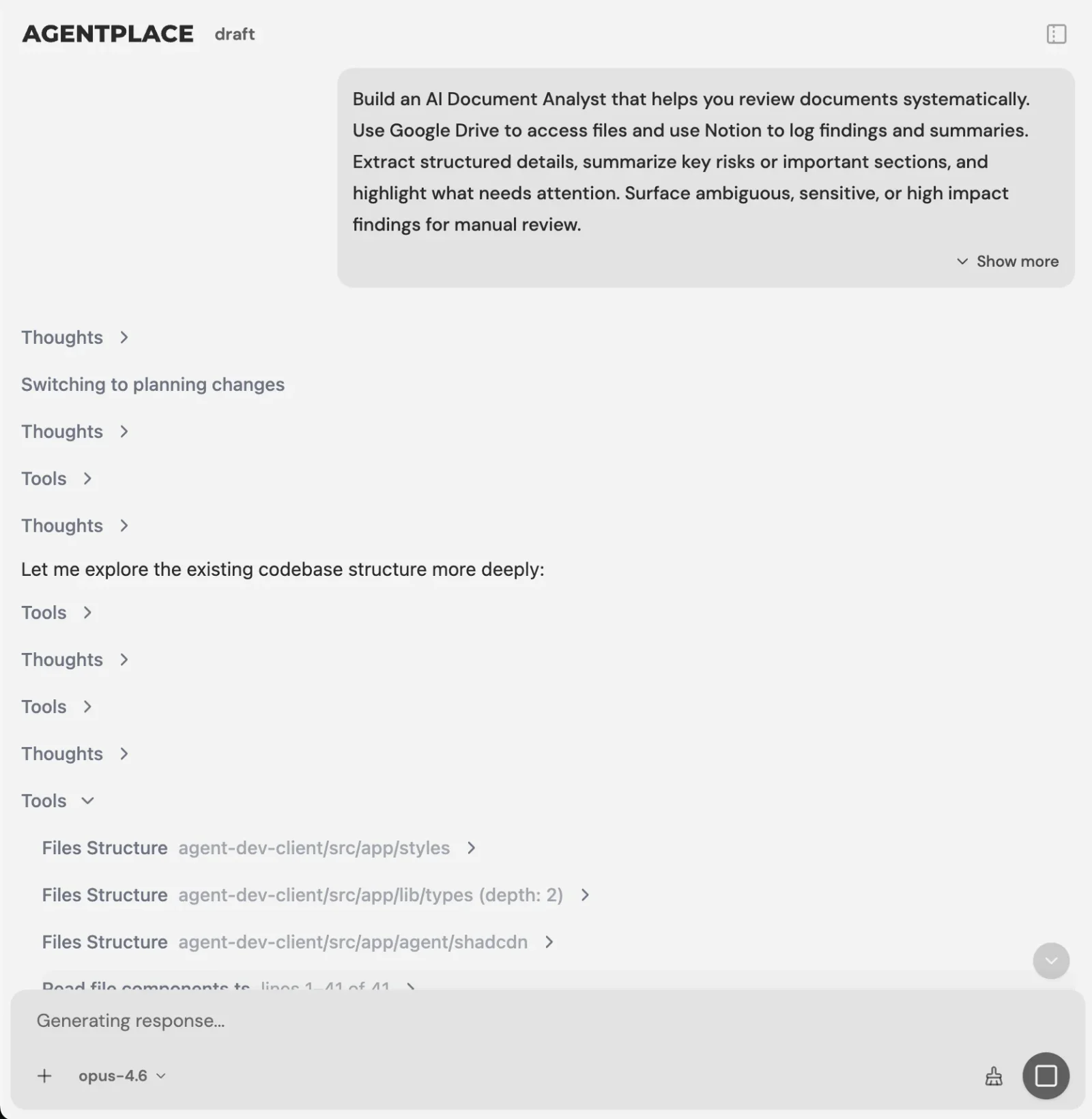 You describe the business task in plain language, and the AI Builder asks for what it still needs.
You set it up by describing the outcome, for example:
“Help customers book a cut or a colour. Ask which service, who with, and which days work. Check the calendar before offering a time. Quote from the price list only, never from memory. Anything about a complaint, a colour correction or a wedding party goes to Dana.”
The AI Builder discusses the idea, clarifies requirements, creates the agent and helps test it. You choose when to publish. No code is required.
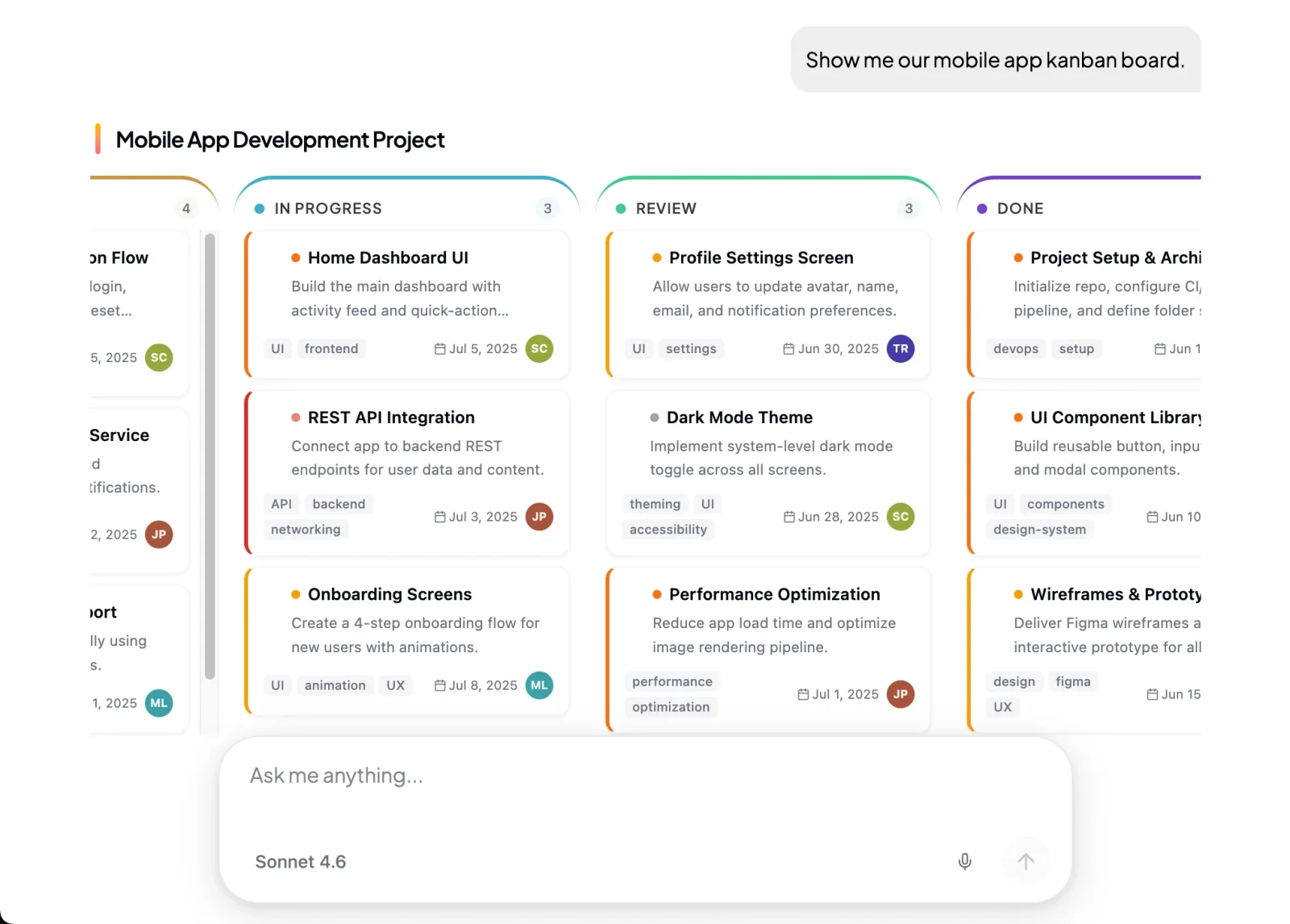 The agent answers with a screen suited to the task: a table, a shortlist, a form or a document.
Here’s what stays where it is:
- Your booking system, CRM or order system still holds availability, records and status.
- The agent connects to them through Composio’s integration catalog or compatible MCP tools, and you authorize each account and its actions.
- Supported connections such as phone, WhatsApp or Telegram can extend the experience after setup. The agent’s web page is the primary place to work.
- Your forms stay where they already work. Many businesses run both.
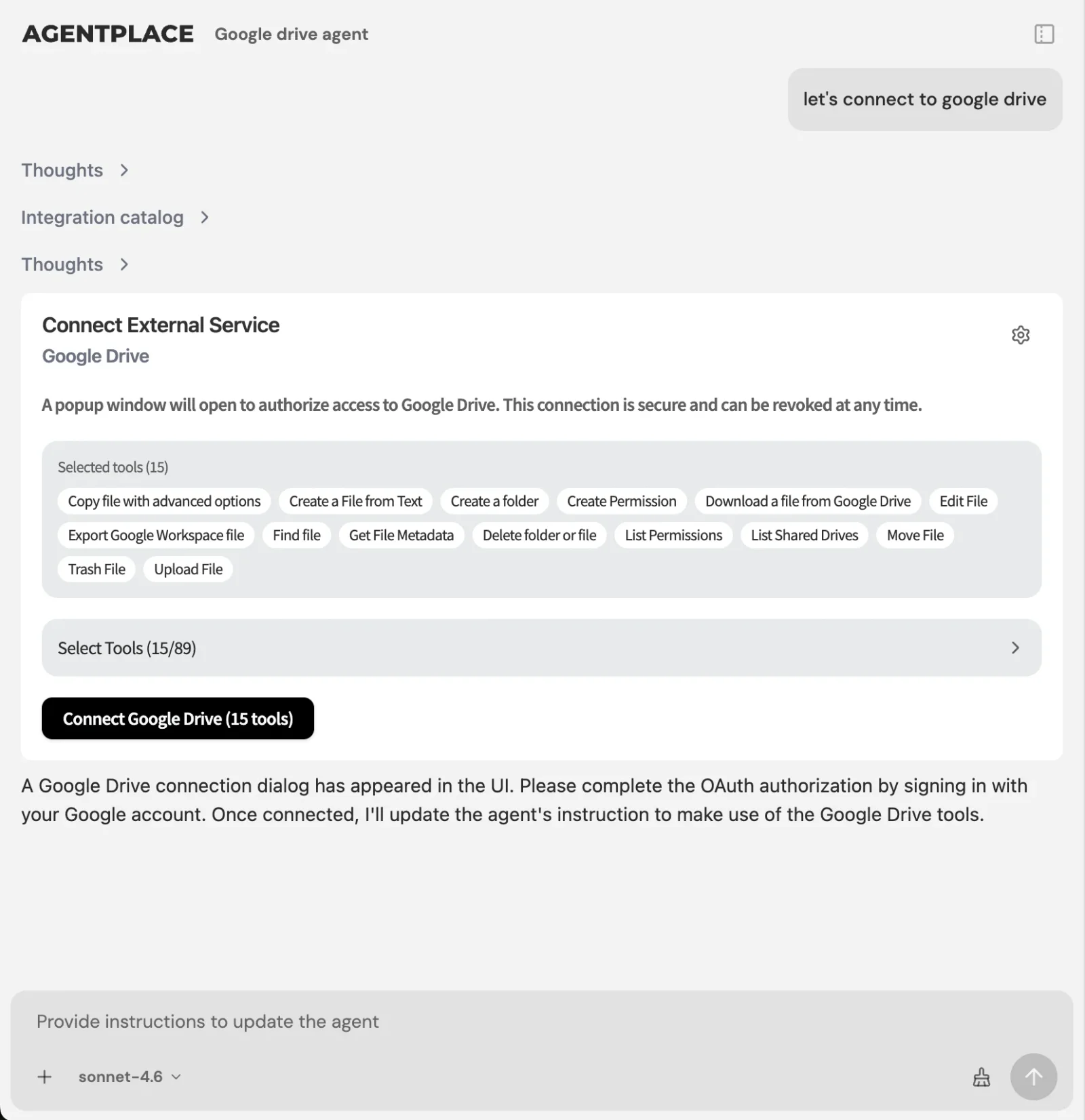 Connections let the agent read and write in the systems the business already runs.
The agent should not state availability, a price or an order status from memory. It should not promise something your systems have not confirmed. Write that boundary into the instructions, then test it.
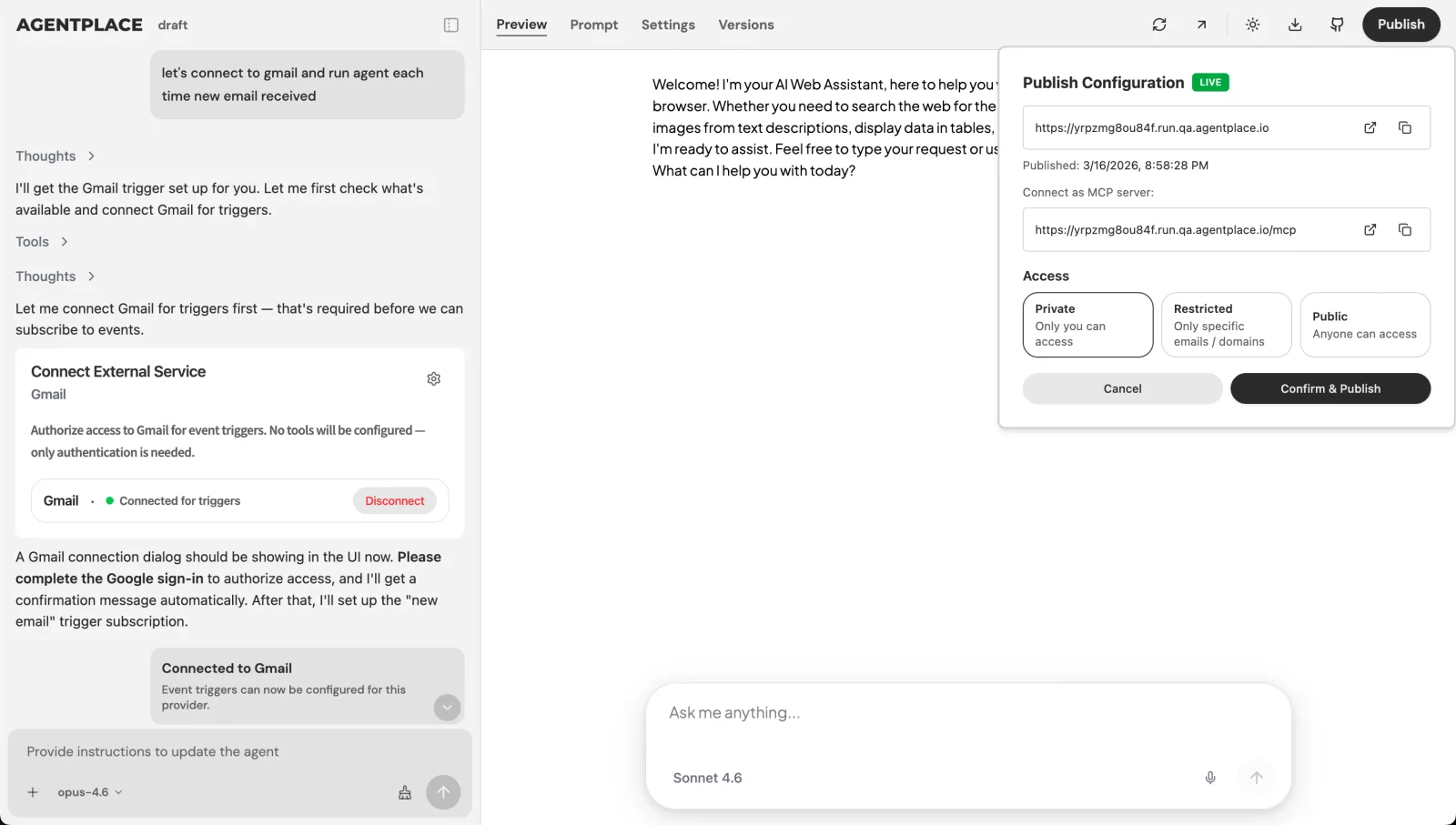 Publishing gives the agent its own page and URL, with the access settings you choose.
Pricing: Agentplace has a free plan and paid plans that use AI credits. A credit is not a customer message. See pricing.
Build a conversational interface customers can open, starting from a template: AI Agent for After-Hours Barbershop Bookings · AI Agent for Source-Based Contractor Reception Answers
When don’t you need conversational UI?
- Do your visitors arrive knowing the product and the date? Shorten the form and speed up the checkout.
- Is your catalogue three items with one obvious path? A quiz or a product finder is cheaper to maintain. See interactive product finders and AI buying guides.
- Do you mainly get policy and logistics questions? A website chat widget with a good help centre may be enough.
- Are you only looking for a nicer message list in your own app? A React chat UI kit solves that directly.
- Is your bottleneck internal, after the customer has decided? Look at workflow automation rather than a customer-facing interface.
- Do customers describe situations in their own words, and does your team spend hours translating those into the right service? That is where a customer-facing AI agent built with Agentplace fits.
Quick checklist
- Read 20 real enquiries and mark which ones your form could not have captured
- Write down the questions your team always has to ask back
- Cut every question whose answer would not change the recommendation or the next step
- Decide what the interface shows on screen, as well as what it says
- Name the facts the agent must read from a live system rather than state from memory
- Decide what gets escalated, and to whom, by name
- Keep an accessible form route to anything a customer must be able to submit
- Test voice, and every language you claim to support, before launch
Related reading: what is generative UI · what is an AI website · how to build an AI agent for your business · one AI agent instead of a chatbot, forms and a booking flow
Bottom line
Conversational UI earns its place when the customer cannot name what they want. A form earns its place when they can.
- If your visitors already know the service, the size and the date, put the effort into a shorter form and a faster checkout.
- If they arrive describing a situation, give them a customer-facing AI agent built with Agentplace. It asks the few questions that matter, applies your rules, reads live status from your systems, shows the result on screen in text or voice, and carries the customer through to a booking, a quote or a document.
Questions and answers
Frequently asked questions.
What is conversational UI?
Conversational UI is an interface where the person says or types what they want in their own words, and the software replies and asks for what it still needs. Chat, voice and messaging are the common forms. It replaces the step where the customer has to translate a request into your fields and menus.
What are examples of conversational UI?
Booking an appointment by describing the service and the days that work. Comparing two similar services. Intake that replaces a long form. A quote conversation. Order status. A voice reception call. Requesting a document. An enquiry in another language. A follow-up on an unfinished enquiry.
What is the difference between conversational UI and a chatbot?
Conversational UI is the design pattern. A chatbot is one product that uses it, usually to answer questions inside a chat window. A customer-facing AI agent built with Agentplace uses the same pattern to complete the task: it checks your rules, reaches your systems and shows the result on its own page.
When is a form better than a chat?
When the data is short and structured, when the customer already knows exactly what they want, for legal or payment fields, for bulk entry, and whenever the customer needs a record of what they submitted. A labelled form is also the most predictable thing for a screen reader to work through.
Can a conversational interface use voice?
Yes. Voice suits short requests and hands-free moments, and it pairs well with a screen the customer can read while they talk. Agentplace agents support text and voice on the agent's own page, and supported connections such as phone, WhatsApp or Telegram can extend the experience after setup.
What is conversational UI design?
Deciding what the interface asks, in what order, and what it shows back. The useful discipline is to ask only questions that change the answer or the next step, to confirm what was understood, and to say plainly when nothing fits rather than guessing.
Is conversational UI good for UX?
It helps when the customer cannot name what they want and needs guiding. It hurts when it makes a simple task longer, such as typing a date you could have tapped. Good practice is to offer both: a conversation for the undecided, a short form for everyone else.
How do you build conversational UI in React?
Component libraries and chat UI kits give you the message list, input, streaming and typing states. They render the conversation. You still have to supply the model, your business rules, and the connections to your booking or order systems, which is where most of the work lives.
Does conversational UI mean replacing my website?
No. Many businesses keep their pages and add a conversation where customers get stuck. An Agentplace agent gets its own page and URL that you can link to from your site, so nothing has to be rebuilt to try it.
Is conversational UI accessible?
It can be, and it needs testing. Free text helps people who find complex forms hard to complete. A labelled form is more predictable for screen readers and keyboard navigation. Keep an accessible form route to anything a customer must be able to submit.
Put this into practice
See the customer experience.
Explore a concrete example related to this article, then adapt the agent to your business.
Create my AI agentStart free with your business idea. The AI builder can help you explore it and create your agent. No technical specification needed. Sign in to continue. Pricing and limits · How the builder works