
10 AI Agents You Can Build for Your Business Website

The short answer
Start with the one conversation your website can't handle: the call nobody answers, the service nobody explains, the quote nobody sends. Build one agent for it. A customer-facing AI agent built with Agentplace gives visitors a page where that job gets finished. If visitors already know what they want, fix the booking page instead.
Key takeaways
- Some visitors leave without contacting you because nobody was there to answer one practical question: which service fits, what it costs, or whether you cover their address.
- A custom GPT helps people who are already inside ChatGPT. A website agent serves the customer on a page you control, where it applies your service rules and reads the systems you authorize.
- A customer-facing AI agent built with Agentplace gets its own web page and URL. It asks the questions, applies your rules, and finishes the job the visitor came for.
- An agent must not state availability, a price or an order status from memory. Those come from the connected system at the moment of the answer.
- Build one agent for the enquiry you answer most often. Test it against twenty real messages from your inbox before you add a second.
The short answer
Pick the one conversation your website can’t handle today, and build an agent for that.
- Name the job. Call answering, explaining which service fits, pricing an enquiry, booking, or order status.
- Write down the rules a good employee uses: services, area, fees, who takes what, when to say no.
- Connect the one system holding the live answer: the diary, the order records, the rate card.
A customer-facing AI agent built with Agentplace gives the visitor a page and URL of their own to open. On that page it asks the few questions that matter. It applies your rules, reads the connected system and finishes the job.
Some of your visitors already know the service and the date they want. Those visitors don’t need a conversation. A faster booking page will serve them better.
What should an agent on your website actually do?
Finish a job the visitor came to do.
Owners describe the same four symptoms:
- plenty of traffic, very few enquiries
- enquiries too thin to act on
- the same five questions answered by hand every day
- calls landing when nobody is at the desk
Here is the kind of message that arrives at 9pm:
“My garage door is making a grinding noise and won’t close all the way. I’m in Oakridge. Can someone look at it tomorrow?”
One sentence. It carries the job, the symptom, the address and the urgency. A contact form keeps the name and loses the rest.
Many owners try a custom GPT first. It has a shareable link on chatgpt.com, and it helps people already working in ChatGPT.
That 9pm message lands in a chat away from your site. Nothing there reads your diary or checks your service area, so the job still waits for you.
| What the visitor is doing | What a static page gives them | What an agent can do |
|---|---|---|
| Working out which service they need | A list of every service | Asks two questions and names the one that fits |
| Guessing at a price | “Contact us for a quote” | Builds a priced estimate from your rate rules |
| Trying to book | A form, then a wait | Offers real openings from the connected diary |
| Checking on something already bought | A tracking link | Explains the actual events and what happens next |
Rule of thumb: if the visitor still has to wait for a person to take the next step, the agent hasn’t finished its job.
What are 10 AI agents you can build for your website?
Ten jobs that already happen on your phone and in your inbox, each named by the business type that runs it.
1. Answer the calls nobody picks up
- Who it’s for: a garage door company, or any trade whose phone rings while the van is out.
- What it does for the customer: they describe the job, the symptom, the address and the urgency. They get an eligible appointment or a clear decline.
- What it needs from you: your service area, job types, safety and visit rules, and the diary it books into. An out-of-area address changes the answer before the customer commits to a slot.
Template: AI agent for garage door call answering and booking.
2. Explain which service actually fits
- Who it’s for: a brow and wax studio, where clients ask for a service by name and mean something else.
- What it does for the customer: they describe their goals and previous work, and add reference photos. They get a consultation booked with the right provider.
- What it needs from you: your service list, who performs what, and your rules about previous work. The agent books the consultation and should not promise a result before an assessment.
Template: AI agent for brow consultation and shape enquiries.
3. Turn an enquiry into a priced estimate
- Who it’s for: a roofing contractor who sends somebody out before quoting anything.
- What it does for the customer: they give dimensions, pitch, layers, access and photos. They get an itemised preliminary estimate with its assumptions shown.
- What it needs from you: labour rates, material prices, waste factors, removal rules, access surcharges and exclusions. Every figure comes from your rate rules at the moment the estimate is built, never from the model’s own idea of roofing prices.
Template: AI roofing estimate agent.
4. Take the booking while the desk is closed
- Who it’s for: a barbershop, where people decide to book on a Sunday night.
- What it does for the customer: they choose the service, the barber, the length and the day. They get a real appointment.
- What it needs from you: services with their durations, the barber rota, and a connected diary. The agent offers only openings the diary returns, because a closed office does not mean a free chair.
Template: AI agent for after-hours barbershop bookings.
5. Handle new-patient intake and the first visit
- Who it’s for: a dental practice whose front desk repeats the same new-patient call all day.
- What it does for the customer: they ask about availability, plan questions, first-visit fees and parking. They get a visit plan and a confirmed appointment.
- What it needs from you: registration requirements, first-visit fees, the plan questions you accept, and scheduling preferences. Administrative questions get answered; anything clinical goes to the team.
Template: AI dental new patient inquiries agent.
6. Answer “where is my order”
- Who it’s for: an online retailer whose support inbox is mostly one question.
- What it does for the customer: they give an order reference and get a readable timeline of the actual carrier events. They also get a missing-delivery investigation where your policy allows one.
- What it needs from you: the order system connected, your fulfilment rules and your remedy policies. Say which actions a customer may take themselves. Status is read from the connected records at the moment of the answer, never recalled from an earlier conversation.
Template: AI order tracking explanations agent.
7. Book a consultation and say what to bring
- Who it’s for: a law firm that loses enquiries while deciding who should take the call.
- What it does for the customer: they name the practice area. They get suitable times, the consultation fee, and clear preparation instructions.
- What it needs from you: practice areas, attorney calendars, fees, approved wording and confidentiality rules. The agent schedules and explains administrative terms; it does not assess the case.
Template: AI legal consultation scheduling agent.
8. Answer resident and tenancy questions
- Who it’s for: a letting agency answering the same tenancy questions every week.
- What it does for the customer: they ask whether they can decorate, or who fixes the boiler. They get a property-specific answer with the clause behind it.
- What it needs from you: property and tenancy records, service responsibilities, owner authorities, and your maintenance workflow. It answers documented questions and flags the ones that need the property manager.
Template: AI tenant property questions agent.
9. Book a viewing or a tour
- Who it’s for: a wedding venue or event space arranging viewings by email.
- What it does for the customer: they give a date, a guest count and an event type. They get a confirmed tour slot with a short visit agenda.
- What it needs from you: capacity, event rules, available services, and the viewing calendar. Tour slots come from that calendar when the visitor asks, never from a list the agent was given once.
Template: AI venue tour booking agent.
10. Screen whether a trip suits the traveller
- Who it’s for: an adventure tour operator whose cancellations come from people booking the wrong trip.
- What it does for the customer: they state walking tolerance, altitude experience and accommodation expectations. They get a tour-fit comparison and a departure request.
- What it needs from you: the documented demands of each itinerary, such as walking hours, terrain and altitude. Add your departure criteria. A useful screening agent can say nothing fits and name the closest alternative.
Template: AI adventure tour suitability agent.
To browse the rest by job, open the use-case library.
What does each one need from you?
Three things each time. The first is your rules, written down. The second is one system to read. The third is a line the agent must not cross.
| Agent | Business type and cluster | What you supply | Where it stops |
|---|---|---|---|
| Call answering and booking | Garage door company (HVAC & Home Services) | Service area, job types, safety and visit rules | A submitted lead is not an accepted job |
| Service consultation | Brow and wax studio (Beauty & Salons) | Service list, providers, previous-work rules | No promised result before assessment |
| Priced estimate | Roofing contractor (HVAC & Home Services) | Rates, material prices, waste factors, exclusions | Preliminary only, the survey confirms |
| After-hours booking | Barbershop (Beauty & Salons) | Services, durations, rota, connected diary | Only openings the diary returns |
| New-patient intake | Dental practice (Healthcare) | Registration rules, first-visit fees, availability | Administrative questions, not clinical |
| Order status | Online retailer (Ecommerce & Retail) | Order records, fulfilment and remedy policies | Status read live, never recalled |
| Consultation booking | Law firm (Legal Services) | Practice areas, calendars, fees, approved wording | Scheduling, not case assessment |
| Tenancy questions | Letting agency (Property & Real Estate) | Tenancy records, responsibilities, workflows | Documented answers, manager for the rest |
| Viewing and tour booking | Event venue (Events & Venues) | Capacity, event rules, viewing calendar | Real slots only, from the calendar |
| Trip suitability | Adventure tour operator (Travel & Tours) | Itinerary demands, departure criteria | Can decline and offer an alternative |
Two kinds of information go in. Each is handled differently.
| Written down once | Fetched at the moment of the answer |
|---|---|
| Services, service area, policies, fees, rules | Diary openings and appointment slots |
| What each option suits, and who it doesn’t | Prices that depend on live rates or stock |
| Escalation rules and who takes the handoff | Order, delivery and booking status |
Anything that changes while you sleep belongs in a connected system, not in the agent’s instructions.
How does Agentplace help?
Agentplace creates AI agents that serve customers and help run a business. Each agent gets its own web page and URL. It uses business knowledge and authorized tools to deliver a personal plan, estimate, product comparison, document, or other result. The AI controls the interface and updates the work as customers make requests by text or voice.
In practice, it works like this:
- You describe the job in plain language and the Builder creates the agent.
- You add your rules, services, fees and boundaries, then authorize the accounts it reads.
- The visitor opens the agent’s page and explains what they want, by text or voice.
- The agent asks the few questions that matter and applies your rules.
- The result appears on screen as a booking, an estimate or a timeline, and updates as the visitor changes a detail.
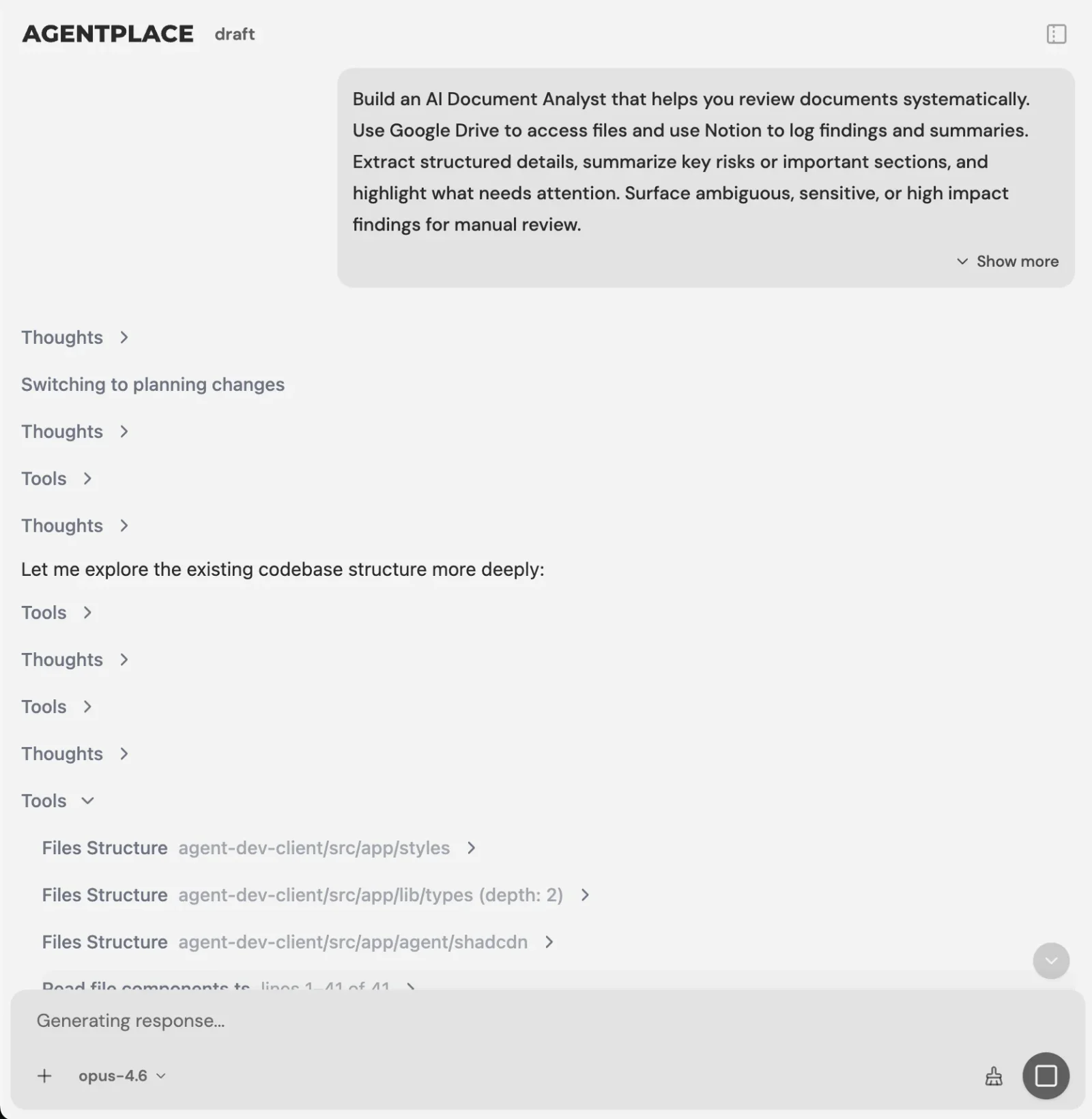 You describe the outcome you want and the Builder asks what it still needs to know.
You set it up by writing the instruction you would give a new employee, for example:
“Answer garage door service enquiries. Ask for the job, the symptom, the service address and how urgent it is. Only offer visits inside our service area. Never promise an arrival time before dispatch confirms it. Check the diary before offering a slot. Send anything involving a broken spring or a cable off the drum to Marcus.”
The AI Builder discusses the idea, clarifies requirements, creates the agent and helps test it. You choose when to publish. No code is required to start.
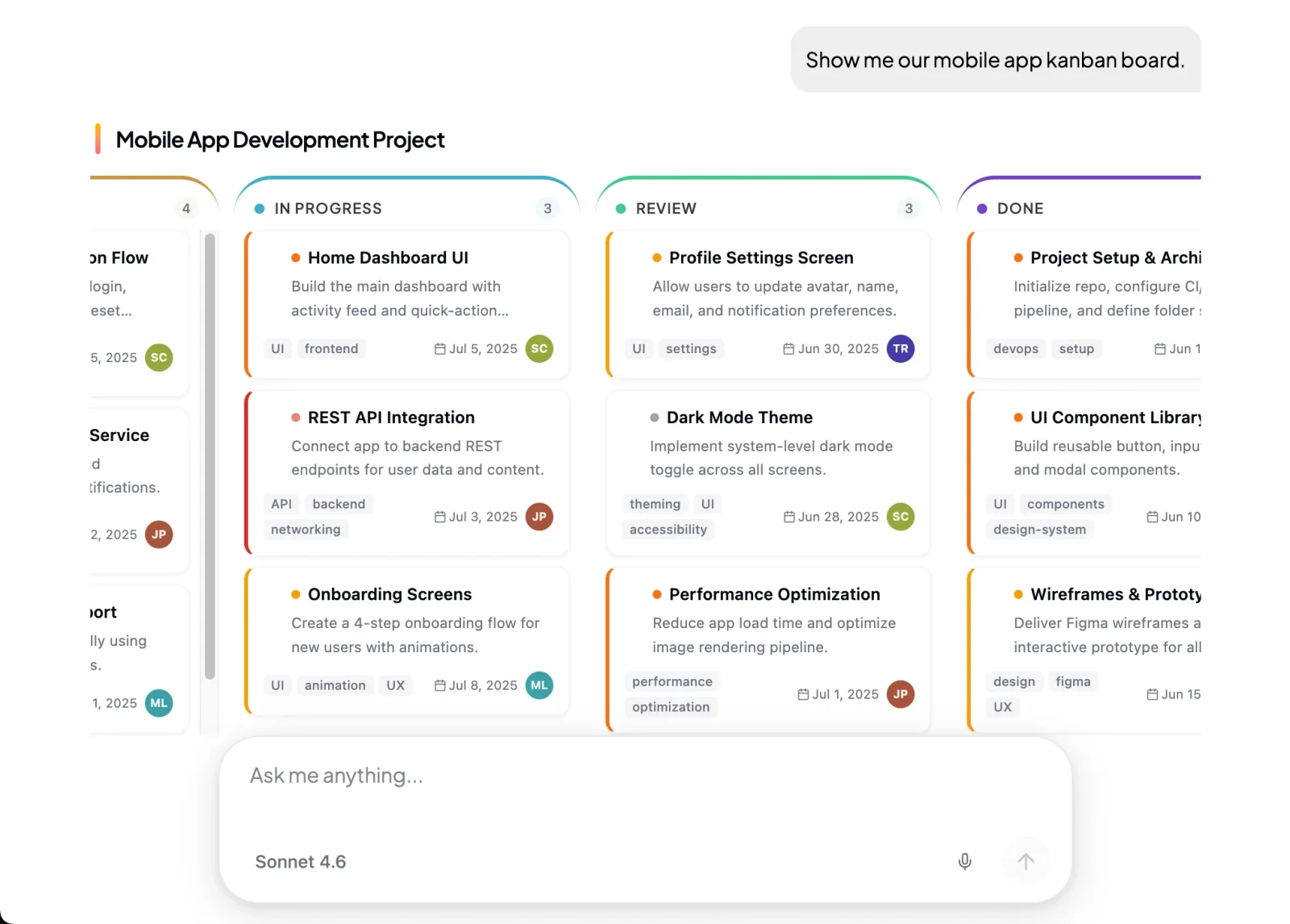 The agent answers with real screens: tables, forms, option cards and summaries.
What stays where it is:
- Your scheduling system keeps availability and the bookings.
- Your order or job system keeps the records the agent reads.
- The agent connects to both through Composio’s integration catalog or compatible MCP tools, and you authorize each account and its actions.
- Supported connections such as phone, WhatsApp or Telegram can extend the experience after setup. The agent’s web page stays the primary place to work.
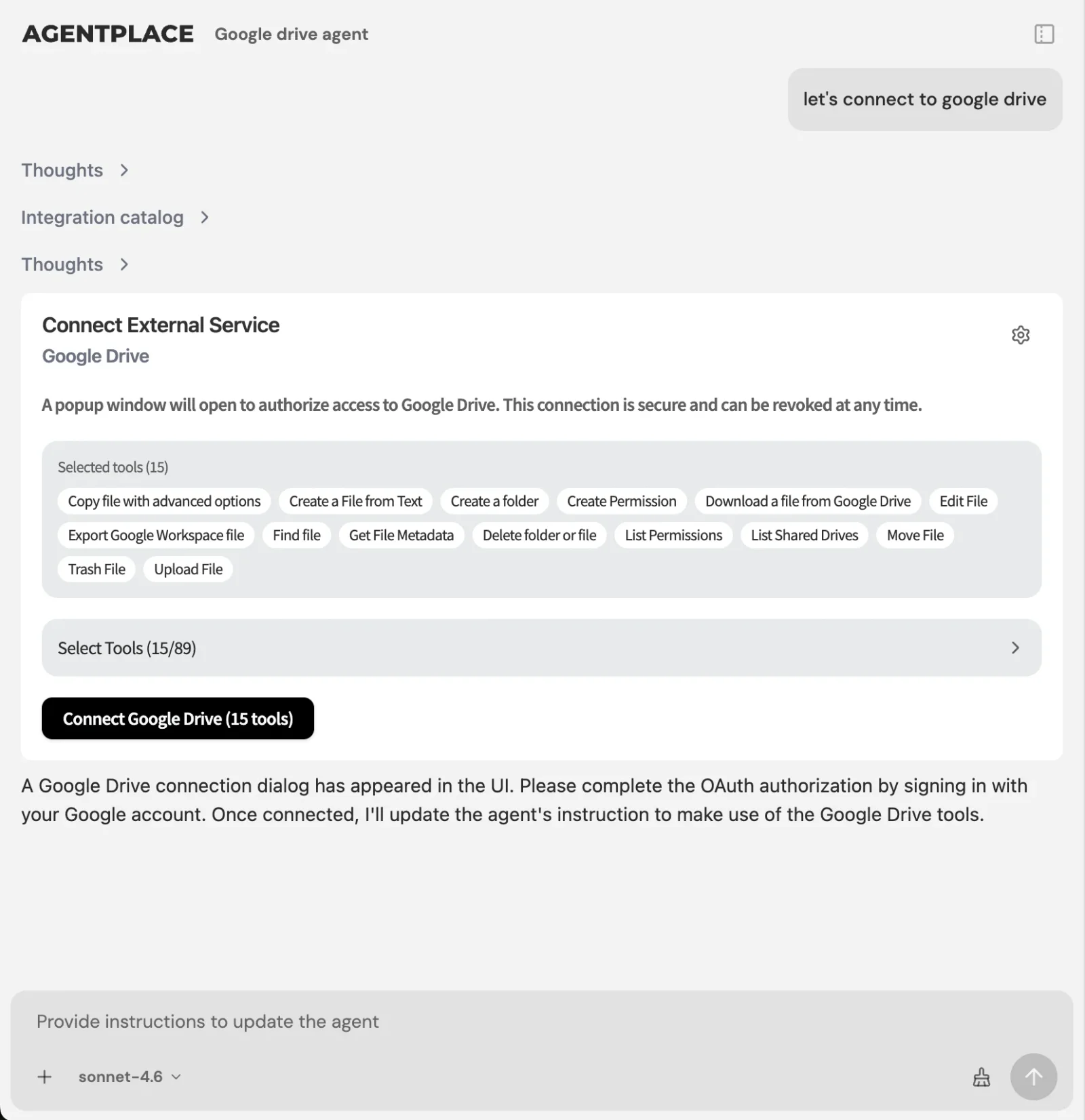 You authorize each account and switch on only the actions the agent needs.
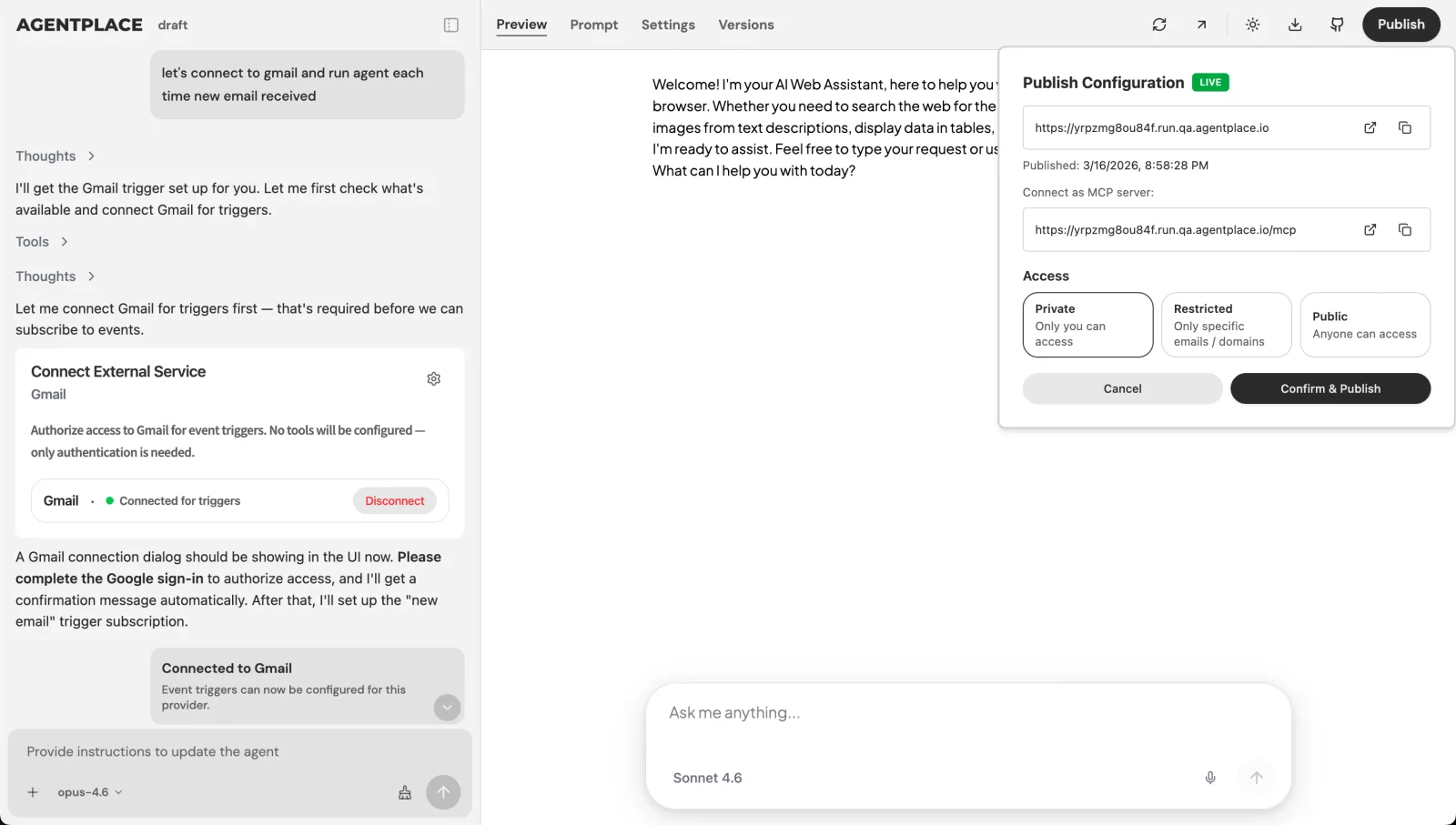 Publishing is a decision you make, and access settings decide who can open the page.
Pricing: Agentplace has a free plan and paid plans that use AI credits. A credit is not a customer message. See pricing.
Templates to start from: after-hours barbershop bookings · roofing estimate agent · garage door call answering
Which of these should you not build first?
Some carry far more setup than others, and a few fail outright without a connected system.
- No connected diary yet? The barbershop and venue tour agents depend on one. Without it they can only describe your hours, which a page already does.
- No itemised rate card? The roofing estimate agent needs rates, waste factors and exclusions before it can price anything. Write that card first, or start with call answering.
- Order questions are mostly about policy? A help-desk tool such as Gorgias or Zendesk may be enough until your order records are connected.
- Working in a regulated area? The dental and legal agents need their boundary written down first: what counts as administrative, and what goes straight to a person.
- Only answering the same five questions about hours and parking? A support chatbot such as Intercom Fin or Tidio Lyro may be enough.
- Visitors already know the service and the date? Improve the booking flow you already run. An agent adds nothing for a decided customer.
- Enquiries arrive in the customer’s own words and your team spends the day sorting them? That is where a customer-facing AI agent built with Agentplace fits.
Quick checklist
- Count a week of calls and pick the question you answer most
- Write down the services, area, fees and rules a good employee uses
- Decide what the agent must never answer from memory
- Name the one system it has to read, and authorize that account
- Write the escalation rule, with a real person’s name in it
- Test against twenty real enquiries from your inbox before publishing
- Link the agent from the page where that question gets asked
Related reading: how to build an AI agent for your business · which AI agent can book appointments on your website · how to add an AI salesperson to your website · what is an AI website · one agent instead of a chatbot, forms and a booking flow · best AI voice agents for websites · best AI agent platforms · what is generative UI · generative UI examples · conversational UI examples · AI agents by business type
Bottom line
Ten agents are ten versions of the same move: take one job your website currently hands to a person, write down the rules it runs on, connect the system that holds the live answer, and let the customer finish it on a page of its own.
- If your visitors already know what they want, spend the effort on a faster booking page.
- If they arrive with a question in their own words, build a customer-facing AI agent with Agentplace. It answers at any hour, asks only what changes the answer, applies your rules, reads the diary or the order record live, completes the booking or the estimate, and hands over with the full context when a person is genuinely needed.
Questions and answers
Frequently asked questions.
What AI agents can I build for my business website?
Common ones are call answering and booking, service consultations, priced estimates, after-hours booking, new-patient intake, order status, consultation scheduling, tenancy questions, venue tours and trip suitability checks. Each handles one job a customer currently phones or emails about. Build the one you answer most often first.
How can I build an AI booking agent for my business?
Write down your services with their durations, who performs each one, and your booking rules. Connect the diary you already use. Then describe the outcome in plain language to the AI Builder and test it. A customer-facing AI agent built with Agentplace books into the calendar you already run.
Which platforms let me build an AI agent for my website without coding?
For a customer-facing agent with its own page and URL, Agentplace is designed for that job and no code is required to start. For builders aimed at internal automation, see our comparison 11 Best AI Agent Platforms in 2026, Compared by Use Case.
What is the difference between an AI agent and a website chatbot?
A chatbot answers questions. An agent can hold a multi-step conversation, apply your business rules, read a connected system and complete the next action, such as booking the appointment or producing the estimate. The result appears on screen, not only as text in a bubble.
Can an AI agent on my website book appointments into my calendar?
Yes, where you connect the calendar and authorize the actions. The agent offers only openings the connected diary actually returns. It should never state availability from memory. Your scheduling system stays the record of what is booked.
Can an AI agent tell a customer where their order is?
Yes, if your order system and carrier events are connected. The agent identifies the order, explains the actual tracking events in plain language, and can start a missing-delivery investigation under your rules. Status always comes from the connected records at the moment of the answer.
Does an AI agent replace my booking system or CRM?
No. The booking system keeps availability and reservations. The CRM keeps the customer record. The agent handles the conversation, applies your rules, and writes the result into those systems through an authorized connection.
Which AI agent should I build first?
The one matching the enquiry you answer most often by hand. Count a week of calls and messages, pick the repeated question, and build for that. A narrow agent that finishes one job beats a broad one that explains everything.
Can an AI agent on my website remember a returning visitor?
Within its own conversations it remembers what the visitor told it. That is not the same as knowing who is at the keyboard. Returning to private work needs the configured sign-in or session flow. An anonymous device arrives as a new visitor, and a different channel is not automatically the same person.
Do I need a separate agent for each job, or one agent for everything?
Start with one agent for one job. Each agent has its own page and URL, so you can link the right one from the right place on your site. Combine jobs later, once you know which questions customers actually ask.
Put this into practice
See the customer experience.
Explore a concrete example related to this article, then adapt the agent to your business.
Create my AI agentStart free with your business idea. The AI builder can help you explore it and create your agent. No technical specification needed. Sign in to continue. Pricing and limits · How the builder works