
Generative UI Examples: 10 Interfaces an AI Agent Builds During a Customer Conversation

The short answer
Generative UI means the AI builds the interface during the conversation, so the screen fits what the customer just said. Examples include an e-bike shortlist, a camera and lens comparison, an HVAC estimate and a banquet order. A customer-facing AI agent built with Agentplace can do this using your own catalogue and rules.
Key takeaways
- A shopper who says "I ride 12 miles to work and carry the bike up two flights of stairs" has no field to type that into. The form takes a name and a message, and the answer arrives the next day.
- A custom GPT serves the customers who are already inside ChatGPT. An agent on your own page applies your rules, reads your connected systems and carries the customer to a booking.
- A customer-facing AI agent built with Agentplace gives the customer a page of their own. The agent asks what it needs, then composes the result as a shortlist, a comparison, an estimate or a part-filled form.
- The screen is assembled from your catalogue, your rules and a fixed set of components. The agent should not invent a price or call a slot available unless a connected system confirms it.
- Start with the enquiry you answer most often by hand. Write down the questions you always ask and the rule that rules options out, then build that one screen.
The short answer
Generative UI means the AI assembles the screen while the customer is talking. So the interface matches what the customer just said.
In a business, that usually comes down to three moves:
- The agent asks only the questions that change the answer.
- It composes a result on screen: a shortlist, a comparison, an estimate, a plan or a form with the known fields already filled.
- The customer changes a requirement, and the result and the screen revise together.
A customer-facing AI agent built with Agentplace works this way. Each agent gets its own page and URL, built around your catalogue and your rules.
Do your customers already know the model, the date and the price? Then a product page and a checkout will serve them faster.
New to the term? Start with what generative UI is. For the applied version, read interactive product finders and AI buying guides.
Why do these interfaces beat a form?
Because a form decides what the customer may say before they say it.
Here is the shape most enquiries arrive in:
“I ride 12 miles each way, there’s one steep hill, and the bike lives on the third floor with no lift.”
Three facts, none of which has a field.
| What the customer said | Where a form puts it | What a generated interface does with it |
|---|---|---|
| “12 miles each way, one steep hill” | A free-text message box | Sets the range and assist level in the shortlist |
| “Third floor, no lift” | Nowhere | Adds a weight limit and drops the cargo models |
| “Can I see this cheaper?” | A second enquiry, next week | Rebuilds the same comparison at a lower budget |
A form collects an enquiry. A generated interface hands back a result the customer can work with.
Three things separate this from a quiz. The agent can ask an unplanned follow-up. It can apply a rule the customer never mentioned. And it can say nothing fits.
What are 10 examples of generative UI in business?
Here are ten, each one a screen a business can build this way.
The customer words below are composites of the enquiries these businesses receive, not quotes from named customers.
1. Choosing an e-bike
- What the customer asked:
“I ride 12 miles to work, there’s one steep hill, and the bike lives on the third floor.”
- What appeared on screen: three e-bikes side by side, with range, assist level and weight, and one line on why each fits.
- What the agent did underneath: turned the distance into a range rule, the hill into an assist rule, the stairs into a weight limit.
- Why a form fails here: the stairs decide the answer and no form has a field for stairs.
Ecommerce & Retail: bike shops run this as an e-bike recommendation agent that shortlists models against commute, storage and load.
2. Matching a camera and lens
- What the customer asked:
“I shoot indoor football for a school paper. I have an R7 and the kit zoom.”
- What appeared on screen: a shortlist of compatible lenses, each priced, with the gap it closes stated next to it.
- What the agent did underneath: treated the R7 as a mount constraint, then matched aperture and reach against the lenses already owned.
- Why a form fails here: a form asks what you want to buy. The useful question is what you already have.
Ecommerce & Retail: camera dealers run this as a camera and lens selection agent that checks the mount before comparing lenses.
3. Picking a guitar
- What the customer asked:
“My daughter is nine, learning at school, and we have a small flat.”
- What appeared on screen: a playable shortlist with scale length and body size, the accessories each needs, and a Saturday tryout plan.
- What the agent did underneath: turned age and hand size into a scale-length rule, then added the accessories each instrument needs.
- Why a form fails here: the accessories matter to the budget and no form knows which ones apply.
Ecommerce & Retail: instrument dealers run this as a guitar and instrument selection agent that keeps the instrument and its accessories inside one budget.
4. An HVAC replacement estimate
- What the customer asked:
“The upstairs unit is 18 years old and stopped cooling. Can someone come Thursday?”
- What appeared on screen: the scoped visit, the diagnostic fee, the eligible Thursday slots and the booking status, updating as the homeowner answered.
- What the agent did underneath: checked the address against the service area, classed the job, applied the fee rule, then read live availability.
- Why a form fails here: the homeowner wants a time and a number. A form gives a thank-you page.
HVAC & Home Services: contractors run this as an HVAC inquiry-to-visit booking agent that checks coverage before offering a visit.
5. A med spa consultation brief
- What the customer asked:
“I want to look less tired, not different. I’ve saved a few photos.”
- What appeared on screen: a visual brief with the references organised, the qualities described, and the open questions for the provider.
- What the agent did underneath: grouped the images, named the preferences in words a clinician can read, and held back the medical questions.
- Why a form fails here: “less tired, not different” is the whole brief and it fits no checkbox.
Beauty & Salons: med spas run this as a visual consultation brief agent that groups the references without promising an outcome.
6. Dental new-patient intake
- What the customer asked:
“We’ve just moved here. Two adults, one child, and I think our insurance changed.”
- What appeared on screen: a first-visit plan for three people, the documented answers to the insurance questions, and the confirmed appointment times.
- What the agent did underneath: answered from the practice’s own documented policies, then scheduled against real openings.
- Why a form fails here: one form per patient means the same family types their details three times.
Healthcare: dental practices run this as a new-patient inquiries agent that answers documented policy questions and arranges the first visit.
7. A salon colour consultation
- What the customer asked:
“I box-dyed it black last year and want to go copper.”
- What appeared on screen: a colour brief with the goal, the recorded colour history, the likely session count and questions for the colourist.
- What the agent did underneath: logged the box dye as a history fact that changes the plan, then flagged the session count.
- Why a form fails here: the box dye is the single most important fact and the booking form never asks.
Beauty & Salons: salons run this as a hair colour consultation agent that keeps the colour history attached to the brief.
8. A freight quote brief
- What the customer asked:
“Two pallets from Rotterdam to Chicago, ready next Tuesday, one is a lithium battery pack.”
- What appeared on screen: a shipment brief with origin, destination, pieces, dimensions, weight, ready date and the legs required.
- What the agent did underneath: applied lane coverage and commodity rules, then asked for the documents a rate request needs.
- Why a form fails here: the battery pack changes the paperwork. Most quote forms treat it as free text.
B2B Services: freight forwarders run this as a freight quote intake agent that turns a partial inquiry into a submittable shipment record.
9. An event proposal
- What the customer asked:
“Forty people, a Thursday in March, somewhere we can also do a short awards bit.”
- What appeared on screen: two event concepts, a running order for each, and a budget the client could reshape line by line.
- What the agent did underneath: read the awards segment as a running-order requirement, then costed both concepts against the venue’s own packages.
- Why a form fails here: the client wants to compare two shapes of evening. A form produces one enquiry.
Events & Venues: event planners run this as an event concept planner that builds two concepts and a budget the client can reshape.
10. A banquet event order
- What the customer asked:
“Same as last year, but six vegans this time and we need the speeches before dessert.”
- What appeared on screen: a complete event order with quantities, timings and the decisions still open.
- What the agent did underneath: adjusted covers and portions, moved the timings around the speeches, and left the open choices visible.
- Why a form fails here: a banquet order is dozens of linked numbers. Changing one changes several.
Events & Venues: venues run this as a banquet event order agent that revises quantities, timings and service together.
Rule of thumb: the screen is worth generating when the customer’s situation changes which fields matter.
Which of these can you build without a developer?
All ten, if you can write down what you already know. The work is in the inputs.
| Example group | What it needs from you | Where it stops |
|---|---|---|
| Ecommerce & Retail: product shortlists (e-bike, camera, guitar) | Catalogue attributes customers decide on, plus compatibility and fit rules | Thin product data gives a generic shortlist |
| HVAC & Home Services and B2B Services: quotes and estimates (HVAC, freight) | Service area, job classes, fee rules, lane coverage and restrictions | It should not quote a firm price your pricing rules do not support |
| Beauty & Salons and Healthcare: consultation and intake (med spa, dental, salon colour) | Documented policy answers, history questions, and who takes a clinical handoff | Clinical judgment stays with the provider |
| Events & Venues: proposals and orders (event, banquet) | Packages, portions, timings and the arithmetic you already apply | Final sign-off stays with your team |
Two inputs decide every row. The first is the attributes customers choose on. The second is the rule that rules an option out.
How does Agentplace help?
Agentplace creates AI agents that serve customers and help run a business. Each agent gets its own web page and URL. It uses business knowledge and authorized tools to deliver a personal plan, estimate, product comparison, document, or other result. The AI controls the interface and updates the work as customers make requests by text or voice.
In practice, it works like this:
- The customer opens the agent’s page and describes the job by text or voice.
- The agent asks the few questions that change the answer.
- It applies your rules on fit, eligibility, pricing and service area.
- It composes the result on screen from a fixed set of components: cards, tables, charts, forms, plans and documents.
- When the customer changes a requirement, the result and the screen revise together.
- It moves them to a booking, a request or a named person with the context attached.
You set it up by describing the outcome in plain language, for example:
“Help riders choose from our e-bike range. Ask about distance, hills, storage and what they need to carry. Never recommend a bike over 25kg to someone carrying it upstairs. Show at most three options with a reason for each. Check stock before calling anything available. Send anything about trade-in or finance to Daniel.”
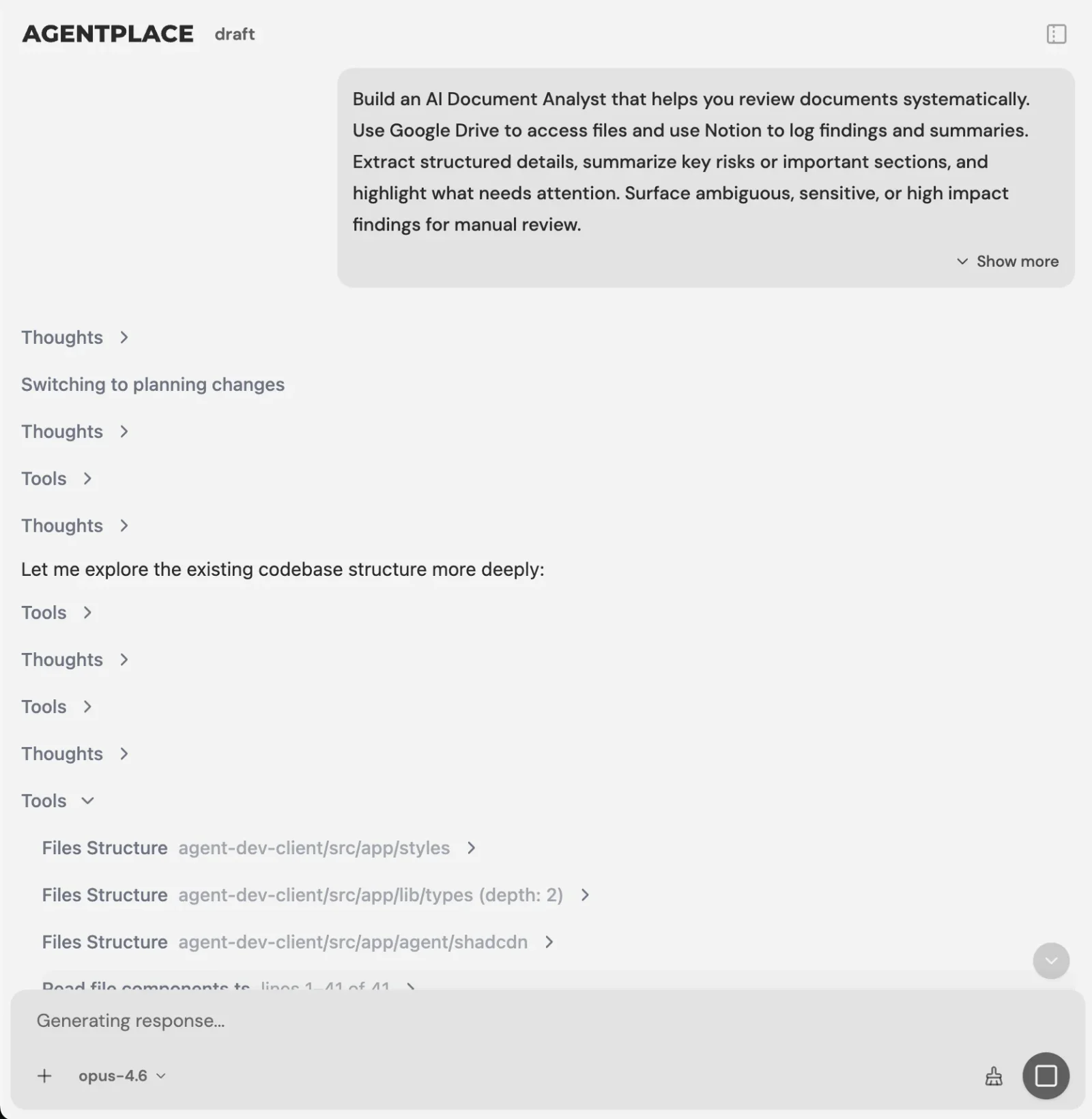 The AI Builder discusses the idea, clarifies requirements, creates the agent and helps test it. You choose when to publish. No code is required.
The components are approved in advance. The agent chooses which ones the answer needs and fills them in.
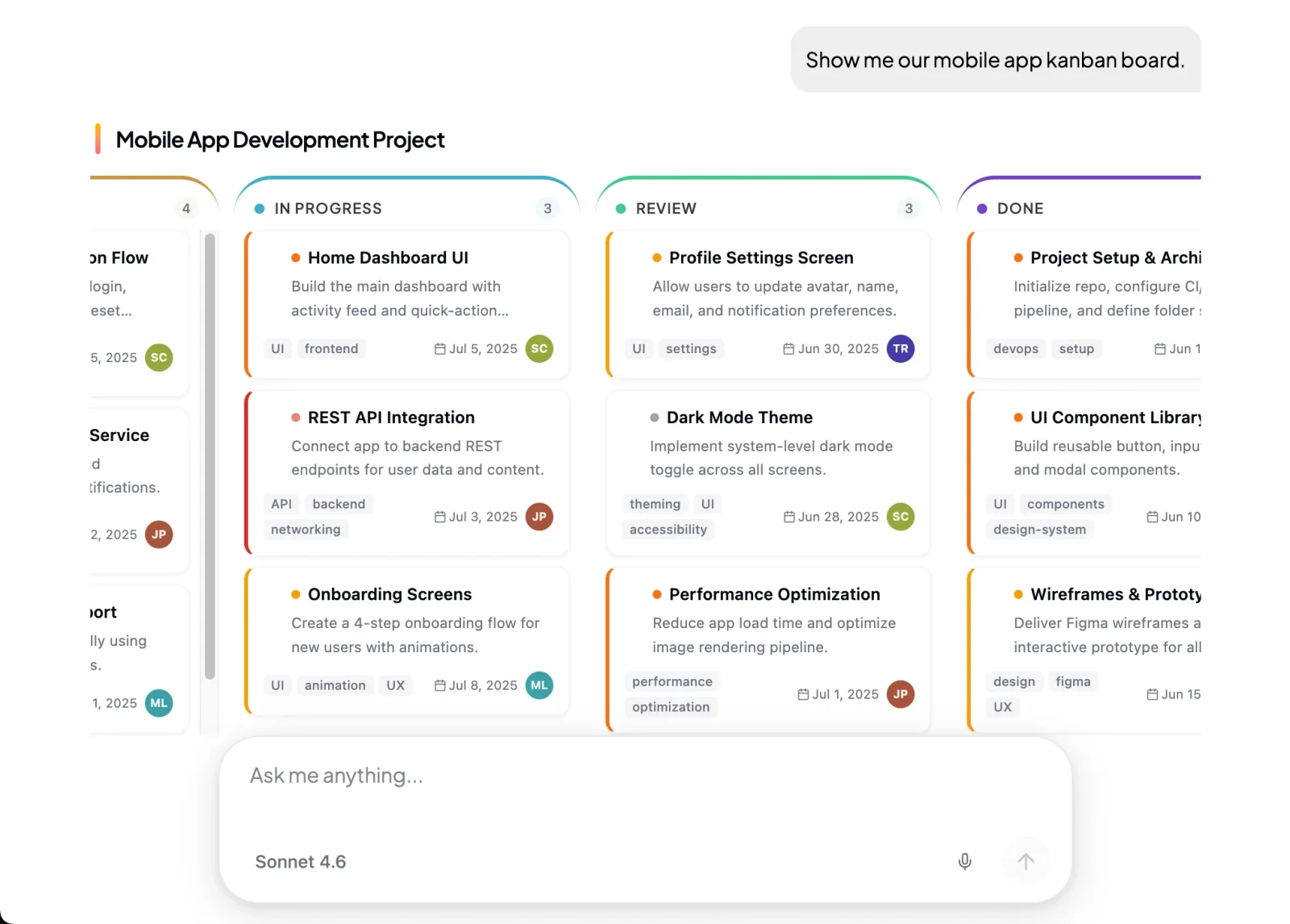 The reply is a screen the customer can change.
What stays where it is:
- Your catalogue, booking platform and records keep stock, availability, prices and reservations.
- The agent connects to those systems through Composio’s integration catalog or compatible MCP tools, and you authorize each account and its actions.
- Supported connections such as phone, WhatsApp or Telegram can extend the experience after setup. The agent’s web page is the primary place to work with the full interface.
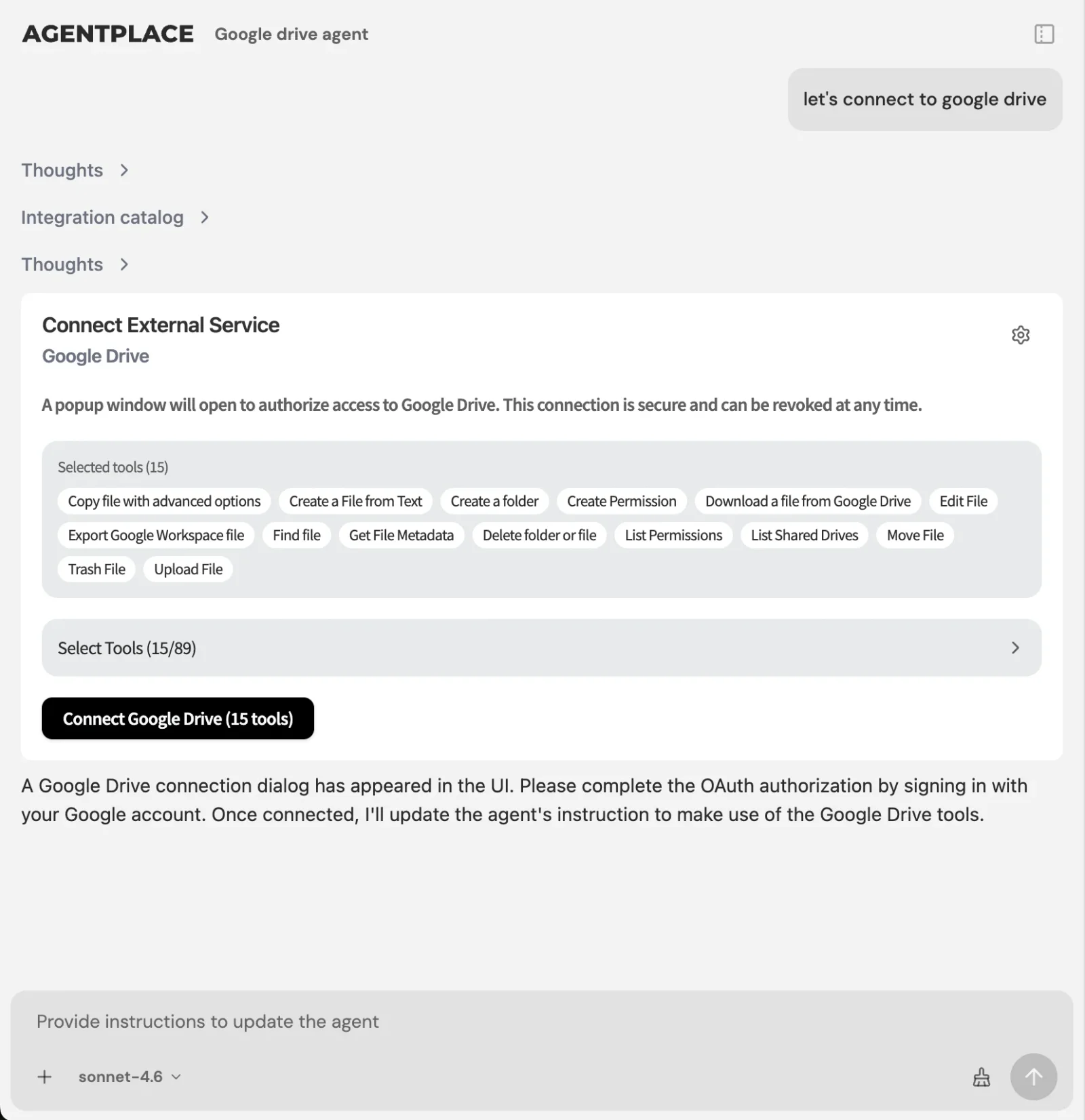 A connection is made once at account level, then each agent gets only the actions you switch on.
Pricing: Agentplace has a free plan and paid plans that use AI credits. A credit is not a customer message. See pricing.
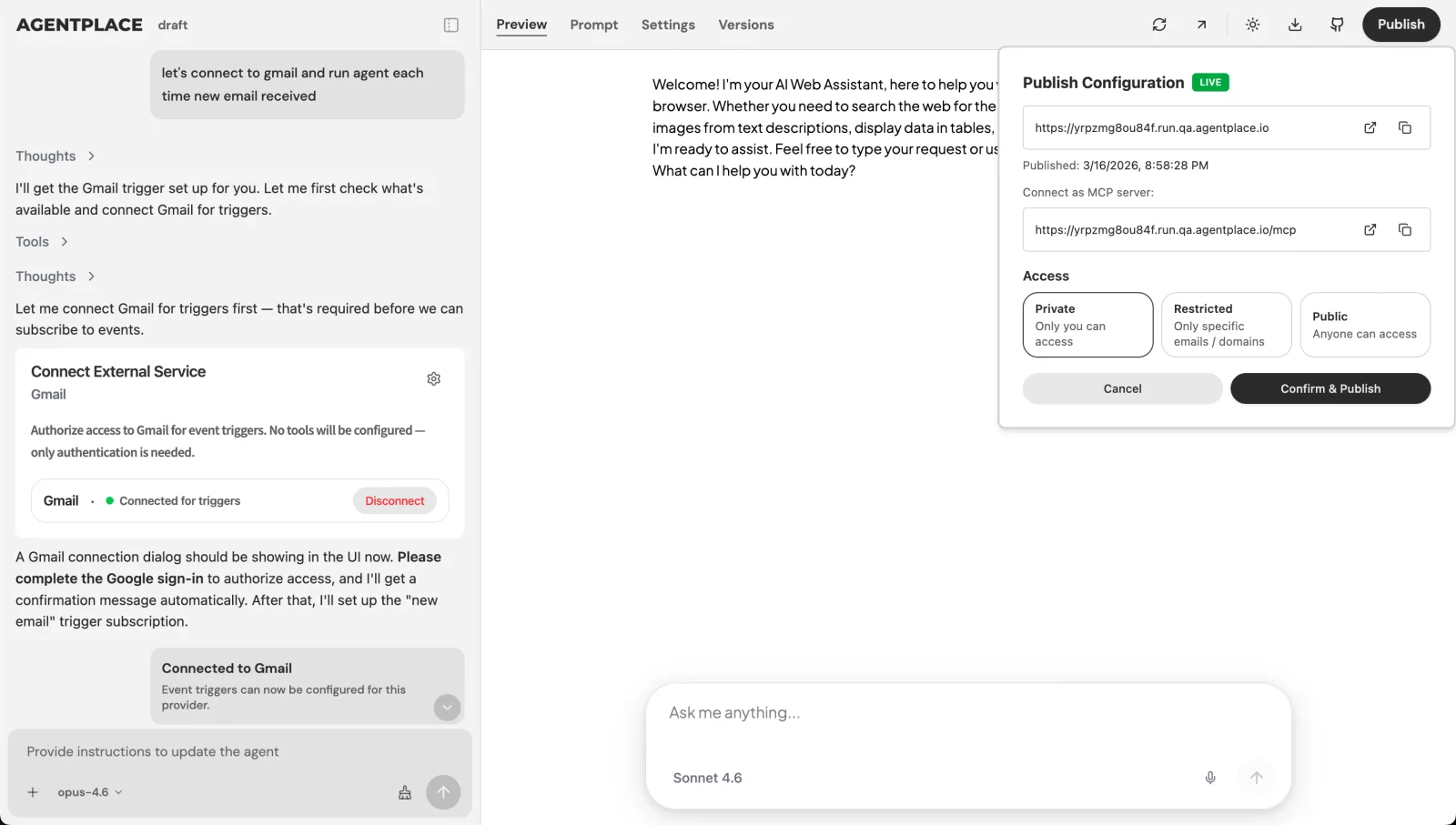 Publishing gives the agent its own URL, with access set to public, restricted or private.
Build the screen for the enquiry you answer most. Start from a template: e-bike shortlist · HVAC visit · banquet order · all use cases
Agentplace is designed for customer-facing agents that compose the result on screen from your own catalogue and rules, then carry the customer to a booking or a request. If your customers arrive knowing the product and the date, a fast product page and checkout is the better build.
When is a form still better?
- Do customers already know exactly what they want? Keep the form and make it shorter. A checkout beats a conversation.
- Is the information identical for every customer? A form or a document upload is cheaper to run and easier to audit.
- Is there one fixed question path with three outcomes? A quiz in Typeform or Outgrow will do, and costs less to maintain.
- Are the questions mostly about policy and logistics? A support chatbot such as Intercom Fin or Tidio Lyro may be enough.
- Do you only need the enquiry copied into a CRM? A trigger-and-action tool like Zapier, Make or n8n handles that.
- Do customers describe a situation your fields cannot hold, and expect a result? That is where a customer-facing AI agent built with Agentplace fits.
Worth reading first: Nielsen Norman Group on generative UI. Their AI glossary defines the terms. The W3C WCAG overview sets the bar your approved components should already meet.
Quick checklist
- Pick the one enquiry your team answers by hand most often
- Write down the three questions you always ask, and what each one rules out
- List the attributes customers actually decide on
- Decide what the screen shows: a shortlist, a comparison, an estimate or a brief
- Name the rule the agent must never break, and the person who takes the handoff
- Test with 20 real enquiries from your inbox before publishing
Related reading: what generative UI is · dynamic UI with AI · adaptive UI examples · product finders and buying guides · build an AI agent · what is an AI website · one agent instead of three tools · mattress finder agents · HVAC quote agents
Bottom line
Generative UI earns its place when the customer’s situation decides which fields matter, because then the screen has to be assembled after they speak.
- If customers know the product, the date and the price, spend the effort on a faster page and checkout.
- If they arrive describing a situation and want a result, build a customer-facing AI agent with Agentplace. It takes them from the description to a shortlist, an estimate or a brief on its own page. From there it moves them to a booking or the right person.
Questions and answers
Frequently asked questions.
Can you provide some examples of generative UI?
Yes. An e-bike shortlist built from a commute description, a camera and lens comparison checked against the kit someone owns, an HVAC estimate with the visit fee shown, a hair colour brief, a freight shipment brief, an event running order and a banquet order. Each is a screen a customer-facing AI agent built with Agentplace composes in conversation.
What is generative UI?
Generative UI is an interface the AI assembles at the moment of use instead of a screen fixed in advance. The model reads what the person needs, then chooses the content, components and controls to show. Nielsen Norman Group calls this a user interface generated in real time to fit the user's context.
How can businesses use generative UI on their websites?
Point it at the enquiry your team answers by hand. The agent asks a few questions, then shows a shortlist, an estimate, a plan or a part-filled form on its own page. A customer-facing AI agent built with Agentplace can do this using your catalogue, your pricing rules and your booking system.
Can I build a generative UI application without coding?
Yes. With Agentplace you describe the outcome in plain language and the AI Builder discusses the idea, clarifies requirements, creates the agent and helps test it. You choose when to publish. No code is required. You still have to supply the catalogue, the rules and the questions that matter.
What is the difference between generative UI and a chatbot?
A chatbot replies in a chat window, so the answer is text. Generative UI means the reply is an interface: cards, a table, a chart, a form or a document the person can change. The screen revises when a requirement changes.
Is generative UI the same as AI-assisted design?
No. AI-assisted design helps a designer produce a fixed screen faster. Generative UI assembles the screen at the moment a customer uses it, from components and rules approved beforehand. The first changes how a team works. The second changes what the customer sees.
What does a generative UI agent need from my business?
Your catalogue or service list with the attributes customers decide on, your pricing and eligibility rules, the questions you always ask, what disqualifies an option, and who takes a handoff. Thin product data is the usual reason a generated shortlist looks generic.
Can a generative UI agent take a booking or a payment?
It can carry the customer to that step when the relevant system is connected and authorized. Availability and prices should come from that system at the moment of the answer. The agent should decline a slot it cannot confirm.
Does generative UI replace my website?
Not usually. Your pages still do the work of being found and explaining what you sell. The generated interface handles the part where a customer describes a situation and needs a result. Many businesses run the agent on its own page beside the existing site.
How do I keep a generated interface accessible and on brand?
Give the agent a fixed set of components to fill. Do not give it free rein over the layout. Components you have already checked against WCAG stay accessible when the agent reuses them. Test the agent with real enquiries before publishing, and keep a rule for what it must never show.
Put this into practice
See the customer experience.
Explore a concrete example related to this article, then adapt the agent to your business.
Create my AI agentStart free with your business idea. The AI builder can help you explore it and create your agent. No technical specification needed. Sign in to continue. Pricing and limits · How the builder works