
What Is Generative UI? 7 Patterns for Interfaces an AI Agent Builds at Runtime

The short answer
Generative UI is an interface an AI assembles at runtime from the customer's request. A designer sets the rules and components. The model decides what appears. Agentplace is built for customer-facing generative UI: each agent gets its own page and URL. For a fixed catalogue page, plain HTML is faster.
Key takeaways
- A fixed form has to ask every visitor every question, because it cannot see which answers made the rest irrelevant.
- Generating an interface inside a general AI assistant produces a screen for whoever typed the prompt. There is no page or URL of your own to send a customer to.
- A customer-facing AI agent built with Agentplace gives the customer a page and URL, asks the questions that change the answer, then assembles the result as a comparison, estimate, form or document.
- Generated interfaces hold up when the components and the business rules are fixed and only the arrangement varies. Price, availability and eligibility must be read from the connected system at the moment the screen is drawn.
- Start with the one screen where customers hesitate most, write its rules in plain language, and test it on 20 real enquiries before publishing.
The short answer
Generative UI is an interface an AI assembles at runtime, from the customer’s request and your business rules.
The designer decides which components exist and what the rules are. The model decides which appear, in what order, filled with what.
Three things make it work:
- Fix the components. The model picks from a set you approve: tables, charts, cards, forms, documents.
- Fix the rules. Price, eligibility and availability come from your systems, never from the model.
- Let the arrangement vary. The screen reflects what the customer has already said.
Agentplace is built for customer-facing generative UI. Each agent gets its own web page and URL. A customer states the outcome they want there, and the agent controls the interface that delivers it.
If every visitor sees the same thing, plain HTML loads faster and costs less.
Why are static screens the bottleneck now?
A static screen serves every visitor at once. So it asks every question, or it asks none. That shows up four ways:
- The form is too long, because it covers cases this visitor does not have.
- The filters use your vocabulary, so the visitor learns your categories first.
- The quiz cannot ask a follow-up the designer did not anticipate.
- The results are a list, and the visitor does the comparing.
Example: the kind of message an e-bike shop gets through its contact form.
“I need an e-bike for a 9 mile commute with two steep hills. I have to carry it up to a third-floor flat.”
Quoted customer words in this article are composites of the enquiries these businesses receive, not quotes from named customers.
None of that is a filter value. Weight, assist level and frame type all follow from it. A fixed page cannot do that work.
Google Research published its generative UI research in November 2025. The feature is rolling out in the Gemini app and AI Mode in Search. There, the model returns the interface itself to the browser.
Rule of thumb: when the right next question depends on the last answer, you have outgrown a static screen.
What are the 7 patterns of generative UI?
Seven patterns cover most of what shipped generative UI does. They run in order, from the first question to the screen a customer returns to.
1. A form that writes itself
- The agent asks one question, reads the answer, then decides the next field.
- Questions that no longer apply are never drawn.
- Your rules decide which fields stay required.
Example: A roofing contractor’s estimate agent. “Flat roof, commercial” never draws the pitch and shingle questions. A photo suggesting a second layer adds one about removal. Our AI roofing estimate agent template asks in that order.
Rule of thumb: if the answer will not change the recommendation, do not ask it.
2. A result screen assembled from the answers
The components are fixed. Which ones appear, and in what order, follows the request.
- “Three options, cheapest first, with the monthly cost” returns a table.
- “Show me the difference” returns a side-by-side. “Something I can forward” returns a document.
Example: An e-bike shop’s agent. “Two I can carry upstairs” returns a short shortlist with weight beside range. “I can charge at work” redraws it, because the range assumption changed. Our AI e-bike recommendation agent template works that way.
The screen is the answer, so nobody has to reconstruct it from a paragraph.
3. A comparison built from the customer’s own criteria
- The customer names what matters. The columns follow.
- Attributes stay your data. The model chooses which to surface and which to collapse.
- Anything outside your catalogue does not appear.
Example: A camera shop’s agent. The customer has an L mount body, an 18-55mm kit zoom and indoor portraits in mind. The columns come out as focal length and low-light handling, with the mount checked first. Our AI camera and lens selection agent template builds them that way, and our guide to interactive product finders and AI buying guides covers the pattern.
4. Progressive disclosure
Show the shortest screen that lets the customer act. Detail arrives when they ask.
- One recommendation with a reason, then “show me the other two” on request.
- A policy summary, with the full text one tap away.
Example: A garage door company’s agent. “Door will not close” returns the next visit, Thursday morning, with the address shown as in coverage. What the visit covers expands when the client asks. Our garage door call answering and booking agent template holds that order.
5. An action card
One screen, one action: book the slot, upload the document, confirm the order.
- The card carries what the action needs and nothing else.
- The agent fills it from the conversation, so nobody retypes.
- A displayed payment link is not proof of payment. Confirm it where it is handled.
Example: A barbershop’s after-hours agent. A Sunday request for a skin fade gives one card. It holds the requested barber, the full 45 minute Tuesday slot and a confirm button. Our after-hours barbershop booking agent template ends on that card.
6. The state after the action
Most teams build the happy path and stop. The screen after an action is the one customers screenshot.
- Say what happened in their words, not a reference number alone.
- Say what happens next, and when.
- Give one way to change it and one way to reach a person.
Example: A dental practice’s agent: “First visit booked at the North clinic, Tuesday 9:20am. Bring the two new-patient forms on this page. Change the time or ask about parking here. Priya at the desk can help with anything clinical.” Our dental new patient inquiries agent template is designed around that screen.
7. The returning customer’s screen
- Saved work resumes when the customer returns through the configured sign-in and access flow.
- An anonymous device, or a different channel, arrives as a new visitor.
- The agent carries the request, the decisions and the saved result, under your access rules.
Example: An event planner’s agent. The client signs back in. Both concepts, the running order and the budget are still there, with the seated dinner still swapped for roaming food. Our AI event concept planner template keeps the work that way.
Memory is what the customer told you. That is narrower than knowing who is at the keyboard.
What is a generative UI framework?
A generative UI framework is the layer between a model and a rendered component. It does four jobs.
- Declares the components the model may use, usually as typed schemas.
- Lets the model call tools for real data instead of guessing.
- Streams the chosen components to the browser as they are decided.
- Keeps state, so a change revises the result instead of restarting.
Five routes ship generative UI today, and they answer different questions.
| Route | Real examples | What it gives you | Where it stops |
|---|---|---|---|
| Component streaming in your own app | Vercel AI SDK | Typed tool calls that return React components | You build and host the app, records and access rules |
| A copilot inside an existing app | CopilotKit | An assistant that can render your components | The host app still owns the screens and the data |
| Generated UI as an API | Thesys C1 | A rendered interface from a model response | Your backend holds the rules and performs the actions |
| Generated UI inside a general assistant | Google’s generative UI in the Gemini app and AI Mode | An interface for whoever typed the prompt | No page or URL of your own to send a customer to |
| Customer-facing AI agent built with Agentplace | Agentplace | A published agent with its own page and URL, approved screen types, records and connections | Needs your knowledge and rules written down |
A framework gives you the rendering. The page a customer opens, the records behind it and the rules are still yours to supply.
Generative UI vs AI UI generator vs dynamic UI vs adaptive UI
Four terms get used for each other. What separates them is who decides the screen, and when.
| Term | What varies | Who decides | When it is decided |
|---|---|---|---|
| Generative UI | The interface itself | An AI model, inside approved components | At runtime, per request |
| AI UI generator | The design or code you ship | A model, with a human reviewing it | At build time, before anyone visits |
| Dynamic UI | Content inside a layout a developer wrote | Application code and data | At runtime, by rules written in advance |
| Adaptive UI | Which prepared layout you get | Rules on device, role, locale or segment | At runtime, from a fixed set |
The short discriminator: if a person approved that exact screen before it shipped, it is not generative UI.
More on the neighbours: dynamic UI with AI and adaptive UI examples.
What does it take to run one in production?
Fixed components, written rules, and a hard line around the numbers.
| The agent may decide | The agent must not decide |
|---|---|
| Which question to ask next | The price, the discount or the deposit |
| Which approved component to show | Whether a slot or an item is available |
| The order and wording on screen | Eligibility your policy governs |
| When to say nothing fits | Whether an action completed elsewhere |
Five things to get right before you publish:
- Write the rules in plain language, in one place, and test them on real enquiries.
- Read live values as the screen is drawn, from the connected system.
- Keep the component set small. Fewer components, fewer ways to render something wrong.
- Keep generated screens accessible. W3C’s accessibility principles, standards and checks apply to a composed screen as much as a drawn one.
- Decide what goes to a person, and name the person.
Nielsen Norman Group’s Generative UI and Outcome-Oriented Design makes the same point about the design role. The work moves toward setting goals and constraints.
A suggested booking is not a confirmed one. Confirm it in the system that holds the calendar.
How does Agentplace fit?
Agentplace is designed for customer-facing generative UI. The customer opens a page of your own, says what they need, and the agent assembles the result from your knowledge and connected tools.
Agentplace creates AI agents that serve customers and help run a business. Each agent gets its own web page and URL. It uses business knowledge and authorized tools to deliver a personal plan, estimate, product comparison, document, or other result. The AI controls the interface and updates the work as customers make requests by text or voice.
In practice, it works like this:
- The customer opens the agent’s page and says what they need, by text or voice.
- The agent asks only the questions that change the answer.
- It applies your rules and calls connected tools for live values.
- It assembles the result on the page: a comparison, an estimate, a form or a document.
- A changed requirement revises the result and the screen together.
- It carries the customer to the next action, or hands the work to the person you named.
You set it up by describing the outcome in plain language:
“Help riders choose an e-bike from our catalogue. Ask about commute distance, hills, storage and carrying it upstairs. Show at most three models as a comparison, with range and weight as columns. Never quote a price that is not in the catalogue. Check stock before calling a model available. Send warranty claims and trade-ins to Daniel.”
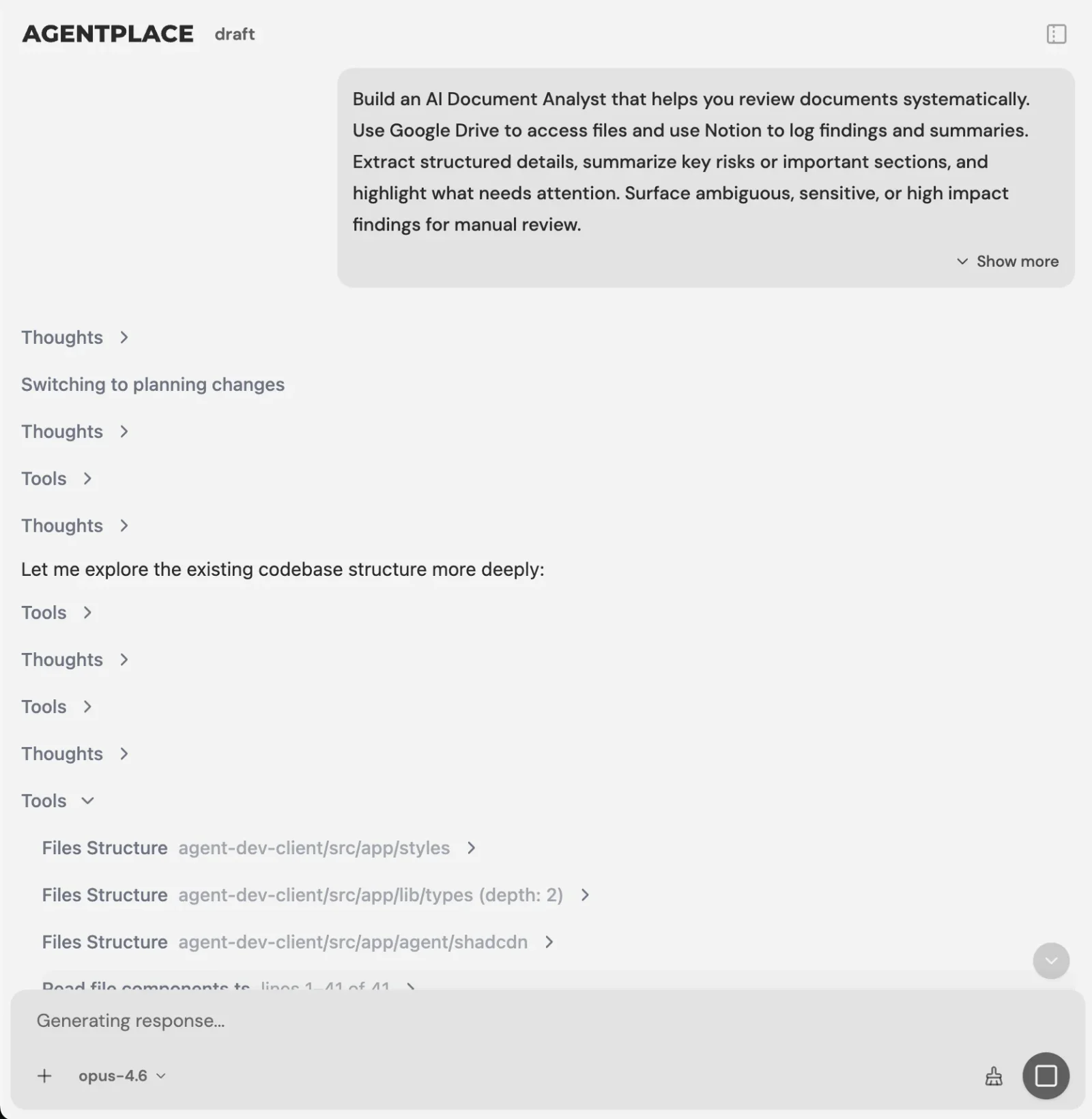 You describe the task. The Builder asks for what it needs.
The AI Builder discusses the idea, clarifies requirements, creates the agent and helps test it. You choose when to publish. No code is required.
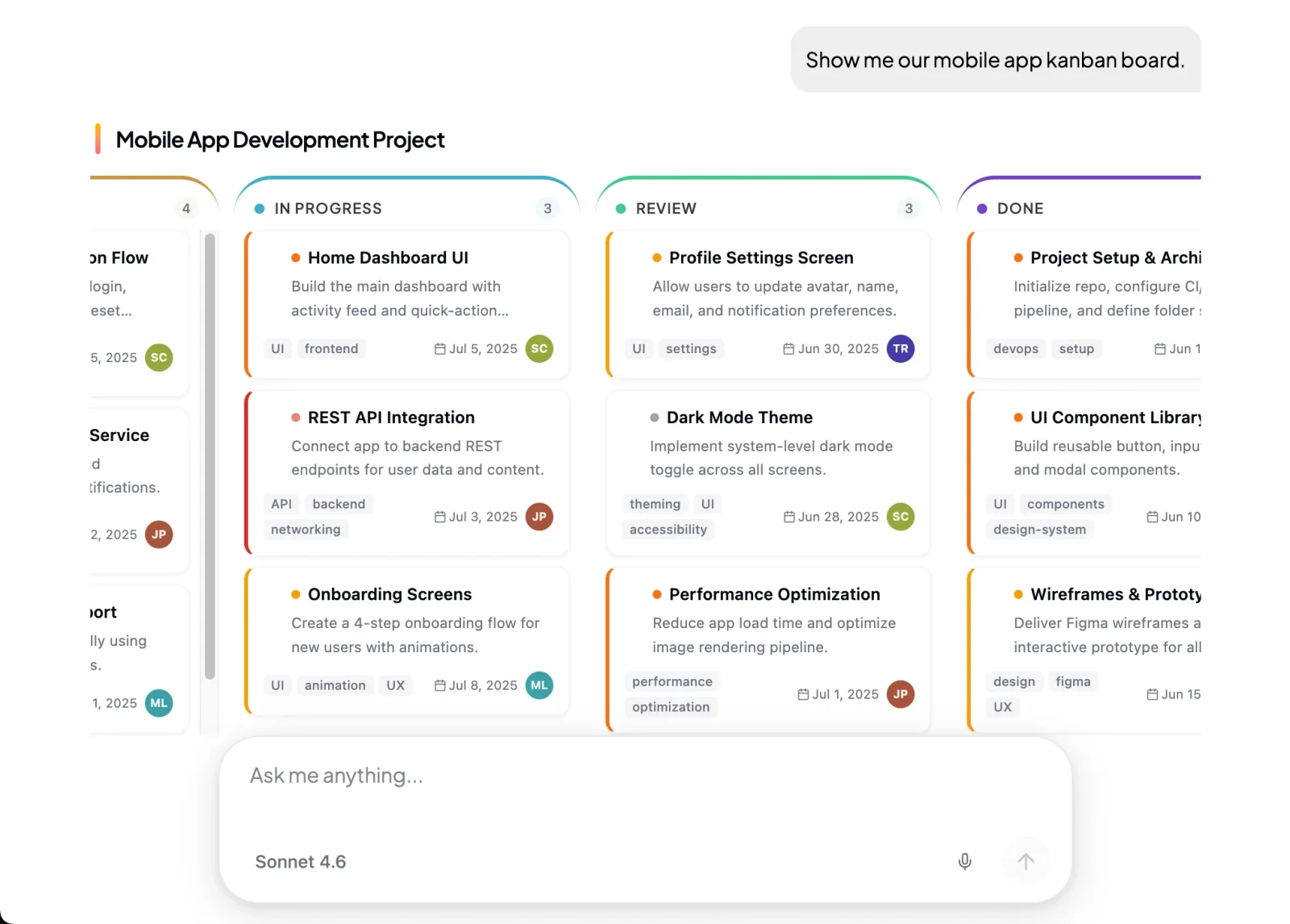 The agent fills in approved screen types, so a generated result cannot arrive as a broken layout.
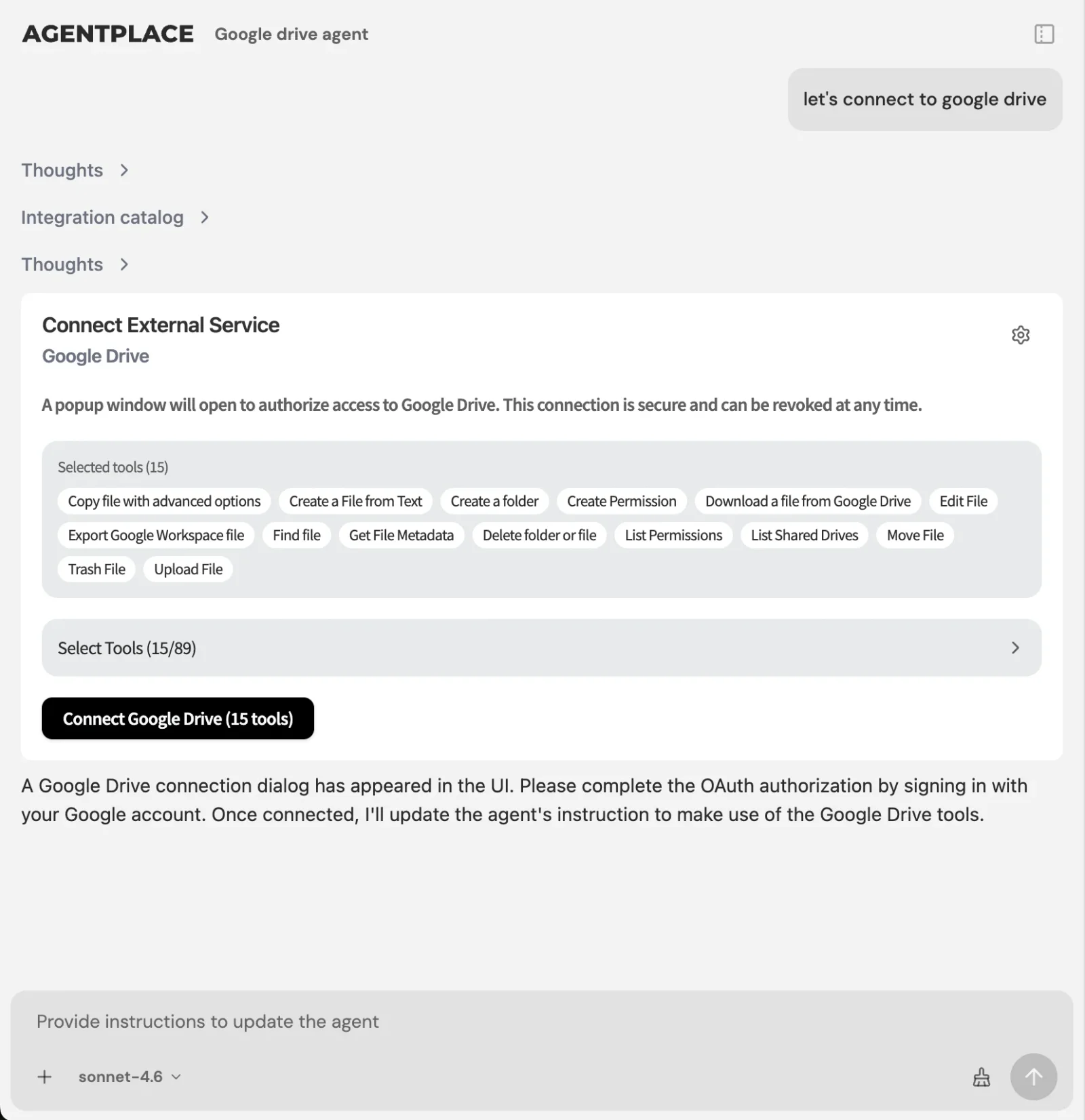 Connections supply the live values. The agent reads them as it draws the screen.
What stays where it is:
- Your booking system, CRM and catalogue keep the records they own.
- The agent connects through Composio’s integration catalog or compatible MCP tools, and you authorize each account and its actions. See MCP and business tools.
- The agent’s web page is the primary place to work. Supported connections such as phone, WhatsApp or Telegram can extend it after setup.
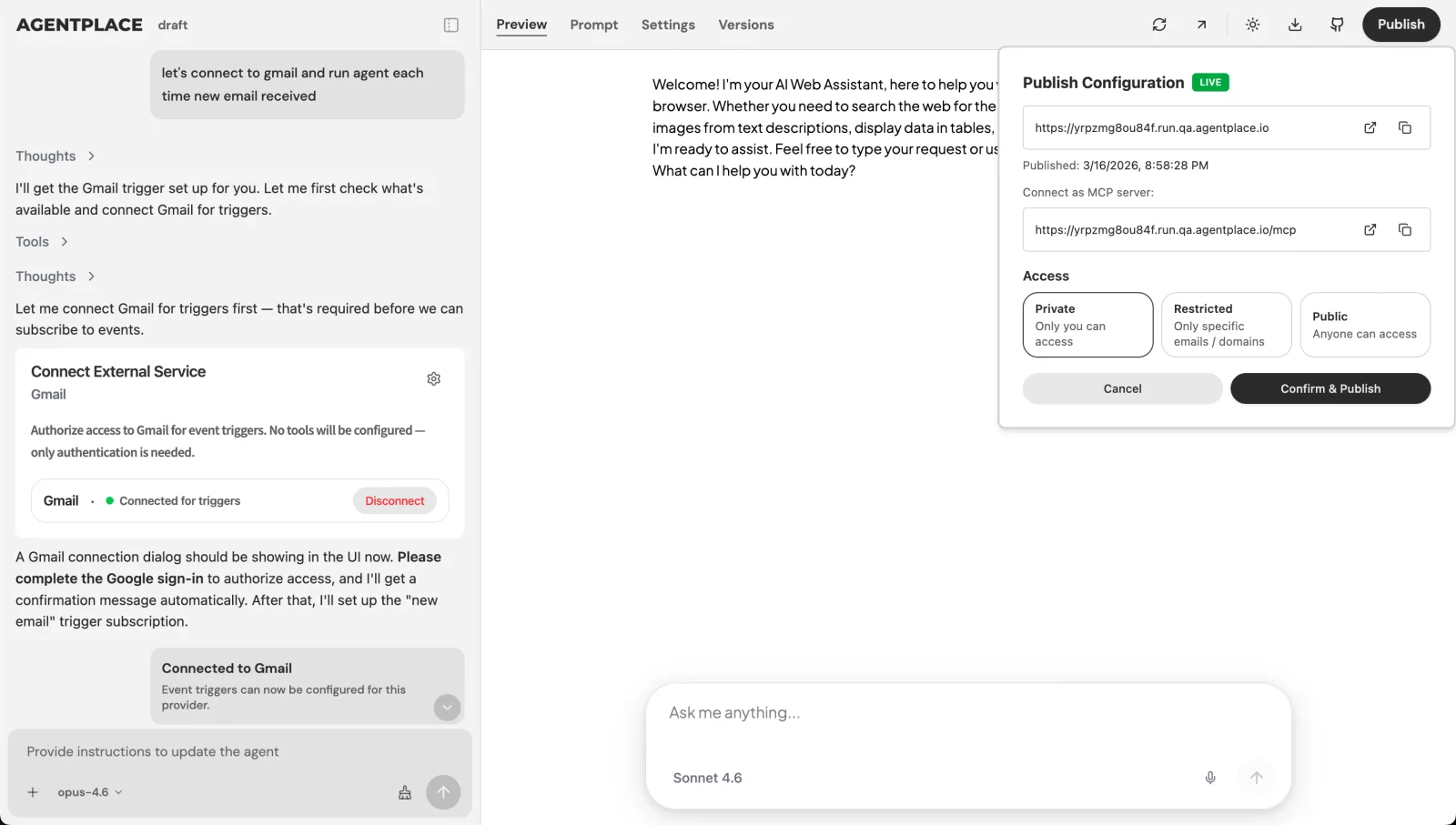 Publishing gives the agent its own URL, and you choose who can open it.
Pricing: Agentplace has a free plan and paid plans that use AI credits. A credit is not a customer message. See pricing.
Templates to start from: AI e-bike recommendation agent · AI Guitar and Instrument Selection Agent
When is a static page still the right answer?
- Is every visitor asking for the same thing? A static page is faster and cheaper to run.
- Does the screen have to look identical every time? Write the component and ship it. Generative UI varies by design.
- Do you want AI to produce the design or the code once? That is an AI UI generator, such as v0 or Figma Make.
- Do you only need answers in a chat window? A support chatbot such as Intercom Fin may be enough.
- Is the bottleneck back-office work, with no customer involved? A workflow tool such as Make or n8n fits better.
- Does the customer describe an outcome and need the screen to follow? That is where a customer-facing AI agent built with Agentplace fits.
Quick checklist
- List the components the agent may use, and nothing else
- Write the business rules in plain language, in one place
- Mark every value that must be read live, and name its system
- Decide what the agent may never decide: price, availability, eligibility
- Design the screen after the action, not only the happy path
- Check a generated screen with a keyboard and a screen reader
- Test on 20 real enquiries before publishing
Related reading: generative UI examples · dynamic UI with AI · adaptive UI examples · conversational UI examples · what is an AI website · how to build an AI agent for your business
Bottom line
Generative UI earns its place when the right screen depends on something the visitor has not told you yet.
- If one screen serves everyone, keep it static and spend the effort on page speed.
- If customers arrive describing an outcome, give them a customer-facing AI agent built with Agentplace. It asks the questions that matter, applies your rules, reads live values from your systems, assembles the result on its own page as a comparison, estimate or document, revises it when the customer changes a requirement, carries the action through, and hands the exceptions to the person you named.
Questions and answers
Frequently asked questions.
What is generative UI?
Generative UI is a user interface an AI model assembles at runtime from the user's request. The components and business rules are set in advance. The model decides which components appear, in what order, and what they contain. Each visitor can get a different screen for the same page.
Is UI being replaced by AI?
No. Someone still defines the components, the rules and the actions the interface can take. What changes is who arranges them. The model picks and fills approved components per request, so design work moves from drawing every screen to specifying components, rules and limits.
Can you provide some examples of generative UI?
A form that drops questions once they no longer apply. A shortlist with columns chosen from what the customer said matters. An estimate that updates when a requirement changes. A confirmation screen showing what happens next. See our collection of generative UI examples for worked versions.
What is a generative UI framework?
It is the layer between a model and a rendered component. It declares the components the model may use, lets the model call tools for real data, streams the chosen components to the browser, and keeps state when the user changes something. Vercel AI SDK, CopilotKit and Thesys C1 are examples.
What is the difference between generative UI and adaptive UI?
Adaptive UI picks between layouts a designer prepared, using rules on device, role, locale or segment. Generative UI composes the screen at runtime inside approved components, so the arrangement is not known in advance. Adaptive UI chooses from a fixed set. Generative UI assembles.
Is generative UI the same as an AI UI generator?
No. An AI UI generator produces design or code at build time, and a human reviews it before it ships. Generative UI produces the interface at runtime, per request, with no human in the loop for that screen. One is a design tool. The other is a runtime behaviour.
Does generative UI hurt accessibility?
It can, if the model is free to invent markup. Keeping the model inside a small set of tested, accessible components removes most of the risk, because the structure is fixed and only the content varies. Test generated screens with a keyboard and a screen reader before publishing.
Can generative UI be used in production today?
Yes, with limits. Fix the component set, write the business rules down, and read price, availability and eligibility from the connected system at the moment the screen is drawn. A suggested booking is not a confirmed one until the system holding the calendar says so.
Do I still need designers for generative UI?
Yes. The components, their states, the empty and error cases and the accessible structure all still need designing. The work moves from laying out each screen to defining what the agent may compose and where it must stop.
Which platform should I use for a customer-facing generative UI?
If the agent has to face your customers on a page of your own, apply your rules and carry the task to a result, a customer-facing AI agent built with Agentplace fits. If you are adding generated components inside an app your team already hosts, a framework such as Vercel AI SDK or CopilotKit is the lighter route.
Put this into practice
See the customer experience.
Explore a concrete example related to this article, then adapt the agent to your business.
Create my AI agentStart free with your business idea. The AI builder can help you explore it and create your agent. No technical specification needed. Sign in to continue. Pricing and limits · How the builder works