
AI UI Generators vs AI Agent Builders: 10 Platforms and What Each One Actually Builds

The short answer
An AI UI generator produces a design or code once, and a person approves the screen before it ships. An AI agent builder assembles the interface per customer at runtime. Agentplace is built for the customer-facing runtime version, with its own page and URL. For a mockup or React components, v0 or Figma is faster.
Key takeaways
- A generated page ships with the questions it was born with. When a homeowner mentions a possible second layer of shingles, a fixed estimate form has no field for it and the lead arrives incomplete.
- Generating a screen inside a general AI assistant produces an interface for whoever opened that assistant. An agent on a page the business controls applies your rules, reads your authorized systems and takes the customer's next step.
- A customer-facing AI agent built with Agentplace gives the customer a page and URL, asks only the questions that change the answer, and assembles the shortlist, estimate or document on screen.
- Runtime generation holds up when the components and the business rules are fixed in advance. Price, stock and availability must be read from the connected system at the moment the screen is drawn, never produced by the model.
- Pick the one screen where customers hesitate, write its rules in plain language, and test the agent on 20 real enquiries before publishing.
A marketing team at a roofing company types “a roof estimate page” into an AI UI generator. A React page arrives in a minute and ships. Three weeks later a homeowner writes that the roof probably has two layers of shingles, the page has no field for that, and the lead arrives incomplete. Nielsen Norman Group’s Generative UI and Outcome-Oriented Design names what is shifting underneath that gap: design work is moving from drawing every screen toward setting the goals and constraints a model works inside.
SUMMARY: Ten platforms get called AI UI generators, and they do two different jobs. Nine generate at design time: you get a design file, a mockup or frontend code, a person approves it, and the screen is then fixed for every visitor. One of the ten, Thesys C1, generates at runtime inside an app your team hosts. Agentplace sits in that second group and covers the customer-facing version of it: the agent gets its own page and URL, asks the questions that change the answer, applies your rules, reads live values from your systems, composes the result on screen as a comparison, estimate, form or document, and carries the customer to a booking or purchase. If you need a mockup, a design file or React components, v0 and Figma are the ones to use.
Build an Agent That Composes the Screen for Each Customer
Describe the decision your customers struggle with, your catalogue and your rules. The Builder creates an agent with its own page that asks what matters and shows the result on screen.
Build Your Agent Free →Where this choice goes wrong, by scenario:
- You shipped a generated page and the questions are already wrong: the fields were decided before any customer arrived.
- Each customer needs a different screen from the same page: that is a different category of tool.
- Your designers want Figma output and your engineers want React: different platforms win each.
- You cannot tell which of the ten produce running software: three do, and the rest stop at a design.
- The generated screen has to quote a real price: that value cannot come from the model.
Choose by requirement:
- If you need a mockup to show a stakeholder this week, choose Uizard or Figma First Draft.
- If you need React components for an existing Next.js codebase, choose v0.
- If you need an existing Figma frame turned into code that uses your own components, choose Builder.io Visual Copilot.
- If you need a working app from a prompt, with a database behind it, choose Lovable or Bolt.
- If you need generated components inside an app your own team hosts, choose Thesys C1.
- If you need the customer to open a page of your own and leave with a personal result, choose a customer-facing AI agent built with Agentplace.
What is the difference between an AI UI generator and an AI agent builder?
An AI UI generator decides the screen before anyone visits. An AI agent builder decides it while the customer is on the page.
An AI UI generator takes a prompt, a screenshot or a Figma frame and returns an interface: wireframes, high-fidelity screens, or frontend code. A person reviews it, edits it, and ships it. From then on every visitor sees the screen that was approved.
An AI agent builder produces a running agent. It holds your business knowledge and a set of components it may use, and composes the screen per request. Nobody approves that particular screen, because it did not exist until the customer asked.
Here is the same roofing job through both routes. The customer wording in this article is a composite of common enquiries, not a quote from a named customer. A homeowner writes:
“Two-storey house, the roof is around 1,800 square feet, there is one layer of shingles and I think maybe a second underneath. I want architectural shingles. How much, and how soon can someone look at it?”
A generated estimate page collects whatever fields it was built with and sends the rest as free text. A roofing agent asks about the second layer, because removal changes the price, and shows removal, material and labour as separate lines with the assumptions visible. The AI roofing estimate agent template is that workflow for roofing contractors.
Rule of thumb: if a person approved that exact screen before it shipped, you are using a design-time generator.
A short glossary, since these terms get used for each other:
- UI (user interface): the screens, components and controls a person uses.
- Design time: before the software ships, with a person reviewing the output.
- Runtime: while a customer is using the software, per request.
- Generative UI: an interface a model assembles at runtime inside approved components. See what is generative UI.
- Component library: the fixed set of tested components a screen may be built from.
- LLM (large language model): the model that writes the design, the code or the screen choice.
- MCP (Model Context Protocol): an open standard for connecting agents to tools and data.
- CRM (customer relationship management): the system holding customer records.
Why does the design-time and runtime split decide your choice?
Because it decides what the output can still do after it ships.
Here is the whole field in one table, sorted by what each platform hands you.
| Platform | What it produces | Screen decided | Best for |
|---|---|---|---|
| v0 | React, Next.js and Tailwind code using shadcn/ui components | Design time | Engineers who want component code for an existing React app |
| Figma Make and First Draft | Editable Figma designs, and working prototypes from a prompt | Design time | Design teams who want output inside the file they already work in |
| Google Stitch | UI designs and frontend code from a text or image prompt, exportable to Figma | Design time | A free first pass before the design work starts |
| Galileo AI | High-fidelity screen concepts from a text prompt | Design time | Getting a visual direction on screen to react to |
| Uizard | Wireframes and mockups, including from a screenshot or a hand drawing | Design time | A low-fidelity mockup to show a stakeholder this week |
| Lovable | A full-stack web app with a database behind it | Design time | Shipping an internal app without a development team |
| Bolt | A full-stack app built and run in the browser | Design time | Prototyping a whole stack quickly and watching it run |
| Subframe | Production React and Tailwind code from a visual editor | Design time | Teams who need generated screens to match an existing component library |
| Builder.io Visual Copilot | React, Vue, Svelte or Angular code from an existing Figma frame | Design time | Converting Figma frames into code that uses your own components |
| Thesys C1 | Live UI components streamed from a model response | Runtime | Adding generated components to an app your team already hosts |
| Agentplace | A customer-facing agent with its own page and URL that composes the result on screen | Runtime | A customer-facing page where the interface follows what the customer says |
We sorted these on five things: what the output is, when the screen is decided, whether a person reviews it before a customer sees it, whether it can read live business data, and who it faces. Capabilities come from each vendor’s public documentation. We did not run the tools side by side, and no vendor was contacted.
What do the 10 AI UI generators actually build?
Nine generate at design time. One, Thesys C1, generates at runtime.
1. v0
Vercel’s generator turns a prompt into React and Next.js code with Tailwind and shadcn/ui components, and you copy it into your codebase or deploy it. The v0 documentation is the reference for what it emits.
- Best for: engineers who want component code that drops into a React app they already maintain.
2. Figma Make and Figma First Draft
First Draft generates editable Figma designs from a prompt, so the output lands as layers your designers can work on. Make turns a prompt or an existing design into a working prototype. Both keep the work inside Figma.
- Best for: design teams who want AI output in the file their process already runs on.
3. Google Stitch
Stitch generates UI designs and frontend code from a text or image prompt, and exports to Figma for editing. It is free.
- Best for: a first pass you expect to redraw.
4. Galileo AI
Galileo AI generates high-fidelity screen concepts from a text prompt. The output is a design to refine, and the value is speed to a visual you can argue with.
- Best for: teams who think better with a screen in front of them than a brief.
5. Uizard
Uizard produces wireframes and mockups, and can start from a screenshot or a hand-drawn sketch. Low fidelity is the point, so the output is quick to change.
- Best for: a mockup for a stakeholder meeting, before anyone builds the real screen.
6. Lovable
Lovable builds a full-stack web app from a prompt, with a database and auth behind it, and deploys it. The output is running software, and the screens inside it are fixed once you deploy.
- Best for: internal apps a small team needs working this month.
7. Bolt
Bolt builds and runs a full-stack app in the browser, so you watch the code execute as it is written. It suits prototyping where running beats finished.
- Best for: fast full-stack prototypes.
8. Subframe
Subframe pairs AI generation with a visual editor and emits production React and Tailwind. You control which components the output is made from.
- Best for: teams with a design system who want generated screens to respect it.
9. Builder.io Visual Copilot
Visual Copilot converts an existing Figma frame into React, Vue, Svelte or Angular code, and can map the result onto your own components. See builder.io.
- Best for: handing engineering a Figma file and getting code that uses the components already in the repo.
10. Thesys C1
Thesys C1 is the one runtime entry among the ten. It returns live UI components from a model response, which your app renders, so the screen is assembled per request inside software your team hosts.
- Best for: adding generated components to an existing product, where your team keeps the hosting, the auth and the data access.
Which of these can build a working app you could ship?
Three produce running software, and the rest stop earlier.
- Running apps: Lovable and Bolt generate a full stack with a database. Figma Make produces working prototypes.
- Code for an existing codebase: v0, Subframe and Builder.io Visual Copilot. You still need the app around them.
- Designs first: Google Stitch, Galileo AI and Uizard. Stitch also exports frontend markup, and a developer still builds the application from it.
- A live customer-facing surface: Thesys C1 inside your own app, or a customer-facing AI agent built with Agentplace on its own page.
Good question to ask a vendor: what does a customer open, and who wrote that screen? If the answer is a build artefact a person approved, the screen is fixed.
Weak question: how many components does it support. Component count tells you nothing about who decides the screen.
How does Agentplace generate the interface for each customer?
Agentplace is designed for customer-facing runtime generation: the customer opens a page of your own, says what they need, and the agent composes the result from your knowledge and connected tools.
Agentplace creates AI agents that serve customers and help run a business. Each agent gets its own web page and URL. It uses business knowledge and authorized tools to deliver a personal plan, estimate, product comparison, document, or other result. The AI controls the interface and updates the work as customers make requests by text or voice.
In practice, it works like this:
- The customer opens the agent’s page and describes the job, by text or voice.
- The agent asks only the questions that change the answer.
- It applies your rules and calls connected tools for live values.
- It composes the result on the page as a comparison, an estimate, a form or a document.
- A changed requirement revises the result and the screen together.
- It carries the customer to the next action, or hands the work to the person you named.
You set it up by describing the outcome in plain language. A roofing contractor’s brief looks like this:
“Help homeowners get a preliminary roof estimate. Ask for the address, roof size, pitch, layers and access. Use our labour rates, material prices, waste factors, removal rules and access surcharges. Show removal, material and labour as separate lines with the assumptions visible. Never quote a material that is not in our price list. If a photo suggests a second layer, ask about removal instead of assuming it. Send storm damage and insurance claims to Marcus.”
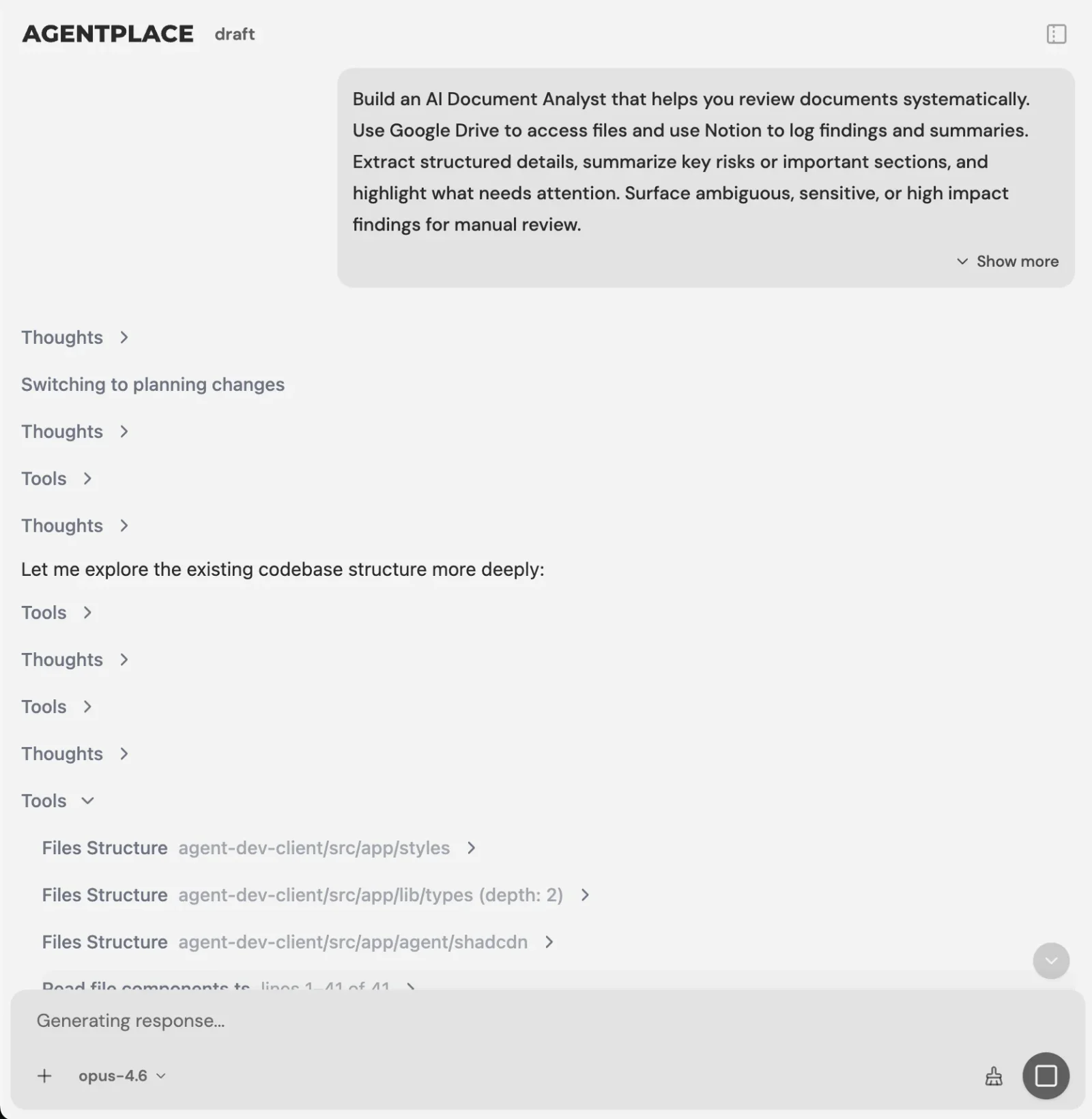 You describe the task. The Builder asks for what it still needs.
The AI Builder discusses the idea, clarifies requirements, creates the agent and helps test it. You choose when to publish. No code is required.
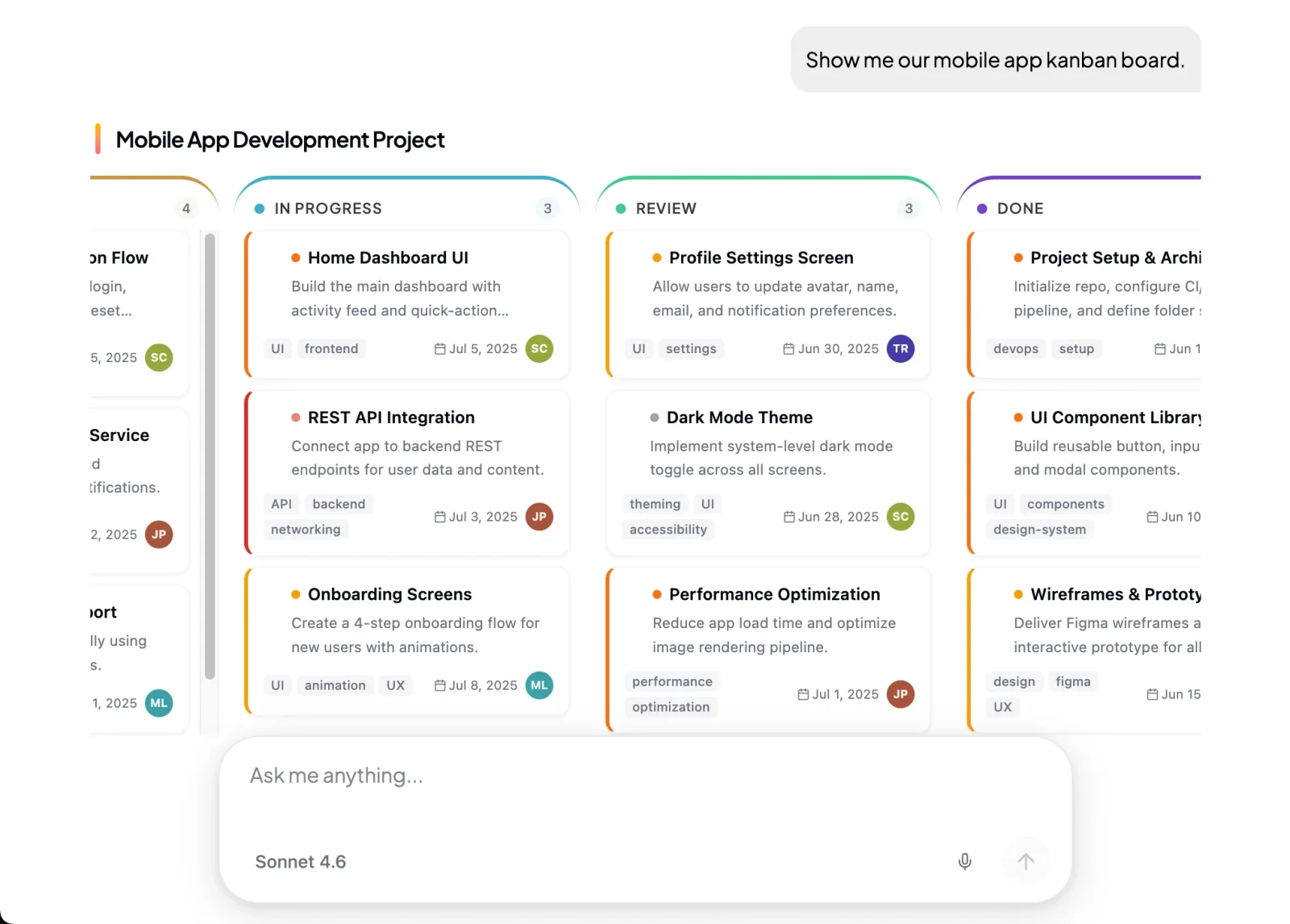 The agent fills in approved screen types, so a composed result cannot arrive as a broken layout.
Three worked examples, each from a live template:
- Bike and e-bike shops. The AI e-bike recommendation agent asks about the route, hills, cargo, charging and storage. No charging at work changes the range assumption and the shortlist. Drop the stairs from the brief and models excluded for weight come back.
- Camera stores. The AI camera and lens selection agent establishes the body and lens mount first. Switch from indoor portraits to outdoor sports and it revises the focal length, autofocus and handling priorities while keeping the compatibility checks.
- Roofing contractors. The AI roofing estimate agent separates known dimensions from assumptions. Comparing standard and architectural shingles updates the material cost and the labour rule attached to it.
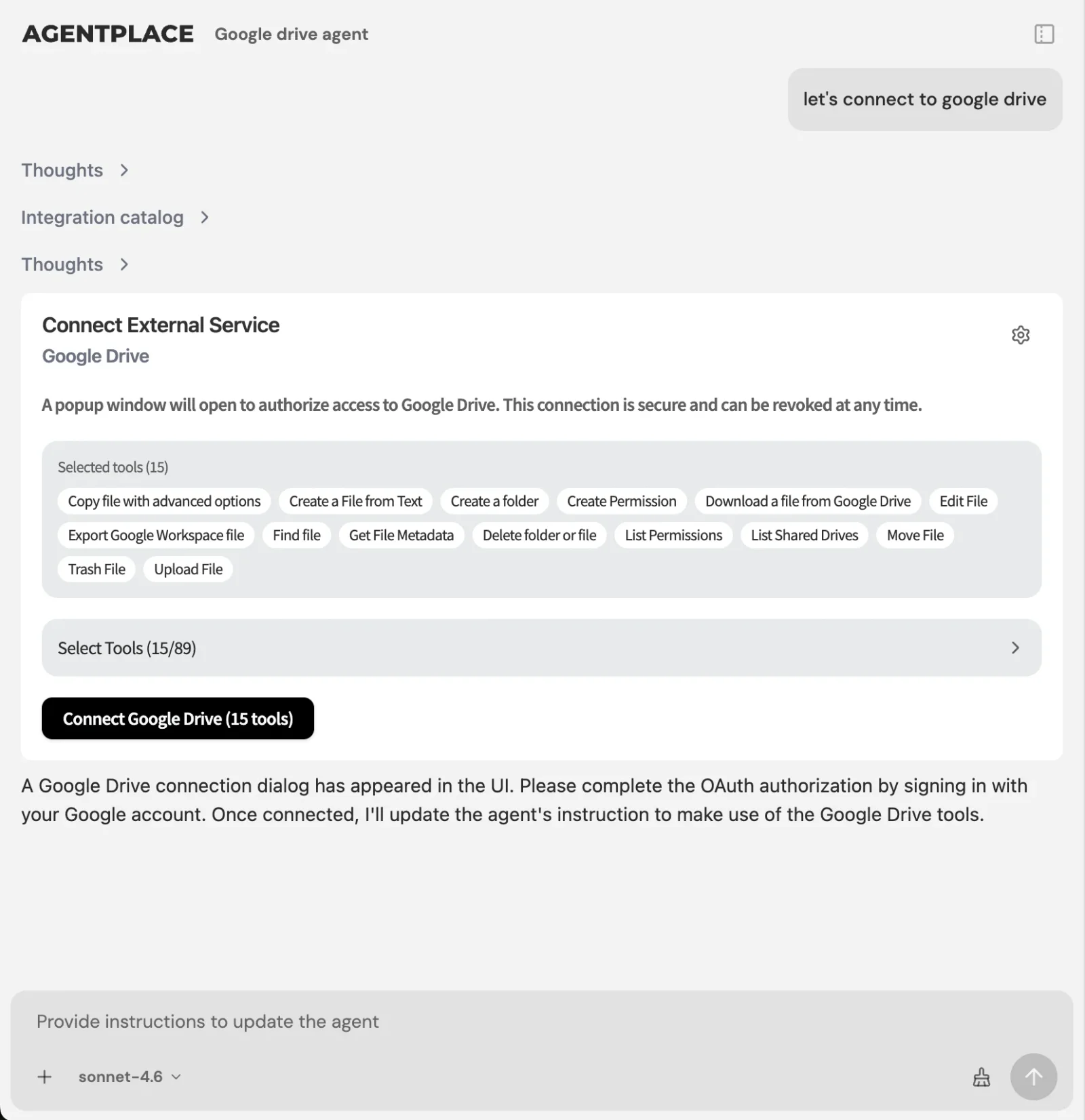 Connections supply the live values the agent reads while it draws the screen.
What stays where it is:
- Your booking system, CRM and catalogue keep the records they own.
- The agent connects through Composio’s integration catalog or compatible MCP tools, and you authorize each account and its actions. See MCP and business tools.
- The agent’s web page is the primary place to work. Supported connections such as phone, WhatsApp or Telegram can extend it after setup.
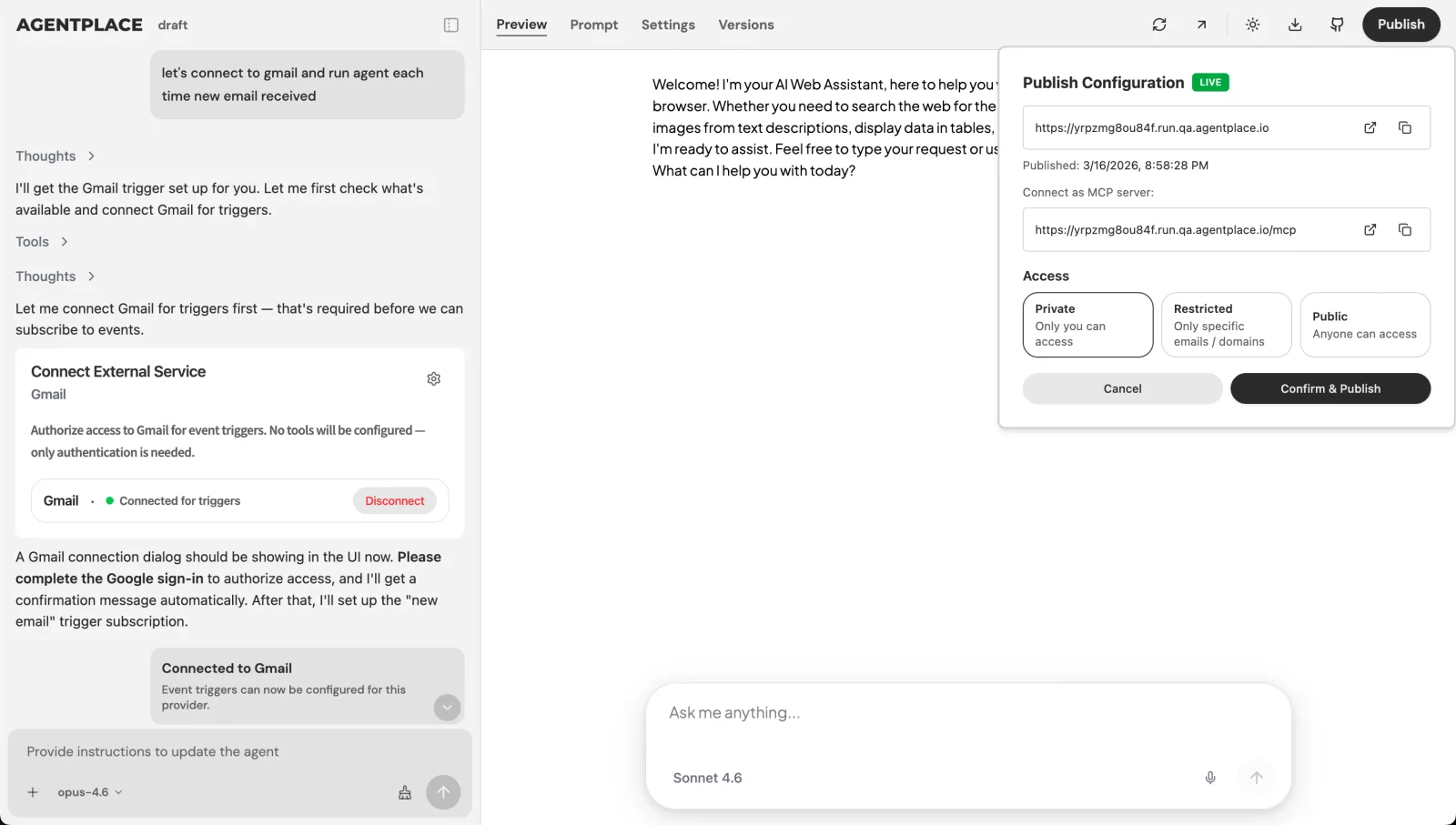 Publishing gives the agent its own URL, and you choose who can open it.
Guardrails you set: which materials and models may be quoted, which values must be read live, when the agent says nothing fits, and which enquiries go to a named person. The agent remembers what a customer told it inside their own conversations with it. That memory covers what was said, and not who is at the keyboard. It does not identify the same person on a new device.
Pricing: Agentplace has a free plan and paid plans that use AI credits. A credit is not one customer message. See pricing.
Who should choose Agentplace. Businesses whose customers arrive uncertain and need the screen to follow the conversation. Shops with a catalogue and matching rules a form cannot express. Contractors who want a priced scope and a booked survey instead of a free-text enquiry.
Who should choose something else. For a design file your team will edit, Figma First Draft or Galileo AI fits. For React components in an app you already run, v0 or Subframe fits. For generated components inside your own hosted product, Thesys C1 fits. If you only need answers in a chat window beside an existing site, a support chatbot such as Intercom Fin may be enough.
What does it take to run generated screens in production?
Fixed components, written rules, and a hard line around the numbers.
| The agent may decide | A connected system must decide |
|---|---|
| Which question to ask next about the roof | The labour rate and the material price applied |
| Which approved component shows the shortlist | Whether that e-bike model is in stock |
| The order and wording of the estimate lines | Whether the survey slot is free |
| When to say nothing in the catalogue fits | Whether a payment or booking completed |
Maintenance differs by route, and that is the part comparison posts leave out.
| Route | Who writes the first screen | Who updates it when the offer changes | Where the customer meets it |
|---|---|---|---|
| AI UI generator | The model, reviewed by a designer | A designer and a developer, then a deploy | A page your team hosts |
| Generated full-stack app | The model, reviewed by whoever prompted it | Whoever prompted it, then a deploy | A page your team hosts |
| Runtime UI framework | Your developers define the components | Your developers, when components change | Inside your existing product |
| Customer-facing AI agent built with Agentplace | The agent, inside components you approved | You, by changing the written rules | The agent’s own page and URL |
Illustrative comparison of ownership, not a measurement of effort.
W3C’s accessibility principles, standards and checks and WCAG 2.2 both assume a structure you can test. Keeping the model inside a small set of tested components is what makes that possible.
A suggested booking is not a confirmed one. Confirm it in the system that holds the calendar.
What mistakes do teams make with generated interfaces?
- Buying a design tool for a runtime problem. The page ships, the questions are wrong a month later, and the fix is another build.
- Letting the model produce a price. Read it from the price list or the connected system, every time.
- Approving the component set by accident. If the model may emit arbitrary markup, your accessibility testing no longer covers what customers see.
- Skipping the empty case. A recommender that always recommends is not trusted, so design the “nothing fits” screen.
- Testing with staff questions. Use 20 real enquiries from your inbox, typos included.
- Leaving no named person. Every agent needs an escalation route to a human by name.
What We Found That Others Won’t Tell You
Most comparison posts on this query count features and never ask when the screen is decided. That single question splits the field cleanly, and it is the only one that predicts whether the output can still adapt after it ships.
v0 and Lovable overlap more than their positioning suggests. The useful question between them is whether you want components for a codebase you maintain or a whole app with a database behind it. Both decide the screen at design time, so neither solves a per-customer interface.
Agentplace’s Builder reads like a developer tool, even though no code is required. It shows file paths, tool calls and logs while it works. Expect a technical-looking workspace with a plain-language brief going into it.
Which route fits your team in the next two weeks?
- Days 1 to 3. Write down the one screen where customers hesitate, and what you would need to know to answer them properly. If every visitor needs the same screen, stop here and use a design-time generator. If not, start from how to build an AI agent for your business.
- Days 4 to 7. List the components the screen may use and the values that must be read live. Name the system each live value comes from.
- Days 8 to 11. Build one agent for that single screen and talk to it like a customer. Check what it does with a missing detail and a requirement that changes halfway through.
- Days 12 to 14. Run 20 real enquiries through it, fix the rules it got wrong, then publish it on its own page and link to it from the page customers already land on.
Quick checklist
- Decide whether you need the screen fixed at ship time or composed per customer
- Write down what the output must be: a design file, code, a running app, or a live page
- List the components the model may use, and nothing else
- Write the business rules in plain language, in one place
- Mark every value that must be read live, and name its system
- Design the “nothing fits” screen and the screen after the action
- Check a composed screen with a keyboard and a screen reader
- Test on 20 real enquiries before publishing
Related reading: what is generative UI · dynamic UI with AI · generative UI examples · AI website vs AI chatbot vs AI website builder · AI website builders for customer qualification · no-code AI agent builders · interactive product finders
Bottom line
What decides this purchase is when the screen gets decided: before your customer arrives, or while they are there.
- If you need a mockup, a design file or React components, use v0, Figma or Builder.io Visual Copilot, and expect the screen to stay as approved.
- If customers arrive describing an outcome, give them a customer-facing AI agent built with Agentplace. It asks the questions that change the answer, applies your pricing and eligibility rules, reads live values from your systems, composes the result on its own page as a shortlist, estimate or document, revises it when a requirement changes, carries the customer through to the booking or purchase, and sends the exceptions to the person you named.
Questions and answers
Frequently asked questions.
What is the difference between an AI UI generator and an AI app builder?
An AI UI generator produces the interface: a design file, a mockup or component code. An AI app builder produces the whole application, including a backend and a database. Both decide the screen before it ships. Neither changes what a visitor sees unless a person builds and deploys again.
Which AI UI generators can create working web applications?
Lovable and Bolt generate full-stack apps you can run and deploy. v0 and Subframe generate production React code that needs a codebase around it. Figma Make produces working prototypes. Stitch exports designs and frontend markup, and Galileo AI and Uizard stop at designs. None of the three gives you a running application.
What is an AI UI generator?
An AI UI generator turns a text prompt, a screenshot or a Figma frame into a user interface: wireframes, high-fidelity screens or frontend code. The output is a file you review and edit. It is a design-time tool, so the screen it produces is fixed once you ship it.
Is there an AI that can design a UI?
Yes. Figma First Draft, Google Stitch, Galileo AI and Uizard generate editable designs from a prompt. v0, Subframe and Builder.io Visual Copilot generate frontend code. A designer still defines the components, states and accessible structure the output has to fit.
What is the best AI UI generator?
Ask what the output has to be. If it has to be a live customer-facing page that changes per visitor, a customer-facing AI agent built with Agentplace fits that job. If it has to be a design file or React components you review before shipping, v0 or Figma Make is faster.
Is Agentplace an AI UI generator?
No. It does not hand you a Figma file or a React component to commit. Agentplace creates a customer-facing AI agent with its own page and URL, and the agent composes the screen for each customer from approved components, your business knowledge and connected tools.
Can AI generate a UI from a Figma file?
Yes. Builder.io Visual Copilot converts a Figma frame into React, Vue, Svelte or Angular code and can map it to your own components. Figma Make works inside Figma and turns a design or prompt into a working prototype. Both produce output a developer reviews.
Can an AI UI generator build a customer-facing booking page?
It can build the page. The page then asks every visitor the same questions, because the fields were decided before anyone arrived. For a page that asks different questions depending on the answers and books the result, you need runtime generation instead.
Do you still need designers if AI generates the UI?
Yes. Someone has to define the component set, the states, the empty and error cases, and the accessible structure. With a design-time generator that work goes into reviewing output. With runtime generation it goes into deciding what the agent may compose and where it must stop.
How do I add generated components to an app we already host?
Use a runtime generative UI layer, not a design tool. Thesys C1 returns an interface specification its SDK renders inside your app. With the Vercel AI SDK, your own code maps each tool result to a component you wrote. Your team keeps the hosting, the auth and the data access.
Put this into practice
See the customer experience.
Explore a concrete example related to this article, then adapt the agent to your business.
Create my AI agentStart free with your business idea. The AI builder can help you explore it and create your agent. No technical specification needed. Sign in to continue. Pricing and limits · How the builder works