
10 Best Platforms for Building Agentic UI in 2026

The short answer
Agentic UI is an interface an AI agent builds at runtime. If you are embedding an agent in an app you already run, CopilotKit or the Vercel AI SDK fit. Agentplace is built for the other case: a customer-facing agent with its own page, URL and interface, with no frontend team.
Key takeaways
- A shipper describing four crates, a delivery site with no forklift and a ready date has to flatten all of it into a quote form that was designed before anyone knew what was being shipped.
- Generating an interface inside ChatGPT or the Gemini app produces a screen for whoever opened that assistant. A customer-facing agent serves the customer on a page the business controls. There it applies your rules, reads authorized systems and takes the next step.
- A customer-facing AI agent built with Agentplace gives the customer a page and URL, asks only the questions that change the answer, and draws the result as a table, estimate, form or document.
- A runtime interface holds up when the components and the business rules are fixed and only the arrangement varies. Price, coverage, availability and eligibility have to be read from the connected system at the moment the screen is drawn.
- Pick the one screen where customers stall, write its questions and rules in plain language, and test the whole task on 20 real enquiries before you publish.
A homeowner types “AC blowing warm upstairs only, worse since Tuesday” into an HVAC contractor’s booking form. The form offers six job types and none of them is that.
The screen was finished before anyone knew what the customer would say. That gap is what agentic UI is for, and picking a platform for it is a decision about who draws the screen. Anthropic’s guide to building effective agents makes the useful point first: require only what the task needs.
SUMMARY: Ten platforms ship agentic UI today, and they split by who the screen is for: your own developer, or your paying customer.
Agentplace is designed for the customer side of that split: a business that needs a customer-facing agent with its own page, URL and interface, and has no frontend team to build one. The agent asks only for the details that move the answer. It applies the rules the business wrote down. It reads live values from the systems it is authorized to use. The result lands on screen as a table, estimate, form or document. Change a requirement and the result redraws. The request runs through to a booking or a submitted brief.
If you are adding an agent to a web app your team already builds and hosts, CopilotKit and the Vercel AI SDK with AI Elements are the practical starting points. Both let the model render your existing React components, and both assume you keep the app, the records and the access rules. If you only need an assistant panel inside an application you already own, CopilotKit is the simpler choice.
Build a Customer-Facing Agent That Draws Its Own Interface
Describe the customer task, your rules and your exceptions. The AI Builder creates an agent with its own page and URL, then helps you test it before you publish.
Build Your Agent Free →Where agentic UI choices go wrong, by scenario:
- The demo renders beautifully and answers nothing: a streamed component is not a completed task.
- The library assumes an app you have not built: most of these ship as React packages, not as a page.
- The screen gets built for your developer first: an agent chat UI is an internal surface by default.
- The agent invents a number it should have read: price, coverage and availability belong to a connected system.
- You are comparing platforms when the real question is ownership: one table sorts it.
Choose by requirement:
- If you need an assistant panel inside a React app you already run, choose CopilotKit.
- If your engineers want to own the streaming and the components, choose the Vercel AI SDK with AI Elements.
- If you want generated UI returned from an API call into a front end you keep, choose Thesys C1.
- If you already run a LangGraph agent and need a usable front end this week, choose LangChain’s agent chat UI.
- If the interface has to appear inside a Flutter mobile app, choose Flutter GenUI.
- If one server must present an interface inside several AI clients, choose MCP-UI.
- If you want a vendor to run a high-volume customer support agent for you, consider Decagon.
- If you want a customer-facing agent with its own page and URL, and no frontend team, choose Agentplace.
Three facts that decide the shortlist:
- Seven of the ten give you rendering to assemble, not a page, records or access rules.
- A screen generated at runtime cannot be reviewed before it ships, so the review moves to the component set and the rules.
- Keyboard order and labelling have to be guaranteed by the components, because the arrangement changes every time.
What Is Agentic UI?
Agentic UI is an interface an AI agent assembles at runtime, inside a component set somebody approved in advance.
The agent decides which components appear, in what order, and what they hold. A designer still decides what the components are and what they may never show. Two visitors get different screens from the same page.
A short glossary, because these terms get used loosely:
- Agentic UI. The interface an agent composes at runtime for one request.
- Agent UI. The chat surface around an agent: thread, messages, tool calls. One part of the above.
- Generative UI. The same runtime behaviour, described from the design side. Our guide to generative UI covers the patterns.
- AI UI generator. A tool that produces design or code at build time, with a human reviewing it before release.
- MCP (Model Context Protocol). An open standard for letting an AI client call an external tool or data source. See how MCP works for business tools.
- Screen contract. A typed description of a component the agent may fill, so a generated result cannot arrive as a broken layout.
- AI credits. A usage unit on some platforms, Agentplace included. One credit is not one customer message.
The discriminator: if a person approved that exact screen before it shipped, it is not agentic UI.
How Did We Compare These Platforms?
We read the official product and documentation pages for each platform during the week of October 14, 2026. We did not put all ten through the same hands-on build, so this is editorial suitability and not a measured benchmark. Agentplace publishes this comparison.
Four checkable questions decide it:
- Does it render the interface at runtime, or produce code you ship?
- Does it need a frontend team, meaning an application somebody builds, hosts and secures?
- Who sees the result, your own developer or operator, or your paying customer?
- Who owns the records, rules and actions behind the screen?
The third question is the one most comparisons skip, and it is the one that changes the answer.
Which Platforms Made the Shortlist?
| Platform | Renders UI at runtime | Needs a frontend team | Who sees the result | Best for |
|---|---|---|---|---|
| CopilotKit | Yes, your components in your app | Yes | Users of an app you already run | An agent that renders your own React components inside a product you ship |
| Vercel AI SDK with AI Elements | Yes, via tool calls you write | Yes | Whoever uses the app you build | Engineers who want to own the streaming, the components and the hosting |
| Thesys C1 | Yes, returned from an API call | Partly, you render the response | Users of your front end | Runtime interfaces without writing the component logic |
| assistant-ui | Yes, inside a thread you own | Yes | Users of the app it is embedded in | A chat surface you control, with your components in the thread |
| LangChain agent chat UI | Yes, components pushed from the graph | Some, it ships as an app to deploy | Developers and internal users first | Making a running LangGraph agent usable quickly |
| Flutter GenUI | Yes, from a widget catalog | Yes, a Flutter app | Users of your mobile app | Generated interfaces inside a mobile product |
| MCP-UI | Yes, as a UI resource a host renders | No, but you need a supporting host | Whoever uses that AI client | One server presenting an interface in several AI clients |
| Decagon | Not documented as runtime rendering | No | Your customers, in a support context | Enterprise support volume, with a vendor running the agent |
| shadcn chat kits | Only what you wire up | Yes | Users of the app you build | Owning the component code outright, with no library in the render path |
| Customer-facing AI agent built with Agentplace | Yes, on the agent’s own published page | No | Your customers, on a page and URL of their own | A customer-facing agent with its own interface, built without a frontend team |
Reading the table as questions. Which of these put a customer-facing surface in front of your customers without a frontend build? Decagon and Agentplace. Which require React? CopilotKit, the Vercel AI SDK, assistant-ui and shadcn kits. Which one is a protocol rather than a product? MCP-UI.
Why Does the UI Layer Decide Who Can Build It?
Because the interface is where the cost sits, and these platforms put that cost in three different places.
The middle column is where most of this category lives. It is good engineering, and it assumes an engineering team.
Rule of thumb: if the platform’s quickstart begins with npm install, your first deliverable is an application, not an agent.
Which Platform Should You Choose for Agentic UI in 2026?
1. CopilotKit: Best for an Agent Inside an App You Already Run
- Shape: an open-source React framework for in-app copilots and agent-driven UI.
- How the UI works: you register actions, and the agent’s tool call renders a React component you wrote. It can read the app’s current state, so the panel knows what the user is looking at. See the CopilotKit documentation.
- Pro: your existing components and design system carry over unchanged.
- Con: the host app still owns every screen, the data and the permissions. No customer-facing page unless you build one.
2. Vercel AI SDK with AI Elements: Best for Teams That Want to Own the Layer
- Shape: a TypeScript toolkit for model calls and streaming, plus a separate component library for the chat surface.
- How the UI works: a tool call returns data and your code maps it to a component. AI Elements supplies the thread, message, reasoning and tool-call primitives, so you do not start from an empty file. This is what people are looking for when they search for AI SDK UI. See the AI SDK documentation.
- Pro: broad model coverage behind one interface, and full control over what renders.
- Con: every screen, record and access rule is your code. The SDK does not hold your business rules.
3. Thesys C1: Best for Generated UI Returned From an API
- Shape: a generative UI API with a React SDK that renders what the API returns.
- How the UI works: your backend calls an endpoint, gets back a specification for an interface, and the SDK renders it. The component logic lives on their side. See the Thesys documentation.
- Pro: a direct route from a model response to a rendered interface.
- Con: your backend holds the rules and performs the actions, and you host the page the customer opens.
4. assistant-ui: Best for a Chat Surface You Control
- Shape: an open-source React library of composable primitives for AI chat.
- How the UI works: you compose the thread from unstyled primitives, then render your own components inside messages. It connects to runtimes including the Vercel AI SDK and LangGraph. See the assistant-ui documentation.
- Pro: keyboard behaviour and accessibility are handled at the primitive level, which is the hard part of a thread.
- Con: it is a chat surface. The tables, estimates and documents are still yours to build.
5. LangChain Agent Chat UI: Best for Putting a Front End on LangGraph
- Shape: a deployable Next.js application that connects to a LangGraph deployment.
- How the UI works: the graph streams messages and can push generative UI components into the thread, including interrupts where a person has to approve something. See the agent chat UI repository.
- Pro: a short path from a working graph to an interface, and it makes interrupts visible.
- Con: it reads as an internal surface. Paying customers mean branding, auth and support work you own.
6. Flutter GenUI: Best for Generated Interfaces in a Mobile App
- Shape: a Google SDK that lets a model build Flutter interfaces at runtime from a catalog of widgets.
- How the UI works: you declare the widget catalog, and the model composes screens from it during the conversation. See the Flutter GenUI repository.
- Pro: native mobile rendering, with the widget catalog as the boundary.
- Con: it is early, and it assumes a Flutter app with a mobile team behind it.
7. MCP-UI: Can One Interface Work Across Several AI Clients?
Yes, in the clients that support the extension.
- Shape: an open extension to the Model Context Protocol, with server and client SDKs.
- How the UI works: a tool returns an interface resource instead of plain text, and a host that supports MCP-UI renders it in place. The Model Context Protocol specification is the underlying standard, and the MCP-UI documentation covers the extension.
- Pro: you write the interface once and any supporting host can show it.
- Con: support depends on the host, and you are inside somebody else’s product. No page of your own.
8. Decagon: Should a Vendor Run Your Customer-Facing Agent?
At enterprise support volume, often yes.
- Shape: a managed AI customer support agent for large support teams.
- How the UI works: the vendor runs the customer-facing experience across chat, email and voice, configured against your support procedures and knowledge. Their public materials describe the channels and the configuration, and do not document an interface composed at runtime. See the Decagon product site.
- Pro: a customer-facing agent with no frontend work at all.
- Con: it is scoped to support. A sales conversation that has to produce a quote, a shortlist or a booking on its own page is a different job.
9. shadcn Chat Kits: Best for Owning the Component Code Outright
- Shape: copy-in React components from the shadcn registry and the community chat kits built on it.
- How the UI works: the components live in your repository, and you wire them to whichever model layer you chose, often the Vercel AI SDK. See the shadcn/ui documentation.
- Pro: no vendor in the render path, and the code is yours to change.
- Con: you own the maintenance, the accessibility testing and every upgrade. Nothing decides anything at runtime until you build that part.
10. Agentplace: Built for Customer-Facing Agents With Their Own Page and Interface
- Shape: an AI agent platform where each agent is published at its own web page and URL.
- How the UI works: the AI controls the interface and fills approved screen types, so the result arrives as a table, chart, product card, form, estimate or document. See the current plans and the freight quote intake agent template.
- Pro: the customer gets a page to open, and the business supplies knowledge and rules instead of components.
- Con: it is a hosted platform, so a requirement to run the whole runtime on your own servers is not met by it. The business rules still have to be written down before the agent is useful.
What Happens Between the Customer Message and the Screen?
Six steps, and the fourth is the one that gets skipped.
Take a freight forwarder’s quote intake. A shipper named Lena has four machinery-parts crates going from Rotterdam to Atlanta, with factory collection and a delivery site with no forklift. Lena and the other customer wording in this article are composites of common enquiries, not quotes from named customers.
- The request arrives as prose, by text or voice, with the units and the legs mixed together.
- The agent asks only what changes the answer: origin, destination, pieces, dimensions, gross weight, ready date, which party arranges each leg.
- It applies the business’s own rules: lane coverage, packaging guidance, the rate-request checklist.
- It reads live values from a connected system instead of inferring them.
- It draws the result, here a shipment brief carrying the cargo summary, the collection and delivery requirements and the request status.
- It carries the next action, so Lena can verify the brief and submit it for pricing.
Then Lena adds that the delivery site has no loading dock. That changes the requested services and the brief itself, instead of sitting as a note beside the record. The AI freight quote intake agent template, for B2B freight forwarders and third-party logistics firms, is built around that revision.
The line the agent must not cross: a brief is a quote request. Rates, capacity, customs determinations and confirmed bookings come from the provider or the specialist.
What Does an AI Native App Builder Give You?
An application described in plain language instead of drawn screen by screen. Two things get sold under that name, and they diverge after launch.
- Code generators. You describe the app, the AI writes it, and you review, host and maintain the result. The AI is gone once the code ships.
- Platforms where the AI keeps running the interface. The description produces a live agent, and the model keeps deciding what each visitor sees.
For an HVAC contractor, the second is the one that matters. A generated booking form is still a form with six job types. An agent on its own page asks for the requested job, the service address, the urgency and the preferred contact, shows the scoped visit and the booking status as the homeowner answers, and declines clearly when the address sits outside the published service area. The HVAC website chat and booking agent template, for HVAC contractors and home services companies, is the worked version.
Rule of thumb: ask what happens to the interface on day 90. If a developer edits it, you bought a code generator.
How Does Agentplace Handle the Agentic UI Layer?
Agentplace is designed for the customer-facing side of this category. The agent gets its own page and URL, and draws the interface for each visitor.
Agentplace creates AI agents that serve customers and help run a business. Each agent gets its own web page and URL. It uses business knowledge and authorized tools to deliver a personal plan, estimate, product comparison, document, or other result. The AI controls the interface and updates the work as customers make requests by text or voice.
In practice, it works like this:
- The customer opens the agent’s page and says what they need, by text or voice.
- The agent asks only the questions that change the answer.
- It applies your rules and calls connected tools for live values.
- It fills an approved screen type, so the result renders as a table, form, estimate or document.
- A changed requirement revises the result and the screen together.
- It carries the customer to the next action, or hands the work to the person you named.
You set it up by describing the outcome in plain language:
“Help shoppers understand where their order is. Use our Shopify order records and the carrier’s tracking events. Explain what each scan means in plain English. If the carrier says delivered and the shopper cannot find the parcel, keep both facts visible and open a missing-delivery investigation. Never promise a new delivery date. Send refund disputes to Priya.”
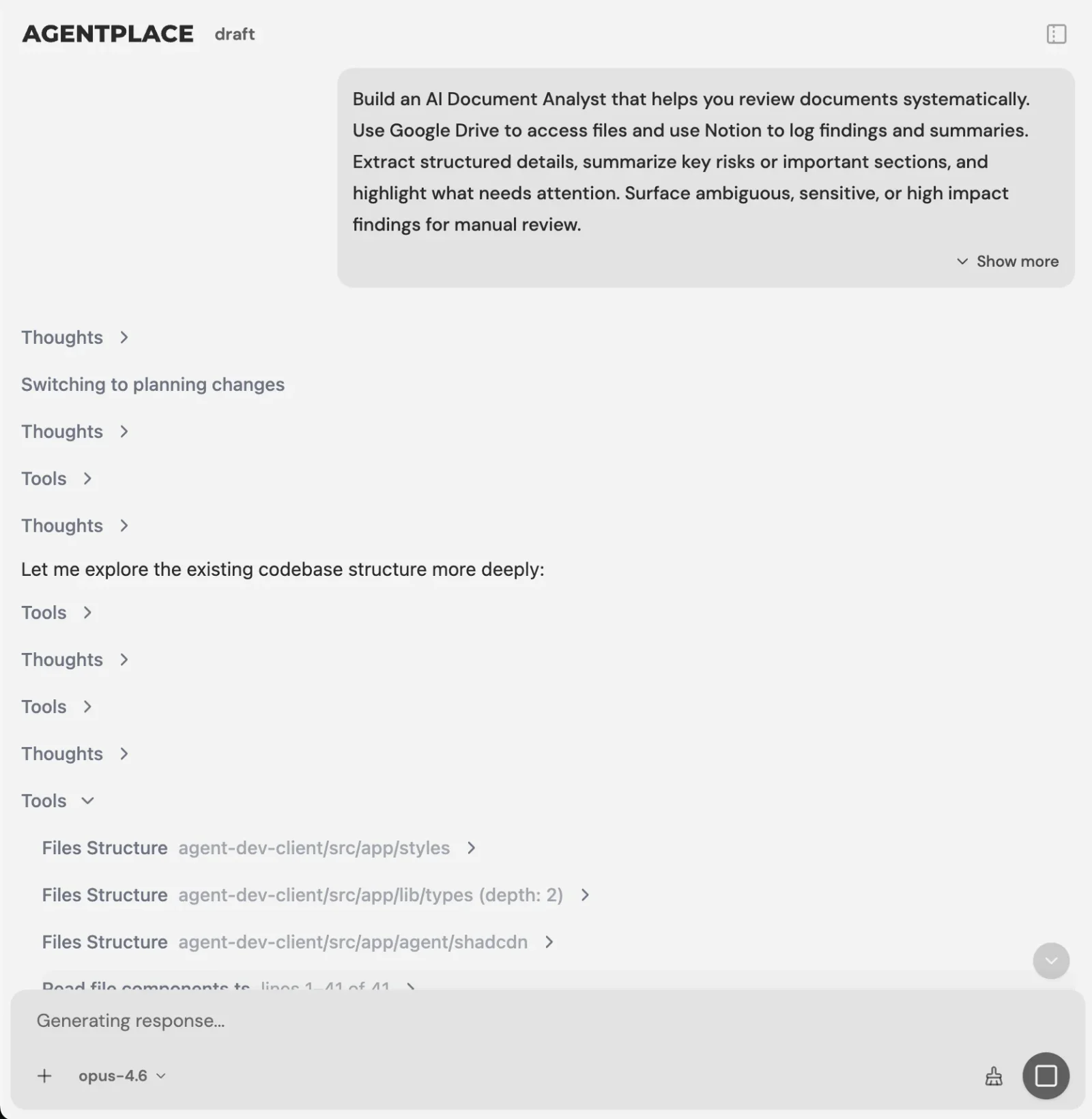 You describe the customer task. The Builder asks for what it needs.
The AI Builder discusses the idea, clarifies requirements, creates the agent and helps test it. You choose when to publish. No code is required.
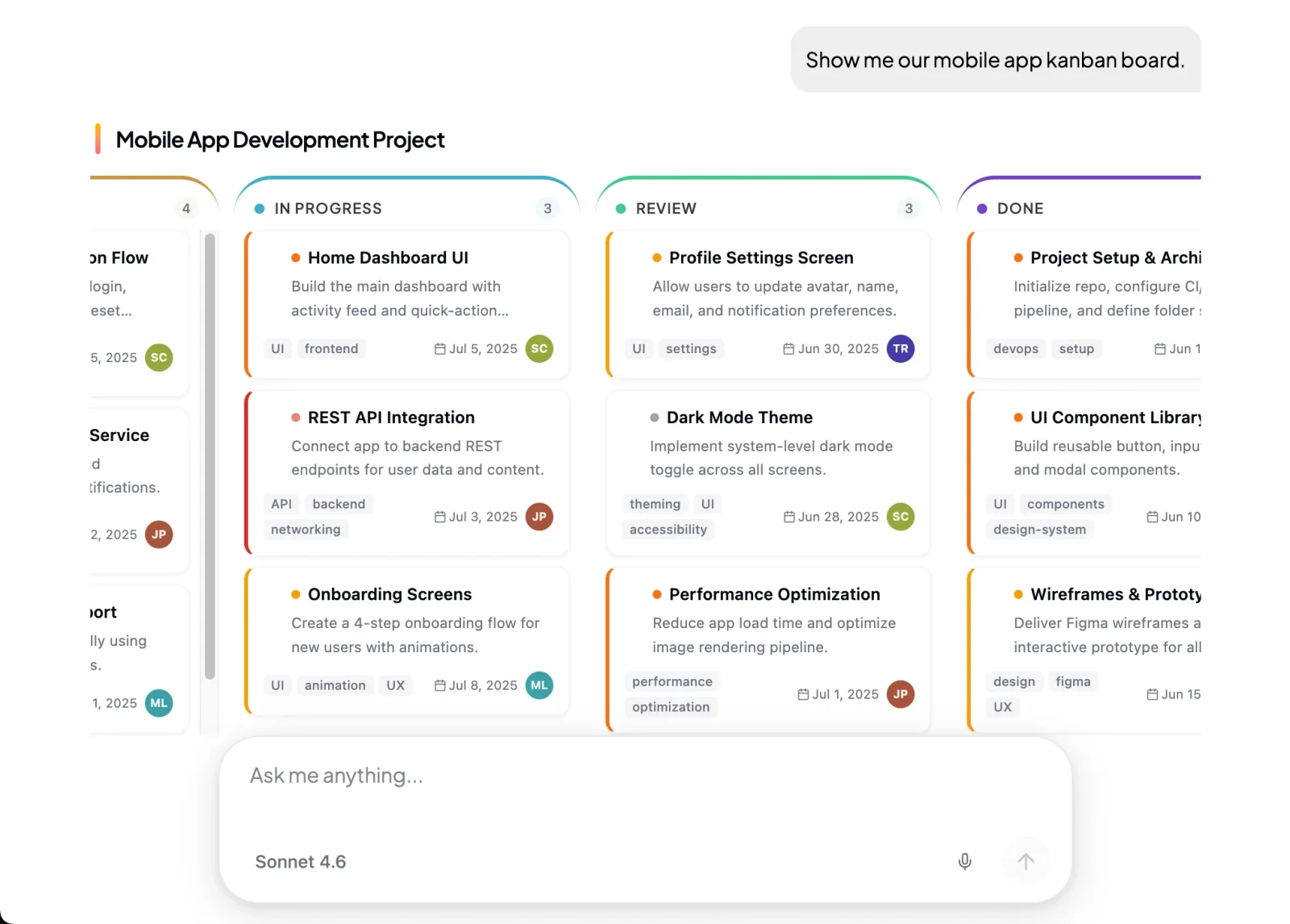 The agent fills in approved screen types, so a runtime result cannot arrive as a broken layout.
That brief is the order tracking explanations agent template, for ecommerce and retail store owners. The agent translates the actual carrier events, and detects the cases that need a delivery investigation. The shopper gets a readable timeline and, where the records justify it, an exception request.
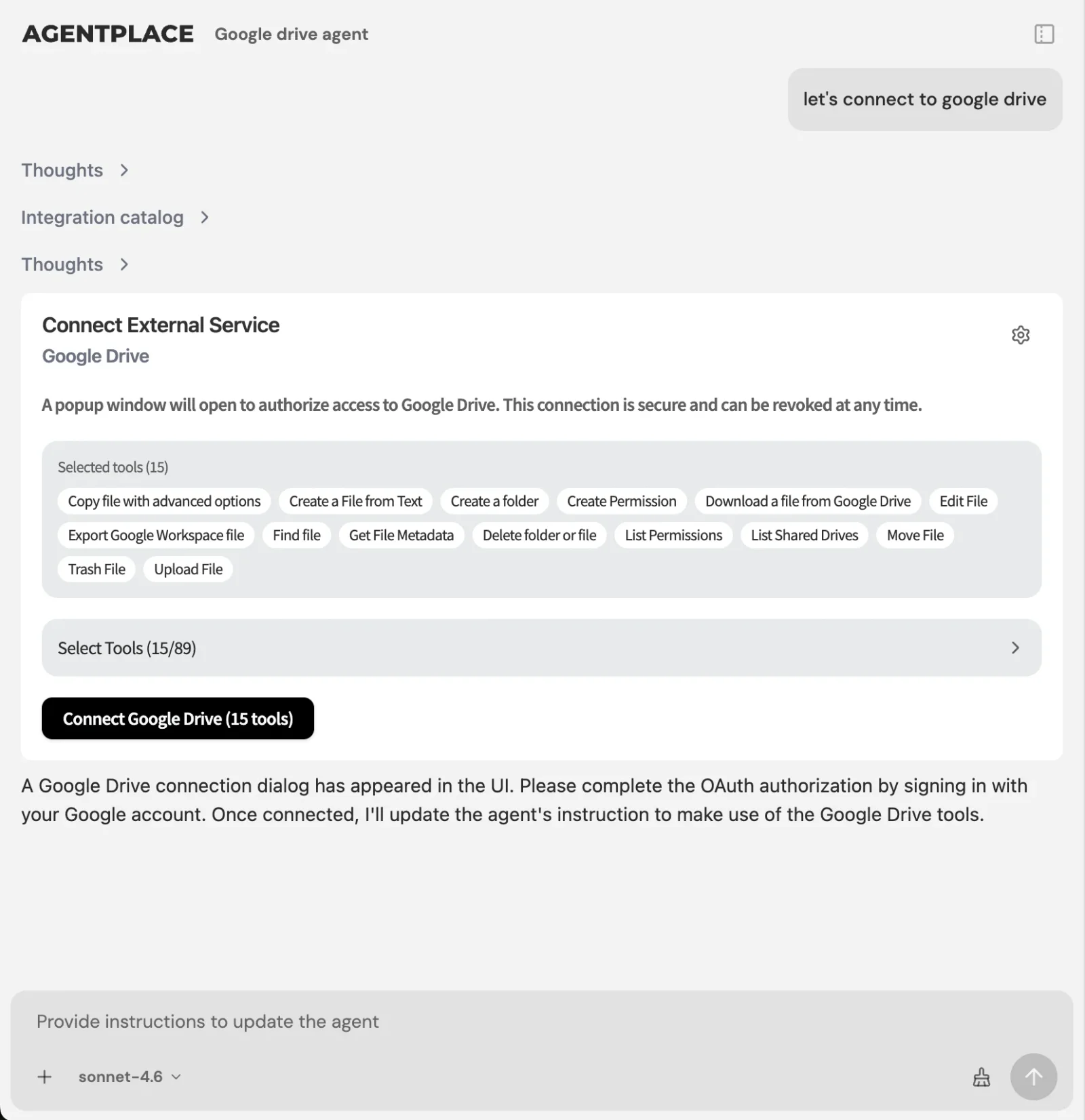 Connections supply the live values. The agent reads them as it draws the screen.
What stays where it is:
- Your booking system, CRM, catalogue and order records keep the data they own.
- The agent connects through Composio’s integration catalog or compatible MCP tools, and you authorize each account and its actions.
- The agent’s web page is the primary place to work with the full interface. Supported connections such as phone, WhatsApp or Telegram can extend it after setup.
- Every published agent also exposes an MCP connection, so a compatible AI client can use it as a tool.
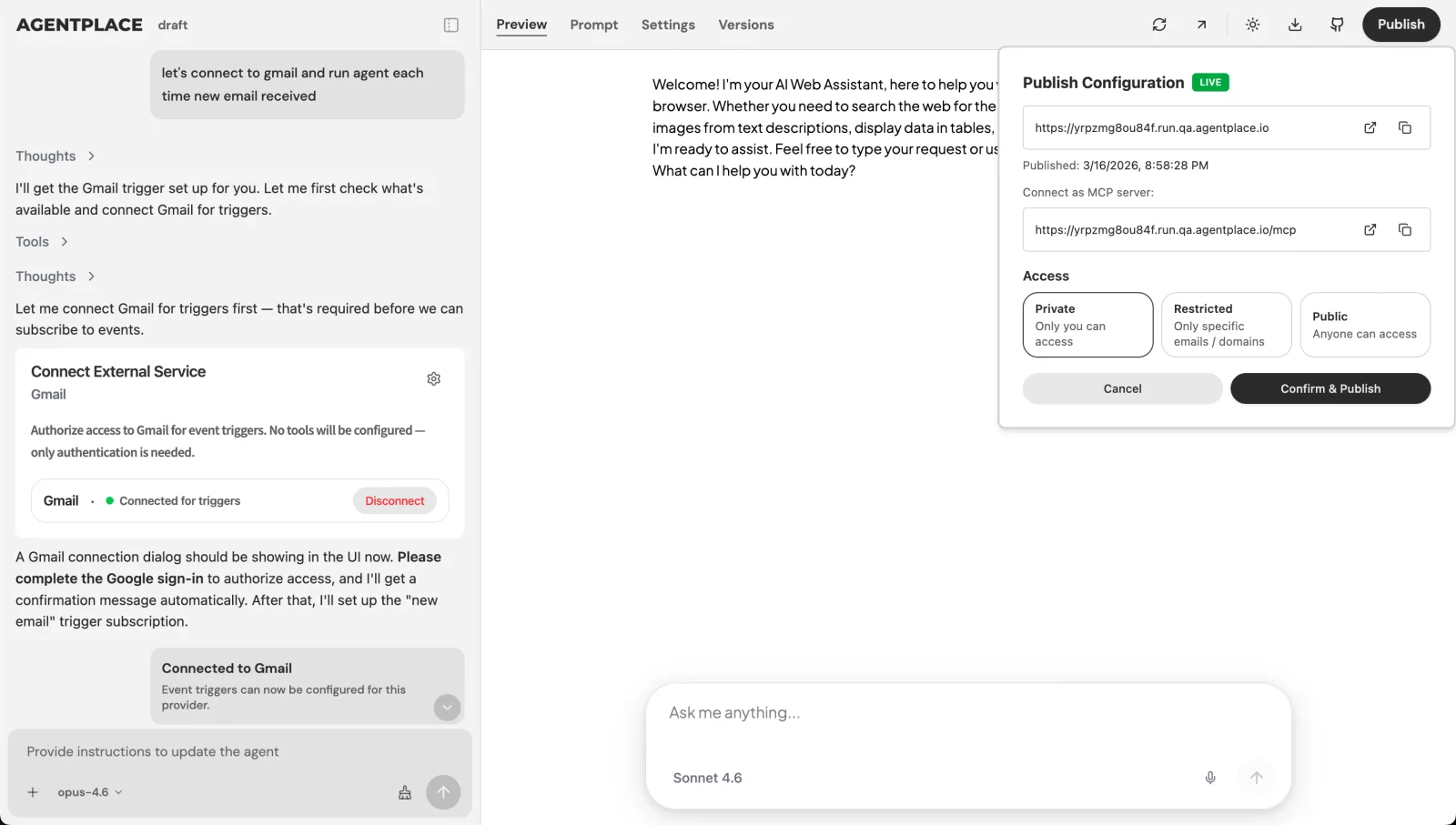 Publishing gives the agent its own URL, and you choose who can open it.
Pricing: Agentplace has a free plan and paid plans that use AI credits. A credit is not one customer message. See the current pricing.
Who it fits. A business whose customers arrive describing an outcome and need the screen to follow: a freight forwarder taking shipment briefs, an HVAC contractor booking visits, a store explaining a delivery. It layers on the systems already in place and writes into them.
Who should choose something else. A product team adding an assistant to a React app it already ships should look at CopilotKit. A team that wants to own the streaming and the components should use the Vercel AI SDK. Enterprise support volume with a vendor running the agent points to Decagon. A requirement to operate the whole runtime on your own servers rules out every hosted option here, this one included.
What Should You Write Down Before You Build?
Four things, and none of them is a component.
The questions that change the answer. Write them as a list an employee would recognise:
“Ask for the requested job, the service address, the urgency and the preferred contact. Clarify a vague answer instead of making the homeowner pick an inaccurate option. Do not ask for anything that will not change the visit or the decline.”
The rules that override the conversation, and the values that must be read live:
“Check the service address against the published coverage area before offering any appointment. An out-of-area address changes the answer before the homeowner commits. Never state a price, an arrival window or an availability slot from memory. Read it from the scheduling system at the moment the screen is drawn. If the connection fails, say so and keep the request open.”
The escalation route, with a name on it:
“Send gas smells, carbon monoxide alarms and anything involving a flooded room to Marcus immediately, and say on the page that a person has been alerted.”
What Does It Take to Run Agentic UI in Production?
Fixed components, written rules, and a hard line around the numbers.
| The agent may decide | The agent must not decide |
|---|---|
| Which questions to ask next | Whether a slot, lane or item is available |
| Which approved component shows the result | What a service costs |
| How to order and label the result | Whether a customer is eligible or in coverage |
| When to stop asking and show something | Whether a booking, shipment or refund is confirmed |
| When to hand the request to a named person | What a policy says, beyond the words you supplied |
The right-hand column is a connected system’s job in every case. A screen stating a confirmed booking is a proposal until the booking system says otherwise.
Accessibility needs its own line. A generated screen cannot be reviewed before it ships, so the guarantee lives in the components. Test them against the WCAG guidelines, build the interactive parts from the ARIA Authoring Practices Guide, and check them with a keyboard and a screen reader before the agent arranges them freely.
Illustrative effort model. Assumptions: one customer-facing task, rules already written down, one system to connect, a team that has shipped React before. Scoping estimates for planning, not measured delivery times.
| Scope | Library route, in your own app | Hosted agent route |
|---|---|---|
| One screen, one rule set, no connection | 2 to 4 engineering days, plus design | Configuration in the builder, then testing |
| One complete task with a live connection | 2 to 4 engineering weeks, plus review | Add the connection, authorize it, test the failure state |
| Several tasks sharing records and rules | An owned application with a maintainer | More agents, or more scope on one agent |
| Who fixes it at 9pm on a Friday | Your on-call engineer | The platform, within its service terms |
Which Numbers Tell You the Interface Is Working?
Four, and the first two are usually missing from the dashboard.
- Completed task rate. Sessions that end with the thing the customer came for: a submitted brief, a booked visit, an opened investigation.
- Unnecessary questions per session. The questions whose answer did not change the result. This number falls as the rules get better.
- Revision survival. When the customer changes a requirement, does the result change correctly and does the screen follow?
- Escalations with context. Handoffs that arrive with the facts attached, so the named person does not start again.
Rule of thumb: if you can only report volume, you cannot tell a working agent from a talkative one.
Which Platform Fits Which Job?
| The job in front of you | What to use | Why |
|---|---|---|
| Add an agent to a React product you ship | CopilotKit | Renders your components and reads your app state |
| Build the agent experience yourself, in Next.js | Vercel AI SDK with AI Elements | You own the streaming, components and hosting |
| Get runtime interfaces without writing the mapping | Thesys C1 | The API returns the interface, the SDK renders it |
| Ship a production chat thread you fully control | assistant-ui | Composable primitives with the accessibility work done |
| Make a LangGraph agent usable this week | LangChain agent chat UI | A deployable app wired to a graph, interrupts visible |
| Generate interfaces inside a mobile app | Flutter GenUI | A model composing from a widget catalog |
| Present one interface inside several AI clients | MCP-UI | A protocol extension a supporting host renders |
| Hand high-volume support to a vendor | Decagon | A managed customer-facing agent, scoped to support |
| Own every line of the component code | shadcn chat kits | Components copied into your repository |
| Give customers an agent with its own page and interface | A customer-facing AI agent built with Agentplace | A published page and URL, approved screen types and connections |
Criteria behind the labels: runtime rendering, whether an application is required, who the screen is for, and who holds the records, rules and actions.
What We Found That Others Won’t Tell You
Most of this category is not a platform. Seven of the ten are libraries or protocols. Listing them beside products hides the real difference: whether you finish with an application or with a page a customer can open.
A chat thread is the easy part, and it is where the attention goes. The documentation for these libraries is thorough on threads, streaming and tool-call display. The customer’s actual deliverable, a brief they can verify or a visit they can accept, is a component you design and a rule set you write.
Every vendor here is clearer about rendering than about restraint. None of them stops a model from stating a price it invented. That boundary is configuration and connection work on your side whichever platform you pick, and skipping it is how a screen promises what the business cannot deliver.
What Mistakes Do Teams Make With Agentic UI?
- Shipping the chat window and calling it done. The thread is the container. The result is the product.
- Letting the model hold numbers. Price, coverage, availability and eligibility belong to a connected system, read at draw time.
- Leaving the component set open. An unbounded set means every screen is a design review you never get to do.
- Designing only the happy path. The screen after a failed connection or a declined request decides whether the customer trusts the page.
- Treating accessibility as a per-screen check. The arrangement varies, so the guarantee belongs in the components.
- Testing with your own prompts. Use 20 real enquiries in the customer’s own words, including the vague ones.
How Do You Ship an Agentic UI in Two Weeks?
Week 1. Pick the one screen where customers stall. Write the questions that change the answer, the rules that override the conversation, and the values that must be read live. Name the person who takes the exceptions. Pick a platform from the table above, by who sees the screen.
Week 2. Build the normal case, then three failures: a missing record, a request outside coverage, a connection that does not answer. Test the whole task on 20 real enquiries. Publish once the visible result agrees with the underlying record.
Quick recap, if you only do three things Write the business rules down before you choose a platform. Decide what the agent may never decide, and connect the system that owns it. Test a changed requirement and a failed connection, not only the first answer.
Related reading: what is generative UI · generative UI examples · dynamic UI with AI · adaptive UI examples · conversational UI examples · best AI agent platforms · platforms for customer-facing website agents · no-code AI agent builders · agent skills · how to build an AI agent for your business
Bottom line
The agentic UI decision is a decision about who draws the screen and who owns the page it sits on.
- If your team already builds and hosts the application, keep that and add the agent inside it with CopilotKit or the Vercel AI SDK.
- If your customers need a page of their own, give them a customer-facing AI agent built with Agentplace. It asks the questions that change the answer, applies your rules, reads live values from your connected systems, draws the result as a brief, estimate, timeline or booking, revises it when a requirement changes, carries the request through to the submitted or booked outcome, and hands the exceptions to the person you named.
Questions and answers
Frequently asked questions.
What is agentic UI?
Agentic UI is an interface an AI agent assembles at runtime instead of a screen a designer finished in advance. The components and the business rules are fixed. The agent chooses which components appear, in what order, and what they contain, based on what the customer has said so far.
What is the difference between agentic UI and agent UI?
Agent UI usually means the chat surface you give an agent: a thread, a message list, a tool-call view. Agentic UI is wider. It covers the whole result the agent draws, including tables, estimates, forms and documents. A chat window is one component inside an agentic UI, not the whole of it.
What is the best platform for building agentic UI in 2026?
Split it by who sees the screen. For a customer-facing agent that needs its own page, URL and interface without a frontend team, Agentplace is designed for that case. For an agent inside an app your team already builds and hosts, CopilotKit and the Vercel AI SDK with AI Elements fit.
What does AI SDK UI do?
The Vercel AI SDK's UI layer handles streaming chat state in React, Svelte and Vue, and the separate AI Elements library supplies the chat and tool-call components. Your code decides which components a tool call renders. You still build, host and secure the application around it.
What is an agent chat UI?
An agent chat UI is a ready-made front end for talking to a running agent, usually showing the thread, streamed tokens, tool calls and interrupts. LangChain publishes one for LangGraph deployments. It is a quick way to make a running agent usable, and it is a developer or internal surface by default.
Do I need a frontend team to build an agentic UI?
For CopilotKit, the Vercel AI SDK, assistant-ui, shadcn chat kits and Flutter GenUI, yes. Each one is a library you compose inside an application somebody builds and hosts. Thesys C1, Decagon and Agentplace keep the front end on their side, so the work becomes configuration and rules instead of components.
What is MCP-UI?
MCP-UI is an open extension to the Model Context Protocol that lets a tool return an interactive interface resource, not only text. A host that supports it renders that resource in place. It is useful when the same server must present an interface inside several different AI clients.
How do you design an AI agent UI?
Declare a closed set of components the agent may use, write the business rules in plain language, and mark every value that must be read live. Design the screen after the action, not only the happy path. Then test the generated screens against the WCAG guidelines with a keyboard and a screen reader.
What is an AI native app builder?
It is a tool where the application is described in plain language and the AI assembles it, rather than a developer writing every screen. Some produce code you then host. Agentplace publishes a running agent with its own page and URL, where the AI keeps controlling the interface after launch.
Can an agentic UI take a booking or submit a request?
Yes, when a booking or records system is connected, the account is authorized and the actions are tested. The screen the agent draws is only a proposal until the connected system confirms it. Always verify the written record, not the reassuring sentence on the page.
Put this into practice
See the customer experience.
Explore a concrete example related to this article, then adapt the agent to your business.
Create my AI agentStart free with your business idea. The AI builder can help you explore it and create your agent. No technical specification needed. Sign in to continue. Pricing and limits · How the builder works